Clustergram - Visualization and diagnostics for cluster analysis in Python

Overview

Clustergram

logo clustergram

Visualization and diagnostics for cluster analysis

DOI

Clustergram is a diagram proposed by Matthias Schonlau in his paper The clustergram: A graph for visualizing hierarchical and nonhierarchical cluster analyses.

In hierarchical cluster analysis, dendrograms are used to visualize how clusters are formed. I propose an alternative graph called a “clustergram” to examine how cluster members are assigned to clusters as the number of clusters increases. This graph is useful in exploratory analysis for nonhierarchical clustering algorithms such as k-means and for hierarchical cluster algorithms when the number of observations is large enough to make dendrograms impractical.

The clustergram was later implemented in R by Tal Galili, who also gives a thorough explanation of the concept.

This is a Python translation of Tal's script written for scikit-learn and RAPIDS cuML implementations of K-Means, Mini Batch K-Means and Gaussian Mixture Model (scikit-learn only) clustering, plus hierarchical/agglomerative clustering using SciPy. Alternatively, you can create clustergram using from_* constructors based on alternative clustering algorithms.

Getting started

You can install clustergram from conda or pip:

conda install clustergram -c conda-forge
pip install clustergram

In any case, you still need to install your selected backend (scikit-learn and scipy or cuML).

The example of clustergram on Palmer penguins dataset:

import seaborn
df = seaborn.load_dataset('penguins')

First we have to select numerical data and scale them.

from sklearn.preprocessing import scale
data = scale(df.drop(columns=['species', 'island', 'sex']).dropna())

And then we can simply pass the data to clustergram.

from clustergram import Clustergram

cgram = Clustergram(range(1, 8))
cgram.fit(data)
cgram.plot()
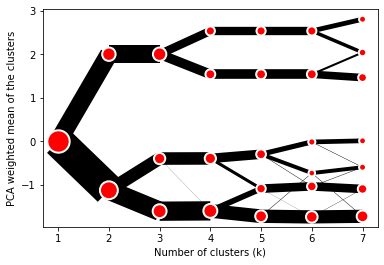
Default clustergram

Styling

Clustergram.plot() returns matplotlib axis and can be fully customised as any other matplotlib plot.

seaborn.set(style='whitegrid')

cgram.plot(
    ax=ax,
    size=0.5,
    linewidth=0.5,
    cluster_style={"color": "lightblue", "edgecolor": "black"},
    line_style={"color": "red", "linestyle": "-."},
    figsize=(12, 8)
)
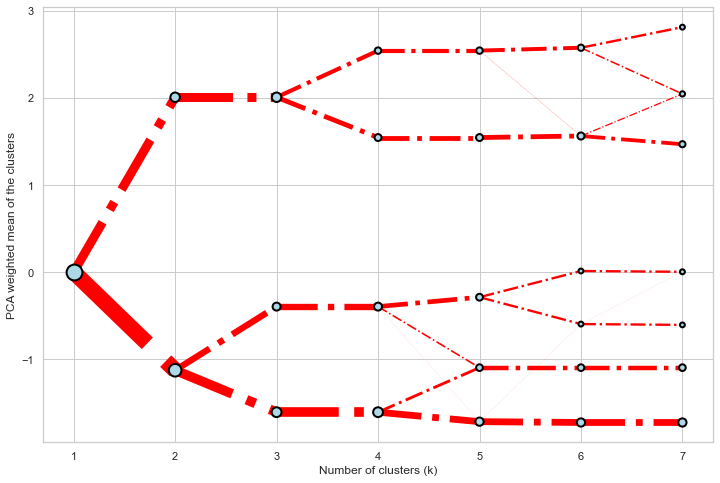
Colored clustergram

Mean options

On the y axis, a clustergram can use mean values as in the original paper by Matthias Schonlau or PCA weighted mean values as in the implementation by Tal Galili.

cgram = Clustergram(range(1, 8))
cgram.fit(data)
cgram.plot(figsize=(12, 8), pca_weighted=True)
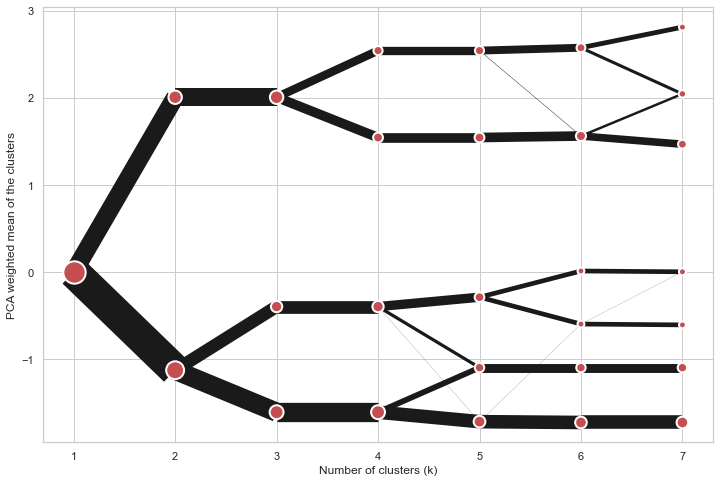
Default clustergram

cgram = Clustergram(range(1, 8))
cgram.fit(data)
cgram.plot(figsize=(12, 8), pca_weighted=False)
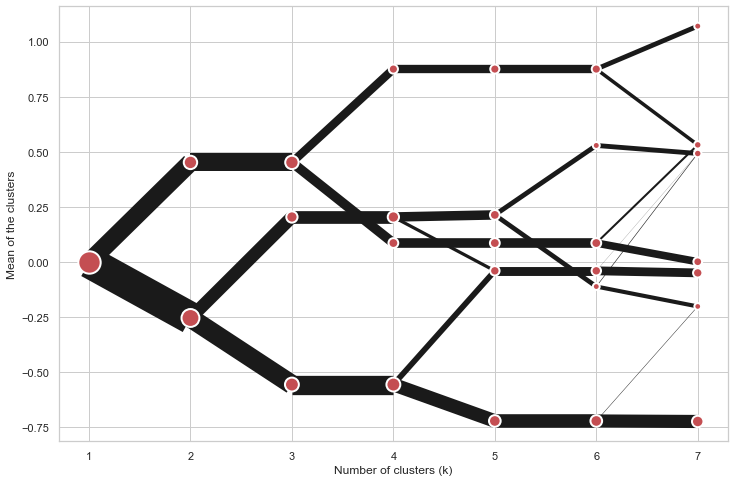
Default clustergram

Scikit-learn, SciPy and RAPIDS cuML backends

Clustergram offers three backends for the computation - scikit-learn and scipy which use CPU and RAPIDS.AI cuML, which uses GPU. Note that all are optional dependencies but you will need at least one of them to generate clustergram.

Using scikit-learn (default):

cgram = Clustergram(range(1, 8), backend='sklearn')
cgram.fit(data)
cgram.plot()

Using cuML:

cgram = Clustergram(range(1, 8), backend='cuML')
cgram.fit(data)
cgram.plot()

data can be all data types supported by the selected backend (including cudf.DataFrame with cuML backend).

Supported methods

Clustergram currently supports K-Means, Mini Batch K-Means, Gaussian Mixture Model and SciPy's hierarchical clustering methods. Note tha GMM and Mini Batch K-Means are supported only for scikit-learn backend and hierarchical methods are supported only for scipy backend.

Using K-Means (default):

cgram = Clustergram(range(1, 8), method='kmeans')
cgram.fit(data)
cgram.plot()

Using Mini Batch K-Means, which can provide significant speedup over K-Means:

cgram = Clustergram(range(1, 8), method='minibatchkmeans', batch_size=100)
cgram.fit(data)
cgram.plot()

Using Gaussian Mixture Model:

cgram = Clustergram(range(1, 8), method='gmm')
cgram.fit(data)
cgram.plot()

Using Ward's hierarchical clustering:

cgram = Clustergram(range(1, 8), method='hierarchical', linkage='ward')
cgram.fit(data)
cgram.plot()

Manual input

Alternatively, you can create clustergram using from_data or from_centers methods based on alternative clustering algorithms.

Using Clustergram.from_data which creates cluster centers as mean or median values:

data = numpy.array([[-1, -1, 0, 10], [1, 1, 10, 2], [0, 0, 20, 4]])
labels = pandas.DataFrame({1: [0, 0, 0], 2: [0, 0, 1], 3: [0, 2, 1]})

cgram = Clustergram.from_data(data, labels)
cgram.plot()

Using Clustergram.from_centers based on explicit cluster centers.:

labels = pandas.DataFrame({1: [0, 0, 0], 2: [0, 0, 1], 3: [0, 2, 1]})
centers = {
            1: np.array([[0, 0]]),
            2: np.array([[-1, -1], [1, 1]]),
            3: np.array([[-1, -1], [1, 1], [0, 0]]),
        }
cgram = Clustergram.from_centers(centers, labels)
cgram.plot(pca_weighted=False)

To support PCA weighted plots you also need to pass data:

cgram = Clustergram.from_centers(centers, labels, data=data)
cgram.plot()

Partial plot

Clustergram.plot() can also plot only a part of the diagram, if you want to focus on a limited range of k.

cgram = Clustergram(range(1, 20))
cgram.fit(data)
cgram.plot(figsize=(12, 8))
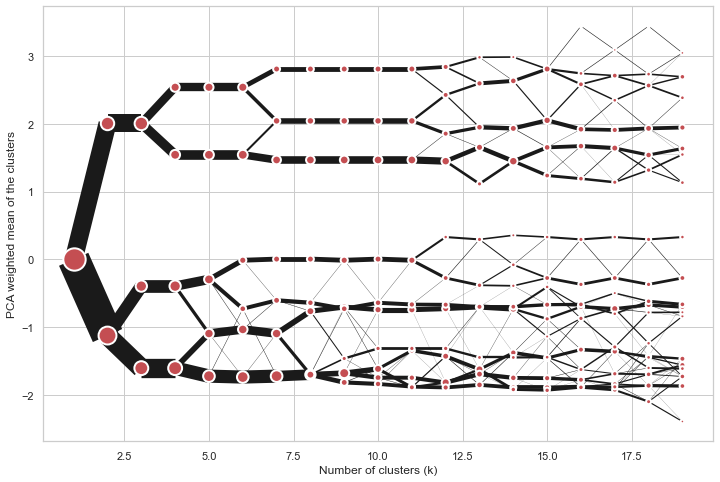
Long clustergram

cgram.plot(k_range=range(3, 10), figsize=(12, 8))
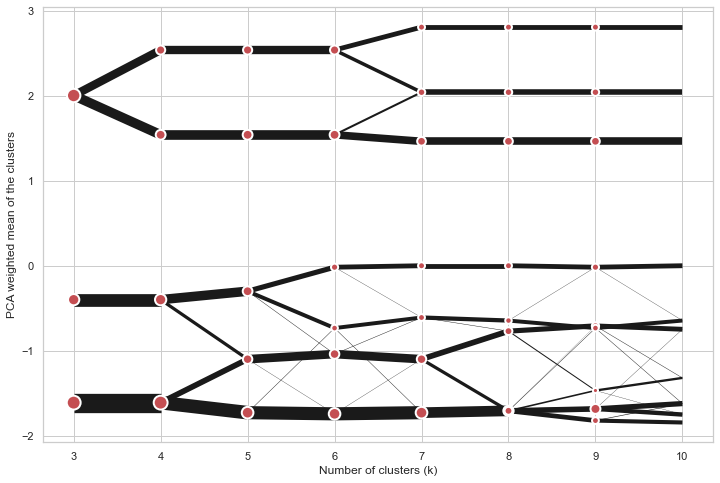
Limited clustergram

Additional clustering performance evaluation

Clustergam includes handy wrappers around a selection of clustering performance metrics offered by scikit-learn. Data which were originally computed on GPU are converted to numpy on the fly.

Silhouette score

Compute the mean Silhouette Coefficient of all samples. See scikit-learn documentation for details.

>>> cgram.silhouette_score()
2    0.531540
3    0.447219
4    0.400154
5    0.377720
6    0.372128
7    0.331575
Name: silhouette_score, dtype: float64

Once computed, resulting Series is available as cgram.silhouette. Calling the original method will recompute the score.

Calinski and Harabasz score

Compute the Calinski and Harabasz score, also known as the Variance Ratio Criterion. See scikit-learn documentation for details.

>>> cgram.calinski_harabasz_score()
2    482.191469
3    441.677075
4    400.392131
5    411.175066
6    382.731416
7    352.447569
Name: calinski_harabasz_score, dtype: float64

Once computed, resulting Series is available as cgram.calinski_harabasz. Calling the original method will recompute the score.

Davies-Bouldin score

Compute the Davies-Bouldin score. See scikit-learn documentation for details.

>>> cgram.davies_bouldin_score()
2    0.714064
3    0.943553
4    0.943320
5    0.973248
6    0.950910
7    1.074937
Name: davies_bouldin_score, dtype: float64

Once computed, resulting Series is available as cgram.davies_bouldin. Calling the original method will recompute the score.

Acessing labels

Clustergram stores resulting labels for each of the tested options, which can be accessed as:

>>> cgram.labels
     1  2  3  4  5  6  7
0    0  0  2  2  3  2  1
1    0  0  2  2  3  2  1
2    0  0  2  2  3  2  1
3    0  0  2  2  3  2  1
4    0  0  2  2  0  0  3
..  .. .. .. .. .. .. ..
337  0  1  1  3  2  5  0
338  0  1  1  3  2  5  0
339  0  1  1  1  1  1  4
340  0  1  1  3  2  5  5
341  0  1  1  1  1  1  5

Saving clustergram

You can save both plot and clustergram.Clustergram to a disk.

Saving plot

Clustergram.plot() returns matplotlib axis object and as such can be saved as any other plot:

import matplotlib.pyplot as plt

cgram.plot()
plt.savefig('clustergram.svg')

Saving object

If you want to save your computed clustergram.Clustergram object to a disk, you can use pickle library:

import pickle

with open('clustergram.pickle','wb') as f:
    pickle.dump(cgram, f)

Then loading is equally simple:

with open('clustergram.pickle','rb') as f:
    loaded = pickle.load(f)

References

Schonlau M. The clustergram: a graph for visualizing hierarchical and non-hierarchical cluster analyses. The Stata Journal, 2002; 2 (4):391-402.

Schonlau M. Visualizing Hierarchical and Non-Hierarchical Cluster Analyses with Clustergrams. Computational Statistics: 2004; 19(1):95-111.

https://www.r-statistics.com/2010/06/clustergram-visualization-and-diagnostics-for-cluster-analysis-r-code/

Comments
  • ENH: support interactive bokeh plots

    ENH: support interactive bokeh plots

    Adds Clustergram.bokeh() method which generates clustergram in a form of internactive bokeh plot. On top of an ability to zoom to specific sections shows the count of observations and cluster label (linked to Clustergram.labels).

    To-do:

    • [ ] documentation
    • [x] check RAPIDS compatibility

    I think I'll need to split docs into muliple pages at this point.

    opened by martinfleis 1
  • ENH: from_data and from_centers methods

    ENH: from_data and from_centers methods

    Addind the ability to create clustergram using custom data, without the need to run any cluster algorithm within clustergram itself.

    from_data gets labels and data and creates cluster centers as mean or median values.

    from_centers utilises custom centers when mean/median is not the optimal solution (like in case of GMM for example).

    Closes #10

    opened by martinfleis 1
  • skip k=1 for K-Means

    skip k=1 for K-Means

    k=1 does not need to be modelled, cluster centre is a pure mean of an input array. All the other options require k=1 e.g to fit gaussian.

    Skip k=1 in all k-means implementations to get avoid unnecessary computation.

    opened by martinfleis 0
  • ENH: add bokeh plotting backend

    ENH: add bokeh plotting backend

    With some larger clustergrams it may be quite useful to have the ability to zoom to certain places interactively. I think that bokeh plotting backend would be good for that.

    opened by martinfleis 0
  • ENH: expose labels, refactor plot computation internals, add additional metrics

    ENH: expose labels, refactor plot computation internals, add additional metrics

    Closes #7

    This refactors internals a bit, which in turn allows exposing the actual clustering labels for each tested iteration.

    Aso adding a few additional methods to assess clustering performance on top of clustergram.

    opened by martinfleis 0
  • Support multiple PCAs

    Support multiple PCAs

    The current way of weighting by PCA is hard-coded to use the first one. But it could be useful to see clustergrams weighted by other PCAs as well.

    And it would be super cool to get a 3d version with the first component on one axis and a second one on the other (not sure how useful though :D).

    opened by martinfleis 0
  • Can this work with cluster made by top2vec ?

    Can this work with cluster made by top2vec ?

    Thanks for your interesting package.

    Do you think Clustergram could work with top2vec ? https://github.com/ddangelov/Top2Vec

    I saw that there is the option to create a clustergram from a DataFrame.

    In top2vec, each "document" to cluster is represented as a embedding of a certain dimension, 256 , for example.

    So I could indeed generate a data frame, like this:

    | x0 | x1| ... | x255 | topic | | -----|----|---- | -------| -- | | 0.5| 0.2 | ....| -0.2 | 2 | | 0.7| 0.2 | ....| -0.1 | 2 | | 0.5| 0.2 | ....| -0.2 | 3 |

    Does Clustergram assume anything on the rows of this data frame ? I saw that the from_data method either takes "mean" or "medium" as method to calculate the cluster centers.

    In word vector, we use typically the cosine distance to calculate distances between the vectors. Does this have any influence ?

    top2vec calculates as well the "topic vectors" as a mean of the "document vectors", I believe.

    opened by behrica 17
Releases(v0.6.0)
Owner
Martin Fleischmann
Researcher in geographic data science. Member of @geopandas and @pysal development teams.
Martin Fleischmann
Notebooks for my "Deep Learning with TensorFlow 2 and Keras" course

Deep Learning with TensorFlow 2 and Keras – Notebooks This project accompanies my Deep Learning with TensorFlow 2 and Keras trainings. It contains the

Aurélien Geron 1.9k Dec 15, 2022
[SIGGRAPH 2020] Attribute2Font: Creating Fonts You Want From Attributes

Attr2Font Introduction This is the official PyTorch implementation of the Attribute2Font: Creating Fonts You Want From Attributes. Paper: arXiv | Rese

Yue Gao 200 Dec 15, 2022
This repository contains a Ruby API for utilizing TensorFlow.

tensorflow.rb Description This repository contains a Ruby API for utilizing TensorFlow. Linux CPU Linux GPU PIP Mac OS CPU Not Configured Not Configur

somatic labs 825 Dec 26, 2022
GAN example for Keras. Cuz MNIST is too small and there should be something more realistic.

Keras-GAN-Animeface-Character GAN example for Keras. Cuz MNIST is too small and there should an example on something more realistic. Some results Trai

160 Sep 20, 2022
NExT-QA: Next Phase of Question-Answering to Explaining Temporal Actions (CVPR2021)

NExT-QA We reproduce some SOTA VideoQA methods to provide benchmark results for our NExT-QA dataset accepted to CVPR2021 (with 1 'Strong Accept' and 2

Junbin Xiao 50 Nov 24, 2022
An extremely simple, intuitive, hardware-friendly, and well-performing network structure for LiDAR semantic segmentation on 2D range image. IROS21

FIDNet_SemanticKITTI Motivation Implementing complicated network modules with only one or two points improvement on hardware is tedious. So here we pr

YimingZhao 54 Dec 12, 2022
TeachMyAgent is a testbed platform for Automatic Curriculum Learning methods in Deep RL.

TeachMyAgent: a Benchmark for Automatic Curriculum Learning in Deep RL Paper Website Documentation TeachMyAgent is a testbed platform for Automatic Cu

Flowers Team 51 Dec 25, 2022
a reimplementation of Holistically-Nested Edge Detection in PyTorch

pytorch-hed This is a personal reimplementation of Holistically-Nested Edge Detection [1] using PyTorch. Should you be making use of this work, please

Simon Niklaus 375 Dec 06, 2022
Securetar - A streaming wrapper around python tarfile and allow secure handling files and support encryption

Secure Tar Secure Tarfile library It's a streaming wrapper around python tarfile

Pascal Vizeli 2 Dec 09, 2022
Learnable Boundary Guided Adversarial Training (ICCV2021)

Learnable Boundary Guided Adversarial Training This repository contains the implementation code for the ICCV2021 paper: Learnable Boundary Guided Adve

DV Lab 27 Sep 25, 2022
EasyMocap is an open-source toolbox for markerless human motion capture from RGB videos.

EasyMocap is an open-source toolbox for markerless human motion capture from RGB videos. In this project, we provide the basic code for fitt

ZJU3DV 2.2k Jan 05, 2023
AntroPy: entropy and complexity of (EEG) time-series in Python

AntroPy is a Python 3 package providing several time-efficient algorithms for computing the complexity of time-series. It can be used for example to e

Raphael Vallat 153 Dec 27, 2022
This is a repository for a semantic segmentation inference API using the OpenVINO toolkit

BMW-IntelOpenVINO-Segmentation-Inference-API This is a repository for a semantic segmentation inference API using the OpenVINO toolkit. It's supported

BMW TechOffice MUNICH 34 Nov 24, 2022
SPLADE: Sparse Lexical and Expansion Model for First Stage Ranking

SPLADE 🍴 + 🥄 = 🔎 This repository contains the weights for four models as well as the code for running inference for our two papers: [v1]: SPLADE: S

NAVER 170 Dec 28, 2022
Adversarially Learned Inference

Adversarially Learned Inference Code for the Adversarially Learned Inference paper. Compiling the paper locally From the repo's root directory, $ cd p

Mohamed Ishmael Belghazi 308 Sep 24, 2022
NaijaSenti is an open-source sentiment and emotion corpora for four major Nigerian languages

NaijaSenti is an open-source sentiment and emotion corpora for four major Nigerian languages. This project was supported by lacuna-fund initiatives. Jump straight to one of the sections below, or jus

Hausa Natural Language Processing 14 Dec 20, 2022
The Illinois repository for Climatehack (https://climatehack.ai/). We won 1st place!

Climatehack This is the repository for Illinois's Climatehack Team. We earned first place on the leaderboard with a final score of 0.87992. An overvie

Jatin Mathur 20 Jun 09, 2022
End-to-end face detection, cropping, norm estimation, and landmark detection in a single onnx model

onnx-facial-lmk-detector End-to-end face detection, cropping, norm estimation, and landmark detection in a single onnx model, model.onnx. Demo You can

atksh 42 Dec 30, 2022
chen2020iros: Learning an Overlap-based Observation Model for 3D LiDAR Localization.

Overlap-based 3D LiDAR Monte Carlo Localization This repo contains the code for our IROS2020 paper: Learning an Overlap-based Observation Model for 3D

Photogrammetry & Robotics Bonn 219 Dec 15, 2022
a reimplementation of UnFlow in PyTorch that matches the official TensorFlow version

pytorch-unflow This is a personal reimplementation of UnFlow [1] using PyTorch. Should you be making use of this work, please cite the paper according

Simon Niklaus 134 Nov 20, 2022