Timeline
A tool for creating SVG timelines from JSON.
Example
You will be able to create timelines that look like this:
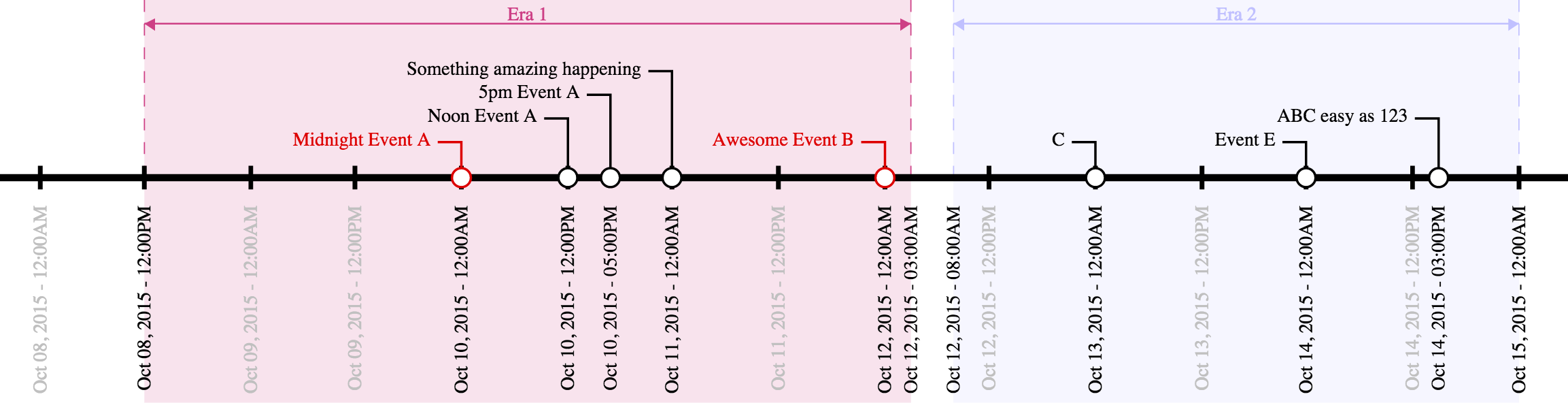
from JSON that looks like this:
{
	"width" : 750,
	"start" : "Oct 8 2015",
	"end" : "Oct 15 2015",
	"num_ticks" : 14,
	"tick_format" : "%b %d, %Y - %I:%M%p",
	"callouts" : [
		["ABC easy as 123", "Oct 14, 2015 3pm"],
		["Midnight Event A", "12am Oct 10, 2015", "#DD0000"],
		["Noon Event A", "12pm Oct 10, 2015"],
		["5pm Event A", "5pm Oct 10, 2015"],
		["Something amazing happening", "Oct 11, 2015"],
		["Awesome Event B", "Oct 12, 2015", "#DD0000"],
		["C", "Oct 13, 2015"],
		["Event E", "Oct 14, 2015"]
	],
	"eras" : [
		["Era 1", "12pm Oct 8, 2015", "3am Oct 12, 2015", "#CD3F85"],
		["Era 2", "8am Oct 12, 2015", "12am Oct 15, 2015", "#C0C0FF"]
	]
}
Data Format
The input file is a JSON document that describes the start and end points of the timeline, tickmarks along the main axis, as well as callouts to specifc dates/times, and eras which visually mark areas along the axis. Many of the fields are dates, which can be described in several common date formats (e.g., "3/14/15", "Nov 11, 2011", etc.) and may optionally also include a time of day (e.g. "3/14/15 9:26am"). (Date/time parsing is handled by the Python package parsedatetime, which parses many formats.)
Required Fields
The only required fields are width, start, and end. All other fields are optional.
widthdescribes the width, in pixels, of the output SVG document. The height will be determined automatically.startis the date/time of the leftmost date/time on the axis.endis the date/time of the rightmost date/time on the axis.
Optional Fields
num_tickscontols the number of tickmarks along the axis between thestartandenddate/times (inclusive). If this field is not present, no tickmarks will be generated except for those at thestartandenddates.tick_formatdescribes the string format of the tickmarks along the axis. It follows the Python datetime formatting conventions.
Callouts
Callouts along the axis are described in the callouts list. Each entry in the callouts list is itself a list with either two or three values, all of which are strings. The first two values are required, while the third is optional. The first value is the text description of the callout (e.g., "Pi Day"), and the second value is the date/time of the callout (e.g., "3/14/15 9:26am"). The optional third value can specify a color for the callout, either a color hexcode starting with a # or a SVG color alias.
Example:
["Ultimate Pi Day", "3/14/15 9:26am"]
or, with a custom callout color:
["Ultimate Pi Day", "3/14/15 9:26am", "#CD3F85"]
Eras
Eras are described in the eras list. Like the callout list, each entry in the eras list is itself a list with either three or four values. The first three are required while the fourth is option; all values are strings. The first value is a text description of the era (e.g., "Summer"), while the second and third values are the start and end date/times of the era, respectively (e.g., "6/21/15 12am", and "9/20/15 11:59pm"). The optional fourth value can specify a color for the era, either a color hexcode starting with a # or a SVG color alias.
Example:
["Summer 2015", "6/21/15 12am", "9/20/15 11:59pm"]
or, with a custom era color:
["Summer 2015", "6/21/15 12am", "9/20/15 11:59pm", "Orange"]
Prerequisites
You must have a python 2.7 installation and install the Python packages parsedatetime and svgwrite.
Usage
./make_timeline.py in.json > out.svg

 28 Dec 14, 2022
 1 Jan 11, 2022
 729 Jan 08, 2023
 1 Oct 15, 2022
 2.3k Jan 02, 2023
 1 Feb 07, 2022
 12 Oct 20, 2022
 2 Dec 24, 2021
 1.1k Jan 06, 2023
 13 Jul 16, 2022
 4 Apr 03, 2022
 53 Dec 28, 2022
 1 Feb 10, 2022
 1 Jan 10, 2022
 16.7k Jan 08, 2023
 2 Jun 15, 2022
 3.2k Jan 01, 2023
 14 Dec 21, 2022
 192 Dec 29, 2022
 15 Dec 10, 2022