当前位置:网站首页>Single arm routing configuration
Single arm routing configuration
2022-07-19 05:20:00 【dafeng2773】
Single arm routing usage scenario :
By default , Different vlan Users are not allowed to access each other , But in some special cases , It is necessary to realize the interaction between different users , At this point, we need to use single arm routing technology ; The principle is to connect a physical interface , Divided into multiple virtual sub interfaces , Each virtual sub interface can be configured with an address as a gateway .
simulation PC Unit network
Experimental equipment : A switch , A router , Two hosts , Build a simple topology
1. Configure switches , Divide vlan, take F0/1 The port belongs to vlan10,F0/2 Belong to vlan20
// Switch settings access mouth , And divide subnets
Switch(config)#interface f0/1 // Get into f0/1 port
Switch(config-if)#switchport mode access // Set the port to access Pattern
Switch(config-if)#switchport access vlan 10 // take f0/1 Port is allocated to vlan10
Switch(config-if)#do show vlan b // See if the configuration is successful
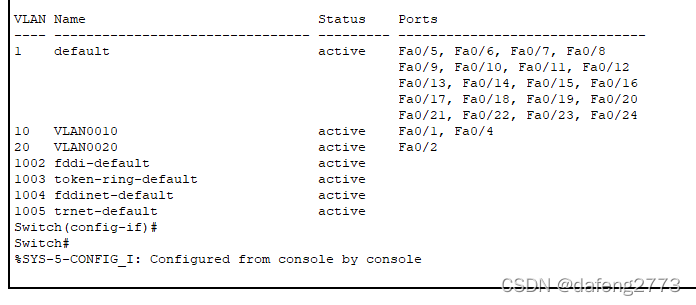
You can see , Switchboard F0/1 Ports are divided into vlan 10,F0/2 Ports are divided into vlan 20
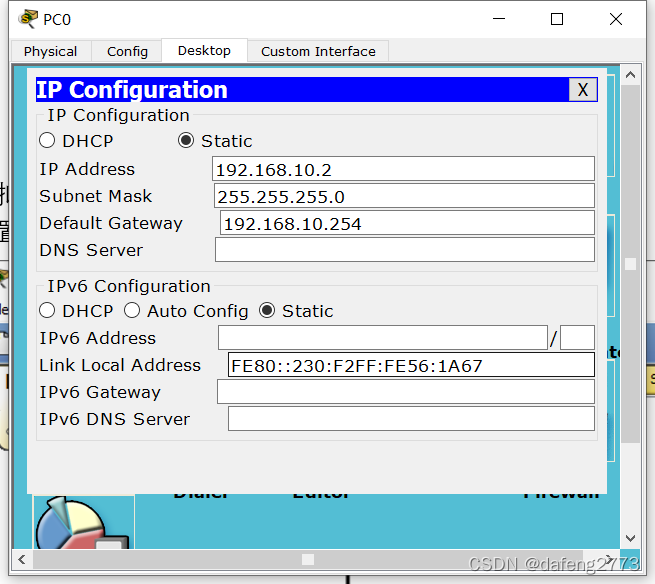
2. To configure PC0 and PC1 Of IP, Attention gateway


3. Configure router , Configure the network port ,
Open the interface of the router
Router(config)#interface f0/0
Router(config-if)#no shutdown
Single arm routing configuration :
1. Open the interface of the router
Router(config)#interface f0/0
Router(config-if)#no shutdown
2. Create a virtual sub interface
Router(config-if)#int f0/0.10 // Get into f0/0 Virtual sub interface of
Router(config-subif)#encapsulation dot1Q 10 // Encapsulate and mark the virtual sub interface vlan10 The label of
Router(config-subif)#ip add 192.168.10.254 255.255.255.0 // To configure IP Address
Router(config-subif)#int f0/0.20
Router(config-subif)#encapsulation dot1Q 20
Router(config-subif)#ip add 192.168.20.254 255.255.255.0
3. Set the port between the switch and the router to TRUNK Pattern .
Switch(config)#int f0/3
Switch(config-if)#switchport mode trunk
4. Configuration is complete , test PC1 And PC2 Is your communication successful

Reference link :
One armed route that can be learned _ Gongs and drums Lane shoulder the blog -CSDN Blog
Welcome to reprint 、 Collection 、 Gain some praise and support !
边栏推荐
- ES6 latest commonly used knowledge dictionary (which can help you solve interview questions, problems in programming, etc.)
- es6新增-let和const (var的缺点&let及const)
- 小程序editor富文本编辑使用及rich-text解析富文本
- Internship project 2 - Homepage configuration - my data module
- vlookup函数的使用方法及实例
- 交换机用户模式、特权模式、全局模式、端口模式
- 微信小程序5-基础加强(没写完)
- Use (offset, page) in JS to achieve login effect
- Wechat applet obtains the week, morning, noon and evening of month, year and day
- Base64 and file conversion
猜你喜欢




随机推荐
Uni app conditional compilation ifdef ENDIF compatible with multiple terminals
mysql的缓存方案问题解决
遍历的方法总结
Nacos配置管理
Two methods of obtaining URL parameters and various methods of obtaining location objects
Excel导入长数据末尾变000
[ES6] use multiple functions such as adding data, filtering and transmitting to the page to realize cases
获取数组中对象内部的数值最大与最小值多功能版及点名系统完整版并展示效果
uni-app 条件编译#ifdef #endif 兼容多个终端
Uniapp uses uview to realize folding panel
[ES6] explain in detail the common objects and other methods of set and array (full version)
指针进阶简单总结
基于PaddleOCR解决文本检测训练模型与inference模型预测效果不一致的问题
循环赛制日程表问题
Easypoi excel simple export
云服务器部署WEB项目
Opendds QoS and custom QoS (timing, timingqospolicy)
多功能(实现)封装函数
Pat class B 1002: write this number
Nacos configuration management