当前位置:网站首页>[ES6] use multiple functions such as adding data, filtering and transmitting to the page to realize cases
[ES6] use multiple functions such as adding data, filtering and transmitting to the page to realize cases
2022-07-19 05:13:00 【Create splendid -- hand in hand with you】
Strengthen the case :
Save a group of students with an array , The attributes of each student include , full name , fraction , Names and scores from the page input Box acquisition , Click query button , Brush selection score is greater than 60 All the students in the class save a group of students in an array ,
css The content part :
li{
list-style:none;
}
*{
margin:0px;
padding:0px;
}
#names{
width:600px;
height:100%;
margin:100px auto;
border:2px solid #FF0000;
padding:10px 10px;
font-size:20px;
background-color:green;
}
#add{
margin-right:50px;
}
input{
width:200px;
font-size: 20px;
}
HTML The content part :
<div id="names">
full name :<input type="text" id="add">
fraction :<input type="text" id="taby">
<button id="btn"> add to </button>
<p> Student information :</p>
<ul id="student">
</ul>
<button id="btn1"> Find qualified students </button>
<p> The passing students are as follows :</p>
<ul id="td">
</ul>
</div>
js The content part :
// Get all the tags
let names = document.querySelector('#add');
let taby = document.querySelector('#taby');
let student =document.querySelector('#student');
let td= document.querySelector('#td');
let btn = document.querySelector('#btn');
let btn1 = document.querySelector('#btn1');
let str='';
// let obj={};
let arr=[];
// Add a monitor , And set it as a click event
btn.addEventListener('click',()=>{
// The names and grades entered by the user are wrapped into objects and transferred to the array , And arranged in order
arr.push({"name":names.value,"scroe":taby.value});
// adopt map machining , Get... In the array item value
str=arr.map((item)=>{
// Get students' names and grades through deconstruction
const{name,scroe}=item;
// By return value , Print out the above content and return it to str
return `<li> full name :${name}, achievement :${scroe}</li>`;
})
// The above str Print the contents of to the page
student.innerHTML=str
}).join( )
// Add a monitor , And set it as a click event
btn1.addEventListener('click',()=>{
// adopt filter() Filter out the data that meets the conditions
let newArray= arr.filter(item=>item.scroe>60);
// Define a connection string variable
let str1 = '';
// adopt map machining , Get... In the array item value
str1=newArray.map(item =>{
// Get students' names and grades through deconstruction
const {name,scroe}=item;
// By return value , Print out the above content and return it to str1
return `<li> full name :${name}, achievement :${scroe}`;
})
// The above str1 Print the contents of to the page
td.innerHTML=str1;
}).join( )
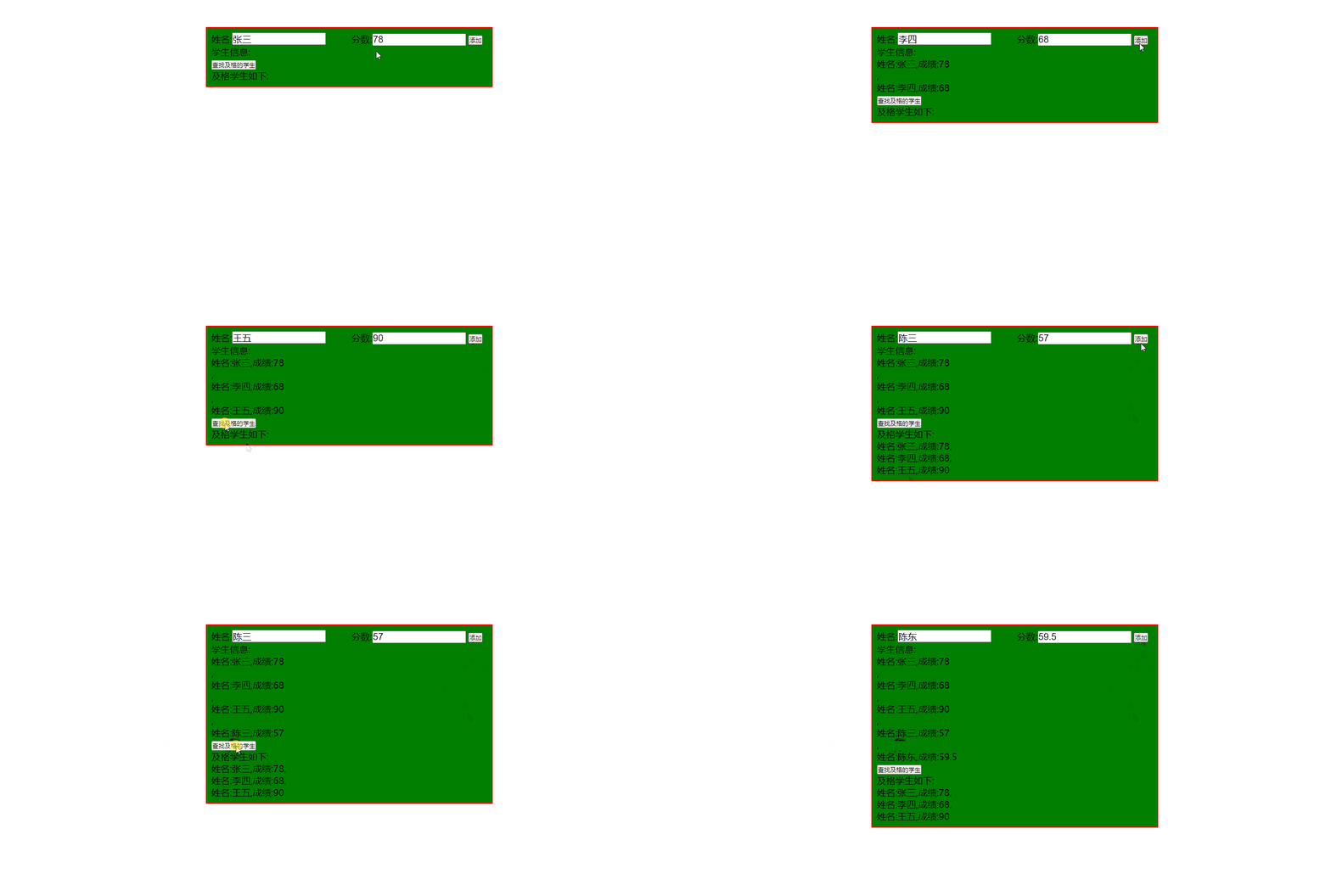
Implement case :
边栏推荐
- Get the multi-functional version of the maximum and minimum values of the internal values of the objects in the array and the full version of the roll call system, and show the effect
- Wechat applet obtains the week, morning, noon and evening of month, year and day
- Ucharts chart, pie chart, bar chart and line chart are used in uniapp
- 学习C语言第二天
- Mongo DB aggregate operations and indexes
- ES6 real case deconstruction (multidimensional array object) new case:
- 数据分析与数据挖掘实战案例本地房价预测(716):
- Word2Vec原理及应用与文章相似度(推荐系统方法)
- Class object automatic injection attribute operation tool
- PCA feature dimensionality reduction of machine learning + case practice
猜你喜欢

User login - and create SMS verification code

这么6的刷题网站你不会没听说过吧?你已经out 了?

Hire the server, and the pytorch environment training yolov5 model tutorial deployed on pycharm professional edition. Server environment installation library file:

Cesium 绑定鼠标事件和移除鼠标事件

Convolutional neural network

Internship project 3- change owner

es6新增-数组部分
ThreadLocal thread safety example and its principle

Uniapp uses uview to realize folding panel

Email (including attachments, Netease, QQ)
随机推荐
(elaborate) ES6 remaining parameters, ES6 built-in objects, template string content (detailed example Dictionary) and practical cases of flexible use of the project
小程序云开发表单提交并在页面中获取数据
6S参数
Applet cloud development upload pictures to cloud storage
645. 错误的集合
Two methods of rotation chart and automatic rotation
Hire the server, and the pytorch environment training yolov5 model tutorial deployed on pycharm professional edition. Server environment installation library file:
模拟库函数
STL容器——map的基本操作
Submit the uniapp form (input, radio, picker) to get the parameter value
C语言 带你 手撕 通讯录
[ES6] explain in detail the common objects and other methods of set and array (full version)
mysql数据库实验实训5,数据查询yggl数据库查询(详细)
cookie是否有效时间限定?如何设置cookie?手把手教你设置
Get the multi-functional version of the maximum and minimum values of the internal values of the objects in the array and the full version of the roll call system, and show the effect
About the current response, the method getoutputstream() has been called
遍历的方法总结
Pat class B 1002: write this number
Applet editor rich text editing and rich text parsing
uniapp 使用uview实现折叠面板