当前位置:网站首页>Applet editor rich text editing and rich text parsing
Applet editor rich text editing and rich text parsing
2022-07-19 05:11:00 【A young man】
Today, I tried to use it in an applet editor Rich text editor , Then use the details page rich-text To parse rich text html.
Download first editor Components , And put it in the project directory ,( Component download address )

After document storage , open richText.wxml You can modify the code according to your needs ,richText.js Empathy .
And then when you need to json Introduce in the file
"usingComponents": {
    "richText":"../../components/richText/richText"
},
In need of wxml Components used in
<richText
  id='richText'
  readOnly='{
   {readOnly}}'
  placeholder='{
   {placeholder}}'
  formatDate='YY/MM/DD'
  buttonTxt=' preservation '
  bind:clearBeforeEvent='clearBeforeEvent'
  bind:clearSuccess='clearSuccess'
  bind:undo='undo'
  bind:restore='restore'
  bind:onEditorReady='onEditorReady'
  bind:bindfocus='bindfocus'
  bind:bindblur='bindblur'
  bind:bindinput='bindinput'
  bind:insertImageEvent='insertImageEvent'
  bind:getEditorContent='getEditorContent'></richText>
Here are the methods and properties of components
readOnly Whether the editor is read-only
clearBeforeEvent Callback before emptying editor content
clearSuccess Callback when emptying editor content succeeds
undo Callback when the content is successfully revoked
restore Callback when the content is restored successfully
onEditorReady Callback when editor initialization is complete , You can get component instances
bindfocus Triggered when the editor is focused
bindblur Trigger when the editor loses focus
bindinput Triggered when editor input , Return rich text content in real time
insertImageEvent Call back when the insert picture button is clicked
getEditorContent Call back when the Save button is clicked , Return rich text content
This is the rich text editor in the applet :
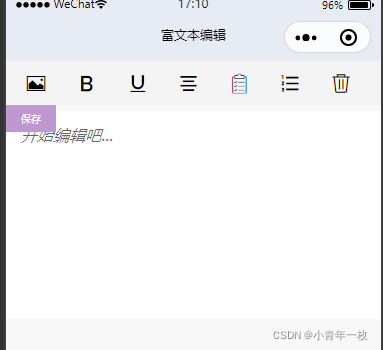
Next, let's talk about , When you enter good information in the rich text editor and submit it to the cloud database , How to query and display data in the details page , At this time, we need to use the official rich-text Component . You can go to the official document to see the detailed properties of this component ( Portal ).
Before getting the data on the details page , Let's first look at the data format submitted to the cloud database in the rich text editor ,

What we want is html Format , use rich-text Component to resolve . In the look at details page, how to query data and render it to the page
<view class="warp">
			<view class="details">

				<view class="detailsContent">
					<rich-text nodes="{
   {html}}" ></rich-text>
				</view>
			</view>
</view>
const db = wx.cloud.database();// Call the database reference of the default cloud environment
const app = getApp();
Page({
data: {
details:{}
},
onLoad: function(options) {
let that=this;
db.collection("details").doc(options.id).get().then(res=>{// Get the data set first , Query data ,
console.log(" Details :",res.data)
this.setData({
html: res.data[0].html.replace('<img ', '<img style="max-width:100%;height:auto;"'),
})
})
},
})You may see that .replace('<img ', '<img style="max-width:100%;height:auto;"'), This is for images added in rich text , The default will be very large . If you set it like this , The picture can be adapted .
This is the effect in the details page :

边栏推荐
- 读论文《Learning to Measure Changes: Fully Convolutional Siamese Metric Networks for Scene Change Detec》
- The code of yolov5 model for pest identification in Title A of the 10th Teddy cup data mining challenge (has been run through, original works, continuously updated)
- Install MySQL
- (精讲)Es6 剩余参数,ES6内置对象,模板字符串内容(详例宝典)及灵活运用项目的实战案例
- 微信小程序云开发使用方法-1
- 决策树原理和案例应用-泰坦尼克号生存预测
- ModelArts第二次培訓筆記
- Harmonyos入门
- SQL语句学习
- Topicexchange switch is simple to use.
猜你喜欢






随机推荐
Logic of image uploading
Feature extraction of machine learning (digitization and discretization of category features and digitization of text features)
微信小程序wx.setClipboardData复制文本
读论文《SNUNet-CD: A Densely Connected Siamese Network for Change Detection of VHR Images》
获取URL参数的两种方法及location对象的各项获取方式
PAT乙级1017: A除以B
uni-app 条件编译#ifdef #endif 兼容多个终端
【C语言—零基础第十一课】旋转大转盘之指针
[batch] batch delete intermediate folder - personal research script
IText modify PDF Text
C语言初学者之初识代码专项练习
Es6最新常用知识宝典(能够帮助你解决面试题困惑,编写程序中出现的问题等)
Fanoutexchange switch is simple to use
【C语言—零基础第六课】输入输出语句格式与复合语句
Es6 真实案例解构(多维数组对象)全新案例:
【C语言—零基础_学习_复习_第五课】基本运算符的运算性质
热更新及其原理
PCA feature dimensionality reduction of machine learning + case practice
Harmonyos fourth training notes
滚动轮加载的两种js方法及模态框拖拽归总