当前位置:网站首页>Applet cloud development upload pictures to cloud storage
Applet cloud development upload pictures to cloud storage
2022-07-19 05:11:00 【A young man】
After learning about cloud development of small programs , Encountered the common image upload in development , Today's simple record summarizes how to upload pictures to cloud storage in cloud development .
Here are two simple cases , One is to select images and upload them directly to cloud storage , Such as replacing avatars is in line with this situation . The second is after selecting pictures , Click the submit button and upload to cloud storage , It's like adding pictures to a circle of friends post or a form Click the Publish button to upload .
Next, let's look at the first case , Choose pictures to upload directly to cloud storage :
The effect is as follows :

Code :
<view>

  <image src="{
   {images}}"></image>

</view>
<view bindtap="upload"> Upload </view>
upload(){
let that=this;
wx.chooseImage({// Asynchronous methods
count: 9,// Select the maximum number of pictures
sizeType:['original', 'compressed'],// Selected picture size Original picture , Compressed graph
sourceType:['album','camera'],// Photo album selection , Camera taking
success(res){
//tempFilePaths It can be used as a picture label src attribute
const tempFilePaths = res.tempFilePaths
console.log(" Selection successful ",res)
for(let i=0; i < tempFilePaths.length; i++){// Cyclic upload of multiple pictures
wx.cloud.uploadFile({// Upload to wechat cloud storage
cloudPath:'myImage/' + new Date().getTime() + "_" + Math.floor(Math.random()*1000) + ".jpg",// Use timestamp plus random number as the name of the image uploaded to the cloud
filePath:tempFilePaths[i],// Local file path
success: res => {
// Return file ID
console.log(" Upload successful ",res.fileID)
that.setData({
images:res.fileID// Get the image uploaded to the cloud and display it on the page
})
wx.showToast({
title: ' Upload successful ',
})
}
})
}
}
})
},After the upload , Click the cloud storage panel refresh to see the newly uploaded image

Next, let's look at the second case , When you select a picture , Click the submit button and upload to cloud storage .
The renderings are as follows :
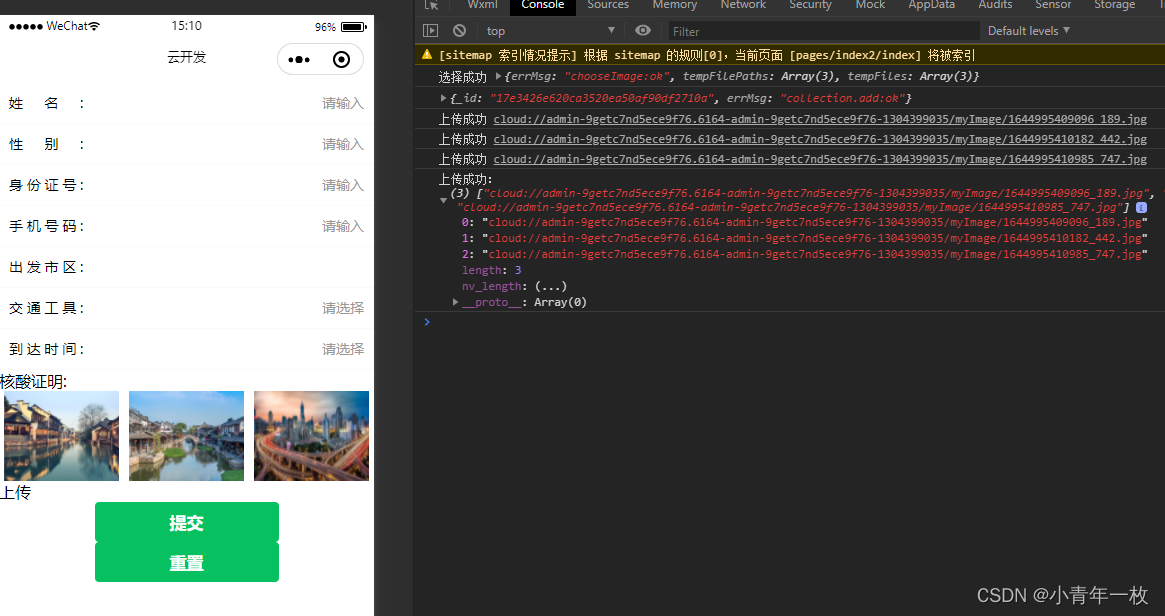

The code is as follows :
<form action="" bindsubmit="addBtn">
<view>

   <view class="imgFlex">
     <block wx:for="{
   {images}}" wx:key="*this" >
        <view data-index="{
   {index}}" class="item_img">
          <image src="{
   {item}}"></image>
        </view>
      </block>
    </view>
    <view bindtap="upload"> Upload </view>
</view>
 <button type="primary" form-type="submit"> Submit </button>
 <button type="primary" form-type="reset"> Reset </button>
</form>
//index.js
//import WxValidate from '../../utils/WxValidate';
const app = getApp()
const db = wx.cloud.database()// Call the database reference of the default cloud environment
Page({
data: {
images:[],// Select Picture
images_success: [],// Upload the cloud storage address array after cloud storage
images_success_size:0,// The number of successful image uploads
},
onLoad(){
},
upload(){
let that=this;
wx.chooseImage({// Asynchronous methods
count: 9,// Select the maximum number of pictures
sizeType:['original', 'compressed'],// Selected picture size Original picture , Compressed graph
sourceType:['album','camera'],// Photo album selection , Camera taking
success(res){
//const tempFilePaths = res.tempFilePaths
that.setData({
images: res.tempFilePaths
});
console.log(" Selection successful ",res)
}
})
},
uploadImage(index){
let that=this
wx.cloud.uploadFile({// Upload to wechat cloud storage
cloudPath:'myImage/' + new Date().getTime() + "_" + Math.floor(Math.random()*1000) + ".jpg",// Name the image with timestamp and random number
filePath:that.data.images[index],// Local file path
success: res => {
// Return file ID
console.log(" Upload successful ",res.fileID)
that.data.images_success[index] = res.fileID;
that.data.images_success_size = that.data.images_success_size+1;
if(that.data.images_success_size == that.data.images.length){
console.log(" Upload successful :", that.data.images_success)
} else {
that.uploadImage(index+1)
}
},
fail: err =>{
that.setData({
images_success:[],
images_success_size:0
})
wx.showToast({
icon:'none',
title: ' Upload failed , Please upload again ',
})
}
})
},
// Submit the form and add it to the database
addBtn: function(e){
let that=this;
if(that.data.images.length > 0){//1、 Determine whether there are pictures
that.setData({
//3、 Initialize a length for the uploaded image , The array uploaded successfully is consistent with the existing array
images_success:that.data.images
})
that.uploadImage(0)//2、 Upload the first picture first when there is a picture
}
},
})
The above is about applets Code for uploading pictures to cloud storage , There are comments in the code , No more explanation here , Practice first . First attempt to write , Welcome to comment
边栏推荐
- 微信小程序云开发使用方法-1
- STL容器——set集合的应用
- ModerlArts第一次培训笔记
- 接上期内容:轮播图剩余两种方法
- The code of yolov5 model for pest identification in Title A of the 10th Teddy cup data mining challenge (has been run through, original works, continuously updated)
- 实习项目1-个性化主页配置
- Use of transactions - Django, SQL tools
- 无重复字符的最长字串
- Simply and quickly establish a pytorch environment yolov5 target detection model to run (super simple)
- SMS verification test without signature template audit
猜你喜欢

读论文《SNUNet-CD: A Densely Connected Siamese Network for Change Detection of VHR Images》

Feature extraction of machine learning (digitization and discretization of category features and digitization of text features)

Simple use of directexchange switches.
Harmonyos fourth training notes

es6新增-数组/对象的解构赋值

ModerlArts第一次培训笔记

es6新增-Symbol数据类型

基于RTX30显卡的ArcGIS Pro2.8深度学习环境配置

Uniapp uses uview to realize folding panel

实习项目3-更改所有者
随机推荐
ArcGIS Pro发布服务
Uniapp uses uview to realize folding panel
[2022 10th Teddy Cup Challenge] Title A: complete version of pest identification (general idea. Detailed process and code and results CSV in compressed package)
Modelarts second training notes
泰迪杯A题完整版 优化更新(4/23)
ModelArts第二次培训笔记
机器学习之特征提取(类别特征进行数值化、离散化、文本特征进行数值化)
【C语言—零基础_学习_复习_第四课】数据类型及其运算
Cve-2019-14234 Django jsonfield SQL injection vulnerability
Simple use of directexchange switches.
Fanoutexchange switch is simple to use
【C语言—零基础第十一课】旋转大转盘之指针
学习C语言的第五天
Cve-2022-23131 ZABBIX SAML SSO authentication bypass vulnerability
uniapp 使用uview实现折叠面板
Topicexchange switch is simple to use.
小程序云开发表单提交并在页面中获取数据
Logic of image uploading
Harmonyos入门
Use of transactions - Django, SQL tools