当前位置:网站首页>小程序editor富文本编辑使用及rich-text解析富文本
小程序editor富文本编辑使用及rich-text解析富文本
2022-07-17 05:05:00 【小青年一枚】
今天尝试了下在小程序中使用editor富文本编辑,然后再详情页使用rich-text来解析富文本html。
首先先下载editor组件,并放到项目目录中,(组件下载地址)

文件存放后,打开richText.wxml可以根据需求修改代码,richText.js同理。
然后在需要的json文件中引入
"usingComponents": {
    "richText":"../../components/richText/richText"
},
在需要的wxml中使用组件
<richText
  id='richText'
  readOnly='{
   {readOnly}}'
  placeholder='{
   {placeholder}}'
  formatDate='YY/MM/DD'
  buttonTxt='保存'
  bind:clearBeforeEvent='clearBeforeEvent'
  bind:clearSuccess='clearSuccess'
  bind:undo='undo'
  bind:restore='restore'
  bind:onEditorReady='onEditorReady'
  bind:bindfocus='bindfocus'
  bind:bindblur='bindblur'
  bind:bindinput='bindinput'
  bind:insertImageEvent='insertImageEvent'
  bind:getEditorContent='getEditorContent'></richText>
这里说下组件的方法及属性
readOnly 编辑器是否只读
clearBeforeEvent 清空编辑器内容之前的回调
clearSuccess 清空编辑器内容成功时回调
undo 撤销内容成功时回调
restore 恢复内容成功时回调
onEditorReady 编辑器初始化完成时回调,可以获取组件实例
bindfocus 编辑器聚焦时触发
bindblur 编辑器失去焦点时触发
bindinput 编辑器输入中时触发,实时返回富文本内容
insertImageEvent 插入图片按钮点击时回调
getEditorContent 保存按钮点击时回调,返回富文本内容
这就是小程序中的富文本编辑器:
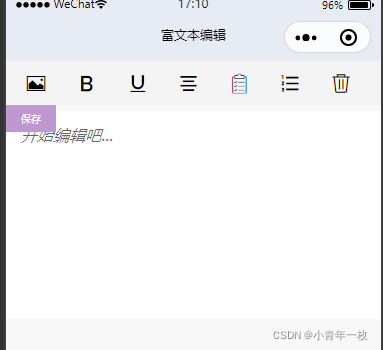
接下来我们说下,当在富文本编辑器中录入好信息并提交到云数据库中,如何在详情页中查询并显示数据,这时候我们就要用到官方给提供的rich-text组件了。大家可以去官方文档中去看下该组件的详细属性(传送门)。
在详情页获取数据之前,我们先看下在富文本编辑器提交给云数据库的数据格式,

我们要的是html格式的,用rich-text组件来解析。在看看详情页中该如何查询数据并渲染到页面
<view class="warp">
			<view class="details">

				<view class="detailsContent">
					<rich-text nodes="{
   {html}}" ></rich-text>
				</view>
			</view>
</view>
const db = wx.cloud.database();//调用默认云环境的数据库引用
const app = getApp();
Page({
data: {
details:{}
},
onLoad: function(options) {
let that=this;
db.collection("details").doc(options.id).get().then(res=>{//首先获取数据集合,查询数据,
console.log("详情数据:",res.data)
this.setData({
html: res.data[0].html.replace('<img ', '<img style="max-width:100%;height:auto;"'),
})
})
},
})大家可能看到在后面中追加了.replace('<img ', '<img style="max-width:100%;height:auto;"'),这个是针对在富文本中添加的图片,默认会很大。这样设置的话,图片就可以适配了。
这就是在详情页中的效果:

边栏推荐
猜你喜欢


随机推荐
Use of flask
Travel data acquisition, data analysis and data mining [2022.5.30]
关于New_Online_Judge_1081_哥德巴赫猜想的思考
How to upload qiniu cloud
Actual cases of data analysis and data mining local house price prediction (716):
. SH scripting
用户登录-以及创建验短信证码
简单快速建立pytorch环境YOLOv5目标检测 模型跑起来(超简单)
卷积神经网络
One article to understand Zipkin
Bank link No. cnasp & Query (II)
02_电影推荐(ContentBased)_用户画像
ModerlArts第一次培训笔记
Notes de formation pour la deuxième fois des modèles
NoSQL overview
IDL调用6S大气校正
mysql数据库实验实训6,数据视图(详细)
学习C语言的第四天
【LeetCode——编程能力入门第二天】运算符(位1的个数/整数的各位积和之差)
学习C语言第8天