当前位置:网站首页>ECS deployment web project
ECS deployment web project
2022-07-19 05:17:00 【qq_ forty-two million forty-two thousand one hundred and fifty-】
One 、 preparation
1、 A cloud server
2、 install Xshell, Access remote server
3、 install Xftp, Transfer files between local and remote servers
4、 install Navicat, Connect to remote database
Two 、 install JDK
1、 Download address Click the jump 
Use the downloaded compressed file Xftp To the server
2、 Decompress the package
tar -zxvf The name of the package
3、 Build a place java Folder
mkdir /usr/local/java
4、 Move the extracted folder to the custom directory
mv Unzipped folder /usr/local/java/
5、 Configure environment variables
vim /etc/profile
Add environment variables at the bottom
export JAVA_HOME=/usr/local/java/***
export CLASSPATH=.:$JAVA_HOME/lib/dt.jar:$JAVA_HOME/lib/tools.jar
export PATH=$PATH:$JAVA_HOME/bin

Then activate the environment variable
source /etc/profile
Last java -version, If the version information can be displayed correctly, the environment configuration is successful 
3、 ... and 、 install MySQL
1、 download MySql Installation package
rpm -ivh http://dev.mysql.com/get/mysql57-community-release-el7-8.noarch.rpm
2、 install Mysql 5.7
yum install -y mysql-server
If it shows Complete! Description installation successful
3、 Set boot up mysql
systemctl enable mysqld.service
4、 Check whether the power on autostart has been installed
systemctl list-unit-files | grep mysqld
If the following contents are displayed, the automatic startup installation has been completed
mysqld.service enabled
5、 Turn on mysql service
systemctl start mysqld.service
6、 see root Temporary password
grep "A temporary password" /var/log/mysqld.log

The last part is the temporary password , Copy down , I need to change my password later 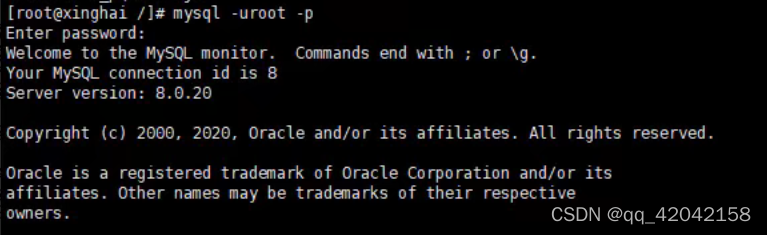
Get into mysql service
mysql -uroot -p
7、 Change temporary password
mysql For the sake of safety , Have their own strategic requirements , If we want to set it as our common root perhaps 123456 Such a password , The policy requirements need to be modified
set global validate_password_policy=LOW;
Then change the password
SET PASSWORD = PASSWORD('root');
8、 Configure remote access
GRANT ALL PRIVILEGES ON *.* TO 'root'@'%' IDENTIFIED BY 'root' WITH GRANT OPTION;
there IDENTIFIED BY ‘root’ Change to yourself mysql Database password
9、 Refresh the permissions
flush privileges;
Four 、 install Tomcat
1、 Download address Click the jump
2、 decompression
tar -zxvf ***
3、 Create a local directory
mkdir /usr/local/tomcat
4、 Move the extracted folder
mv *** /usr/local/tomcat/
5、 ... and 、 Configure firewall
see firewall Service status
systemctl status firewalld
see firewall The state of
firewall-cmd --state
Turn on 、 restart 、 close 、firewalld.service service
#  Turn on
service firewalld start
#  restart
service firewalld restart
#  close
service firewalld stop
View firewall rules
firewall-cmd --list-all
Inquire about 、 to open up 、 Close the port
#  Check whether the port is open
firewall-cmd --query-port=8080/tcp
#  to open up 80 port
firewall-cmd --permanent --add-port=80/tcp
#  Remove port
firewall-cmd --permanent --remove-port=8080/tcp
# service iptables restart ( After modifying the configuration, restart the firewall )
firewall-cmd --reload
#  Parameter interpretation 1、firwall-cmd: yes Linux Operations provided firewall A tool for ;
#2、--permanent: Indicates set to persistent ;
#3、--add-port: Identify the added port ;
It's open here 80、8080、3306 These three ports
6、 ... and 、 Configure cloud server security group

7、 ... and 、Tomcat Directly access the system without adding the project name
1、 Change the default port to 80
Get into tomcat In the directory of conf Catalog , open server.xml
vim server.xml

Change the port number to 80, Because the default port number of the browser is 80, That way, you don't need to add a port number when accessing the project
2、 stay Host Add under node
<Context docBase="/usr/local/tomcat/***/webapps/ Project name " path="" reloadable="false"/>

And then use Navicat Import the database into the ECS mysql
The final will be war bag tomcat Of webapps Under the table of contents , Pay attention to put... When the server is not started
And then to tomcat Of bin Start the project under the directory
./startup.sh
Shut down the server
./shutdown.sh
边栏推荐
猜你喜欢

【LeetCode——编程能力入门第一天】基本数据类型[在区间范围内统计奇数数目/去掉最低工资和最高工资后的工资平均值)

路由器loopback口实验

Submit the uniapp form (input, radio, picker) to get the parameter value

Wechat applet cloud development and use method-1
单臂路由配置

Applet cloud development form submission and data acquisition in the page

Baidu map realizes thermal map

C语言初学者之初识代码专项练习

这么6的刷题网站你不会没听说过吧?你已经out 了?

新手学习渗透测试的入门指南
随机推荐
【LeetCode——编程能力入门第二天】运算符(位1的个数/整数的各位积和之差)
C语言练习题
JS native object plus attributes
Applet cloud development form submission and data acquisition in the page
学习C语言第二天
微信小程序云开发使用方法-1
Multifunctional (Implementation) encapsulation function
新手学习渗透测试的入门指南
C语言初学者之初识代码专项练习
Continue from the previous issue: the remaining two methods of the rotation chart
【Es6】forEach,for...in ,for...of专栏,让你通过项目案例快速分辨各种for语句的使用方式及区别(完整版)内部有详细注释
哨兵二号轨道数据下载
Es6最新常用知识宝典(能够帮助你解决面试题困惑,编写程序中出现的问题等)
小程序云开发 上传图片到云存储
无重复字符的最长字串
路由器loopback口实验
[ES6] quickly print user information to the page
获取数组中对象内部的数值最大与最小值多功能版及点名系统完整版并展示效果
学习C语言第8天
LeetCode53. 最大子数组和