当前位置:网站首页>Continue from the previous issue: the remaining two methods of the rotation chart
Continue from the previous issue: the remaining two methods of the rotation chart
2022-07-19 05:12:00 【Create splendid -- hand in hand with you】
The first method of rotation chart :
Simple rotation chart (HTML page ):
<!DOCTYPE html>
<html lang="en">
<head>
    <meta charset="UTF-8">
    <title>turnPhoto1</title>
    <link rel="stylesheet" href="css/turnPhoto1.css">
</head>
<body id="body">

</body>
<script src="js/turnPhoto1.js"></script>

</html>
Called as a whole js The content part :
let Maximum = 8;//photoDiv Maximum number of , Can be changed flexibly

function generateElement()// to body add to div
{

    let body = window.document.getElementById("body");
    let photoDiv;
    for (let i = 0; i < Maximum; i++) {
        photoDiv = window.document.createElement("div");
        // ---------------------------------------------------- Both codes are set class Property value
        photoDiv.setAttribute("class", "photo");
        // photoDiv.className = "photo";
        // ---------------------------------------------------- Both codes are set id Property value
        photoDiv.setAttribute("id", i+1+"");
        // photoDiv.id=i+1+"";
        // ----------------------------------------------------
        photoDiv.style.backgroundImage = "url('image/" + (i + 1) + ".jpg')"
        body.appendChild(photoDiv);
    }
    //  Put a layer of tulle on the top layer
    let veilDiv=window.document.createElement("div");
    veilDiv.setAttribute("class","veil");
    // veilDiv.className="veil";
    body.append(veilDiv);
}

let index = 0;
let photos = window.document.getElementsByClassName("photo");// The rotation chart is manipulated by an array
function turn()// Shuffling figure
{
    if (index==photos.length)// After the subscript reaches the length of the array
    {
        index = 0;// Zero immediately
    }
    for (let i = 0; i < photos.length; i++) // be-all photoDiv invisible ,for The loop can be changed , But it may not work after the change
    {
        photos[i].style.display = "none";
    }
    photos[index].style.display = "block";// Give Way index The point is photoDiv so
    index++;
}

generateElement();
setInterval(turn, 2000);// Call the rotation graph function every two seconds
css Style part :
body
{
margin: 0;
padding: 0;
background-color: #FDE6E0;
}
.photo
{
width: 100%;
height: 100%;
/*background-image: url("image/1.jpg");*/
background-size:cover;
background-repeat: no-repeat;
position: absolute;
}
.veil
{
width: 100%;
height: 100%;
background-color: #E9EBFE;
opacity:0.3;
position: absolute;
}
The second method of rotation chart :
HTML Page content section :
<!DOCTYPE html>
<html lang="en">
<head>
<meta charset="UTF-8">
<title>turnPhoto2</title>
<link rel="stylesheet" href="css/turnPhoto2.css">
</head>
<body>
<img src="image/8.jpg" id="photo">
<script src="js/turnPhoto2.js"></script>
</body>
</html>
js Call the content section ( Simple type ):
let Maximum = 8;
let index = 1;
let photo =window.document.getElementById("photo");
function turn() {
if (index > Maximum) {
index = 1;
}
// ---------------------------------------------------------------- Set up img Of src attribute , Choose between two ways
// photo.src = "image/" + index + ".jpg";
photo.setAttribute("src","image/"+index+".jpg");
// ----------------------------------------------------------------
index++;
}
setInterval(turn, 2000);
css Style part :
body
{
padding: 0;
margin:0;
background-color: #C7EDCC;
}
#photo
{
width: 100%;
height: 100%;
position: absolute;
top:0px;
left:0px;
}
边栏推荐
- 决策树原理和案例应用-泰坦尼克号生存预测
- Es6最新常用知识宝典(能够帮助你解决面试题困惑,编写程序中出现的问题等)
- 645. 错误的集合
- Using JS to realize the second level menu of anjuke and the full version (demonstration of precautions and problem points)
- 【C语言—零基础_学习_复习_第五课】基本运算符的运算性质
- 读论文《Learning to Measure Changes: Fully Convolutional Siamese Metric Networks for Scene Change Detec》
- LeetCode53. 最大子数组和
- 实习项目2-主页配置-我的数据模块
- 【C语言—零基础_学习_复习_第四课】数据类型及其运算
- 热更新及其原理
猜你喜欢

Applet editor rich text editing and rich text parsing

Bi design: distributed high concurrency epidemic prevention health management system based on vue+socket+redis

How to upload qiniu cloud

C语言初学者之初识代码专项练习
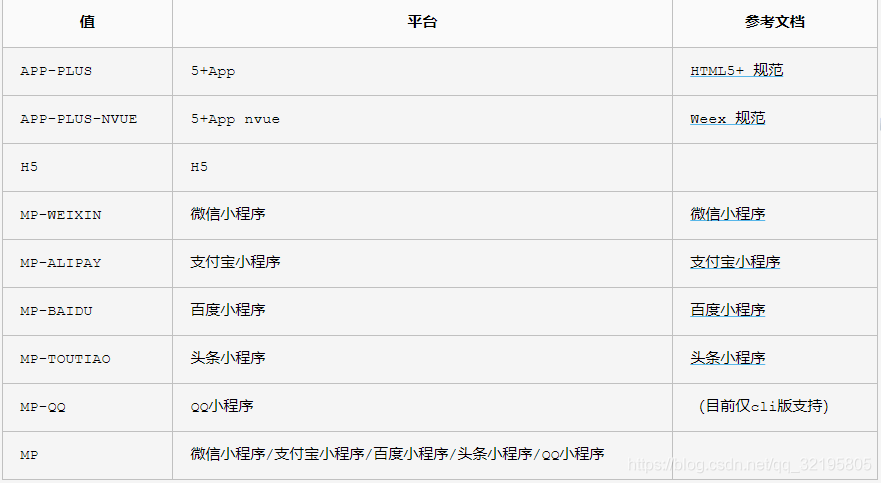
uni-app 条件编译#ifdef #endif 兼容多个终端

uniapp中使用ucharts图表,饼状图,柱状图,折线图

About the current response, the method getoutputstream() has been called

【C语言—零基础第六课】输入输出语句格式与复合语句

Hire the server, and the pytorch environment training yolov5 model tutorial deployed on pycharm professional edition. Server environment installation library file:

读论文《SNUNet-CD: A Densely Connected Siamese Network for Change Detection of VHR Images》
随机推荐
读论文《SNUNet-CD: A Densely Connected Siamese Network for Change Detection of VHR Images》
ES6 latest commonly used knowledge dictionary (which can help you solve interview questions, problems in programming, etc.)
IDL 读取葵花8(Himawari-8)HSD数据
Flex弹性布局
Internship project 1 - personalized homepage configuration
645. 错误的集合
Travel data acquisition, data analysis and data mining [2022.5.30]
computed和watch的区别
学习C语言第7天
Wechat applet cloud development and use method-1
小程序云开发表单提交并在页面中获取数据
百度地图 实现 热力图
学习C语言的第四天
C语言 带你 手撕 通讯录
IDL调用6S大气校正
租用服务器,以及部署在pycharm专业版上的pytorch环境训练yolov5模型教程服务器环境安装库文件:
数据分析与数据挖掘实战案例本地房价预测(716):
轮播图节流阀原理及本地存储归总
读论文《Learning to Measure Changes: Fully Convolutional Siamese Metric Networks for Scene Change Detec》
Internship project 2 - Homepage configuration - my data module