当前位置:网站首页>实习项目2-主页配置-我的数据模块
实习项目2-主页配置-我的数据模块
2022-07-17 05:05:00 【卷心菜007】
目录
Pandroid仿真数据管理平台
1.实现效果


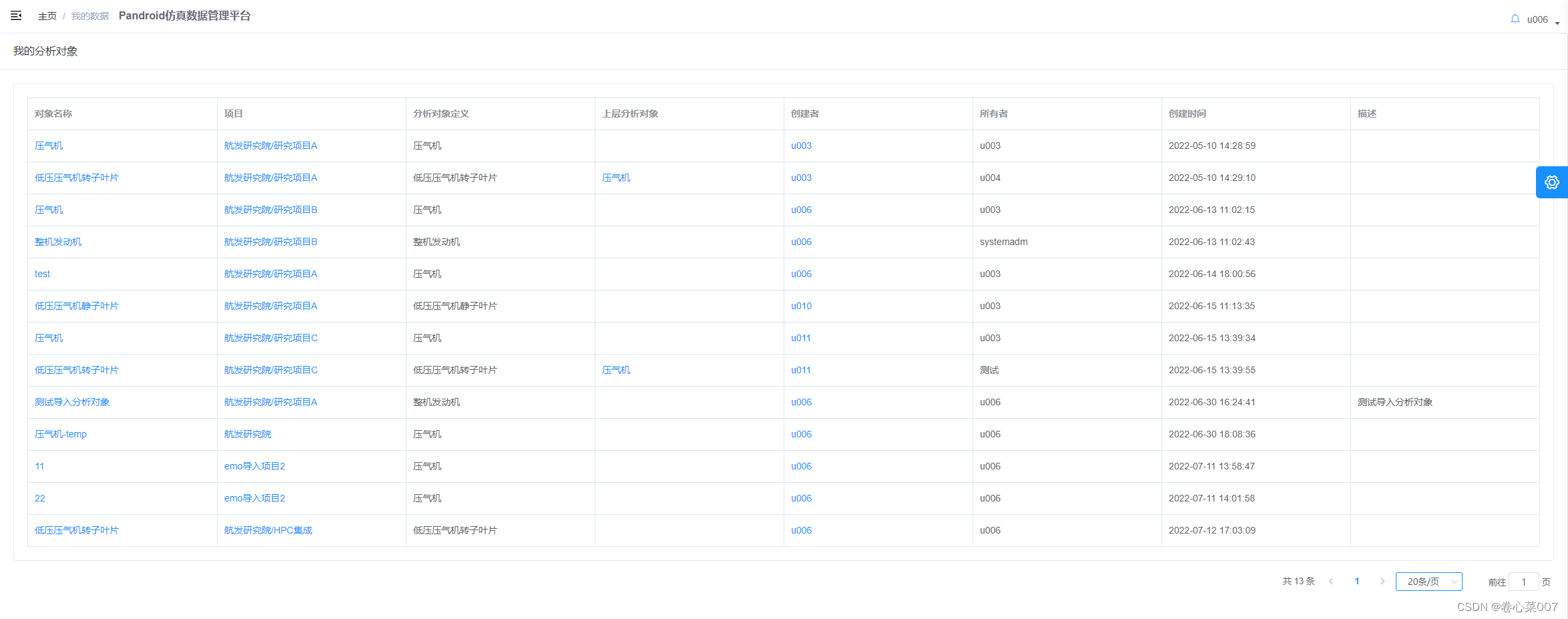
2.框架:element-ui vue
3.实现主要思想 : 组件复用
4.代码实现
父组件


子组件
总计十一个模块盒子

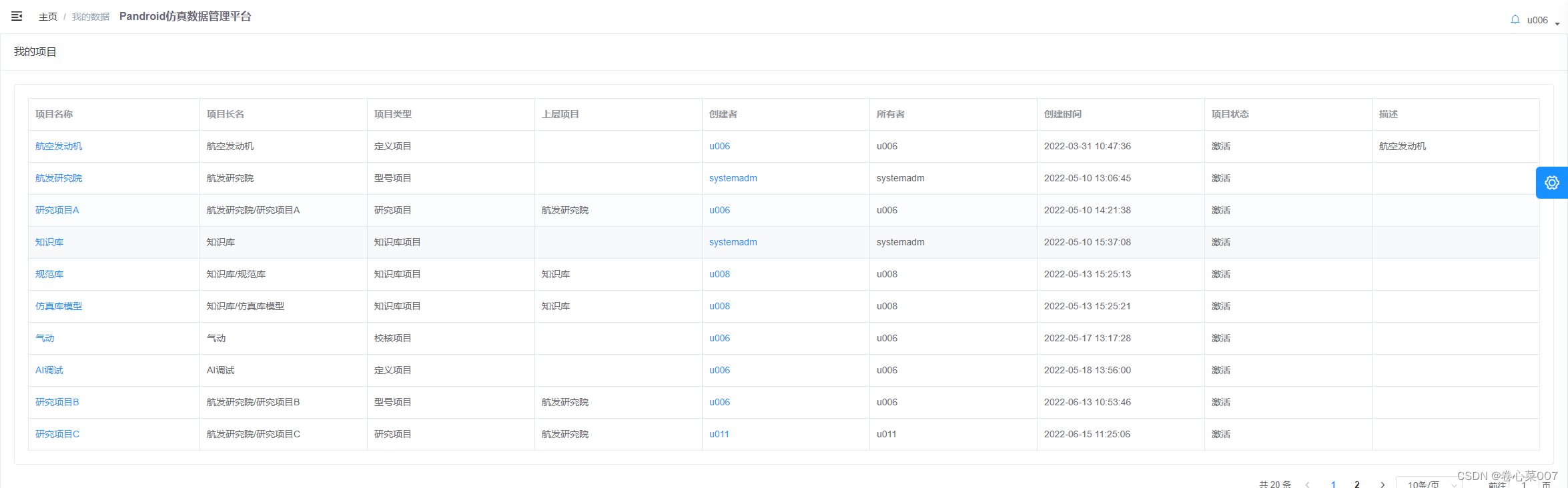

组件复用的优点:
1.组件化是独立和可复用的代码组织单元。组件系统是vue核心特性之一,它使开发者使用小型、独立和通常可复用的组件构建大型应用;
2.组件化开发能大幅度提高应用开发效率、测试性、复用性等;
3.组件使用按分类有:页面组件、业务组件、通用组件;
4.vue的组件是基于配置的,我们通常编写的组件是组件配置而非组件,框架后续会生成其构造函数,它们基于VueComponent,扩展于Vue;
5.vue中常见组件化技术有属性prop,自定义事件,插槽等,它们主要用于组件通信、扩展等;
6.合理的划分组件,有助于提高应用性能;
7.组件应该是高内聚、低耦合的;
8.遵循单向数据流的原则。
组件复用:
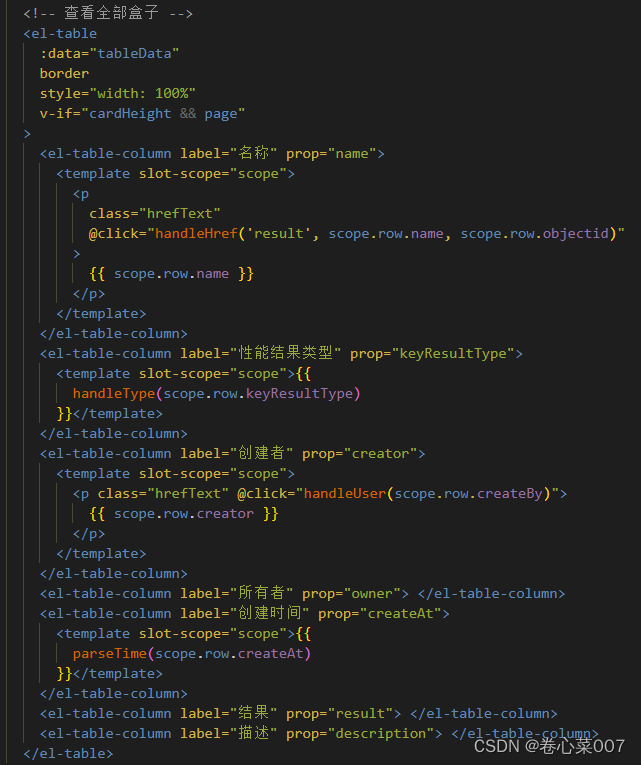
采用组件复用的思想,在"我的数据"及查看全部中复用相同的组件,在组件中,通过添加不同的v-if判断体条件,判断显示盒子不同样式的el-table
在查看全部中,存在page(页数),在"我的数据"中仅显示全部数据的前十条且不存在翻页page,所以,以page作为判断条件,在不同的页面显示不同的盒子.

换页分页的实现:
父子组件中通过props/$emit传递page(页面页数)以及pagesize(每页数据条数),当父组件改变page/pagesize时,子组件通过watch监听page/pagesize数据的变化,并重新触发事件导致页面刷新.


title变化实现:
$router.push()实现


完整代码
子组件(两个为例)
我的任务
// 我的任务
<template>
  <el-card shadow="never">
    <div slot="header" class="card-sub-title clearfix" v-if="!page">
      <span class="fl">我的任务</span>
      <div class="fr">
        <el-button
          type="primary"
          plain
          size="mini"
          round
          @click="pushShow(title)"
        >
          查看全部
          <i class="el-icon-right el-icon--right"></i>
        </el-button>
      </div>
    </div>
    <el-table
      :data="tableData"
      border
      style="width: 100%"
      :max-height="cardHeight - 110"
      size="mini"
      v-if="cardHeight && !page"
    >
      <el-table-column label="任务名称" prop="instanceName">
        <template slot-scope="scope">
          <p class="hrefText" @click="handleDetail(scope.row)">
            {
   { scope.row.instanceName }}
          </p>
        </template>
      </el-table-column>
      <el-table-column label="项目" prop="projectName"> </el-table-column>
      <el-table-column label="版本" prop="itemVersionName"> </el-table-column>
      <el-table-column label="阶段" prop="itemVersionStage"> </el-table-column>
      <el-table-column label="类型" prop="type">
        <template slot-scope="scope">{
   {
          scope.row.type == "1" ? "仿真任务" : ""
        }}</template>
      </el-table-column>
      <el-table-column label="上层任务" prop="superiorInstance">
      </el-table-column>
      <el-table-column label="任务负责人">
        <template slot-scope="scope">
          <span v-for="item in scope.row.directors" :key="item.userId"
            >{
   { item.userName }}
          </span>
        </template>
      </el-table-column>
      <!-- <el-table-column label="达标状态" prop="itemVersionName">
				    </el-table-column> -->
      <el-table-column label="创建时间" prop="modifiedat">
        <template slot-scope="scope">{
   {
          parseTime(scope.row.addTime)
        }}</template>
      </el-table-column>
      <el-table-column label="任务状态" prop="instanceStatus">
        <template slot-scope="scope">{
   {
          getTaskStatus(scope.row.instanceStatus)
        }}</template>
      </el-table-column>
    </el-table>
    <el-table
      :data="tableData"
      border
      style="width: 100%"
      v-if="cardHeight && page"
    >
      <el-table-column label="任务名称" prop="instanceName">
        <template slot-scope="scope">
          <p class="hrefText" @click="handleDetail(scope.row)">
            {
   { scope.row.instanceName }}
          </p>
        </template>
      </el-table-column>
      <el-table-column label="创建时间" prop="modifiedat">
        <template slot-scope="scope">{
   {
          formatTime(scope.row.addTime)
        }}</template>
      </el-table-column>
      <el-table-column label="项目" prop="projectName"> </el-table-column>
      <el-table-column label="版本" prop="itemVersionName"> </el-table-column>
      <el-table-column label="阶段" prop="itemVersionStage"> </el-table-column>
      <el-table-column label="类型" prop="type">
        <template slot-scope="scope">{
   {
          scope.row.type == "1" ? "仿真任务" : ""
        }}</template>
      </el-table-column>
      <el-table-column label="上层任务" prop="superiorInstance">
      </el-table-column>
      <el-table-column label="任务负责人">
        <template slot-scope="scope">
          <span v-for="item in scope.row.directors" :key="item.userId"
            >{
   { item.userName }}
          </span>
        </template>
      </el-table-column>
      <!-- <el-table-column label="达标状态" prop="itemVersionName">
				    </el-table-column> -->
      <el-table-column label="任务状态" prop="instanceStatus">
        <template slot-scope="scope">{
   {
          getTaskStatus(scope.row.instanceStatus)
        }}</template>
      </el-table-column>
    </el-table>
  </el-card>
</template>
<script>
import { findMyTaskPage } from "@/api/bpmn/process";
import { parseTime } from "@/utils/index";
import { taskStatus } from "@/utils/statusCode.js";
import router from "@/router";
export default {
  name: "myWork",
  props: ["page", "pagesize"],
  data() {
    return {
      cardHeight: 0,
      tableData: [],
      taskStatus: taskStatus,
    };
  },
  methods: {
    parseTime: parseTime,
    findMyTaskPage() {
      let data = {
        start: this.page,
        limit: this.pagesize || 10,
      };
      findMyTaskPage({ displayType: "1" }, data).then((res) => {
        if (res) {
          this.tableData = res.data.records;
          this.total = res.data.total;
          this.$emit("retotal", this.total);
        }
      });
    },
    getCardHeight() {
      var bodyHeight = document.body.clientHeight;
      var marginHeight = 150;
      this.cardHeight = bodyHeight / 2 - marginHeight;
    },
    // 任务状态
    getTaskStatus(val) {
      var status = "";
      taskStatus.forEach((item) => {
        if (val == item.val) {
          status = item.label;
        }
      });
      return status;
    },
    handleHref(itemType, name, id) {
      var path =
        location.origin +
        "/#/dataNavigation?itemType=" +
        itemType +
        "&id=" +
        id +
        "&name=" +
        name;
      window.open(path);
    },
    handleDetail(row) {
      let query = {
        name: row.instanceName,
        id: row.instanceId,
        itemType: "task",
      };
      router.push({ path: "/dataNavigation", query: query });
    },
    // 我的任务
    pushShow(title) {
      this.$router.push({
        path: "/myDatasList",
        query: {
          title: "我的任务",
        },
      });
    },
  },
  mounted() {
    this.getCardHeight();
    this.findMyTaskPage();
  },
  watch: {
    page(newVal, oldValue) {
      this.findMyTaskPage();
    },
    pagesize(newVal, oldValue) {
      this.findMyTaskPage();
    },
  },
};
</script>
我的版本方案
<template>
  <el-card shadow="never">
    <div slot="header" class="card-sub-title clearfix" v-if="!page">
      <span class="fl">我的版本方案</span>
      <div class="fr">
        <el-button
          type="primary"
          plain
          size="mini"
          round
          @click="pushShow(title)"
        >
          查看全部
          <i class="el-icon-right el-icon--right"></i>
        </el-button>
      </div>
    </div>
    <el-table
      :data="tableData"
      border
      style="width: 100%"
      :max-height="cardHeight - 110"
      size="mini"
      v-if="cardHeight && !page"
    >
      <el-table-column label="版本名称" prop="name">
        <template slot-scope="scope">
          <p
            class="hrefText"
            @click="handleHref('version', scope.row.name, scope.row.objectid)"
          >
            {
   { scope.row.name }}
          </p>
        </template>
      </el-table-column>
      <el-table-column label="分析对象" prop="itemName">
        <template slot-scope="scope">
          <p
            class="hrefText"
            @click="handleHref('item', scope.row.itemName, scope.row.item)"
          >
            {
   { scope.row.itemName }}
          </p>
        </template>
      </el-table-column>
      <el-table-column label="项目" prop="projectName">
        <template slot-scope="scope">
          <p
            class="hrefText"
            @click="
              handleHref('project', scope.row.projectName, scope.row.project)
            "
          >
            {
   { scope.row.projectName }}
          </p>
        </template>
      </el-table-column>
      <el-table-column label="分析对象定义" prop="itemDefName">
      </el-table-column>
      <el-table-column label="版本方案定义" prop="defName"> </el-table-column>
      <el-table-column label="上层版本方案" prop="parentName">
      </el-table-column>
      <el-table-column label="阶段" prop="stage">
        <template slot-scope="scope">{
   {
          filterStage(scope.row.stage)
        }}</template>
      </el-table-column>
      <el-table-column label="创建者" prop="creator">
        <template slot-scope="scope">
          <p class="hrefText" @click="handleUser(scope.row.createBy)">
            {
   { scope.row.creator }}
          </p>
        </template>
      </el-table-column>
      <el-table-column label="所有者" prop="owner"> </el-table-column>
      <el-table-column label="创建时间" prop="createAt">
        <template slot-scope="scope">{
   {
          parseTime(scope.row.createAt)
        }}</template>
      </el-table-column>
      <el-table-column label="描述" prop="description"> </el-table-column>
    </el-table>
    <el-table
      :data="tableData"
      border
      style="width: 100%"
      v-if="cardHeight && page"
    >
      <el-table-column label="版本名称" prop="name">
        <template slot-scope="scope">
          <p
            class="hrefText"
            @click="handleHref('version', scope.row.name, scope.row.objectid)"
          >
            {
   { scope.row.name }}
          </p>
        </template>
      </el-table-column>
      <el-table-column label="分析对象" prop="itemName">
        <template slot-scope="scope">
          <p
            class="hrefText"
            @click="handleHref('item', scope.row.itemName, scope.row.item)"
          >
            {
   { scope.row.itemName }}
          </p>
        </template>
      </el-table-column>
      <el-table-column label="项目" prop="projectName">
        <template slot-scope="scope">
          <p
            class="hrefText"
            @click="
              handleHref('project', scope.row.projectName, scope.row.project)
            "
          >
            {
   { scope.row.projectName }}
          </p>
        </template>
      </el-table-column>
      <el-table-column label="分析对象定义" prop="itemDefName">
      </el-table-column>
      <el-table-column label="版本方案定义" prop="defName"> </el-table-column>
      <el-table-column label="上层版本方案" prop="parentName">
      </el-table-column>
      <el-table-column label="阶段" prop="stage">
        <template slot-scope="scope">{
   {
          filterStage(scope.row.stage)
        }}</template>
      </el-table-column>
      <el-table-column label="创建者" prop="creator">
        <template slot-scope="scope">
          <p class="hrefText" @click="handleUser(scope.row.createBy)">
            {
   { scope.row.creator }}
          </p>
        </template>
      </el-table-column>
      <el-table-column label="所有者" prop="owner"> </el-table-column>
      <el-table-column label="创建时间" prop="createAt">
        <template slot-scope="scope">{
   {
          parseTime(scope.row.createAt)
        }}</template>
      </el-table-column>
      <el-table-column label="描述" prop="description"> </el-table-column>
    </el-table>
  </el-card>
</template>
<script>
import { queryVersionByCondition } from "@/api/queryTableData";
import { getUserListByPage } from "@/api/authorization/user";
import { parseTime } from "@/utils/index";
import { findVersionStage } from "@/api/version";
export default {
  name: "myVersions",
  props: ["page", "pagesize"],
  data() {
    return {
      cardHeight: 0,
      tableData: [],
      stageData: [],
      activeUser: {},
      userDetailShow: false,
    };
  },
  methods: {
    parseTime: parseTime,
    queryVersionByCondition() {
      let data = {
        start: this.page,
        limit: this.pagesize || 10,
      };
      queryVersionByCondition(data).then((res) => {
        if (res) {
          this.tableData = res.data.records;
          this.total = res.data.total;
          this.$emit("retotal", this.total);
        }
      });
    },
    // 表格过滤阶段的方法
    filterStage(stage) {
      let label = "";
      this.stageData.forEach((item) => {
        if (item.objectid == stage) {
          label = item.name;
        }
      });
      return label;
    },
    getCardHeight() {
      var bodyHeight = document.body.clientHeight;
      var marginHeight = 150;
      this.cardHeight = bodyHeight / 2 - marginHeight;
    },
    handleHref(itemType, name, id) {
      var path =
        location.origin +
        "/#/dataNavigation?itemType=" +
        itemType +
        "&id=" +
        id +
        "&name=" +
        name;
      window.open(path);
    },
    handleUser(userId) {
      if (!userId) {
        this.$message("用户ID缺失!");
        return;
      }
      getUserListByPage({
        start: 1,
        limit: 10,
        objectid: userId,
      }).then((res) => {
        if (res) {
          this.activeUser = { ...res.data.records[0] };
          this.userDetailShow = true;
        }
      });
    },
    // 获取所有版本阶段
    findVersionStage() {
      var data = {
        objectid: 2,
      };
      findVersionStage(data).then((res) => {
        if (res) {
          this.stageData = res.data.element || [];
        }
      });
    },
    // 表格过滤阶段的方法
    filterStage(stage) {
      let label = "";
      this.stageData.forEach((item) => {
        if (item.objectid == stage) {
          label = item.name;
        }
      });
      return label;
    },
    // 我的版本方案
    pushShow(title) {
      this.$router.push({
        path: "/myDatasList",
        query: {
          title: "我的版本方案",
        },
      });
    },
  },
  created() {
    this.findVersionStage();
  },
  mounted() {
    this.getCardHeight();
    this.queryVersionByCondition();
  },
  watch: {
    page(newVal, oldValue) {
      this.queryVersionByCondition();
    },
    pagesize(newVal, oldValue) {
      this.queryVersionByCondition();
    },
  },
};
</script>
父组件
<template>
  <div class="dashboard-container firstPage">
    <div class="dashboard-text">
      <el-card class="box-card" style="min-height: calc(100vh - 80px)">
        <div slot="header" class="clearfix">
          <span>{
   {$route.query.title}}</span>
        </div>
        <!-- 我的项目 -->
        <myProjects :page='currentPage' :pagesize="pagesize" @retotal="totalChange" v-if=" $route.query.title === '我的项目' "></myProjects>
        <!-- 我的分析对象 -->
        <myAnalysisTargets :page='currentPage' :pagesize="pagesize" @retotal="totalChange" v-if=" $route.query.title === '我的分析对象' "></myAnalysisTargets>
        <!-- 我的版本方案 -->
        <myVersions :page='currentPage' :pagesize="pagesize" @retotal="totalChange" v-if=" $route.query.title === '我的版本方案' "></myVersions>
        <!-- 我的模型 -->
        <myModels :page='currentPage' :pagesize="pagesize" @retotal="totalChange" v-if=" $route.query.title==='我的模型'"></myModels>
        <!-- 我的求解文件 -->
        <mySolvingFiles :page='currentPage' :pagesize="pagesize" @retotal="totalChange" v-if=" $route.query.title === '我的求解文件'" ></mySolvingFiles>
        <!-- 我的分析报告 -->
        <myReports :page='currentPage' :pagesize="pagesize" @retotal="totalChange" v-if=" $route.query.title === '我的分析报告' "></myReports>
        <!-- 我的仿真结果 -->
        <myReuslts :page='currentPage' :pagesize="pagesize" @retotal="totalChange" v-if=" $route.query.title === '我的仿真结果'" ></myReuslts>
        <!-- 我的性能结果 -->
        <myAllKeyResult :page='currentPage' :pagesize="pagesize" @retotal="totalChange" v-if=" $route.query.title === '我的性能结果' "></myAllKeyResult>
        <!-- 我的任务 -->
        <myWork :page='currentPage' :pagesize="pagesize" @retotal="totalChange" v-if=" $route.query.title === '我的任务' "></myWork>
        <!-- 我的审批申请 -->
        <myApply :page='currentPage' :pagesize="pagesize" @retotal="totalChange" v-if=" $route.query.title === '我的审批申请' "></myApply>
        <!-- 我的代办审批 -->
        <myToDoTaskNode :page='currentPage' :pagesize="pagesize" @retotal="totalChange" v-if=" $route.query.title === '我的代办审批'"></myToDoTaskNode>
        <div class="mt15" style="text-align: right">
          <el-pagination
            @size-change="handleSizeChange"
            @current-change="handleCurrentChange"
            :current-page="currentPage"
            :page-sizes="[10, 20, 30, 40]"
            :page-size="pagesize"
            layout="total, prev, pager, next, sizes, jumper"
            :total="total"
          >
          </el-pagination>
        </div>
      </el-card>
    </div>
  </div>
</template>
<script>
import MyProjects from "../dashboard/components/myDatas/myProjects";
import MyAnalysisTargets from "../dashboard/components/myDatas/myAnalysisTargets";
import MyVersions from "../dashboard/components/myDatas/myVersions";
import MyModels from "../dashboard/components/myDatas/myModels";
import MySolvingFiles from "../dashboard/components/myDatas/mySolvingFiles";
import MyReports from "../dashboard/components/myDatas/myReports";
import MyReuslts from "../dashboard/components/myDatas/myReuslts";
import MyAllKeyResult from "../dashboard/components/myDatas/myAllKeyResult";
import MyToDoTaskNode from "../dashboard/components/myDatas/myToDoTaskNode";
import MyApply from "../dashboard/components/myDatas/myApply";
import MyWork from "../dashboard/components/myDatas/myWork";

export default {
  name: "myDatasList",
  components: {
    MyProjects,
    MyAnalysisTargets,
    MyVersions,
    MyModels,
    MySolvingFiles,
    MyReports,
    MyReuslts,
    MyAllKeyResult,
    MyToDoTaskNode,
    MyApply,
    MyWork,
  },
  data(){
    return{
			currentPage:1,
			pagesize:10,
			total:0,
		}
  },
  methods:{
    totalChange(val){
      this.total  = val;
      this.prev = val
    },
    handleSizeChange(val){
      debugger
      this.pagesize = val
      this.$emit("add",this.page)
      this.$emit("add",this.pagesize)
		},
    handleCurrentChange(val){
			this.currentPage = val
		},
  },
};
</script>
边栏推荐
猜你喜欢

Learn about scheduled tasks in one article

The code of yolov5 model for pest identification in Title A of the 10th Teddy cup data mining challenge (has been run through, original works, continuously updated)

IDL 6S查找表
Harmonyos入门
Harmonyos third training notes
第十届泰迪杯数据挖掘挑战赛A题害虫识别YOLOv5模型代码(已跑通,原创作品,持续更新)
![[2022 10th Teddy Cup Challenge] Title A: complete version of pest identification (general idea. Detailed process and code and results CSV in compressed package)](/img/e6/beea0bb0a9f4b41206c6fcb130fdfd.png)
[2022 10th Teddy Cup Challenge] Title A: complete version of pest identification (general idea. Detailed process and code and results CSV in compressed package)

User management - restrictions

日志加入数据库实现思路

IText modify PDF Text
随机推荐
Cve-2022-23131 ZABBIX SAML SSO authentication bypass vulnerability
Asynchronous data SMS verification code
【C语言—零基础第十四课】变量的作用域与存储类
学习C语言第8天
IDL调用6S大气校正
用户登录-以及创建验短信证码
使用js实现安居客二级菜单及(注意事项和问题点演示)完整版
【LeetCode——编程能力入门第二天】运算符(位1的个数/整数的各位积和之差)
事务的使用-django、 SQL工具
获取数组中对象内部的数值最大与最小值多功能版及点名系统完整版并展示效果
Harmonyos入门
[2022 10th Teddy Cup Challenge] Title A: complete version of pest identification (general idea. Detailed process and code and results CSV in compressed package)
【C语言—零基础_学习_复习_第五课】基本运算符的运算性质
简单快速建立pytorch环境YOLOv5目标检测 模型跑起来(超简单)
STL容器——set集合的应用
Notes de formation pour la deuxième fois des modèles
Differences and precautions of fastjson, jackjson and gson
微信小程序获取年月日周及早上、中午、晚上
Message converter (JSON)
How to upload qiniu cloud