当前位置:网站首页>【Es6】forEach,for...in ,for...of专栏,让你通过项目案例快速分辨各种for语句的使用方式及区别(完整版)内部有详细注释
【Es6】forEach,for...in ,for...of专栏,让你通过项目案例快速分辨各种for语句的使用方式及区别(完整版)内部有详细注释
2022-07-17 05:04:00 【共创splendid--与您携手】
案例:数组,格式化对象,{name:'张三',birthday:'2020-10-09'} 格式化为 {name:'张三',birthday:'2020-10-09',age:20} (要求:将一组数据打印至页面中并且判断年龄小于20的对象也打印到页面中)
共同部分HTML内容:
<ul>
</ul>
<hr style="border:5px solid red;">
<div>
</div>
第一种:利用forEach去编写项目:
//创建一个数组对象
let newarray = [
{name:'张三',birthday:'2000-10-10'} ,
{name:'李四',birthday:'2010-10-10'} ,
{name:'王五',birthday:'2001-10-10'} ,
{name:'孙琦',birthday:'2000-10-10'} ,
]
//定义一个连接字符,便于衔接
let str='';
//使用array.map(处理事件体又称加工)处理内部内容
let mapnewarray = newarray.map((item)=>{
//获取当前的年
let newyear = new Date().getFullYear();
//获取创建中的年,通过截取获得值并赋给一个变量
let newbirthday = item.birthday.substr(0,4);
//根据上面的两个时间都赋给一个变量后,将当前时间(年)减去创建的已知年数值赋给一个变量为当前的年龄
let times = newyear - newbirthday;
//返回两个值 一个是数组中的每一个对象的值 另一个是我们所获取的当前年龄值
return {...item,times:times};
})
// console.log(mapnewarray)
//通过上面的返回值,我面验证了是可以打印出来得
//获取HTML页面中的标签属性
let ul =document.querySelector('ul');
//使用forEach遍历下面的内容
mapnewarray.forEach(item => {
//利用上面定义的连接字符将通过forEach循环衔接赋给页面中打印
ul.innerHTML=str+=`<li>姓名:${item.name},出生年月日:${item.birthday},年龄:${item.times}</li>`;
})
// Array filter() //筛选
//通过筛选判断出年龄小于20的对象
let temp = mapnewarray.filter(item=>item.times<=20);
//定义一个连接字符,便于衔接
let trs='';
//使用forEach遍历下面的内容
temp.forEach(item=>{
//利用上面定义的连接字符将通过forEach循环衔接
trs=trs+`<li>姓名:${item.name},出生年月日:${item.birthday},年龄:${item.times}</li>`;
})
//在页面中显示其结果
document.querySelector('div').innerHTML=trs;
第二种:利用for...of去编写项目:
//由于下面很多内容与上面的雷同,所以本内容只解释未讲解的内容
let newarray = [
{name:'张三',birthday:'2000-10-10'} ,
{name:'李四',birthday:'2010-10-10'} ,
{name:'王五',birthday:'2001-10-10'} ,
{name:'孙琦',birthday:'2000-10-10'} ,
]
let str='';
let mapnewarray = newarray.map((item)=>{
let newyear = new Date().getFullYear();
let newbirthday = item.birthday.substr(0,4);
let times = newyear - newbirthday;
return {...item,times:times};
})
// console.log(mapnewarray);
//这里利用for ... of 循环 第一个item是数组中的每个对象 of 后面的是接收者的名称
for(let item of mapnewarray){
str+=`<li>姓名:${item.name},出生年月日:${item.birthday},年龄:${item.times}</li>`;
}
document.querySelector('ul').innerHTML=str;
let temp = mapnewarray.filter(item=>item.times<=20);
let trs='';
//这里利用for ... of 循环 第一个item是数组中的每个对象 of 后面的是接收者的名称
for(let item of temp){
trs=trs+`<li>姓名:${item.name},出生年月日:${item.birthday},年龄:${item.times}</li>`
}
document.querySelector('div').innerHTML=trs;
第三种:利用for...inf去编写项目:
//由于下面很多内容与上面的雷同,所以本内容只解释未讲解的内容
let newarray = [
{name:'张三',birthday:'2000-10-10'} ,
{name:'李四',birthday:'2010-10-10'} ,
{name:'王五',birthday:'2001-10-10'} ,
{name:'孙琦',birthday:'2000-10-10'} ,
]
let str='';
let mapnewarray = newarray.map((item,index)=>{
let newyear = new Date().getFullYear();
let newbirthday = item.birthday.substr(0,4);
let times = newyear - newbirthday;
return {...item,times:times,index};
})
//这里利用for ... in循环 第一个item是数组中的每个对象 of 后面的是接收者的名称
for(let index in mapnewarray){
str+=`<li>姓名:${mapnewarray[index].name},出生年月日:${mapnewarray[index].birthday},年龄:${mapnewarray[index].times}</li>`
}
document.querySelector('ul').innerHTML=str;
let temp = mapnewarray.filter(item=>item.times<=20);
let trs='';
//这里利用for ... in循环 第一个item是数组中的每个对象 of 后面的是接收者的名称
for(let index in temp){
trs=trs+`<li>姓名:${temp[index].name},出生年月日:${temp[index].birthday},年龄:${temp[index].times}</li>`
}
document.querySelector('div').innerHTML=trs;
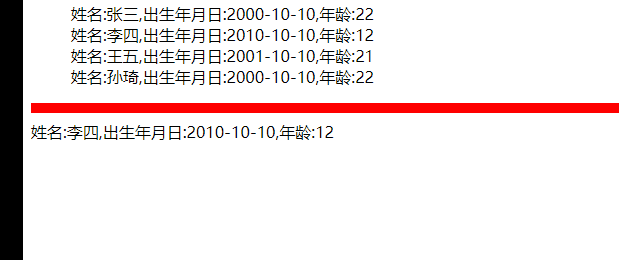
实现效果(实现效果相同):
边栏推荐
- 【p5.js】模拟烟花效果-交互媒体设计作业
- md5 密码加密
- IDL 读取葵花8(Himawari-8)HSD数据
- [2022 10th Teddy Cup Challenge] Title A: complete version of pest identification (general idea. Detailed process and code and results CSV in compressed package)
- 【C语言_复习_学习第二课】什么是进制?进制之间应该如何转换
- POC——DVWA‘s XSS Reflected
- pygame安装-Requirement already satisfied问题
- 学习C语言第二天
- 安装MySQL
- 【LeetCode——编程能力入门第一天】基本数据类型[在区间范围内统计奇数数目/去掉最低工资和最高工资后的工资平均值)
猜你喜欢

SQL statement learning

【2022第十届‘泰迪杯’挑战赛】A题:害虫识别完整版(大致思路。详细过程和代码以及结果csv在压缩包中)

Topicexchange switch is simple to use.

租用服务器,以及部署在pycharm专业版上的pytorch环境训练yolov5模型教程服务器环境安装库文件:

mysql数据库实验实训5,数据查询yggl数据库查询(详细)

Simply and quickly establish a pytorch environment yolov5 target detection model to run (super simple)

异步数据-短信验证码

PyGame aircraft War 1.0 (step + window no response problem)

数据分析与数据挖掘实战案例本地房价预测(716):

一个问题的探讨
随机推荐
【C】张梁计算器
(精讲)Es6 剩余参数,ES6内置对象,模板字符串内容(详例宝典)及灵活运用项目的实战案例
微信小程序状态栏
Fanoutexchange switch is simple to use
Bank link No. cnasp & Query (II)
Sleuth getting started
About the current response, the method getoutputstream() has been called
安装MySQL
[2022 10th Teddy Cup Challenge] Title A: complete version of pest identification (general idea. Detailed process and code and results CSV in compressed package)
学习C语言的第6天
POC——DVWA‘s SQL Injection
IDL调用6S大气校正
CVE-2021-44228 Log4j 复现及原理
Harmonyos third training notes
IDL MODIS 生成查找表
用户登录-以及创建验短信证码
Modelarts second training notes
无重复字符的最长字串
How to upload qiniu cloud
PyGame installation -requirement already satisfied