TextSnake: A Flexible Representation for Detecting Text of Arbitrary Shapes
A PyTorch implement of TextSnake: A Flexible Representation for Detecting Text of Arbitrary Shapes (ECCV 2018) by Megvii
- Paper link: arXiv:1807.01544
- Github: princewang1994/TextSnake.pytorch
- Blog: TextSnake: A Flexible Representation for Detecting Text of Arbitrary Shapes
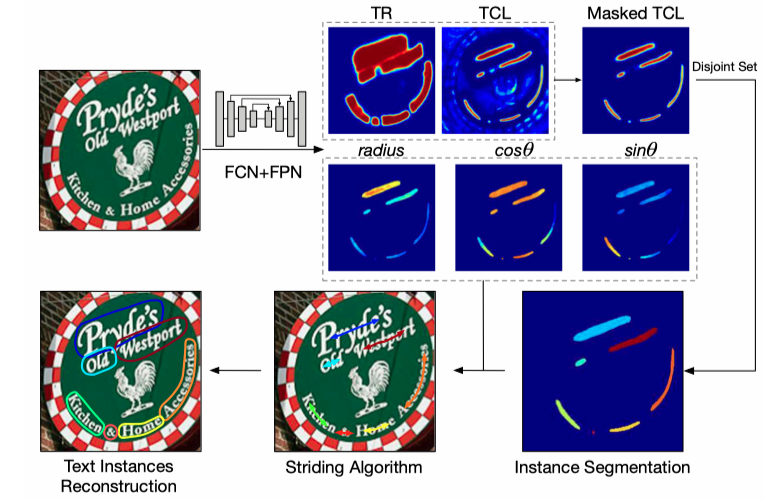
Paper
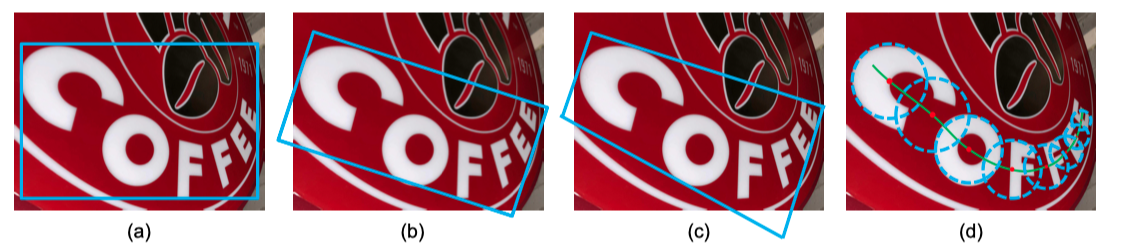
Comparison of different representations for text instances. (a) Axis-aligned rectangle. (b) Rotated rectangle. (c) Quadrangle. (d) TextSnake. Obviously, the proposed TextSnake representation is able to effectively and precisely describe the geometric properties, such as location, scale, and bending of curved text with perspective distortion, while the other representations (axis-aligned rectangle, rotated rectangle or quadrangle) struggle with giving accurate predictions in such cases.
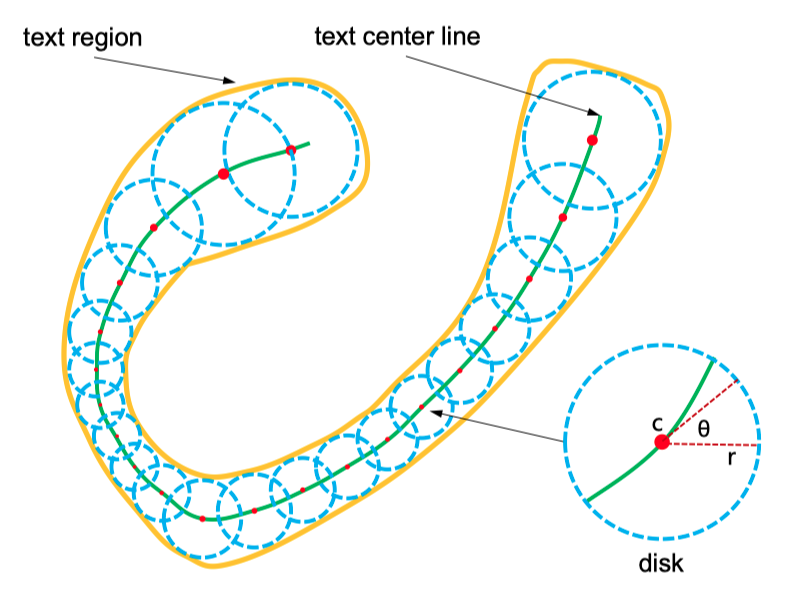
Textsnake elements:
- center point
- tangent line
- text region
Description
Generally, this code has following features:
- include complete training and inference code
- pure python version without extra compiling
- compatible with laste PyTorch version (write with pytroch 0.4.0)
- support TotalText and SynthText dataset
Getting Started
This repo includes the training code and inference demo of TextSnake, training and infercence can be simplely run with a few code.
Prerequisites
To run this repo successfully, it is highly recommanded with:
- Linux (Ubuntu 16.04)
- Python3.6
- Anaconda3
- NVIDIA GPU(with 8G or larger GPU memory for training, 2G for inference)
(I haven't test it on other Python version.)
- clone this repository
git clone https://github.com/princewang1994/TextSnake.pytorch.git
- python package can be installed with
pip
$ cd $TEXTSNAKE_ROOT
$ pip install -r requirements.txt
Data preparation
Total-Text: follow the dataset/total_text/README.mdSynthText: follow the datset/synth-text/README.md
Pretraining with SynthText
$ CUDA_VISIBLE_DEVICES=$GPUID python train.py synthtext_pretrain --dataset synth-text --viz --max_epoch 1 --batch_size 8
Training
Training model with given experiment name $EXPNAME
training from scratch:
$ EXPNAME=example
$ CUDA_VISIBLE_DEVICES=$GPUID python train.py $EXPNAME --viz
training with pretrained model(improved performance much)
$ EXPNAME=example
$ CUDA_VISIBLE_DEVICES=$GPUID python train.py example --viz --batch_size 8 --resume save/synthtext_pretrain/textsnake_vgg_0.pth
options:
exp_name: experiment name, used to identify different training processes--viz: visualization toggle, output pictures are saved to./visby default
other options can be show by run python train.py -h
Running tests
Runing following command can generate demo on TotalText dataset (300 pictures), the result are save to ./vis by default
$ EXPNAME=example
$ CUDA_VISIBLE_DEVICES=$GPUID python eval_textsnake.py $EXPNAME --checkepoch 190
options:
exp_name: experiment name, used to identify different training process
other options can be show by run python train.py -h
Evaluation
Total-Text metric is included in dataset/total_text/Evaluation_Protocol/Python_scripts/Deteval.py, you should first modify the input_dir in Deteval.py and run following command for computing DetEval:
$ python dataset/total_text/Evaluation_Protocol/Python_scripts/Deteval.py $EXPNAME --tr 0.8 --tp 0.4
or
$ python dataset/total_text/Evaluation_Protocol/Python_scripts/Deteval.py $EXPNAME --tr 0.7 --tp 0.6
it will output metrics reports.
Pretrained Models
- SynthText pretrained model: synthtext_fixlr/textsnake_vgg_0.pth (extract code:
xmoh) - Total-Text pretrained model: finetune_larger_tcl/textsnake_vgg_180.pth (extract code:
dms6) - Google Drive: TextSnake_pretrain
Download from links above and place pth file to the corresponding path(save/XXX/textsnake_vgg_XX.pth).
Performance
DetEval reporting
Following table reports DetEval metrics when we set vgg as the backbone(can be reproduced by using pertained model in Pretrained Model section):
| tr=0.7 / tp=0.6(P|R|F1) | tr=0.8 / tp=0.4(P|R|F1) | FPS(On single 1080Ti) | |
|---|---|---|---|
| expand / no merge | 0.652 | 0.549 | 0.596 | 0.874 | 0.711 | 0.784 | 12.07 |
| expand / merge | 0.698 | 0.578 | 0.633 | 0.859 | 0.660 | 0.746 | 8.38 |
| no expand / no merge | 0.753 | 0.693 | 0.722 | 0.695 | 0.628 | 0.660 | 9.94 |
| no expand / merge | 0.747 | 0.677 | 0.710 | 0.691 | 0.602 | 0.643 | 11.05 |
| reported on paper | - | 0.827 | 0.745 | 0.784 |
* expand denotes expanding radius by 0.3 times while post-processing
* merge denotes that merging overlapped instance while post-processing
Pure Inference
You can also run prediction on your own dataset without annotations:
- Download pretrained model and place
.pthfile tosave/pretrained/textsnake_vgg_180.pth - Run pure inference script as following:
$ EXPNAME=pretrained
$ CUDA_VISIBLE_DEVICES=$GPUID python demo.py $EXPNAME --checkepoch 180 --img_root /path/to/image
predicted result will be saved in output/$EXPNAME and visualization in vis/${EXPNAME}_deploy
Qualitative results
- left: prediction/ground true
- middle: text region(TR)
- right: text center line(TCL)


What is comming
- Pretraining with SynthText
- Metric computing
- Pretrained model upload
- Pure inference script
- More dataset suport: [ICDAR15, CTW1500]
- Various backbone experiments
License
This project is licensed under the MIT License - see the LICENSE.md file for details
Acknowledgement
- This project is writen by Prince Wang, part of codes refer to songdejia/EAST
- Thanks techkang for your great help!

 86 Dec 28, 2022
 27 Dec 17, 2022
 2 Nov 16, 2021
 171 Aug 04, 2022
 81 Jan 04, 2023
 30 Nov 05, 2022
 323 Nov 10, 2022
 3.3k Dec 31, 2022
 169 Dec 30, 2022
 170 Dec 27, 2022
 48 Jan 02, 2023
 10 Oct 21, 2022
 487 Nov 11, 2022
 128 Sep 12, 2022
 3.2k Dec 31, 2022
 13 Mar 31, 2022
 27 Jun 20, 2022
 167 Nov 20, 2022
 120 Dec 28, 2022
 231 Dec 27, 2022