
CycleGAN and pix2pix in PyTorch
New: Please check out contrastive-unpaired-translation (CUT), our new unpaired image-to-image translation model that enables fast and memory-efficient training.
We provide PyTorch implementations for both unpaired and paired image-to-image translation.
The code was written by Jun-Yan Zhu and Taesung Park, and supported by Tongzhou Wang.
This PyTorch implementation produces results comparable to or better than our original Torch software. If you would like to reproduce the same results as in the papers, check out the original CycleGAN Torch and pix2pix Torch code in Lua/Torch.
Note: The current software works well with PyTorch 1.4. Check out the older branch that supports PyTorch 0.1-0.3.
You may find useful information in training/test tips and frequently asked questions. To implement custom models and datasets, check out our templates. To help users better understand and adapt our codebase, we provide an overview of the code structure of this repository.
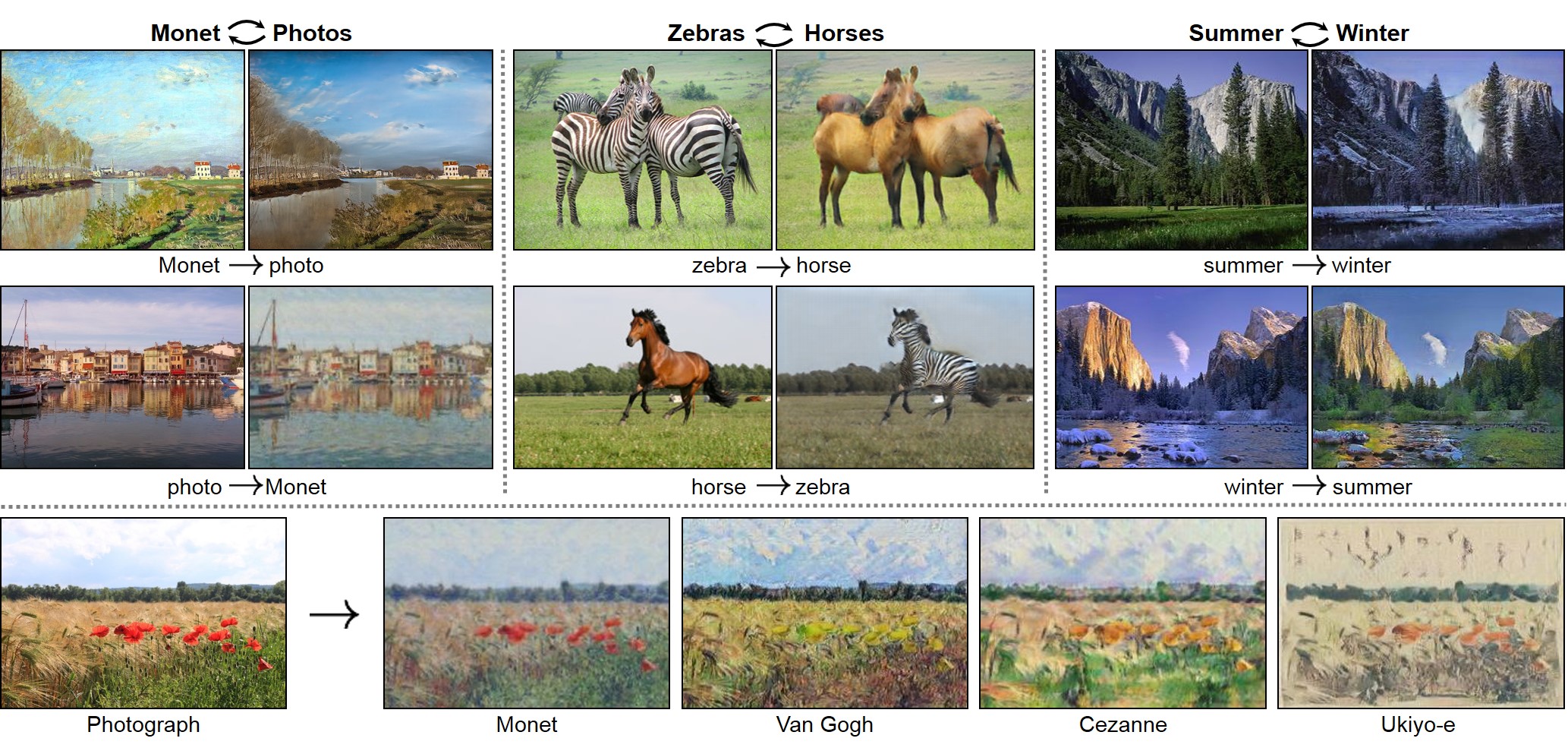
CycleGAN: Project | Paper | Torch | Tensorflow Core Tutorial | PyTorch Colab
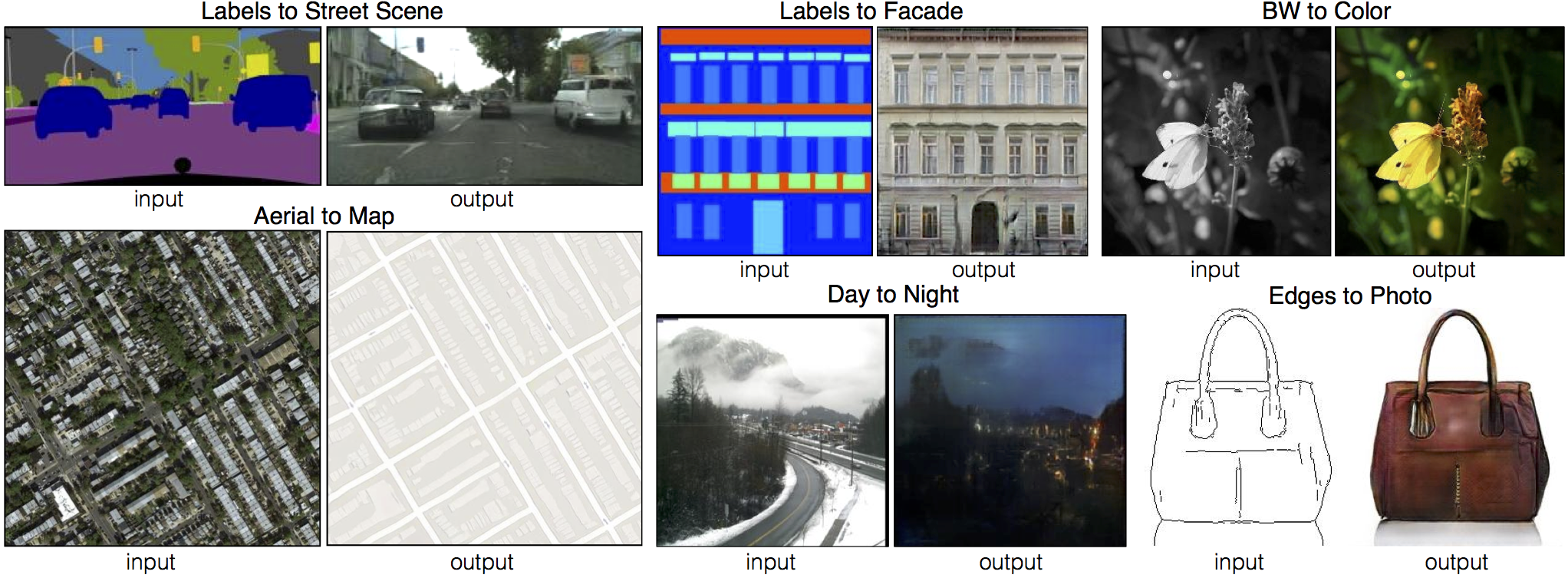
Pix2pix: Project | Paper | Torch | Tensorflow Core Tutorial | PyTorch Colab
EdgesCats Demo | pix2pix-tensorflow | by Christopher Hesse

If you use this code for your research, please cite:
Unpaired Image-to-Image Translation using Cycle-Consistent Adversarial Networks.
Jun-Yan Zhu*, Taesung Park*, Phillip Isola, Alexei A. Efros. In ICCV 2017. (* equal contributions) [Bibtex]
Image-to-Image Translation with Conditional Adversarial Networks.
Phillip Isola, Jun-Yan Zhu, Tinghui Zhou, Alexei A. Efros. In CVPR 2017. [Bibtex]
Talks and Course
pix2pix slides: keynote | pdf, CycleGAN slides: pptx | pdf
CycleGAN course assignment code and handout designed by Prof. Roger Grosse for CSC321 "Intro to Neural Networks and Machine Learning" at University of Toronto. Please contact the instructor if you would like to adopt it in your course.
Colab Notebook
TensorFlow Core CycleGAN Tutorial: Google Colab | Code
TensorFlow Core pix2pix Tutorial: Google Colab | Code
PyTorch Colab notebook: CycleGAN and pix2pix
ZeroCostDL4Mic Colab notebook: CycleGAN and pix2pix
Other implementations
CycleGAN
[Tensorflow] (by Harry Yang), [Tensorflow] (by Archit Rathore), [Tensorflow] (by Van Huy), [Tensorflow] (by Xiaowei Hu), [Tensorflow2] (by Zhenliang He), [TensorLayer1.0] (by luoxier), [TensorLayer2.0] (by zsdonghao), [Chainer] (by Yanghua Jin), [Minimal PyTorch] (by yunjey), [Mxnet] (by Ldpe2G), [lasagne/Keras] (by tjwei), [Keras] (by Simon Karlsson), [OneFlow] (by Ldpe2G)
pix2pix
[Tensorflow] (by Christopher Hesse), [Tensorflow] (by Eyyüb Sariu), [Tensorflow (face2face)] (by Dat Tran), [Tensorflow (film)] (by Arthur Juliani), [Tensorflow (zi2zi)] (by Yuchen Tian), [Chainer] (by mattya), [tf/torch/keras/lasagne] (by tjwei), [Pytorch] (by taey16)
Prerequisites
- Linux or macOS
- Python 3
- CPU or NVIDIA GPU + CUDA CuDNN
Getting Started
Installation
- Clone this repo:
git clone https://github.com/junyanz/pytorch-CycleGAN-and-pix2pix
cd pytorch-CycleGAN-and-pix2pix
- Install PyTorch and 0.4+ and other dependencies (e.g., torchvision, visdom and dominate).
- For pip users, please type the command
pip install -r requirements.txt. - For Conda users, you can create a new Conda environment using
conda env create -f environment.yml. - For Docker users, we provide the pre-built Docker image and Dockerfile. Please refer to our Docker page.
- For Repl users, please click
.
- For pip users, please type the command
CycleGAN train/test
- Download a CycleGAN dataset (e.g. maps):
bash ./datasets/download_cyclegan_dataset.sh maps
- To view training results and loss plots, run
python -m visdom.serverand click the URL http://localhost:8097. - Train a model:
#!./scripts/train_cyclegan.sh
python train.py --dataroot ./datasets/maps --name maps_cyclegan --model cycle_gan
To see more intermediate results, check out ./checkpoints/maps_cyclegan/web/index.html.
- Test the model:
#!./scripts/test_cyclegan.sh
python test.py --dataroot ./datasets/maps --name maps_cyclegan --model cycle_gan
- The test results will be saved to a html file here:
./results/maps_cyclegan/latest_test/index.html.
pix2pix train/test
- Download a pix2pix dataset (e.g.facades):
bash ./datasets/download_pix2pix_dataset.sh facades
- To view training results and loss plots, run
python -m visdom.serverand click the URL http://localhost:8097. - Train a model:
#!./scripts/train_pix2pix.sh
python train.py --dataroot ./datasets/facades --name facades_pix2pix --model pix2pix --direction BtoA
To see more intermediate results, check out ./checkpoints/facades_pix2pix/web/index.html.
- Test the model (
bash ./scripts/test_pix2pix.sh):
#!./scripts/test_pix2pix.sh
python test.py --dataroot ./datasets/facades --name facades_pix2pix --model pix2pix --direction BtoA
- The test results will be saved to a html file here:
./results/facades_pix2pix/test_latest/index.html. You can find more scripts atscriptsdirectory. - To train and test pix2pix-based colorization models, please add
--model colorizationand--dataset_mode colorization. See our training tips for more details.
Apply a pre-trained model (CycleGAN)
- You can download a pretrained model (e.g. horse2zebra) with the following script:
bash ./scripts/download_cyclegan_model.sh horse2zebra
- The pretrained model is saved at
./checkpoints/{name}_pretrained/latest_net_G.pth. Check here for all the available CycleGAN models. - To test the model, you also need to download the horse2zebra dataset:
bash ./datasets/download_cyclegan_dataset.sh horse2zebra
- Then generate the results using
python test.py --dataroot datasets/horse2zebra/testA --name horse2zebra_pretrained --model test --no_dropout
-
The option
--model testis used for generating results of CycleGAN only for one side. This option will automatically set--dataset_mode single, which only loads the images from one set. On the contrary, using--model cycle_ganrequires loading and generating results in both directions, which is sometimes unnecessary. The results will be saved at./results/. Use--results_dir {directory_path_to_save_result}to specify the results directory. -
For pix2pix and your own models, you need to explicitly specify
--netG,--norm,--no_dropoutto match the generator architecture of the trained model. See this FAQ for more details.
Apply a pre-trained model (pix2pix)
Download a pre-trained model with ./scripts/download_pix2pix_model.sh.
- Check here for all the available pix2pix models. For example, if you would like to download label2photo model on the Facades dataset,
bash ./scripts/download_pix2pix_model.sh facades_label2photo
- Download the pix2pix facades datasets:
bash ./datasets/download_pix2pix_dataset.sh facades
- Then generate the results using
python test.py --dataroot ./datasets/facades/ --direction BtoA --model pix2pix --name facades_label2photo_pretrained
-
Note that we specified
--direction BtoAas Facades dataset's A to B direction is photos to labels. -
If you would like to apply a pre-trained model to a collection of input images (rather than image pairs), please use
--model testoption. See./scripts/test_single.shfor how to apply a model to Facade label maps (stored in the directoryfacades/testB). -
See a list of currently available models at
./scripts/download_pix2pix_model.sh
Docker
We provide the pre-built Docker image and Dockerfile that can run this code repo. See docker.
Datasets
Download pix2pix/CycleGAN datasets and create your own datasets.
Training/Test Tips
Best practice for training and testing your models.
Frequently Asked Questions
Before you post a new question, please first look at the above Q & A and existing GitHub issues.
Custom Model and Dataset
If you plan to implement custom models and dataset for your new applications, we provide a dataset template and a model template as a starting point.
Code structure
To help users better understand and use our code, we briefly overview the functionality and implementation of each package and each module.
Pull Request
You are always welcome to contribute to this repository by sending a pull request. Please run flake8 --ignore E501 . and python ./scripts/test_before_push.py before you commit the code. Please also update the code structure overview accordingly if you add or remove files.
Citation
If you use this code for your research, please cite our papers.
@inproceedings{CycleGAN2017,
  title={Unpaired Image-to-Image Translation using Cycle-Consistent Adversarial Networks},
  author={Zhu, Jun-Yan and Park, Taesung and Isola, Phillip and Efros, Alexei A},
  booktitle={Computer Vision (ICCV), 2017 IEEE International Conference on},
  year={2017}
}


@inproceedings{isola2017image,
  title={Image-to-Image Translation with Conditional Adversarial Networks},
  author={Isola, Phillip and Zhu, Jun-Yan and Zhou, Tinghui and Efros, Alexei A},
  booktitle={Computer Vision and Pattern Recognition (CVPR), 2017 IEEE Conference on},
  year={2017}
}
Other Languages
Related Projects
contrastive-unpaired-translation (CUT)
CycleGAN-Torch | pix2pix-Torch | pix2pixHD| BicycleGAN | vid2vid | SPADE/GauGAN
iGAN | GAN Dissection | GAN Paint
Cat Paper Collection
If you love cats, and love reading cool graphics, vision, and learning papers, please check out the Cat Paper Collection.
Acknowledgments
Our code is inspired by pytorch-DCGAN.

 77 Dec 16, 2022
 18 Nov 01, 2022
 19 Sep 08, 2022
 1.4k Dec 29, 2022
 3 Dec 01, 2022
 3 Jan 01, 2022
 5 Sep 26, 2022
 28 Dec 11, 2022
 253 Jan 01, 2023
 203 Dec 29, 2022
 14 Oct 26, 2022
 1 Feb 15, 2022
 11.3k Dec 30, 2022
 8 Dec 30, 2022
 35 Jan 08, 2023
 675 Dec 25, 2022
 10 Jan 02, 2023
 31 Nov 22, 2022
 21 Oct 27, 2022
 1 Feb 14, 2022