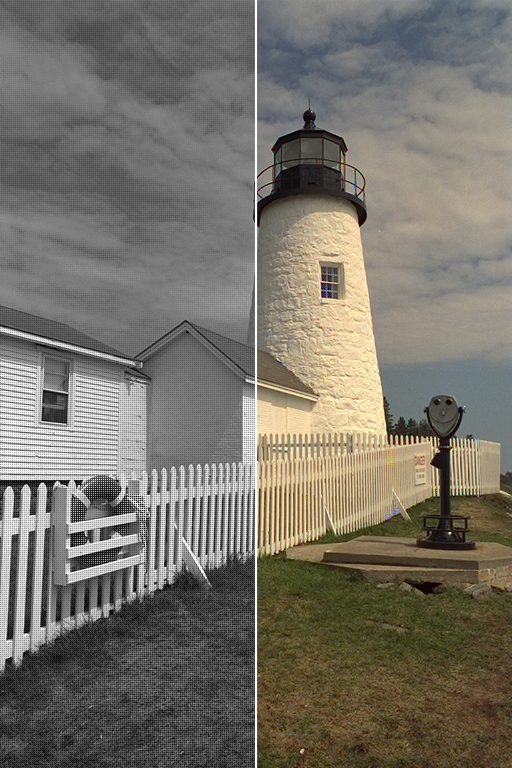
A Python package implementing various CFA (Colour Filter Array) demosaicing algorithms and related utilities.

Overview

Colour - Demosaicing


Develop Build Status Coverage Status Code Grade Package Version

A Python package implementing various CFA (Colour Filter Array) demosaicing algorithms and related utilities.

It is open source and freely available under the New BSD License terms.

https://raw.githubusercontent.com/colour-science/colour-demosaicing/master/docs/_static/Demosaicing_001.png

1   Features

The following CFA (Colour Filter Array) demosaicing algorithms are implemented:

  • Bilinear
  • Malvar (2004)
  • DDFAPD - Menon (2007)

2   Installation

Because of their size, the resources dependencies needed to run the various examples and unit tests are not provided within the Pypi package. They are separately available as Git Submodules when cloning the repository.

2.1   Primary Dependencies

Colour - Demosaicing requires various dependencies in order to run:

2.2   Pypi

Once the dependencies are satisfied, Colour - Demosaicing can be installed from the Python Package Index by issuing this command in a shell:

pip install --user colour-demosaicing

The overall development dependencies are installed as follows:

pip install --user 'colour-demosaicing[development]'

3   Usage

3.1   API

The main reference for Colour - Demosaicing is the Colour - Demosaicing Manual.

3.2   Examples

Various usage examples are available from the examples directory.

4   Contributing

If you would like to contribute to Colour - Demosaicing, please refer to the following Contributing guide for Colour.

5   Bibliography

The bibliography is available in the repository in BibTeX format.

6   Code of Conduct

The Code of Conduct, adapted from the Contributor Covenant 1.4, is available on the Code of Conduct page.

7   Contact & Social

The Colour Developers can be reached via different means:

8   About

Colour - Demosaicing by Colour Developers
Copyright © 2015-2021 – Colour Developers – [email protected]
This software is released under terms of New BSD License: https://opensource.org/licenses/BSD-3-Clause
Comments
  • PR: Add garbage collection to reduce memory consumption.

    PR: Add garbage collection to reduce memory consumption.

    Summary

    Added explicit deletion of temporary variables to reduce the memory consumption of the demosaicing methods.

    Description

    In particular for the demosaicing method by Menon, I have noticed a huge memory consumption. In one particular case I was not able to demosaic a large image (around 7000 x 5000) with 14 GB of available memory. By introducing the explicit deletion, I was able to tone it down to 5 GB in that particular case. I've added the garbage collection to the other demosaicing methods as well, even though the gain in memory usage is not as big.

    opened by MaxSchambach 20
  • [BUG]: Exit without throwing an exception

    [BUG]: Exit without throwing an exception

    Description

    Hey folks,

    I am a frequent user of your library and made it even part of my own project PlenoptiCam, where I recently encountered a problem, which I believe is due to the colour-demosaicing software library. Raw images passed to PlenoptiCam are relativey large in terms of their spatial resolution, thus requiring a large amount of memory. I observed that occasionally my software quit at some point without throwing an error or exception. When debugging, I noticed that this behaviour occurs at a point of my pipeline where the rather costly demosaicing_CFA_Bayer_Menon2007 function is called. I attempted to reproduce the problem with a synthetic image having a very large image resolution and observed the same problem: program abort without any message. Below you can find a short code example causing this issue on my machine.

    While it is obvious why this error occurs, I would like to have a little control about the case when it happens. Would it be possible to throw an exception just before the function call crashes? This would allow users to keep programs running and let them know about the cause of the problem.

    Code for Reproduction

    import numpy as np
    from colour_demosaicing import demosaicing_CFA_Bayer_Menon2007
    
    mockup_image = np.ones([int(1e4), int(1e4)])
    res = demosaicing_CFA_Bayer_Menon2007(CFA=mockup_image, pattern="RGGB", refining_step=True)
    

    Exception Message

    An Exception would be desired, but unfortunately there is no.
    

    Environment Information

    ===============================================================================
    *                                                                             *
    *   Interpreter :                                                             *
    *       python : 3.8.10 (default, Mar 15 2022, 12:22:08)                      *
    *                [GCC 9.4.0]                                                  *
    *                                                                             *
    *   colour-science.org :                                                      *
    *       colour : 0.4.1                                                        *
    *       colour-demosaicing : 0.2.1                                            *
    *                                                                             *
    *   Runtime :                                                                 *
    *       imageio : 2.16.1                                                      *
    *       matplotlib : 3.5.1                                                    *
    *       networkx : 2.7.1                                                      *
    *       numpy : 1.22.3                                                        *
    *       scipy : 1.8.0                                                         *
    *                                                                             *
    ===============================================================================
    
    Defect 
    opened by hahnec 13
  • Is

    Is "colour-demosaicing" available in Anaconda?

    I would like to use colour_demosaicing in my python script as follows: from colour_demosaicing import demosaicing_CFA_Bayer_bilinear as demosaic I installed colour-science with conda install -c conda-forge colour-science but I get the following error:

    Traceback (most recent call last):
      File "robotcar.py", line 12, in <module>
        from colour_demosaicing import demosaicing_CFA_Bayer_bilinear as demosaic
    ImportError: No module named colour_demosaicing
    

    Is there any other package library I should install in conda env to import colour_demosaicing ?

    opened by mrgransky 11
  • Error when using colour import on Win10 Python 3.7.9

    Error when using colour import on Win10 Python 3.7.9

    Hi, Trying to use your library for demosaic RAW16 -> RGB images and for some reason getting 'The specified module could not be found', despite the fact that installed all prerequisites listed and VC code can see colour package as locally installed, any help will be appreciated.

    image

    image

    API Discussion 
    opened by gennadyg 6
  • Visible clipping artifacts in highlights with Malvar (2004) and Menon (2007).

    Visible clipping artifacts in highlights with Malvar (2004) and Menon (2007).

    My apologies ahead of time for not posting images as I am uncertain whether I have the appropriate rights.

    I just tried demosaicing_CFA_Bayer_Malvar2004() and demosaicing_CFA_Bayer_Menon2007() on the standard MATLAB test image "mandi.tif" (see https://www.mathworks.com/help/images/ref/demosaic.html).

    With the Malvar method, I see distinctive speckles of pure red and blue in the output near highlights. Besides that, the results are basically identical to that of MATLAB.

    With the Menon method, there are pure red, green, and blue everywhere.

    I suspect these are some bugs in the way overflow and underflow are handled.

    API Discussion 
    opened by jiawen 6
  • Why is brightness changing when using the Malvar algorithm?

    Why is brightness changing when using the Malvar algorithm?

    Hi, When using the Malvar algorithm I get an output image which is much brighter than the original input image. This change is different for different images. What is the reason this happens?

    API Discussion 
    opened by song4me 4
  • How to make demosaicing function return RGB values in [0,1] range?

    How to make demosaicing function return RGB values in [0,1] range?

    Hi, @KelSolaar , thanks a lot for the lib.
    I noticed that the demosaicing function does not return the output in [0,1] range, how can I make it in [0,1] range?

    def demosaicing_CFA_Bayer_bilinear(CFA, pattern='RGGB'):
    Notes
        -----
        -   The definition output is not clipped in range [0, 1] : this allows for
            direct HDRI / radiance image generation on *Bayer* CFA data and post
            demosaicing of the high dynamic range data as showcased in this
            `Jupyter Notebook <https://github.com/colour-science/colour-hdri/\
    blob/develop/colour_hdri/examples/\
    examples_merge_from_raw_files_with_post_demosaicing.ipynb>`__.
    
    API Discussion 
    opened by Jiazheng411 3
  • PR: Support for pixels with a value of zero.

    PR: Support for pixels with a value of zero.

    The existing convolutions caused pixels with a value of zero to underflow. Problem is solved by performing floating point convolutions, and clipping negative pixel values to zero. nb. scipy.signal dependency is added

    opened by MadsDyrmann 3
  • Demosaicing does not return clipped values

    Demosaicing does not return clipped values

    Demosaicing a normalized bayer image with float values between 0 and 1 using the demosaicing_CFA_Bayer_Malvar2004 method does not return a clipped image. This should either be mentioned in the documentation or demosaicing methods should finish with an appropriate clipping step since without noticing this behaviour the resulting PSNRs are significantly worse.

    API Discussion 
    opened by timmeinhardt 3
  • Investigate potential overflows in the complex demosaicing definitions.

    Investigate potential overflows in the complex demosaicing definitions.

    I am using this with a point grey camera, and I get some weird artifacts while using the demosaicing_CFA_Bayer_DDFAPD, demosaicing_CFA_Bayer_Malvar2004, and demosaicing_CFA_Bayer_Menon2007 methods. The method demosaicing_CFA_Bayer_bilinear doesn't seem to have that problem.

    They look like these blue dots. I am thinking that the colors are overflowing the byte. screen shot 2016-10-05 at 12 57 01 pm

    Task 
    opened by m0ose 3
  • Bump bleach from 3.2.1 to 3.3.0

    Bump bleach from 3.2.1 to 3.3.0

    Bumps bleach from 3.2.1 to 3.3.0.

    Changelog

    Sourced from bleach's changelog.

    Version 3.3.0 (February 1st, 2021)

    Backwards incompatible changes

    • clean escapes HTML comments even when strip_comments=False

    Security fixes

    • Fix bug 1621692 / GHSA-m6xf-fq7q-8743. See the advisory for details.

    Features

    None

    Bug fixes

    None

    Version 3.2.3 (January 26th, 2021)

    Security fixes

    None

    Features

    None

    Bug fixes

    • fix clean and linkify raising ValueErrors for certain inputs. Thank you @Google-Autofuzz.

    Version 3.2.2 (January 20th, 2021)

    Security fixes

    None

    Features

    • Migrate CI to Github Actions. Thank you @hugovk.

    Bug fixes

    • fix linkify raising an IndexError on certain inputs. Thank you @Google-Autofuzz.
    Commits
    • 79b7a3c Merge pull request from GHSA-vv2x-vrpj-qqpq
    • 842fcb4 Update for v3.3.0 release
    • 1334134 sanitizer: escape HTML comments
    • c045a8b Merge pull request #581 from mozilla/nit-fixes
    • 491abb0 fix typo s/vnedoring/vendoring/
    • 10b1c5d vendor: add html5lib-1.1.dist-info/REQUESTED
    • cd838c3 Merge pull request #579 from mozilla/validate-convert-entity-code-points
    • 612b808 Update for v3.2.3 release
    • 6879f6a html5lib_shim: validate unicode points for convert_entity
    • 90cb80b Update for v3.2.2 release
    • Additional commits viewable in compare view

    Dependabot compatibility score

    Dependabot will resolve any conflicts with this PR as long as you don't alter it yourself. You can also trigger a rebase manually by commenting @dependabot rebase.


    Dependabot commands and options

    You can trigger Dependabot actions by commenting on this PR:

    • @dependabot rebase will rebase this PR
    • @dependabot recreate will recreate this PR, overwriting any edits that have been made to it
    • @dependabot merge will merge this PR after your CI passes on it
    • @dependabot squash and merge will squash and merge this PR after your CI passes on it
    • @dependabot cancel merge will cancel a previously requested merge and block automerging
    • @dependabot reopen will reopen this PR if it is closed
    • @dependabot close will close this PR and stop Dependabot recreating it. You can achieve the same result by closing it manually
    • @dependabot ignore this major version will close this PR and stop Dependabot creating any more for this major version (unless you reopen the PR or upgrade to it yourself)
    • @dependabot ignore this minor version will close this PR and stop Dependabot creating any more for this minor version (unless you reopen the PR or upgrade to it yourself)
    • @dependabot ignore this dependency will close this PR and stop Dependabot creating any more for this dependency (unless you reopen the PR or upgrade to it yourself)
    • @dependabot use these labels will set the current labels as the default for future PRs for this repo and language
    • @dependabot use these reviewers will set the current reviewers as the default for future PRs for this repo and language
    • @dependabot use these assignees will set the current assignees as the default for future PRs for this repo and language
    • @dependabot use this milestone will set the current milestone as the default for future PRs for this repo and language

    You can disable automated security fix PRs for this repo from the Security Alerts page.

    Dependencies 
    opened by dependabot[bot] 2
  • Default convolution mode introduces edge effects

    Default convolution mode introduces edge effects

    The default image extension mode used in scipy.ndimage.convolve is 'reflect', which reflects the image about the edge of the pixels. This introduces artefacts in the edge of the resulting RGB layers when demosaicing:

    # Constant ones as image
    orig = np.ones((2,2)) 
    R, G, B = demosaicing_CFA_Bayer_bilinear(orig)
    
    # R, G and B should also be constant 1 (at least in the measured pixels), but instead
    # R: [[2.25, 0.75], G: [[0.5, 1.5], B: [[0.25, 0.75],
    #     [0.75, 0.25]]     [1.5, 0.5]]     [0.75, 2.25]]
    

    Passing mode='mirror' - which reflects about pixel centers (doesn't repeat the edge values) - to convolve in demosaicing_CFA_Bayer_bilinear returns the expected values. I figure this should be the default for demosaicing?

    opened by maaleske 3
Releases(v0.2.3)
Owner
colour-science
Colour Science & Digital Imaging
colour-science
An example which streams RGB-D images over spout.

Spout RGB-D Example An example which streams RGB-D images over spout with visiongraph. Due to the spout dependency this currently only works on Window

Florian Bruggisser 4 Nov 14, 2022
QR code python application which can read(decode) and generate(encode) QR codes.

QR Code Application This is a basic QR Code application. Using this application you can generate QR code for you text/links. Using this application yo

Atharva Parkhe 1 Aug 09, 2022
An add to make adding screenshots and copied images to the scene easy

Blender Clipboard to Scene It doesn't work with version 2.93 and higher (I tested it on 2.91 and 2.83) There is an issue with importing the Pillow mod

Mohammad Mehdi Afkhami 3 Dec 29, 2021
Transfers a image file(.png) to an Excel file(.xlsx)

Transfers a image file(.png) to an Excel file(.xlsx)

Junu Kwon 7 Feb 11, 2022
A Python Script to convert Normal PNG Image to Apple iDOT PNG Image.

idot-png-encoder A Python Script to convert Normal PNG Image to Apple iDOT PNG Image (Multi-threaded Decoding PNG). Usage idotpngencoder.py -i inputf

Lrdcq 2 Feb 17, 2022
MyPaint is a simple drawing and painting program that works well with Wacom-style graphics tablets.

MyPaint A fast and dead-simple painting app for artists Features Infinite canvas Extremely configurable brushes Distraction-free fullscreen mode Exten

MyPaint 2.3k Jan 01, 2023
Python modules to work with large multiresolution images.

Large Image Python modules to work with large, multiresolution images. Large Image is developed and maintained by the Data & Analytics group at Kitwar

Girder 136 Jan 02, 2023
starfish is a Python library for processing images of image-based spatial transcriptomics.

starfish: scalable pipelines for image-based transcriptomics starfish is a Python library for processing images of image-based spatial transcriptomics

199 Dec 08, 2022
PIX is an image processing library in JAX, for JAX.

PIX PIX is an image processing library in JAX, for JAX. Overview JAX is a library resulting from the union of Autograd and XLA for high-performance ma

DeepMind 294 Jan 08, 2023
Pixel art as well as various sets for hand crafting

Pixel art as well as various sets for hand crafting

1 Nov 09, 2021
A SIXEL encoder/decoder implementation derived from kmiya's sixel

libsixel What is this? This package provides encoder/decoder implementation for DEC SIXEL graphics, and some converter programs. (https://youtu.be/0Sa

Hayaki Saito 2k Jan 09, 2023
Detecting haze image with hazer.

hazer-py Detecting haze image with hazer. What is hazer Hazer is a lib for getting "haze degree". This repository is python version of hazer: https://

Joey777210 2 Dec 27, 2021
Convert bitmap images to seeds for Tiny-83 NFT project.

What is this? This tool allows you to convert any 14p high and 22p wide Bitmap (.bmp) to the seed needed for the Tiny-83 NFT project. Project Twitter:

shib_maximalist 1 Oct 31, 2021
Seaborn-image is a Python image visualization library based on matplotlib and provides a high-level API to draw attractive and informative images quickly and effectively.

seaborn-image: image data visualization Description Seaborn-image is a Python image visualization library based on matplotlib and provides a high-leve

48 Jan 05, 2023
Imutils - A series of convenience functions to make basic image processing operations such as translation, rotation, resizing, skeletonization, and displaying Matplotlib images easier with OpenCV and Python.

imutils A series of convenience functions to make basic image processing functions such as translation, rotation, resizing, skeletonization, and displ

PyImageSearch 4.3k Jan 01, 2023
🛹 Turn an SVG into an STL for stencil creation purposes

svg2stl This repository provides a script which takes as input an SVG such as this one: It outputs an STL file like this one: You can also see an inte

Max Halford 3 Dec 29, 2021
Generate meme GIFs in which an image you choose can be viewed by the user only after they wait a whole hour.

Generate meme GIFs in which an image you choose can be viewed by the user only after they wait a whole hour.

Feliks Maak 1 Jan 31, 2022
Scramb.py is a region based JPEG Image Scrambler and Descrambler written in Python

Scramb.py Scramb.py is a region based JPEG Image Scrambler and Descrambler written in Python. Main features Scramb.py can scramble images regions. So

47 Dec 25, 2022
Art directed cropping, useful for responsive images

Art direction sets a focal point and can be used when you need multiple copies of the same Image but also in in different proportions.

Daniel 1 Aug 16, 2022
Generate your own QR Code and scan it to see the results! Never use it for malicious purposes.

QR-Code-Generator-Python Choose the name of your generated QR .png file. If it happens to open the .py file (the application), there are specific comm

1 Dec 23, 2021