当前位置:网站首页>FTXUI基础笔记(botton按钮组件基础)
FTXUI基础笔记(botton按钮组件基础)
2022-07-17 03:18:00 【zhangrelay】

先看原版示例程序吧:
#include <memory>  // for shared_ptr, __shared_ptr_access
#include <string>  // for operator+, to_string

#include "ftxui/component/captured_mouse.hpp"  // for ftxui
#include "ftxui/component/component.hpp"  // for Button, Horizontal, Renderer
#include "ftxui/component/component_base.hpp"      // for ComponentBase
#include "ftxui/component/screen_interactive.hpp"  // for ScreenInteractive
#include "ftxui/dom/elements.hpp"  // for separator, gauge, text, Element, operator|, vbox, border

using namespace ftxui;

int main(int argc, const char* argv[]) {
  int value = 50;

  // The tree of components. This defines how to navigate using the keyboard.
  auto buttons = Container::Horizontal({
      Button("计数加1", [&] { value--; }),
      Button("计数减1", [&] { value++; }),
  });

  // Modify the way to render them on screen:
  auto component = Renderer(buttons, [&] {
    return vbox({
               text(" 数值 = " + std::to_string(value)),
               separator(),
               gauge(value * 0.01f),
               separator(),
               buttons->Render(),
           }) |
           border;
  });

  auto screen = ScreenInteractive::FitComponent();
  screen.Loop(component);
  return 0;
}

// Copyright 2020 Arthur Sonzogni. All rights reserved.
// Use of this source code is governed by the MIT license that can be found in
// the LICENSE file.
默认数值为50。点击按键实现加减1功能。

简要解释一下:
头文件部分
#include <memory> // for shared_ptr, __shared_ptr_access
#include <string> // for operator+, to_string#include "ftxui/component/captured_mouse.hpp" // for ftxui
#include "ftxui/component/component.hpp" // for Button, Horizontal, Renderer
#include "ftxui/component/component_base.hpp" // for ComponentBase
#include "ftxui/component/screen_interactive.hpp" // for ScreenInteractive
#include "ftxui/dom/elements.hpp" // for separator, gauge, text, Element, operator|, vbox, border
按钮属性,包括点击后功能
// The tree of components. This defines how to navigate using the keyboard.
auto buttons = Container::Horizontal({
Button("计数加1", [&] { value--; }),
Button("计数减1", [&] { value++; }),
});
整体在终端的显示:
// Modify the way to render them on screen:
auto component = Renderer(buttons, [&] {
return vbox({
text(" 数值 = " + std::to_string(value)),
separator(),
gauge(value * 0.01f),
separator(),
buttons->Render(),
}) |
border;
});
程序bug,加减写反了:

自行修订即可。
这个功能太简陋了,原版复杂一些的示例如下:
#include <memory>  // for shared_ptr, __shared_ptr_access
#include <string>  // for operator+, to_string

#include "ftxui/component/captured_mouse.hpp"  // for ftxui
#include "ftxui/component/component.hpp"  // for Button, Horizontal, Renderer
#include "ftxui/component/component_base.hpp"      // for ComponentBase
#include "ftxui/component/component_options.hpp"   // for ButtonOption
#include "ftxui/component/screen_interactive.hpp"  // for ScreenInteractive
#include "ftxui/dom/elements.hpp"  // for gauge, separator, text, vbox, operator|, Element, border
#include "ftxui/screen/color.hpp"  // for Color, Color::Blue, Color::Green, Color::Red

using namespace ftxui;

int main(int argc, const char* argv[]) {
  int value = 50;

  // The tree of components. This defines how to navigate using the keyboard.
  auto buttons = Container::Horizontal({
      Button(
          "计数减一", [&] { value--; }, ButtonOption::Animated(Color::Red)),
      Button(
          "复位(默认50)", [&] { value = 50; }, ButtonOption::Animated(Color::Green)),
      Button(
          "计数加一", [&] { value++; }, ButtonOption::Animated(Color::Blue)),
  });

  // Modify the way to render them on screen:
  auto component = Renderer(buttons, [&] {
    return vbox({
        vbox({
            text(" 数值 = " + std::to_string(value)),
            separator(),
            gauge(value * 0.01f),
        }) | border,
        buttons->Render(),
    });
  });

  auto screen = ScreenInteractive::FitComponent();
  screen.Loop(component);
  return 0;
}

// Copyright 2020 Arthur Sonzogni. All rights reserved.
// Use of this source code is governed by the MIT license that can be found in
// the LICENSE file.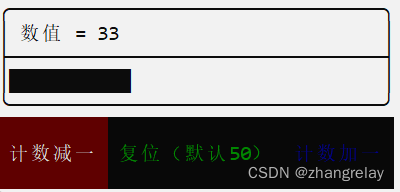
减

复位

加
看起来效果好一些。
改变之处:
// The tree of components. This defines how to navigate using the keyboard.
auto buttons = Container::Horizontal({
Button(
"计数减一", [&] { value--; }, ButtonOption::Animated(Color::Red)),
Button(
"复位(默认50)", [&] { value = 50; }, ButtonOption::Animated(Color::Green)),
Button(
"计数加一", [&] { value++; }, ButtonOption::Animated(Color::Blue)),
});
-End-
边栏推荐
- 2022 Yangtze River Delta mathematical modeling: Gearbox Fault Diagnosis
- What happens when MySQL tables change from compressed tables to ordinary tables?
- Raspberry pie configuration
- automake中文手册_incomplete
- Burpsuite2022.1 detailed installation steps include certificate installation
- windows10:vscode下go语言的适配
- 剑指 Offer 59 - II. 队列的最大值
- [try to hack] NTLM authentication process
- Animation animation clip frame skipping, animation queue
- Use case of TS - Snake Eater
猜你喜欢
HCIP第七天笔记

【RuoYi-Vue-Plus】学习笔记 30 - Redisson(六) 有界阻塞队列 Bounded Blocking Queue(Redisson 源码 + Lua 脚本)

【论文笔记】VOLO: Vision Outlooker for Visual Recognition

A Tutorial on Learned Multi-dimensional Indexes

Assembly line technology

Go environment installation

厲害,竟然把VSCode玩成了IDEA的效果,有點哇塞

Chapter 4 user data analysis
How to do clear scanning: try scanning tailor scantailor advanced | including the usage of scantailor

Application of MATLAB in linear algebra
随机推荐
大文件上传
Leetcode 931: minimum sum of descent path
Animation 动画片段跳帧、动画队列
【LeetCode】558. Intersection of quadtree
[C language] 0 basic tutorial - file operation (to be continued)
正畸学分支和工具
如何使用谷歌地球客户端及kml下载
Sword finger offer 60 Points of N dice
Redis数据迁移方法三
Hcip day 5 notes
【论文笔记】VOLO: Vision Outlooker for Visual Recognition
Explanation of Hoff transformation
DataX DorisWriter 插件文档
Penetration test-02 vulnerability scanning
IDEA配置SFTP,SSH非常方便的部署以及定位错误日志
Codeforces Round #807 (Div. 2) A~D
Redis数据迁移:方法二AOF
HCIP实验4
关于数据库的问题,唯一和非重复的概念
流水线技术