当前位置:网站首页>HCIP实验4
HCIP实验4
2022-07-17 02:28:00 【懒大王吃狼】
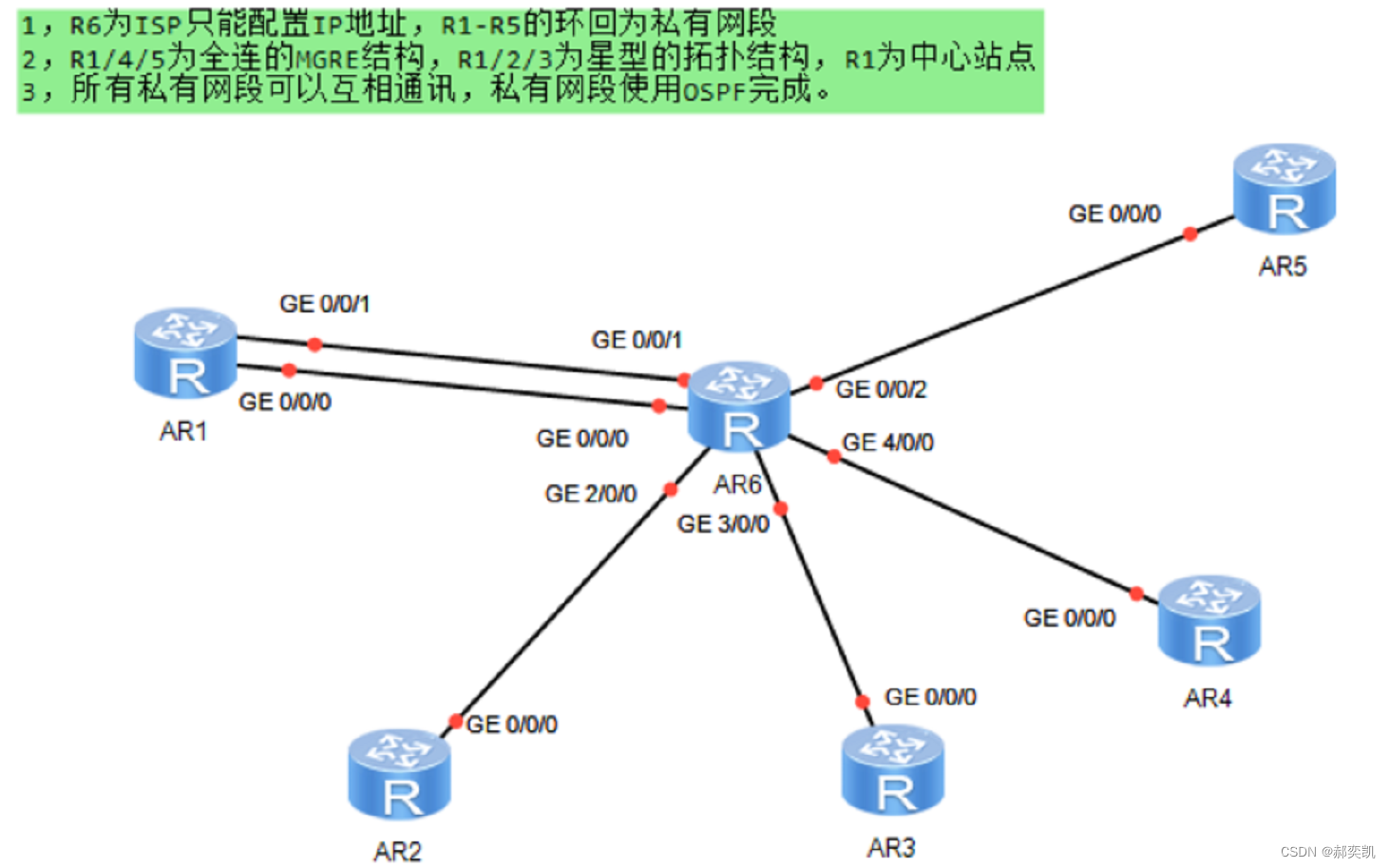
1,R6为ISP只能配置IP地址,R1-R5的环回为私有网段
2, R67A15万全连的NGRE结构,R1323力星型的拓扑结构,Riz为中心站点
3,所有私有网段可以互相通讯,私有网段使用05PF完成
[r1]int g 0/0/0
[r1-GigabitEthernet0/0/0]ip address 116.0.0.1 24
[r1-GigabitEthernet0/0/0]int g 0/0/1
[r1-GigabitEthernet0/0/1]ip address 16.0.0.1 24
[r1-GigabitEthernet0/0/1]int l0
[r1-LoopBack0]ip address 192.168.1.1 24

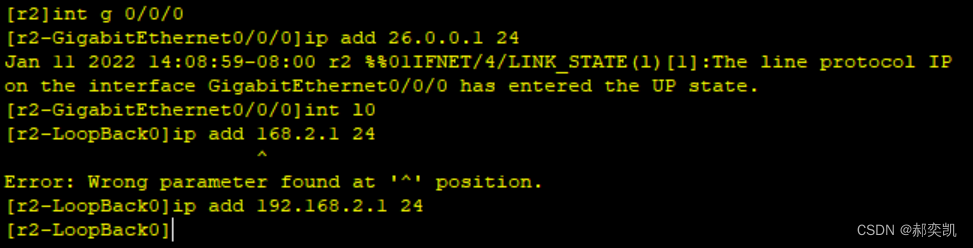
[r2]int g 0/0/0
[r2-GigabitEthernet0/0/0]ip add 26.0.0.1 24
[r2-GigabitEthernet0/0/0]int l0
[r2-LoopBack0]ip add 192.168.2.1 24
[r3]int g 0/0/0
[r3-GigabitEthernet0/0/0]ip add 36.0.0.1 24
[r3-GigabitEthernet0/0/0]int l0
[r3-LoopBack0]ip add 192.168.3.1 24

[r4]int g 0/0/0
[r4-GigabitEthernet0/0/0]ip add 46.0.0.1 24
[r4-GigabitEthernet0/0/0]int l0
[r4-LoopBack0]ip add 192.168.4.1 24

[r5]int g 0/0/0
[r5-GigabitEthernet0/0/0]ip add 56.0.0.1 24
[r5-GigabitEthernet0/0/0]int l0
[r5-LoopBack0]ip add 192.168.5.1 24


[isp]int g 0/0/0
[isp-GigabitEthernet0/0/0]ip add 16.0.0.2 24
[isp-GigabitEthernet0/0/0]int g 0/0/1
[isp-GigabitEthernet0/0/1]ip add 116.0.0.2 24
[isp-GigabitEthernet0/0/1]int g 0/0/2
[isp-GigabitEthernet0/0/2]ip add 26.0.0.2 24
[isp-GigabitEthernet0/0/2]int g 2/0/0
[isp-GigabitEthernet2/0/0]ip add 36.0.0.2 24
[isp-GigabitEthernet2/0/0]int g 3/0/0
[isp-GigabitEthernet3/0/0]ip add 46.0.0.2 24
[isp-GigabitEthernet3/0/0]int g 4/0/0
[isp-GigabitEthernet4/0/0]ip add 56.0.0.2 24

给每一台路由配置环回
[R1]ip route-static 0.0.0.0 0 16.0.0.2
[R1]ip route-static 0.0.0.0 0 116.0.0.2
[R2]ip route-static 0.0.0.0 0 26.0.0.2
[R3]ip route-static 0.0.0.0 0 36.0.0.2
[R4]ip route-static 0.0.0.0 0 46.0.0.2
[R5]ip route-static 0.0.0.0 0 56.0.0.2
[r1]int t0/0/0
[r1-Tunnel0/0/0]ip add 10.0.0.1 24
[r1-Tunnel0/0/0]tunnel-protocol gre p2mp
[r1-Tunnel0/0/0]source 16.0.0.1
[r1-Tunnel0/0/0]nhrp network-id 100
[r1-Tunnel0/0/0]nhrp entry multicast dynamic
r4]int t0/0/0
[r4-Tunnel0/0/0]tunnel-protocol gre p2mp
[r4-Tunnel0/0/0]source 46.0.0.1
[r4-Tunnel0/0/0]nhrp network-id 100
[r4-Tunnel0/0/0]ip add 10.0.0.2 24
[r4-Tunnel0/0/0]tunnel-protocol gre p2mp
[r4-Tunnel0/0/0]source 46.0.0.1
[r4-Tunnel0/0/0]nhrp network-id 100
[r4-Tunnel0/0/0]nhrp entry multicast dynamic
[R1-Tunnel0/0/0]nhrp entry 10.0.0.2 46.0.0.1 register
[R1-Tunnel0/0/0]nhrp entry 10.0.0.3 56.0.0.1 register
[R4-Tunnel0/0/0]nhrp entry 10.0.0.1 16.0.0.1 register
[R4-Tunnel0/0/0]nhrp entry 10.0.0.3 56.0.0.1 register
[R5-Tunnel0/0/0]nhrp entry 10.0.0.1 16.0.0.1 register
[R5-Tunnel0/0/0]nhrp entry 10.0.0.2 46.0.0.1 register

[R2]int t 0/0/0
[R2-Tunnel0/0/0]ip add 11.0.0.2 24
[R2-Tunnel0/0/0]tunnel-protocol gre p2mp
[R2-Tunnel0/0/0]source GigabitEthernet 0/0/0
[R2-Tunnel0/0/0]nhrp network-id 200
[R2-Tunnel0/0/0]nhrp entry 11.0.0.1 116.0.0.1 register

 构建ospf
[R1]ospf 1 router-id 1.1.1.1
[R1-ospf-1]a 0
[R1-ospf-1-area-0.0.0.0]network 192.168.1.0 0.0.0.255
[R1-ospf-1-area-0.0.0.0]network 10.0.0.0 0.0.0.255
[R1-ospf-1-area-0.0.0.0]network 11.0.0.0 0.0.0.255

[R2]ospf 1 router-id 2.2.2.2
[R2-ospf-1]a 0
[R2-ospf-1-area-0.0.0.0]network 192.168.2.0 0.0.0.255
[R2-ospf-1-area-0.0.0.0]network 11.0.0.0 0.0.0.255

[R3]ospf 1 router-id 3.3.3.3
[R3-ospf-1]a 0
[R3-ospf-1-area-0.0.0.0]network 192.168.3.0 0.0.0.255
[R3-ospf-1-area-0.0.0.0]network 11.0.0.0 0.0.0.255

[R4]ospf 1 router-id 4.4.4.4
[R4-ospf-1]a 0
[R4-ospf-1-area-0.0.0.0]network 192.168.4.0 0.0.0.255
[R4-ospf-1-area-0.0.0.0]network 10.0.0.0 0.0.0.255

[R5]ospf 1 router-id 5.5.5.5
[R5-ospf-1]a 0
[R5-ospf-1-area-0.0.0.0]network 192.168.5.0 0.0.0.255
[R5-ospf-1-area-0.0.0.0]network 10.0.0.0 0.0.0.255

修改R1/R2/R3的mgre下ospf的工作模式为broadcast,让R2,R3放弃选举或者直接让R1/R2/R3的ospf网络类型改为p2mp,R2/R3优先级改为0,放弃选举
[R1-Tunnel0/0/1]ospf network-type broadcast
[R2-Tunnel0/0/0]ospf network-type broadcast
[R2-Tunnel0/0/0]ospf network-type broadcast
[R2-Tunnel0/0/0]ospf dr-priority 0
[R3-Tunnel0/0/0]ospf dr-priority 0
最后将所有的OSPF网络类型设置为P2MP
验证


边栏推荐
- [C language] 0 basic tutorial - file operation (to be continued)
- By voting for the destruction of STI by Dao, seektiger is truly community driven
- KubeCon + CloudNativeCon Europe 2022
- MySQL create project R & D account
- (21)Blender源码分析之鼠标按下消息添加到队列的过程
- How to paste data in Excel into CXGRID
- GNOME-BOXES虚拟机创建安装
- kubernetes学习之持久化存储StorageClass(4)
- laradock重启mysql 找来的
- Agent mode - power node of station B
猜你喜欢

TS的使用案例——贪吃蛇

一种鲁棒变形卷积神经网络图像去噪
让企业数字化砸锅和IT主管背锅的软件供应链安全风险指北
Work fishing clock simulator wechat applet source code

Doris学习笔记之查询

Thinkphp5.0 model operation uses page for paging

LeetCode 931:下降路径最小和
![[C language errata] error in getting array length in function](/img/3a/2de171251396ed1ffedf28ab221670.png)
[C language errata] error in getting array length in function

HCIP实验5

Boston house price analysis assignment summary
随机推荐
JMeter中如何实现接口之间的关联?
51单片机——双字节乘以双字节
Machine learning library scikit learn (linear model, ridge regression, insert a column of data, extract the required column, vector machine (SVM), clustering)
1255. 得分最高的单词集合 状态压缩动态规划
线程的私有存储空间
Number of supported question banks and examination question banks of swiftui examination question bank project (tutorial includes source code)
options has an unknown property ‘before‘
ClickHouse 中的公共表表达式 CTE
kubernetes学习之持久化存储StorageClass(4)
【Nodejs】npm/nrm无法加载文件、因为在此系统禁止执行脚本解决方式
STM32 serial port sending and receiving multiple data tutorial based on gas sensor practice
DataX DorisWriter 插件文档
Unity using Sqlite
【LeetCode】745. Prefix and suffix search
Chapter I Introduction
Subline快捷操作
Thinkphp5.0 model operation uses page for paging
GNOME-BOXES虚拟机创建安装
【LeetCode】558. Intersection of quadtree
laradock重启mysql 找来的