当前位置:网站首页>Qt OpenGL 通过鼠标和键盘移动三维物体(设置相机)
Qt OpenGL 通过鼠标和键盘移动三维物体(设置相机)
2022-07-17 01:33:00 【wb175208】
设置相机: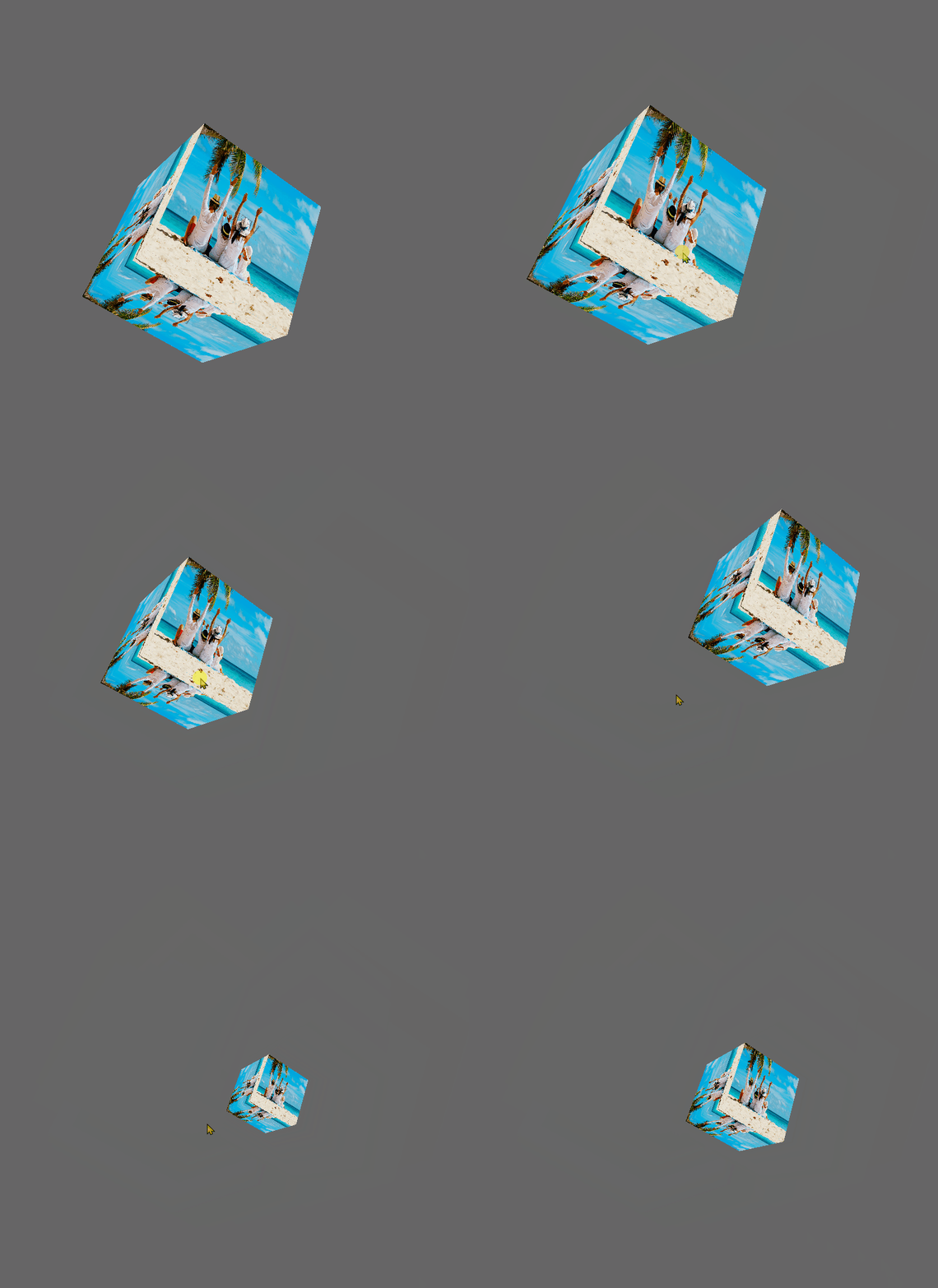
#pragma once
#include <QVector3D>
#include <QMatrix4x4>

class CubeCamera {

public:
	CubeCamera();
	CubeCamera(QVector3D position,float pitch, float yaw, QVector3D wordUp);
	~CubeCamera();

	QMatrix4x4 getViewMatrix();

	void wheel(int detal);
	float&getZoom() {

		return _zoom;
	}

	void keyPress(int key);
	void mouseMove(float detalX, float detalY);

private:
	void updateCameraVector();
private:
	float _pitch = 0.0;
	float _yaw = 0.0;
	QVector3D _wordUp;
	QVector3D _right;

	QVector3D _position = QVector3D(0.0, 0.0, -3.0);
	QVector3D _up = QVector3D(0.0, 1.0, 0.0);
	QVector3D _front = QVector3D(0.0, 0.0, 0.0);


	float _zoom = 45.0;
	float _zoomStep = 2.0;
};
#include "CubeCamera.h"

CubeCamera::CubeCamera() {

}


CubeCamera::CubeCamera(QVector3D position, float pitch, float yaw, QVector3D wordUp) {

	_position = position;
	_pitch = pitch;
	_yaw = yaw;
	_wordUp = wordUp;

	updateCameraVector();
}

CubeCamera::~CubeCamera() {

}

QMatrix4x4 CubeCamera::getViewMatrix() {

	QMatrix4x4 viewMatrix;
	viewMatrix.lookAt(_position, _position + _front, _up);
	return viewMatrix;
}

void CubeCamera::wheel(int detal) {

	if (detal < 0){

		_zoom += _zoomStep;
		if (_zoom >= 60.0){

			_zoom = 60.0;
		}
	} else {

		_zoom -= _zoomStep;
		if (_zoom <= 1.0){

			_zoom = 1.0;
		}
	}
}

void CubeCamera::keyPress(int key) {

	if (key == Qt::Key_A) {

		_position += _right * 0.1;
	} else if (key == Qt::Key_D) {

		_position -= _right * 0.1;
	} else if (key == Qt::Key_W) {

		_position -= _wordUp * 0.1;
	} else if (key == Qt::Key_S) {

		_position += _wordUp * 0.1;
	} else if (key == Qt::Key_E) {

		_position += _front *0.1;
	} else if (key == Qt::Key_Q) {

		_position -= _front *0.1;
	}
}

void CubeCamera::mouseMove(float xoffset, float yoffset) {

	xoffset *= 0.005;
	yoffset *= 0.005;
	qDebug() << xoffset<< yoffset;

	_yaw -= xoffset;
	_pitch += yoffset;

	if (_pitch > 89.0f)
		_pitch = 89.0f;
	if (_pitch < -89.0f)
		_pitch = -89.0f;

	updateCameraVector();
}

void CubeCamera::updateCameraVector() {

	QVector3D front;
	front.setX(cos(_yaw) * cos(_pitch));
	front.setY(sin(_pitch));
	front.setZ(sin(_yaw) * cos(_pitch));
	_front = front.normalized();

	_right = QVector3D::crossProduct(_front, _wordUp).normalized();

	_up = QVector3D::crossProduct(_right, _front).normalized();
}
#pragma once

#include <QOpenGLWindow>
#include <QOpenGLExtraFunctions>
#include <QDebug>
#include <QOpenGLTexture>
#include <QElapsedTimer>
#include <QOpenGLShader>
#include <QOpenGLShaderProgram>

class RotateCubeWnd : public QOpenGLWindow{

	Q_OBJECT

public:
	RotateCubeWnd();
	~RotateCubeWnd();

protected:
	void initializeGL()override;
	void paintGL()override;

	void keyPressEvent(QKeyEvent *event);
	void mouseMoveEvent(QMouseEvent *event);
	void wheelEvent(QWheelEvent *event);
	void mousePressEvent(QMouseEvent *event);
	void mouseReleaseEvent(QMouseEvent *event);
private slots:
	void slotTimeOut();
private:
	GLuint _VBO, _VAO;
	class QOpenGLFunctions_3_3_Core* _openGLCore;
	QOpenGLShaderProgram _shaderProgram;//着色器程序,所里系统所有的着色器

	class QOpenGLTexture *_texture1;

	QMatrix4x4 model,view, projection;
	class QTimer* _timer = nullptr;
	double _angle = 30.0;

	class CubeCamera* _cubeCamera = nullptr;

	bool _lBtnDown = false;
	QPoint _lBtnDownPos;
};
#include "RotateCubeWnd.h"
#include <QKeyEvent>
#include <QMouseEvent>
#include <QWheelEvent>
#include <QTimer>
#include <QOpenGLFunctions_3_3_Core>
#include "CubeCamera.h"

RotateCubeWnd::RotateCubeWnd(){

	_timer = new QTimer;
	_timer->start(20);
	connect(_timer, SIGNAL(timeout()), this, SLOT(slotTimeOut()));

	_cubeCamera = new CubeCamera(QVector3D(0.0, 0.0, -4.0), 0.0, 90.0, QVector3D(0.0, 1.0, 0.0));
}

RotateCubeWnd::~RotateCubeWnd(){

}

void RotateCubeWnd::initializeGL() {

	_openGLCore = QOpenGLContext::currentContext()->versionFunctions<QOpenGLFunctions_3_3_Core>();

	//开启深度测试
	_openGLCore->glEnable(GL_DEPTH_TEST);
	_openGLCore->glDepthFunc(GL_LESS);

	GLfloat vertexData[] = {

		// X Y Z U V
		// 下
	   -1.0f,-1.0f,-1.0f,   0.0f, 0.0f,
		1.0f,-1.0f,-1.0f,   1.0f, 0.0f,
	   -1.0f,-1.0f, 1.0f,   0.0f, 1.0f,
		1.0f,-1.0f,-1.0f,   1.0f, 0.0f,
		1.0f,-1.0f, 1.0f,   1.0f, 1.0f,
	   -1.0f,-1.0f, 1.0f,   0.0f, 1.0f,
		// 上
	   -1.0f, 1.0f,-1.0f,   0.0f, 0.0f,
	   -1.0f, 1.0f, 1.0f,   0.0f, 1.0f,
		1.0f, 1.0f,-1.0f,   1.0f, 0.0f,
		1.0f, 1.0f,-1.0f,   1.0f, 0.0f,
	   -1.0f, 1.0f, 1.0f,   0.0f, 1.0f,
		1.0f, 1.0f, 1.0f,   1.0f, 1.0f,
		// 前
	   -1.0f,-1.0f, 1.0f,   1.0f, 0.0f,
		1.0f,-1.0f, 1.0f,   0.0f, 0.0f,
	   -1.0f, 1.0f, 1.0f,   1.0f, 1.0f,
		1.0f,-1.0f, 1.0f,   0.0f, 0.0f,
		1.0f, 1.0f, 1.0f,   0.0f, 1.0f,
	   -1.0f, 1.0f, 1.0f,   1.0f, 1.0f,
		// 后
	   -1.0f,-1.0f,-1.0f,   0.0f, 0.0f,
	   -1.0f, 1.0f,-1.0f,   0.0f, 1.0f,
		1.0f,-1.0f,-1.0f,   1.0f, 0.0f,
		1.0f,-1.0f,-1.0f,   1.0f, 0.0f,
	   -1.0f, 1.0f,-1.0f,   0.0f, 1.0f,
		1.0f, 1.0f,-1.0f,   1.0f, 1.0f,
		// 左
	   -1.0f,-1.0f, 1.0f,   0.0f, 1.0f,
	   -1.0f, 1.0f,-1.0f,   1.0f, 0.0f,
	   -1.0f,-1.0f,-1.0f,   0.0f, 0.0f,
	   -1.0f,-1.0f, 1.0f,   0.0f, 1.0f,
	   -1.0f, 1.0f, 1.0f,   1.0f, 1.0f,
	   -1.0f, 1.0f,-1.0f,   1.0f, 0.0f,
		// 右
		1.0f,-1.0f, 1.0f,   1.0f, 1.0f,
		1.0f,-1.0f,-1.0f,   1.0f, 0.0f,
		1.0f, 1.0f,-1.0f,   0.0f, 0.0f,
		1.0f,-1.0f, 1.0f,   1.0f, 1.0f,
		1.0f, 1.0f,-1.0f,   0.0f, 0.0f,
		1.0f, 1.0f, 1.0f,   0.0f, 1.0f
	};

	_openGLCore->glGenVertexArrays(1, &_VAO);
	_openGLCore->glGenBuffers(1, &_VBO);

	_openGLCore->glBindVertexArray(_VAO);

	_openGLCore->glBindBuffer(GL_ARRAY_BUFFER, _VBO);
	_openGLCore->glBufferData(GL_ARRAY_BUFFER, sizeof(vertexData), vertexData, GL_STATIC_DRAW);

	// 位置属性
	_openGLCore->glVertexAttribPointer(0, 3, GL_FLOAT, GL_FALSE, 5 * sizeof(float), (void*)0);
	_openGLCore->glEnableVertexAttribArray(0);
	// 坐标属性
	_openGLCore->glVertexAttribPointer(1, 2, GL_FLOAT, GL_FALSE, 5 * sizeof(float), (void*)(3 * sizeof(float)));
	_openGLCore->glEnableVertexAttribArray(1);

	//垂直镜像mirrored
	_texture1 = new QOpenGLTexture(QImage("E:/Projects/QtGuiTest/OPenGLApp/RotateCube/a.jpg").mirrored());
	if (!_texture1->isCreated()) {

		qDebug() << "Failed to load texture";
	}
	_texture1->setWrapMode(QOpenGLTexture::DirectionS, QOpenGLTexture::Repeat);
	_texture1->setWrapMode(QOpenGLTexture::DirectionT, QOpenGLTexture::Repeat);
	_texture1->setMinificationFilter(QOpenGLTexture::Linear);
	_texture1->setMagnificationFilter(QOpenGLTexture::Linear);


	_shaderProgram.addShaderFromSourceFile(QOpenGLShader::Vertex, "E:/Projects/QtGuiTest/OPenGLApp/RotateCube/RotateCube.vert");
	_shaderProgram.addShaderFromSourceFile(QOpenGLShader::Fragment, "E:/Projects/QtGuiTest/OPenGLApp/RotateCube/RotateCube.frag");
	_shaderProgram.link();

	_shaderProgram.bind();
	_shaderProgram.setUniformValue("textureImg", 0);

	model.rotate(45.0, QVector3D(1.0, 1.0, 1.0));
	model.scale(0.5);

	view = _cubeCamera->getViewMatrix();
}

void RotateCubeWnd::paintGL() {

	_openGLCore->glClearColor(0.4f, 0.4f, 0.4f, 1.0f);
	_openGLCore->glClear(GL_COLOR_BUFFER_BIT | GL_DEPTH_BUFFER_BIT);

	_openGLCore->glActiveTexture(GL_TEXTURE0);
	_texture1->bind();

	_shaderProgram.bind();

#if 0
	QMatrix4x4 view;
	/* 第一个参数相当于改变摄像头的观察位置,有规律的改变这个值就能起到从不同角度观察物体的效果。 而改变第二个参数则相当于改变世界坐标系的原点,整个世界坐标系上的物体将随之移动。 */
	view.lookAt(QVector3D(0.0f, 0.0f, -3.0f), QVector3D(0.0, 0.0, 0.0), QVector3D(0.0, 1.0, 0.0));
	view.rotate(_angle, QVector3D(0.0, 1.0, 0.0));
#else
	QMatrix4x4 view = _cubeCamera->getViewMatrix();
#endif

	QMatrix4x4 projection;
	projection.perspective(_cubeCamera->getZoom(), width() / height(), 0.1, 100);


	_shaderProgram.setUniformValue("model", model);
	_shaderProgram.setUniformValue("view", view);
	_shaderProgram.setUniformValue("projection", projection);
	/* 立方体6个面,每个面有2个三角形,每个三角形有3个顶点,所以需要绘制的顶点数是:6 × 2 × 3 = 36 */
	_openGLCore->glDrawArrays(GL_TRIANGLES, 0, 36);

	update();

}

void RotateCubeWnd::keyPressEvent(QKeyEvent *event) {

	_cubeCamera->keyPress(event->key());

}

void RotateCubeWnd::mouseMoveEvent(QMouseEvent *event) {

	if (_lBtnDown){

		float xpos = static_cast<float>(event->pos().x());
		float ypos = static_cast<float>(event->pos().y());

		float xoffset = _lBtnDownPos.x() - xpos;
		float yoffset = _lBtnDownPos.y() - ypos;

		_lBtnDownPos = event->pos();

		_cubeCamera->mouseMove(xoffset, yoffset);
	}
}

void RotateCubeWnd::wheelEvent(QWheelEvent *event) {

	_cubeCamera->wheel(event->delta());
	update();
}

void RotateCubeWnd::mousePressEvent(QMouseEvent *event) {

	if (event->button() == Qt::LeftButton){

		_lBtnDown = true;
		_lBtnDownPos = event->pos();
	}
}

void RotateCubeWnd::mouseReleaseEvent(QMouseEvent *event) {

	if (event->button() == Qt::LeftButton) {

		_lBtnDown = false;
	}
}

void RotateCubeWnd::slotTimeOut() {

	_angle += 1.0;
	//update();
}
#include "OPenGLApp.h"
#include <QtWidgets/QApplication>

#include <QtOpenGL/QtOpenGL>
#include "MyOpenGLWnd.h"
#include "EBOWnd.h"
#include "HelloShader.h"
#include "HelloShaderSelf.h"
#include "TextureWnd.h"
#include "CameraWnd.h"
#include "QOpenGLLight.h"
#include "RotateCube/RotateCubeWnd.h"

int main(int argc, char *argv[]) {

	QApplication a(argc, argv);

	RotateCubeWnd window;
	window.setTitle(QStringLiteral("这是一个OpenGL窗口"));
	window.resize(800, 800);

	window.show();
	return a.exec();
}
顶点着色器:
#version 330 core
layout (location = 0) in vec3 aPos;
layout (location = 1) in vec2 aTextureCoord;
out vec3 outColor;
out vec2 textureCoord;

//矩阵必须初始化,初始化单位矩阵,否则GLSL语言中默认矩阵是0矩阵
uniform mat4 trans = mat4(1.0);

uniform mat4 model = mat4(1.0);
uniform mat4 view = mat4(1.0);
uniform mat4 projection = mat4(1.0);

void main(){

	gl_Position = projection * view * model * vec4(aPos, 1.0);
	textureCoord = aTextureCoord;
}
片段着色器:
#version 330 core
out vec4 fragColor;
in vec3 outColor;//从顶点着色器中传过来的颜色
in vec2 textureCoord;
uniform sampler2D textureImg;
void main(){

	fragColor = texture(textureImg, textureCoord);
}
aaa
边栏推荐
- 第一章 绪论
- 论文阅读:U-Net++: Redesigning Skip Connections to Exploit Multiscale Features in Image Segmentation
- 367. 有效的完全平方数(入门必会)
- Chapter II linear table
- [MySQL] MHA high availability
- My most productive easypypi once again has been updated! V1.4.0 release
- Ext JS的数字类型处理及便捷方法
- MYSQL主从搭建
- Ubuntu clear CUDA cache
- ncnn paramdict&modelbin
猜你喜欢

谷歌 Chrome 浏览器安装 PWA 应用将显示更多描述信息

Zabbix6.0 monitors Dell and IBM server hardware through Idrac and imm2

CorelDRAW cannot be installed. Solution
Win10 onedrive failure reinstallation

Rtx3090 installing pytorch3d

Rhce8 Learning Guide Chapter 1 installing rhel8.4
![In depth understanding of machine learning - unbalanced learning: sample sampling technology - [smote sampling method and borderline smote sampling method of manual sampling technology]](/img/9f/a0d03b23e66849f12150f9a72f36c5.png)
In depth understanding of machine learning - unbalanced learning: sample sampling technology - [smote sampling method and borderline smote sampling method of manual sampling technology]

leetcode 222. Number of nodes of a complete binary tree (required)

第二章 线性表

基于Matlab的男女声音信号分析与处理
随机推荐
CorelDRAW cannot be installed. Solution
2002 - Can‘t connect to server on ‘127.0.0.1‘ (36)
Simple usage and interface introduction of labelme
Ncnn thread
MySQL 增删查改(基础)
第二章 线性表
通过Dao投票STI的销毁,SeekTiger真正做到由社区驱动
Chengxin University envi_ The second week of IDL experiment content: extract aod+ in all MODIS aerosol products for detailed analysis
XX City high school network topology overall planning configuration
Unity解决同材质物体重叠产生Z-Fighting的问题
Machine learning library scikit learn (linear model, ridge regression, insert a column of data, extract the required column, vector machine (SVM), clustering)
Dive into deep learning - 2.2 data preprocessing
Dive Into Deep Learning——2.2数据预处理
VGG (Visual Geometry Group)
In depth understanding of machine learning - unbalanced learning: sample sampling technology - [smote sampling method and borderline smote sampling method of manual sampling technology]
Pure virtual function
Subline快捷操作
Through openharmony compatibility evaluation, the big brother development board and rich teaching and training resources have been ready
10. Redis interview FAQ
In depth understanding of machine learning - unbalanced learning: sample sampling technology - [adasyn sampling method of manual sampling technology]