当前位置:网站首页>Network knowledge-04 network layer IPv6
Network knowledge-04 network layer IPv6
2022-07-19 07:19:00 【Earth shattering pig worm】
List of articles
- 6 IPv6
- 6.1 IPv6 Address representation
- 6.2 IPv6 Address classification
- 6.3 IPv6 Form of agreement
- 6.3.1 Basic first
- 6.3.2 Extend the first
- 6.3.2.1 Expand the order in which headers appear
- 6.3.2.2 Extended header options
- 6.3.2.2.1 Hop-by-Hop Options header (Hop-by-hop Options Header)
- 6.3.2.2.2 Destination option header (Destination Options Header)
- 6.3.2.2.3 Routing header (Routing Header)
- 6.3.2.2.4 Segmented header (Fragment Header)
- 6.3.2.2.5 Certification header
- 6.3.2.2.6 Encapsulate the safety payload head
- 6.3.2.2.7 Upper level head
- 7 Internet Group Management Protocol IGMP
- 8 Virtual private network VPN
- 9 Network address translation NAT
6 IPv6
IP It's the core protocol of the Internet , Currently in use IP(IPv4) Is in 20 century 70 Designed in the late S . After decades of development ,IPv4 Your address has been exhausted ,ISP Can't apply for new IP The address block is broken . In order to solve IP The fundamental measure of address exhaustion is to adopt a new version with larger address space IP, namely IPv6.
6.1 IPv6 Address representation
IPv6 Total addresses 128 position , In order to facilitate manual reading and input , and IPv4 The address is the same ,IPv6 The address can also be represented by a string of characters .IPv6 Address using 16 Hexadecimal said ,IPv6 The address is divided into 8 Block , each 16 position , Between blocks “:” separate .
#  One IPv5 The character representation of the address
ABCD:EF01:2345:6789:ABCD:EF01:2345:6789
#  With subnet prefix IPv6 Address representation
ABCD:EF01:2345:6789:ABCD:EF01:2345:6789/64
#  With ports IPv6 Address representation
[ABCD:EF01:2345:6789:ABCD:EF01:2345:6789]:8080
meanwhile , For multiple address blocks 0 situations , have access to “::” Number , To simplify . Simplification principle :
- + whole 0 block “0000”, It can be reduced to “0”
- + Multiple full 0 block , It can be reduced to “::”
- + One IPv6 Only one... Can appear in the address “::”, There are multiple full 0 When a block ,“::” To simplify the longest paragraph , There is no longest one to be near ( Left )
- +“::” It can appear at the beginning or end of the address
| Before simplification | After simplification |
|---|---|
| ABCD:0000:2345:0000:ABCD:0000:2345:0000 | ABCD:0:2345:0:ABCD:0:2345:0 |
| ABCD:EF01:0:0:0:0:0:6789 | ABCD:EF01::6789 |
| ABCD:0:0:0:ABCD:0:0:6789 | ABCD::ABCD:0:0:6789 |
| 2001:0:0:0:0:0:0:0 | 2001:: |
| FF01:0:0:0:0:0:0:101 ( Multicast address ) | FF01::101 |
| 0:0:0:0:0:0:0:1 ( Loopback address ) | ::1 |
| 0:0:0:0:0:0:0:0 ( No address specified ) | :: |
| 12AB:0000:0000:CD30:0000:0000:0000:0000/60 | 12AB:0:0:CD30::/60 |
6.2 IPv6 Address classification
IPv6 Addresses are divided into three categories as a whole : Unicast address , Anycast address , Multicast address .
- Unicast address : A unicast address corresponds to an interface , Packets sent to unicast addresses will be received by the corresponding interface ;
- Anycast address : An anycast address corresponds to a group of interfaces , Packets sent to anycast addresses will be received by one of these interfaces , Which interface is received is determined by the specific routing protocol ;
- Multicast address : A multicast address corresponds to a group of interfaces , Packets sent to the multicast address will be received by all interfaces of this group ;

| Address type | Binary prefix |
|---|---|
| No address specified | 00…0(128 position ), It can be recorded as ::/128 |
| Loopback address | 00…1(128 position ), It can be recorded as ::1/128 |
| Multicast address | 11111111(8 position ), It can be recorded as FF00::/8 |
| Local link unicast address | 1111111010(10 position ), It can be recorded as FE80::/10 |
| Global unicast address | ( In addition to the above four , All other binary prefixes ) |
- No address specified :16 Byte full 0 Address , It can be abbreviated as ::, It is mainly used at the beginning of system startup , Not yet allocated IP when , External request IP Address time , Use as source address , It cannot be used in the destination address of the packet .
- Loopback address : And IPv4 The loopback address is the same , Used when sending data packets to yourself , In daily network troubleshooting, you can test the network layer protocol status .
- Multicast address : Function and IPv4 equally , This kind of address accounts for IPv6 Of the total number of addresses 1/256.
- Local link unicast address : Some units use the Internet TCP/IP agreement , But there is no link to the Internet . All hosts on this network can communicate with local addresses , But it cannot communicate with other hosts on the Internet . The prefix of the local unicast address is FE80::/64. This kind of address war IPv6 Of the total number of addresses 1/1024.
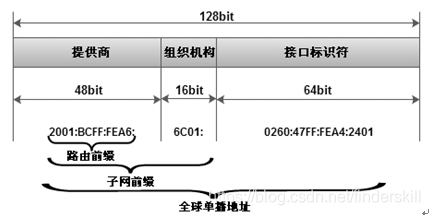
- Global unicast address :IPv6 In the final one . The division method is shown in the figure below :
[ Failed to transfer the external chain picture , The origin station may have anti-theft chain mechanism , It is suggested to save the pictures and upload them directly (img-ULhQnDOT-1653033084969)(https://note.youdao.com/yws/res/21518/WEBRESOURCE4b57b3b37397e0066765df1d7b125c84)]
6.2.1 Global unicast address
- front 3bit Fix 001;
- Address range :2xxx:xxxxx/3 - 3FFF: :FFFF;
- 2001::/16 IPV6 Internet address ;
- 2002::/16 6to4 Transition address ;
- 3ffe::/16 be used for 6bone Prefix of test purpose ;
Interface identifier : finger 64bit Of MAC Address ( The future of network adapters MAC Address ), Or based on 48bit MAC The address is extended to 64bit(EUI 64). In the global unicast address , The regulations are as follows 2001:BCFF:FEA6::/48 It means a IPv6 Route prefix ,2001:BCFF:FEA6:6C01::/64 It means a IPv6 Subnet prefix .
6.2.2 Local link address
Fixed prefix FE80::/10; When a node is enabled IPv6 Automatically generate , The format is as follows ,64 Bit expansion by MAC Address according to EUI 64 It's a transformation .

EUI-64 Format : be based on MAC Address auto construction ; for example :MAC The address is 0012:3400:ABCD;
#  First turn on the MAC The address is separated in half , Insert a fixed value FFFE;
0012:3400:ABCD ----> 0012:34FF:FE00:ABCD;

#  Turn the seventh place upside down :0----> 1, 1---->0
0012:34FF:FE00:ABCD  ----> 0212:34FF:FE00:ABCD;

#  Finally, add the prefix :
FE80::212:34FF:FE00:ABCD;
6.2.3 Local site address
Be similar to IPv4 Private address in , Only used on the internal network , Such as a printer .

Fixed prefix FEC0::/10;
about IPv6 Configuration of local site address , Must pass DHCPv6 Assign addresses 、 Stateless prefix announcement 、 Or input manually .
6.2.4 The only local address
ULA, The only local address , Conceptually, it is equivalent to private IP, Can only be used on the local network , stay IPv6 Internet Cannot be routed on . The local address of the site mentioned above was abandoned due to the vague definition of the original standard , Then RFC The unique local address is redefined to meet the private requirements in the local environment IPv6 Use of address .
stay RFC4193 It standardizes a type used to replace the local unicast address of the site in local communication .ULA Have a fixed prefix FC00::/7, It's divided into two parts :FC00::/8 There is no definition of ,FD00::/8 The definition is as follows :
6.2.5 No address specified
form :0:0:0:0:0:0:0:0/128 --> ::/128;
Indicates that the address is not specified , Or write the default route on behalf of all routes ;
This address serves as the source of some messages IP Address , For example, when detecting as a duplicate address DAD The source address of the neighbor request message sent when , perhaps DHCPv6 The source of the message sent by the client during initialization IP.
6.2.6 Return address
form :0:0:0:0:0:0:0:1;
Same as IPV4 in 127.0.0.1 Address means the same thing , Represents the node itself .
6.2.7 Embedded IPv4
mapping IPV4 Of IPV6 Address – Only for owning IPV4 and IPV6 Local range of dual protocol stack nodes . Among them high 80bit Set to 0, after 16bit Set to 1, Follow again IPV4 Address
0000:0000:0000:0000:0000:ffff:206.123.31.2
0000:0000:0000:0000:0000:ffff:ce7b:1f01
6.3.8. Multicast address (IPv6 The core of communication )
Prefix :FFxx::/8;
stay IPV6 There is no concept of broadcasting in , Instead of using multicast ; therefore IPv6 There are a lot of multicast usage in .

- Sign bit is 0000 Indicates that the multicast address is permanently reserved , Allocated to various technologies ;
- Sign bit is 0001 Indicates the temporary multicast address that users can use ;
The range segment defines the range of multicast addresses , Its definition is as follows :
| Binary system | Hexadecimal | Range type |
|---|---|---|
| 0001 | 1 | Local interface range |
| 0010 | 2 | Local link range |
| 0011 | 3 | Local subnet range |
| 0100 | 4 | Local management scope |
| 0101 | 5 | Local site scope Private network address similar to multicast |
| 1000 | 8 | Scope of organization |
| 1110 | E | Worldwide Public network address similar to multicast |
Here are some multicast addresses :
| Address | Range |
|---|---|
| FF02::1 | all nodes All nodes in the local link range |
| FF02::2 | all routers All routers in the local link range |
| FF02::5 | all ospf routers All runs OSPF The router |
| FF02::9 | all rip routers All runs RIP The router |
| FF02::A | all eigrp routers All runs eigrp The router |
| FF05::2 | All routers within a site |
6.3 IPv6 Form of agreement
RFC2460 Defined IPv6 Datagram format . On the whole structure ,IPv6 Datagram format and IPv4 The datagram format is the same , Also by IP Header and data ( stay IPv6 It is called payload in ) These two parts make up , But in IPv6 The datagram data portion may also include 0 One or more IPv6 Extended headers (Extension header), As shown in the figure below .IP The header part is fixed as 40 bytes , The maximum length of the payload part shall not exceed 65535 byte .
[ Failed to transfer the external chain picture , The origin station may have anti-theft chain mechanism , It is suggested to save the pictures and upload them directly (img-646TVzim-1653033084971)(https://note.youdao.com/yws/res/21611/WEBRESOURCE222d4c58f9e8946f0d0c063b939a63af)]
6.3.1 Basic first
[ Failed to transfer the external chain picture , The origin station may have anti-theft chain mechanism , It is suggested to save the pictures and upload them directly (img-UqHilRsu-1653033084971)(https://note.youdao.com/yws/res/21618/WEBRESOURCE671e005b115f0c9e05445880dc1732c4)]
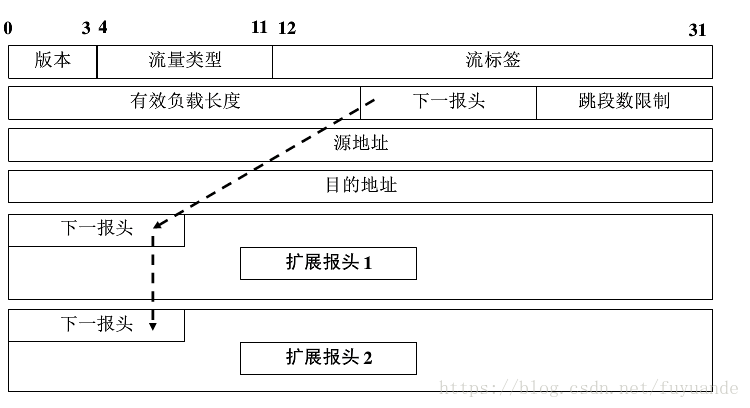
- edition (version): Occupy 4 position . Indicates the version of the agreement , Yes IPv6 The field is 6.
- Traffic class (trafiic class): Occupy 8 position . This is to distinguish between different IPv6 The type or priority of the datagram .
- Stream label (flow label): Occupy 20 position .IPv6 A new mechanism is to support resource pre allocation , And allow the router to associate each datagram with a given resource allocation item .IPv6 Eliminate the flow (flow) Abstract concept of . So-called “ flow ” That is, from a specific source to a specific destination on the Internet ( Unicast or multicast ) A series of datagrams ( Such as real-time audio or video transmission ), And in this “ flow ” The routers on the route they pass all guarantee the specified quality of service . All datagrams belonging to the same stream have the same stream label . therefore , Stream label for real-time audio / The transmission of video data is particularly important . For traditional e-mail or non real-time data , Stream labels are useless , Set it to 0 that will do , You can refer to [RFC6437].
- Payload length (payload length): Occupy 16 position . To specify IPv6 The number of bytes of a datagram other than the basic header ( All extended headers are included in the payload ). The maximum value is 64KB(65535 byte )
- Next first (next header): Occupy 8 position , amount to IPv4 Protocol field or optional field of .
- When IPv6 When the datagram does not have an extended header , The function of this field is similar to IPv4 The protocol fields are the same , Its value indicates that the data after the basic header should be delivered IP Which layer of high-level agreement is above layer ( Such as 6 Express TCP).
- When an extended header appears , The value of this field identifies the type of the first extension header .
- Jump limit (hop limit): Occupy 8 position . Used to prevent datagrams from existing indefinitely in the network . The source point sets a hop limit when each datagram is sent ( The maximum is 255). When each router forwards datagrams , First reduce the value in the hop limit field 1. When the hop limit value is 0 when , Discard this datagram .
- source address : Occupy 128 position . Of the datagram sender IP Address .
- Destination address : Occupy 128 position . Of the datagram receiver IP Address .
6.3.2 Extend the first
stay IPv6 in , Those by IPv4 Special functions provided by options , By means of IPv6 After the header, add the extended header implementation . route 、 Time stamp 、 Functions such as fragmentation and super large grouping are IPv6 Implement in the extension header , Therefore, there are no special functions in IPv6 The basic header of assigns corresponding bits . Based on this design ,IPv6 The head is fixed to 40 byte , Extended headers are only added when needed . Usually , The extended header is handled by the terminal host only .
IPv6 The format characteristics of the router simplify the design and implementation of high-performance router to a certain extent , because IPv6 The router needs more commands to process packets than IPv4 Simple . Because in IPv4 The header of contains almost all the options , Therefore, each intermediate router must check whether these options exist . stay IPv6 in , These related options are uniformly moved to the extended header , In this way, the intermediate router does not have to deal with every possible option ( have only “ Hop by hop options ” The header must be handled ), It improves the speed of the processor processing data packets , It also improves its forwarding performance .
IPv6 The extended header is attached to IPv6 Header purpose IP After the address field , There can be 0 individual , Or multiple extended headers . Each extension header consists of several fields , Their lengths are also different . But the first field of all extension headers is 8 Bit “ Next first ” Field . The value of this field indicates what the field is after expanding the header . When using multiple extended headers , Should appear in the above order . The head of the high-level department is always placed last . Extended header and higher layer protocols ( for example TCP/UDP) Head and IPv6 The head is linked , Form a cascade of heads . Here's the picture :
6.3.2.1 Expand the order in which headers appear
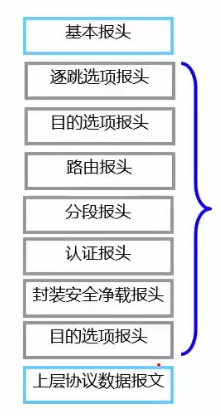
Extended header and higher layer protocols ( Such as TCP and UDP) Head and IPv6 Heads are linked to form cascading heads . The next header field in each header identifies the type of the following header , Common options are hop by hop 、 Routing options 、 Fragmentation options 、TCP、UDP and ICMPv6 etc. . The order in which the extended headers appear is shown in the following figure :
| Head type | The order | value | reference |
|---|---|---|---|
| IPv6 Head | 1 | 41 | [RFC2460][RFC2473] |
| Hop by hop options | 2 | 0 | [RFC2460] Keep up with the IPv6 After the head |
| Destination options | 3,8 | 60 | [RFC2460] |
| Routing options | 4 | 43 | [RFC2460][RFC5095] |
| Fragmentation options | 5 | 44 | [RFC2460] |
| Package safety load (ESP) | 7 | 50 | |
| authentication (AH) | 6 | 51 | |
| ( nothing , No next head ) | 9 | 59 | [RFC2460] |
| ICMPv6 | Last | 58 | |
| UDP | Last | 17 | |
| TCP | Last | 6 | |
| Various other high-level agreements | Last |
except " Hop by hop options " Out of your position ( It's mandatory ), The order of expanding headers is suggested , So a IPv6 The implementation of must process the extension headers in the order they are received . Only " Destination options " The head can be used twice . The first is to point out that it is contained in IPv6 The purpose in the head IPv6 Address , The second time ( Location 8) It's about the final destination of the datagram . In some cases ( For example, use routing headers ), When the datagram is forwarded to the final destination ,IPv6 The purpose in the head IP The address field will change .
Basic header 、 The relationship between the extended header and the three-layer protocol data message is shown in the figure below :
6.3.2.2 Extended header options
6.3.2.2.1 Hop-by-Hop Options header (Hop-by-hop Options Header)
be relative to IPv4,IPv6 Provides a more flexible and scalable way , Combine extensions with options . because IPv4 Head space limitations ( Maximum 60 byte ), Those from IPv4 The option for has been discontinued . and IPv6 Variable length extended headers or options encoded in special extended headers can be adapted to the current larger Internet. If the option exists , You can put the hop by hop option ( Associated with each router on a datagram transmission path ) Or destination options ( Only relevant to the recipient ).
Hop by hop options ( be called HOPOPT) Is the only option handled by each router the packet passes through . This extended header must be processed by all nodes of the forwarding path . At present, the route alarm (RSVP and MLDv1) And Jumbo The hop by hop option header is used in frame processing , Because the routing alarm needs to be notified to all nodes in the forwarding path , and Jumbo The frame is longer than 65535 Byte message , Transmission of this message requires that all nodes in the forwarding path can handle it normally . The format is as follows :

- Next Header Represents the protocol type of the next header ;
- Hdr Ext Len Indicates the length of the option header ( barring Next Header);
- Options It is a combination of a series of option fields and fill fields .
Every Option The format of is as follows :
Hop by hop options Option The code of is TLV aggregate ( type - length - value ), The field description is as follows :
- The first byte gives the option type , Include some subfields , When the option is not recognized, it is just a IPv6 How nodes act , And whether the option data changes when the datagram is forwarded .
- The option data length field gives the byte length of the option data .
The recognition rules of action subfield are as follows :
| value | action |
|---|---|
| 00 | Skip options , To continue processing |
| 01 | Discard datagrams |
| 10 | Discard datagrams , And send a “ICMPv6 Parameter problem ” news |
| 11 | And 10 identical , But only when the destination of the packet is not multicast , Send this ICMPv6 news |
If a datagram sent to the multicast destination contains an unknown option , Then a large number of nodes will generate traffic returning to the source node . This can be done by setting the action subfield to 11 To avoid . The advantage of this setting is , A new option can be carried in a datagram , And ignored by routers that can't understand it , This helps facilitate incremental deployment of new options .
Change the bit field ( In the picture Chg):
Its function is to prompt when the option data changes during datagram forwarding ( Set as 1).
| value | meaning |
|---|---|
| 0 | Option data will not change the route |
| 1 | Option data may change the route |
Some of the options that have been defined are as follows :
| Option name | Head | action | change | type | length |
|---|---|---|---|---|---|
| fill 1 | HD | 00 | 0 | 0 | N/A |
| fill N | HD | 00 | 0 | 1 | variable |
| Very large payload | H | 11 | 0 | 194 | 4 |
| Tunnel encapsulation limits | D | 00 | 0 | 4 | 4 |
| Router warning | H | 00 | 0 | 5 | 4 |
| Quick start | H | 00 | 1 | 6 | 8 |
| CALIPSO | H | 00 | 0 | 7 | 8+ |
| Home address | D | 11 | 0 | 201 | 16 |
- Head HD respectively : Jump by jump (H) Options or destinations (D)
- fill 1 And fill N
because IPv6 Options need to be consistent with 8 Byte offset alignment , So the smaller option is 0 Fill until the length is 8 byte . fill 1 Options ( type 0) Is the only option that lacks length fields and value fields , It only has 1 Byte length , The value is 0. fill N Options ( type 1) Fill the option area of the head 2 Bytes or more , And use TLV The format of . about n Each fill byte , The option data length field contains a value of (n-2). - IPv6 Very large payload
In some TCP/IP In the network ( For example, the network used to interconnect supercomputers ), Due to the normal 64KB Of IP Datagram size limit , It will cause unnecessary overhead when transmitting a large amount of data .IPv6 The super large payload option specifies a payload that is larger than normal MTU Of IPv6 The datagram , It's called a very large message . This option cannot be selected by MTU Less than 64KB The link is connected to the node . The oversized payload option provides a 32 Bit field , Used to carry payload in 65536~4294967295 Datagrams between bytes . When a super large message for transmission is formed , Its normal load length field is set to 0. And in the upper layer agreement ( for example TCP) Use in Internet The checksum algorithm should calculate the length value from the option instead of the length field value in the basic header . - Tunnel encapsulation limits
Tunneling is the encapsulation of one protocol into another , for example IP Datagrams may be encapsulated in another IP Payload part of datagram . Tunnel can be used for virtual overlay network , In Overlay Networks , One network can be another IP The link layer uses . Tunnels can be nested , In order to let the sender control the tunnel layer finally used for encapsulation , Tunnel encapsulation restriction options are defined . This option works similar to IPv4 Of TTL and IPv6 The number of hops limit field . - Router warning
The router warning option indicates that the datagram contains information that needs to be processed by the router , It is associated with IPv4 The router warning options for are the same . - Quick start
Quick start (QS) Options and [RFC4782] Defined TCP/IP“ Quick start ” The program is used in conjunction with . Options include the number of bits required by the sender / Encoded value of transmission rate in seconds 、QS TTL Value and some additional information . If the router along the way thinks it can accept the required rate , In this case, they will decrease QS TTL, And keep the required rate unchanged when forwarding datagrams . If the router cannot meet , Will reduce the rate to an acceptable value . If the router cannot recognize QS Options , Do not decrease QS TTL. The receiver will provide feedback to the sender , Including the received datagram IPv4 TTL or IPv6 Hop limit field and own QS TTL Differences between , And the rate obtained may be adjusted by the routers along the way . This message will be used by the sender to determine the sending rate . Yes TTL The purpose of value comparison is to ensure that each router along the way participates QS negotiation . If any router is found decreasing IPv4 TTL or IPv6 Hop limit field , But not modified QS TTL value , It means that it is not enabled QS. - Home address
When using IPv6 When moving options , This option saves the of sending datagrams IPv6 Node “ hometown ” Address . This option allows the mobile node to provide its normal home address and its new address when roaming ( It is usually a temporary assignment ). When others IPv6 When a node needs to communicate with a mobile node , It can use the home address of the node . in addition IPv6 It also defines if the home address option exists , The destination option header containing it must appear after the routing header , And in pieces 、 Certification and ESP Before the head ( If these heads also exist ).
6.3.2.2.2 Destination option header (Destination Options Header)
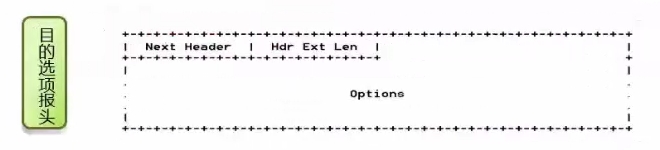
- The meaning of the parameter is the same as that of the hop by hop option header , The destination option header contains the information that the destination needs to process ;
- The final destination of the message and the nodes in the routing header address list will check this option ;
- It can appear twice : Before routing header and upper layer protocol data message .
6.3.2.2.3 Routing header (Routing Header)
IPv6 The routing header provides the sender with a IPv6 Datagram control mechanism , To control ( At least partially control ) The path of datagrams through the network . at present , There are two different versions of the routing extension header , They are called types 0(RH0) And type 2(RH2).RH0 It has been rejected for security reasons [RFC5095], RH2 Is defined as and mobile IP The common use . It is used to specify the intermediate node through which the message must be forwarded .

- Next header: 8bit The header type immediately following the routing header
- Hdr Ext Len: 8bit Route header length ( barring Next Header)
- Routing Type: 8bit Identify the routing header type (RFC Defined as 0)
- Segements left:8bit The number of intermediate nodes that should still be visited before reaching the destination node
- type-specific data: Variable length , The format is determined by the route type (routing type) To decide . according to Routing Type Value , Give the corresponding forwarding data .
6.3.2.2.4 Segmented header (Fragment Header)
Segment head (Fragment Header) be used for IPv6 The source node sends a greater than path... To the destination MTU Datagram .1280 Bytes are for IPv6 The defined link layer is the smallest MTU. stay IPv6 in , Only the sender of datagram can perform fragmentation operation , With this IPv4 Different .
The fragment header contains information and IPv4 The same in the head , Only the identifier field is 32 position , Larger identifier fields provide the ability to slice more pieces .

- When the message exceeds MTU It is necessary to send the message in segments , Segment sending is completed by segment extension header ;
- Next Header Indicates the next message header ;
- Reserved Yes, set the reserved field to 0;
- Framgment Offset Represents the segment offset , It refers to the position offset of the message segment in the original message ;
- Res Yes, the reserved field is set to 0;
- M flag:1 It means that there are fragment messages in the future ,0 Indicates the last fragment message ;
- Identification Indicates segmented ID .
6.3.2.2.5 Certification header

- The authentication extension header is used to provide IP Message authentication and other functions , be applied to IP Security , Provide message verification 、 Integrity check ;
- RFC2402 The specific details of the extended header are defined in .
6.3.2.2.6 Encapsulate the safety payload head
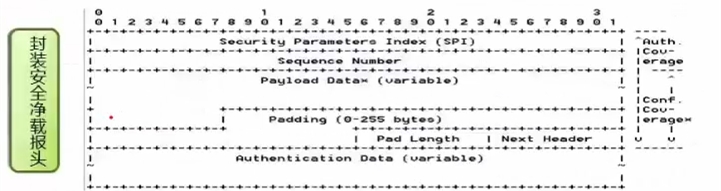
- The encapsulated safe payload extension header is mainly used in IP Security , Provide message verification 、 Integrity check and encryption ;
- RFC2406 The specific details of the extended header are defined in .
6.3.2.2.7 Upper level head
This is used to identify the upper layer protocol type of datagram , Such as TCP、UDP、ICMP etc. .
7 Internet Group Management Protocol IGMP
understand IGMP, First of all, we need to understand multicast . Specific view 2.6 section . The following figure is a typical multicast example :
7.1 IGMP
IGMP(Internet Group Management Protocol) Internet Group Management Protocol , be responsible for IPv4 Multicast member management protocol , Used in IP Between the host and the multicast router directly adjacent to it 、 Maintain multicast group membership .
IGMP agreement (IPv4) and MLD agreement (IPv6) Used to help hosts specify which groups they are interested in ( Which multicast groups do you want to join ), And determining whether messages from certain sources should be received or filtered . In order to achieve this goal , The host needs to send some messages to the multicast router of the local subnet to exchange some multicast membership management information to the multicast router .
Multicast uses D class IP Address ,IP The range of addresses is 224.0.0.0-239.255.255.255. among 224.0.0.1 Represents all computers on the subnet ,224.0.0.2 Represents all routers on the subnet . in addition , multicast ip Address can only be used as destination address , Moreover, error messages about multicast addresses cannot be generated .
IGMP Of mac The address is 01-00-5e-xx-xx-xx, After that 23bits yes ip Low address 23bits. This also shows that as long as you know a multicast ip Address , Can be converted to its mac Address , No need to pass arp The request for mac Address .
IGMP So far, the protocol has three versions :
- IGMPv1( from RFC 1112 Definition ) Support host membership query and host membership report
- IGMPv2( from RFC 2236 Definition ) Support membership query,membership report,Leave Group message
- IGMPv3( from RFC 3376 Definition ) Support membership report and membershipquery
IGMP Two stages of
1、 When a host joins a new multicast group , The host sends a message to the multicast address of the multicast group IGMP message , Declare that you want to be a member of the group . The local multicast router received IGMP After the message , We should also use multicast routing protocol to forward this group membership to other multicast routers on the Internet
2、 Group membership is dynamic . The local multicast router should periodically inquire the host on the local LAN , Determine whether these hosts continue to be members of the Group
A detailed reference : Multicast learning ——IGMP Protocol Brief
7.2 Multicast routing protocol
have only IGMP The protocol cannot complete the multicast task . A multicast router connected to a LAN must also work with other multicast routers on the Internet , In order to transmit multicast datagrams to all group members with the smallest code , This requires the use of multicast routing protocols .
In the process of multicast, the members of a multicast group change dynamically . Multicast team members pass IGMP The protocol registers with the nearest multicast router , Indicate which multicast group you belong to. After receiving a multicast packet, a router will determine whether it is connected to the members of this multicast group , If there is, forward .
Multicast routing is actually to find the multicast forwarding tree with the source host as the root node . The same multicast group , There will also be different multicast forwarding trees for different source points .
Multicast routing protocols generally forward multicast datagrams , Use the following three methods :
- Flooding and pruning
- Tunnel technology
- Core based discovery technology .
Some common multicast routing techniques :
- Distance vector multicast routing protocol DVNRP
- Core based forwarding tree CBT
- Develop the shortest multicast extension through priority MOSPF
- Protocol Independent Multicast - Sparse mode PIM-SM
- Protocol Independent Multicast - Intensive way PIM-DM
8 Virtual private network VPN
because IP The lack of address , Some institutions can apply IP Far smaller than the host it owns . At this time, it is not guaranteed that all hosts can access the Internet . In many cases , Only some hosts are allowed to connect to the Internet in the organization's Network . so , In this kind of network , For IP The address is called the local address ( Private network IP), And the only one in the world that can link to the Internet IP Is the global address ( Public network IP).
To prevent private networks IP With the public network IP Rush into each other , from RFC1918 Just indicate some private addresses , For private networks .2013 year 4 month ,RFC6890 It comprehensively points out all private networks IP. as follows :
| Network type | IP classification | Address range | IP Number |
|---|---|---|---|
| The private network | A class | 10.0.0.0 To 10.255.255.255 | 1658 m |
| The private network | B class | 172.16.0.0 To 172.31.255.255 | 104 m |
| The private network | C class | 192.168.0.0 To 192.168.255.255 | 6.5 m |
| Public network | A class | 1.0.0.0 To 9.255.255.255 | 1.5 One hundred million |
| Public network | A class | 11.0.0.0 To 126.255.255.255 | 19.23 One hundred million |
| Public network | B class | 128.0.0.0 To 172.15.255.255 | 7.3 One hundred million |
| Public network | B class | 172.32.0.0 To 191.255.255.255 | 3.3 One hundred million |
| Public network | C class | 192.0.0.0 To 192.167.255.255 | 0.11 One hundred million |
| Public network | C class | 192.169.0.0 To 223.255.255.255 | 5.03 One hundred million |
Adopt such a special IP The network of addresses is called Private network , Because it's special IP Only used in this institution , Many private networks IP All types , Such as the LAN used by everyone IP Usually 192.168.xxx.xxx. so , special IP Address pages are called reusable addresses (reusalbe address).
Virtual private network (VPN) It is a new network technology , It provides us with a way to use the public network ( Such as the largest public Internet ) It is a connection mode that can safely remotely access the private network inside the enterprise . We know that a network connection usually consists of three parts : The client 、 Transmission media and servers .VPN The network also needs these three parts , The difference is VPN The connection is not a physical transmission medium , But use IP Tunnel technology As the transmission medium , This tunnel is built on the basis of public network or private network , Such as Internet or private Intranet etc. .
At the same time, we should realize VPN Connect , There must be one based on Windows NT or Windows2000 Server( at present Windows The system is the most popular , It's also true VPN An operating system with the most comprehensive technical support ) Of VPN The server ,VPN On the one hand, the server is connected to the private network inside the enterprise (LAN), On the other hand, connect to the Internet or other private networks , It's about VPN The server must have a public network IP Address , In other words, the enterprise must first have a legal Internet Or private network domain name . When the client passes VPN When connecting to communicate with computers in a private network , First of all NSP( Internet service provider ) Transfer all data to VPN The server , And then by VPN The server transmits all the data to the target computer . Because in VPN Communication in the tunnel can ensure the specificity of the communication channel , And the transmitted data is compressed 、 Encrypted , therefore VPN Communication also has the communication security of private network .
Whole VPN The communication process can be simplified as follows 4 There are four general steps :
- The client is going to VPN The server makes a request ;
- VPN The server responds to the request and issues an identity challenge to the client , The client sends encrypted user authentication response information to VPN The server ;
- VPN The server checks the response according to the user database , If the account is valid ,VPN The server will check whether the user has remote access ; If the user has remote access permission ,VPN The server accepts this connection ;
- Last VPN The client and server public keys generated by the server during the authentication process will be used to encrypt the data , And then through VPN Tunnel technology for packaging 、 encryption 、 Transfer to the destination intranet .
9 Network address translation NAT
NAT(Network Address Translation), Network address translation . By making the internal network private IP The address is translated into the world's only public network IP Address , So that the internal network can be connected to external networks such as the Internet .
Specific reference : Network address translation (NAT)
边栏推荐
- Pytorch learning diary (4)
- M design of GPS data longitude and latitude height analysis and Kalman analysis software based on matlab-GUI
- m基于matlab的超宽带MIMO雷达对目标的检测仿真,考虑时间反转
- M analysis of anti-interference performance of high-speed frequency hopping communication system based on Simulink
- Fundamentals of crawlers - basic principles of multithreading and multiprocessing
- 4. Installation and use of idea
- Minecraft bedrock BDS service tutorial
- Pychart installation tutorial
- PyTorch学习日记(四)
- m基于matlab的协作mimo分布式空时编码技术的仿真
猜你喜欢

网络知识-03 数据链路层-以太网
JS不使用async/await解决数据异步/同步问题

快速学会cut命令,uniq命令的使用

The use and differences of dictionaries, tuples and lists,

Crawler Basics - session and cookies

Performance evaluation and comparison of lightweight application servers of major cloud service manufacturers, Alibaba cloud, Tencent cloud, Huawei cloud, and ucloud

PyTorch学习日记(四)

PyTorch学习日记(四)
![Minecraft integration package [gtnh] gray Technology: new vision server building tutorial](/img/59/d5f226f57cfd7d28d5a76ff38fae16.png)
Minecraft integration package [gtnh] gray Technology: new vision server building tutorial

Data protection / disk array raid protection IP segment 103.103.188 xxx
随机推荐
M simulation of UWB MIMO radar target detection based on MATLAB, considering time reversal
Pychart installation tutorial
How to record enterprise or personal domain names
Fundamentals of crawler - basic principles of agent
Pytorch learning diary (4)
字典、元组和列表的使用及区别,
PyTorch学习日记(三)
What does ack attack mean? How to defend ack attack
[ restartedMain] o.s.b.d.LoggingFailureAnalysisReporter :
Quickly understand redirection
爬虫基础—WEB网页基础
m基于matlab的BTS天线设计,带GUI界面
m3GPP-LTE通信网络中认知家庭网络Cognitive-femtocell性能matlab仿真
express
How does legend open its service? What do you need to prepare to open legend private server?
Functions and random numbers
搭建一个网站都需要那些东西
regular expression
Minecraft integration package [gtnh] gray Technology: new vision server building tutorial
M simulation of 16QAM and 2DPSK communication links based on Simulink, and get the bit error rate curve by calling Simulink model through MATLAB