当前位置:网站首页>Minecraft integration package [gtnh] gray Technology: new vision server building tutorial
Minecraft integration package [gtnh] gray Technology: new vision server building tutorial
2022-07-19 07:04:00 【zeruns】
My world (MC) Integrated package [GTNH] Gray Technology : New horizons Server building tutorial , Provide server and client downloads , In this paper, the server system uses Linux, For panel MCSM.
The server and client are from MCBBS Download the , Original address :https://url.zeruns.tech/GTNH
Client download :https://url.zeruns.tech/GTNH_client Extraction code : iyqm
Download on the server :https://url.zeruns.tech/GTNH_server Extraction code : 9utm
Video tutorial :https://www.bilibili.com/video/BV13U4y1c7om/
- windows build MC Server tutorial :https://blog.zeruns.tech/archives/529.html
- Raspberry pie building my world server tutorial :https://blog.zeruns.tech/archives/601.html
- Wei Unicom NAS Use Container Build my world server :https://blog.zeruns.tech/archives/612.html
- Various Minecraft Server side introduction and download :https://blog.zeruns.tech/archives/626.html
- Cost effective and cheap VPS/ ECS recommends :https://blog.zeruns.tech/archives/383.html
MC Open service communication group :966038270
My world open service exchange TG Group :https://t.me/Minecraft_zeruns
GTNH Introduction to integration package
If ! Gray technology cannot overturn your worldview !
that !GTNH This integration is best for you !
you 're right ! This integration includes GregTech5U,Thaumcraft, Buildcraft,Witchery,Galacticraft,BloodMagic, Forestry etc. 200+ individual Mod, And have 2300+ A task is waiting for you to complete ! Of course ! This integration also includes several made by the author of the integration package GregTech Expand Mod!
although ! This integration package has gone through 7 Years of discipline !
however ! It will overturn your world outlook again , Let you revel in it for at least a year !
Come on ! Give Way GTNH Once again beyond pure GT, Reach the peak of science and Technology !
What is? 《 Gray Technology : New horizons 》?
What you are looking at now is one that is gradually using gray technology to balance MC1.7.10 Version of all game content , An all inclusive , Apply all the integration packages . After seven years of development by the author ( It is still under development ), There are few integration packages that can match 《 Gray Technology : New horizons 》 On the game content and Mod Our magic has changed thousands of synthesis , And made an extremely thick assignment book , Corresponding , Also made a custom gift bag system , The task reward used for part also customizes the generation of the world , Customize the interface of the magic guide manual , wait .
Why make this integration package ?
Make this integration package , In order to let players experience an ultra long technology line , And players will find , The later , each Mod The degree of linkage is getting higher and higher , It can even be said that it has been integrated , This integration package has broken the routine , Break through the Minecraft Shackles of . Let's talk about it , This integration , It has been aligned with independent games .
In order to achieve the goal of super long scientific and technological line , This integration takes gray technology and its expansion as the main line , other Mod Supplemented , Using gray technology in the era of science and Technology , Give many others Mod A proper positioning . Since the stone age , Survival will become more difficult —— Until you enter the steam age . But this integration is far more than that . In order to wear stronger equipment , In order to resist the monsters at night , In order to eliminate the alien world BOSS, You have to step into the age of electricity . When you enter the age of electricity , You will soon find out , With the resources of the earth , It's not enough for you to develop rapidly —— therefore , You can only aim at the rising sun , A few shining planets in the dim starry sky .
The task development process of the game
0 level : The most basic Minecraft, Panmas farm , Gray technology's flint tool
1 level : Gray Technology - The steam age , Craftsman's soul , Chisel , Steam machine
2 level : Gray Technology - Low voltage era , The railway , Forestry , More utilities , knapsack , Twilight forest
3 level : Gray Technology - Medium voltage era , The mysterious age and its expansion , Forestry , Advanced solar , applied energistics 2
4 level : Gray Technology - High pressure era , Galaxies and their expansion ,AFSU, Witchcraft
5 level : Gray Technology - Ultra high voltage era , Gene industry , Blood magic
6 level : Gray Technology - The age of drama , Nuclear fusion gameplay 、 Require higher automation
7 level : Gray Technology - Zero pressure era ,Tectech Unique mechanism 、 The final form of the circuit board
8 level : Gray Technology - The future era of extreme pressure and endless pursuit , Under the expanding demand for materials , Achieve the ultimate goal
screenshots


Server setup preparation
First you have to have a server ( What is already there can be ignored ), Here are some suggestions :
- Aliyun station :https://dashi.aliyun.com/site/zeruns/yxz?userCode=jdjc69nf
- Tencent cloud kills every second :https://curl.qcloud.com/lQSAXVLq
- Hua Wei Yun :https://url.zeruns.tech/hwy2021
- Tencent cloud double 11 :https://curl.qcloud.com/uOh7Rius
- Alibaba cloud AMD The server :https://url.zeruns.tech/aliyun_amd
Other cost-effective servers are recommended :https://blog.zeruns.tech/archives/383.html
As a reminder : If you are a new user, there is a discount , Buy as long as you can , Because the server with preferential price expires, the follow-up fee is very expensive , And new users can only buy it once , So try to buy it for a long time .
because MOD Too much , Configuration recommendation 4G Memory up , bandwidth 5 Zhaoqi .
After purchasing the server, choose to install Centos7 System , And then use ssh Login server .ssh Client software recommendation putty or mobaxterm.
install JAVA Environmental Science
ARM edition JDK Download address :https://url.zeruns.tech/ywU1r You can download it yourself and upload it to the server , Then modify the following command .
#  download JDK Installation package , You can also go to the official website to download
wget https://img.zeruns.tech/down/Java/OpenJDK8U-jdk_x64_linux_hotspot_8u292b10.tar.gz

#  Create installation directory
mkdir /usr/local/java/

#  Unzip... In the current directory JDK Compressed files
tar -zxvf OpenJDK8U-jdk_x64_linux_hotspot_8u292b10.tar.gz -C /usr/local/java/

#  Set the environment variable ( install  VIM  Input  yum -y install vim)
vim /etc/profile
#  Add the corresponding variable at the end
 Scroll the cursor to the end   Press down   On the keyboard  INS  key , Switch to insert mode
 After entering these strings   Press ESC Exit insertion mode
 Then press  Shift + ;  Input  wq  And return to save

export JAVA_HOME=/usr/local/java/jdk8u292-b10
export JRE_HOME=${JAVA_HOME}/jre
export CLASSPATH=.:${JAVA_HOME}/lib:${JRE_HOME}/lib
export PATH=${JAVA_HOME}/bin:$PATH

#  Apply the modified environment variables
source /etc/profile

#  Soft link programs to environment variables
ln -s /usr/local/java/jdk8u292-b10/bin/java /usr/bin/java

#  Test for proper installation , Show  java version "1.8.0_292"  It's normal
java -version
Port open
Panel needs 23333( Main functions ) Port and port 20010 - 20200(FTP function ) Port range .
The default port of the game server is 25565.
If you use Alibaba cloud , Tencent cloud Or other cloud service providers , Please enter the console to the firewall security group policy , Release the above ports .
Or release all ports , Both in and out directions should be


If you still can't access , Please close the firewall of the system :
#  Turn off firewall , Execute sequentially
systemctl stop firewalld
systemctl disable firewalld
service iptables stop
Install the panel
One line command quick installation ( Apply to AMD64 framework Ubuntu/Centos/Debian/Archlinux)
wget -qO- https://gitee.com/Suwingser/MCSManager-installer/raw/master/install.sh | bash
- After execution , Use
systemctl start mcsmYou can start the panel service . - Run the command
systemctl enable mcsmTo set the startup and self startup . - Run the command
systemctl status mcsmIt can display the running status . - The panel code and running environment are automatically installed in
/opt/Under the table of contents .
If one click installation doesn't work , You can try installing... Manually , Refer to this article :https://blog.zeruns.tech/archives/584.html# Install the panel
Access after installation http:// Yours ip:23333/ You can access the panel .
- Default account :#master
- Default password : 123456
establish MC Server side
download GTNH Server and client of , The download address is at the beginning of the article .
Then log in to the management panel , Click on Create a new instance application , And then click Quick creation . Fill in the server name , Fill in the file name of the server forge-1.7.10-10.13.4.1614-1.7.10-universal.jar , The maximum and minimum memory is filled according to the actual memory of your server , Remember to add units M or G, Then click Create server .


Click on the management , File online management , Upload the server compressed package just downloaded .


Then decompress the compressed package , Enter the extracted Directory , Cut all the documents inside out .

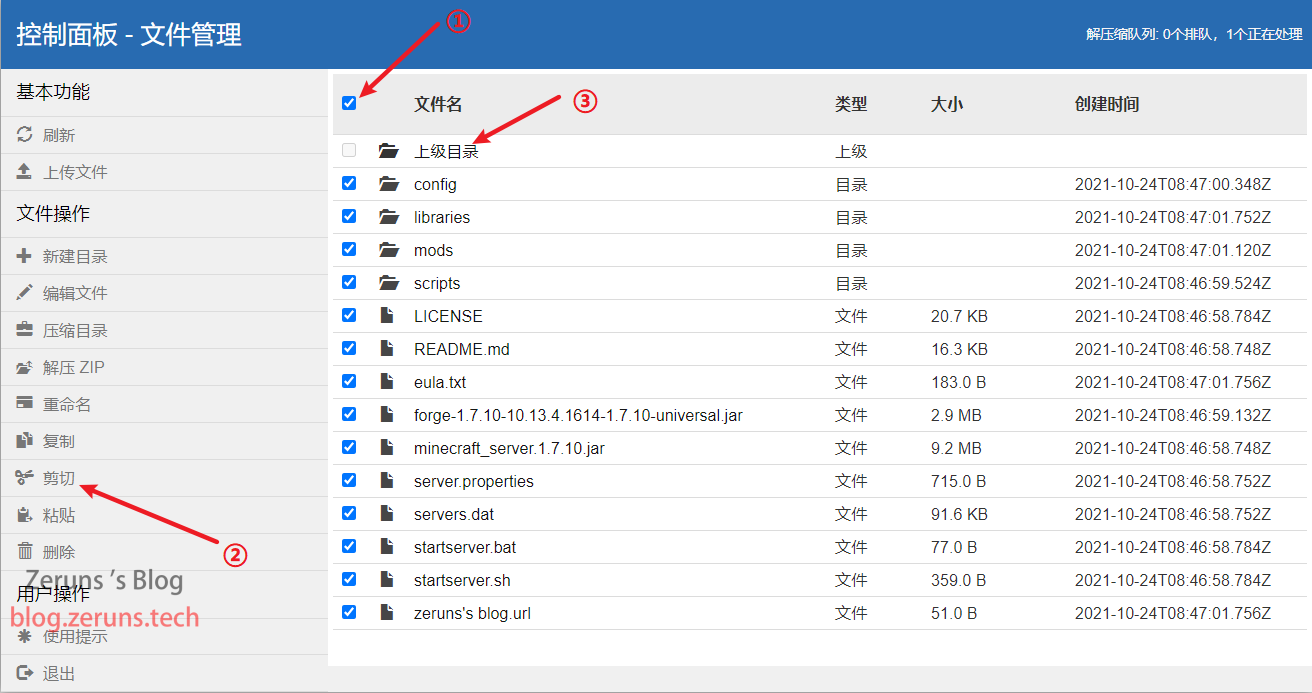
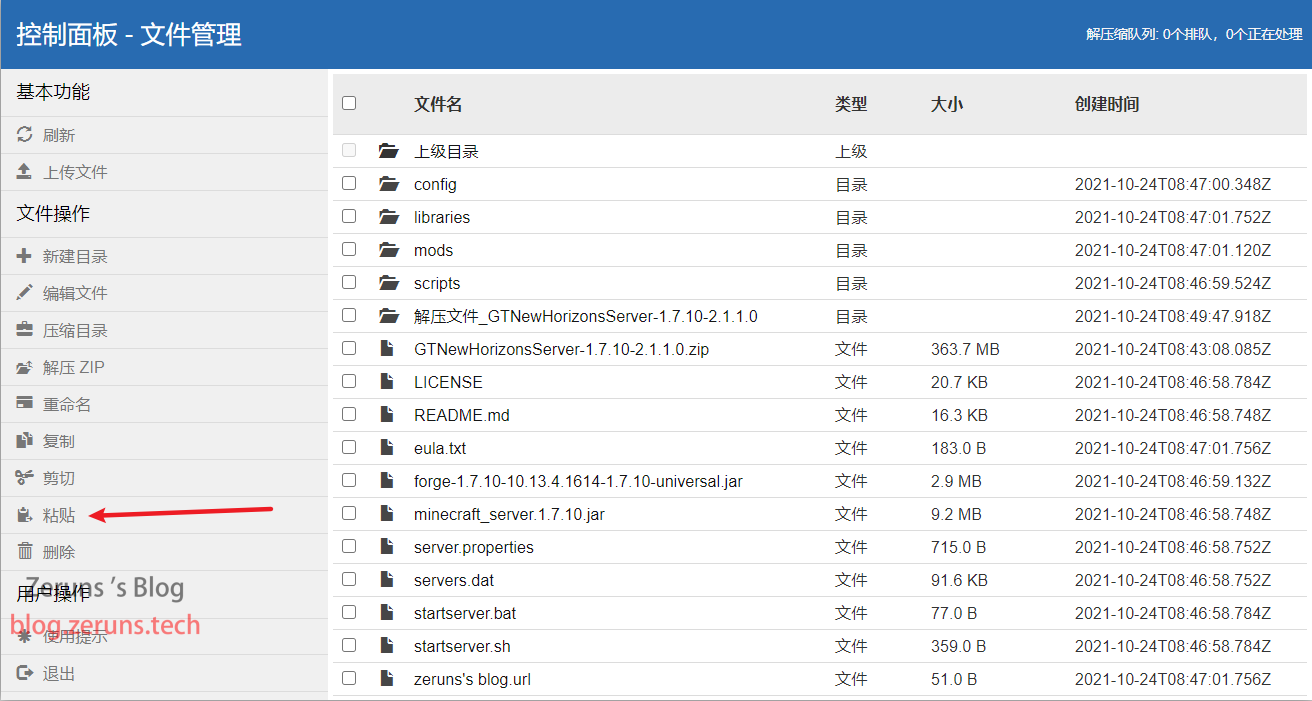
Then click the analog terminal , Turn on , You can start the server , It may take a long time to open for the first time .

Wait for the message shown in the figure, that is, the server has run successfully .

The default port is 25565, If you need to modify, change server.properties The configuration file . I have modified this server configuration file , By default, genuine authentication and whitelist mode are turned off , Need to open by yourself .
Add a server to the game , Enter your... Directly IP that will do , If you modify the port, you need to add the port .
Recommended reading
- Cost effective and cheap VPS/ ECS recommends :https://blog.zeruns.tech/archives/383.html
- Build intranet penetration server , belt Web panel :https://blog.zeruns.tech/archives/397.html
- How to build a personal blog :https://blog.zeruns.tech/archives/218.html
- NAS Set up sweet candy star wish service Hang up to make money :https://blog.zeruns.tech/archives/627.html
- How to build a confession wall website (LoveWall):https://blog.zeruns.tech/archives/634.html
- NVR( Digital Video Recorder ) Installation and commissioning , Monitoring installation tutorial :https://blog.zeruns.tech/archives/637.html
边栏推荐
- 1.服务器是什么?
- Servlet 笔记
- 剑指Offer刷题记录——Offer 04. 二维数组中的查找
- slackware 14.2 安装KDE 5 plasma
- ArraysList方法
- 阿里云 杭州 ARM 云服务器性能评测
- 正则表达式,生成器,迭代器
- Comparison between CS brand SD NAND and SPI NAND
- Performance evaluation and comparison of lightweight application servers of major cloud service manufacturers, Alibaba cloud, Tencent cloud, Huawei cloud, and ucloud
- Regular expression, generator, iterator
猜你喜欢

What is tsd/qsd? What is CS Genesis SD NAND?

The use and differences of dictionaries, tuples and lists,

Good partner of single chip microcomputer - CS Genesis SD NAND flash
Servlet 笔记

m基于MATLAB-GUI的GPS数据经纬度高度解析与kalman分析软件设计

postgresql 数据库如何设置主键自增长

m基于matlab的协作mimo分布式空时编码技术的仿真

Tianyi cloud Hangzhou virtual machine (VPS) performance evaluation

ARM服务器搭建 我的世界(MC) 1.18.2 版私服教程

Gnome 安装扩展插件(40.1版本,opensuse tumbleweed)。
随机推荐
企业或个人域名备案怎么弄
ACK攻击是什么意思?ACK攻击怎么防御
slackware 14.2 安装KDE 5 plasma
Alibaba cloud Hangzhou arm ECS performance evaluation
[automated testing] - robotframework practice (I) building environment
m基于simulink的16QAM和2DPSK通信链路仿真,并通过matlab调用simulink模型得到误码率曲线
freebsd12 安装gnome3图形界面
SYN洪水攻击的原理,syn洪水攻击的解决办法
1.服务器是什么?
mysql的复习总结
Gnome 安装扩展插件(40.1版本,opensuse tumbleweed)。
我的世界1.12.2 神奇宝贝(精灵宝可梦) 开服教程
高防服务器是如何确认哪些是恶意IP/流量?ip:103.88.32.XXX
基于simulink的转速反馈单闭环直流调速系统
[ restartedMain] o.s.b.d.LoggingFailureAnalysisReporter :
Homework
Utilisation et différenciation des dictionnaires, des tuples et des listes,
各大云服务厂商 轻量应用服务器 性能评测对比,阿里云、腾讯云、华为云、Ucloud
中国知网论文free下载的方法
PyTorch学习日记(二)