当前位置:网站首页>[AI] action recognition using simple neural network -- Based on coco key points
[AI] action recognition using simple neural network -- Based on coco key points
2022-07-19 05:18:00 【Dreamcatcher wind】
Preface
coco The dataset contains key point detection , If you want to use these extracted key points for behavior recognition , What to do ? The following is mainly through building a simple neural network ( Multilayer perceptron ) To classify key points .
Mission : If you need to classify the actions of making phone calls and playing mobile phones .
Start
First step , Need to use HRNet Extract the key points of the characters in the image , The required engineering code is detailed in this blog :
The second step , Need to rewrite main.py Code in file :
import argparse
import imp
import time
import os
import cv2 as cv
import numpy as np
from pathlib import Path
from Point_detect import Points
from lib.utils.visualization import draw_points_and_skeleton,joints_dict
import csv
from tqdm import tqdm

def image_detect(opt):

    skeleton = joints_dict()['coco']['skeleton']
    hrnet_model = Points(model_name='hrnet', opt=opt,resolution=(384,288))

    pic_file = os.listdir(opt.source)
    # print(pic_file,'\n')
    for pic in tqdm(pic_file):
        img0 = cv.imread(os.path.join(opt.source, pic))
        frame = img0.copy()
    #predict
        pred, bbox = hrnet_model.predict(img0) #  It's modified here Point_detect.py file ,  Get one more bbox Coordinate information

        ###  Convert to a one bit array to save ,  We'll deal with it later ( There are many people involved )
        for target in range(len(pred)):
            pred_flatten = pred[target].ravel()[0:33] #  Just before getting 11 A key point
            new = []
            tag = 0
            for i in range(len(pred_flatten)):
                if tag != 2:
                    new.append(pred_flatten[i])
                    tag += 1
                else:
                    tag = 0

            point_num = 1

            base_x, base_y = pred_flatten[0], pred_flatten[1]  #  Take this as the benchmark ( nose )

            w , h = img0.shape[1]-base_x, img0.shape[0]-base_y
            k = 0
            with open('keypoint_call.csv', 'a', encoding='utf8') as name:
                for i in pred_flatten:
                    if i > 1: #  Greater than 1 The part of is the coordinate ,  Less than 1 What we need is confidence
                        #  Normalized coordinates ,  Calculate the position of key points relative to the picture
                        #  Be careful :  Consider the situation on the left and right ,  Adopt symmetrical calculation method
                        if i-base_x < 0:
                            x_ = base_x+(base_x-i)
                            x = -(x_-base_x)/w
                        else:
                            x = (i-base_x)/w
                        if i-base_y < 0:
                            y_ = base_y+(base_y-i)
                            y = -(y_-base_y)/w
                        else:
                            y = (i-base_y)/h

                        if k % 2 == 0: #  Write when odd x,  Write when even y
                            name.write(str(x)+',') if point_num < len(pred_flatten) else name.write(str(x)+'\n')
                        else:
                            name.write(str(y)+',') if point_num < len(pred_flatten) else name.write(str(y)+'\n')
                    else:
                        name.write(str(i)+',') if point_num < len(pred_flatten) else name.write(str(i)+'\n')
                    point_num += 1
                    k += 1

        #  Visualize and save
        # for i, pt in enumerate(pred):
        #     frame = draw_points_and_skeleton(frame, pt, skeleton)
        #     name = 'test_result'+pic+'.jpg'
        #     cv.imwrite(os.path.join('D:/save',name), frame)

        ###  Be careful , pt That's the point ,  It's a len=17 Of tuple,  Each element corresponds to a point


def video_detect(opt):
    hrnet_model = Points(model_name='hrnet', opt=opt, resolution=(384, 288))  # resolution = (384,288)  or (256,192)

    skeleton = joints_dict()['coco']['skeleton']

    cap = cv.VideoCapture(opt.source)
    if opt.save_video:
        fourcc = cv.VideoWriter_fourcc(*'MJPG')
        out = cv.VideoWriter('data/runs/{}_out.avi'.format(os.path.basename(opt.source).split('.')[0]), fourcc, 24, (int(cap.get(3)), int(cap.get(4))))
    while cap.isOpened():
        ret, frame = cap.read()
        if not ret:
            break
        pred = hrnet_model.predict(frame)

        for pt in pred:
            frame = draw_points_and_skeleton(frame,pt,skeleton)
        if opt.show:
            cv.imshow('result', frame)
        if opt.save_video:
            out.write(frame)
        if cv.waitKey(1) == 27:
            break
    out.release()
    cap.release()
    cv.destroyAllWindows()
# video_detect(0)
if __name__ == '__main__':
    parser = argparse.ArgumentParser()
    parser.add_argument('--source', type=str, default='D:/call', help='source')  #  Folder for pictures
    parser.add_argument('--detect_weight', type=str, default="./yolov5/weights/yolov5x.pt", help='e.g "./yolov5/weights/yolov5x.pt"')
    parser.add_argument('--save_video', action='store_true', default=False,help='save results to *.avi')
    parser.add_argument('--show', action='store_true', default=True, help='save results to *.avi')
    parser.add_argument('--device', default='cpu', help='cuda device, i.e. 0 or 0,1,2,3 or cpu')
    parser.add_argument('--conf-thres', type=float, default=0.25, help='object confidence threshold')
    parser.add_argument('--iou-thres', type=float, default=0.45, help='IOU threshold for NMS')
    parser.add_argument('--classes', nargs='+', type=int, help='filter by class: --class 0, or --class 0 2 3')
    parser.add_argument('--agnostic-nms', action='store_true', help='class-agnostic NMS')
    parser.add_argument('--augment', action='store_true', help='augmented inference')

    opt = parser.parse_args()
    image_detect(opt)
Be careful , Here is a place that is very important , Namely How to normalize key points .
Because the size and location of the target in each picture are completely different , Therefore, you can't directly use the upper left corner of the image as the origin to find the location of key points , You need to use a key point as the origin . The method I use is to learn YOLO v5 Yes Bounding Box Do normalization , The core idea is (x/w , y/h), But some changes are needed :

To obtain a csv file :

The third step , Build multi-layer perceptron , Training classification model :
import csv
import pandas as pd
import numpy as np
import matplotlib.pyplot as plt
from sklearn.model_selection import train_test_split

from keras import models, optimizers
from keras.models import Sequential
from keras.layers import Dense, Dropout, BatchNormalization
import keras.backend as K
from keras.callbacks import LearningRateScheduler
from keras.utils.np_utils import *

###  Read the file
data_call = pd.read_csv('D:/keypoint_call.csv') #  This is the file of the key points of making a phone call
data_play = pd.read_csv('D:/keypoint_play.csv') #  This is the file of the key points of playing mobile phone
data_no = pd.read_csv('D:/keypoint_no.csv') #  This is a negative sample file

###  Positive and negative sample splicing ,  normalization
train = pd.DataFrame(pd.concat([data_play, data_call], ignore_index=True))
###  A filling 17 A key point
for i in range(len(train.columns), 34):
    train.insert(loc=i, column=str(i+1), value=0)
###  Hot coding alone
target = [1 if num < len(data_play) else 2 for num in range(len(train))] # 0: Negative sample   1: Play with the smarthphone   2: Make a phone call
train = pd.DataFrame(pd.concat([train, data_no], ignore_index=True))
for i in range(len(data_no)):
    target.append(0)
target = np.array(target)
target = to_categorical(target, 3)

###  Assign training set and verification set
x_train, x_val, y_train, y_val = train_test_split(train, target, test_size=0.2, random_state=2022)

###  Learning rate adjustment program
def scheduler(epoch):
    if epoch % 30 == 0 and epoch != 0:
        lr = K.get_value(model.optimizer.lr)
        K.set_value(model.optimizer.lr, lr * 0.1)
        print("lr changed to {}".format(lr * 0.1))
    return K.get_value(model.optimizer.lr)

#  Training
seed = 9
np.random.seed(seed)

model = Sequential()
model.add(Dense(256, input_dim=34, activation='relu'))
# model.add(Dropout(0.5)),
model.add(Dense(128, input_dim=256, activation='relu'))
# model.add(Dropout(0.5)),
# model.add(BatchNormalization()),
model.add(Dense(64, input_dim=128, activation='relu')),
# model.add(Dropout(0.15)),
model.add(Dense(3, activation='softmax'))

model.compile(optimizer=optimizers.adam_v2.Adam(lr=0.001), #  Learning rate is very important !
              loss='categorical_crossentropy',
              metrics=['accuracy'])

reduce_lr = LearningRateScheduler(scheduler)
history = model.fit(np.array(x_train),
                    np.array(y_train),
                    epochs=100,
                    batch_size=64, # bs Very important !
                    validation_data=(np.array(x_val), np.array(y_val)),
                    callbacks=[reduce_lr]
                    )
###  Visualizing training results
acc = history.history['accuracy']
val_acc = history.history['val_accuracy']
loss = history.history['loss']
val_loss = history.history['val_loss']

epochs = range(1, len(acc) + 1)

plt.figure(figsize=(6,6))
plt.plot(epochs, acc, 'b', label='Train acc',color='lightseagreen')
plt.plot(epochs, val_acc, 'b', label='Val acc',color='tomato')
plt.xlabel('Epochs')
plt.ylabel('acc')
plt.legend()
plt.show()

###  Save the model
model.save('D:/keypoint_model.h5') 
Step four , Reasoning :
Yes main.py Just a little modification :( You can use a if To control the generation of csv Or reasoning , You can modify )
import argparse
import imp
from random import randrange
import time
import os
import cv2 as cv
import numpy as np
from pathlib import Path
from Point_detect import Points
from lib.utils.visualization import draw_points_and_skeleton,joints_dict
import csv
from tqdm import tqdm
from keras.models import load_model

def image_detect(opt):

    skeleton = joints_dict()['coco']['skeleton']
    hrnet_model = Points(model_name='hrnet', opt=opt,resolution=(384,288))

    keypoint_model = load_model('keypoint_model.h5')

    pic_file = os.listdir(opt.source)
    # print(pic_file,'\n')
    for pic in pic_file:
        print('pic = {} :'.format(pic))
        img0 = cv.imread(os.path.join(opt.source, pic))
        frame = img0.copy()
        pred, bbox = hrnet_model.predict(img0)

        ###  Convert to a one bit array to save ,  We'll deal with it later ( There are many people involved )
        for target in range(len(pred)):
            pred_flatten = pred[target].ravel()[0:33] #  Just before getting 11 A key point
            point = []
            tag = 0
            for i in range(len(pred_flatten)):
                if tag != 2:
                    point.append(pred_flatten[i])
                    tag += 1
                else:
                    tag = 0

            base_x, base_y = point[0], point[1]  #  Take this as the benchmark ( nose )

            w , h = img0.shape[1]-base_x, img0.shape[0]-base_y

            xy = []
            k = 0
            for i in point:
                if i-base_x < 0:
                    x_ = base_x+(base_x-i)
                    x = -(x_-base_x)/w
                else:
                    x = (i-base_x)/w
                if i-base_y < 0:
                    y_ = base_y+(base_y-i)
                    y = -(y_-base_y)/w
                else:
                    y = (i-base_y)/h

                if k % 2 == 0:
                    xy.append(x)
                else:
                    xy.append(y)
                k += 1

            for i in range(12):
                xy.append(0)

            out = keypoint_model.predict(np.array(xy).reshape(1,-1))
            print('out = {}'.format(out))
            predict = np.argmax(out)
            tag = 'play phone' if predict == 1 else ('call' if predict == 2 else 'normal')
            print('tag = {}\n'.format(tag))

            #  preservation bbox and tag
            if tag == 'call':
                cv.rectangle(frame, (bbox[target][0],bbox[target][1]), (bbox[target][2],bbox[target][3]), (255,0,0), thickness=2)
                cv.putText(frame, tag, (bbox[target][0],bbox[target][1]-10), cv.FONT_HERSHEY_SIMPLEX, color=(255,0,0), fontScale = 0.75, thickness=2)
            else:
                cv.rectangle(frame, (bbox[target][0],bbox[target][1]), (bbox[target][2],bbox[target][3]), (0,0,255), thickness=2)
                cv.putText(frame, tag, (bbox[target][0],bbox[target][1]-10), cv.FONT_HERSHEY_SIMPLEX, color=(0,0,255), fontScale = 0.75, thickness=2)

        name = 'test_result'+pic+'.jpg'
        cv.imwrite(os.path.join('D:/save',name), frame)

def video_detect(opt):
    hrnet_model = Points(model_name='hrnet', opt=opt, resolution=(384, 288))  # resolution = (384,288)  or (256,192)
    skeleton = joints_dict()['coco']['skeleton']

    cap = cv.VideoCapture(opt.source)
    if opt.save_video:
        fourcc = cv.VideoWriter_fourcc(*'MJPG')
        out = cv.VideoWriter('data/runs/{}_out.avi'.format(os.path.basename(opt.source).split('.')[0]), fourcc, 24, (int(cap.get(3)), int(cap.get(4))))
    while cap.isOpened():
        ret, frame = cap.read()
        if not ret:
            break
        pred = hrnet_model.predict(frame)
        for pt in pred:
            frame = draw_points_and_skeleton(frame,pt,skeleton)
        if opt.show:
            cv.imshow('result', frame)
        if opt.save_video:
            out.write(frame)
        if cv.waitKey(1) == 27:
            break
    out.release()
    cap.release()
    cv.destroyAllWindows()
# video_detect(0)
if __name__ == '__main__':
    parser = argparse.ArgumentParser()
    parser.add_argument('--source', type=str, default='D:/aa', help='source')  #  Folder for pictures
    parser.add_argument('--detect_weight', type=str, default="./yolov5/weights/yolov5x.pt", help='e.g "./yolov5/weights/yolov5x.pt"')
    parser.add_argument('--save_video', action='store_true', default=False,help='save results to *.avi')
    parser.add_argument('--show', action='store_true', default=True, help='save results to *.avi')
    parser.add_argument('--device', default='cpu', help='cuda device, i.e. 0 or 0,1,2,3 or cpu')
    parser.add_argument('--conf-thres', type=float, default=0.25, help='object confidence threshold')
    parser.add_argument('--iou-thres', type=float, default=0.45, help='IOU threshold for NMS')
    parser.add_argument('--classes', nargs='+', type=int, help='filter by class: --class 0, or --class 0 2 3')
    parser.add_argument('--agnostic-nms', action='store_true', help='class-agnostic NMS')
    parser.add_argument('--augment', action='store_true', help='augmented inference')

    opt = parser.parse_args()
    image_detect(opt)
Last , Look at the results
notes 1: No negative samples were added at that time , So the effect is only for entertainment :)
notes 2: Here is a picture , The one with the hat is me ( Cut your hair too short in a fit of anger , Recovering ing)
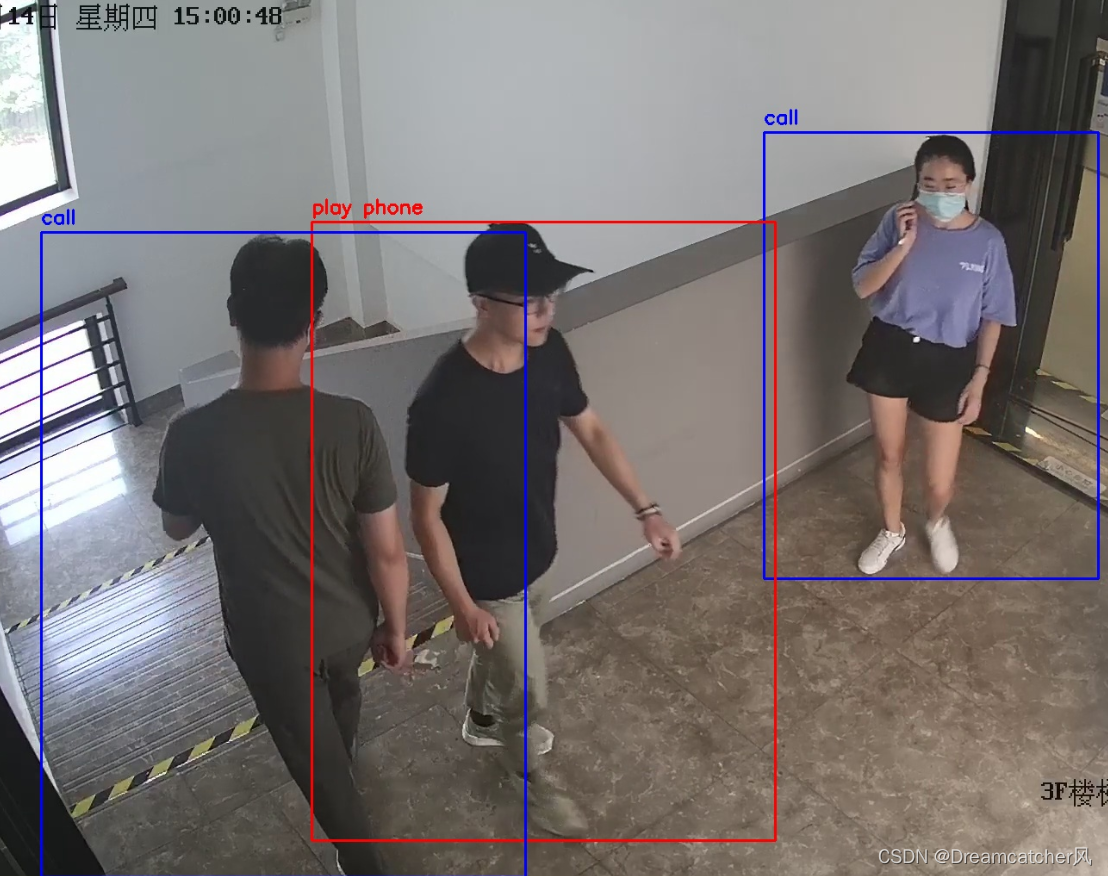

Postscript : The whole process is relatively simple , Encountered a small pit , Mainly in normalization . I didn't consider this problem before , In the actual measurement, it is found that the model is completely arbitrary , Finally find the reason , To solve it .
If you have new ideas , Looking forward to communication and discussion

Pay attention to my WeChat official account “ Wind's thinking notes ”, Let's think about the present , Explore the road to freedom in the future .

边栏推荐
- 2.6.2 内存泄漏
- Pat class B 1017: a divided by B
- 无重复字符的最长字串
- Get the multi-functional version of the maximum and minimum values of the internal values of the objects in the array and the full version of the roll call system, and show the effect
- 小程序editor富文本编辑使用及rich-text解析富文本
- 【C语言—零基础_学习_复习_第五课】基本运算符的运算性质
- 学习C语言第三天
- Leetcode53. maximum subarray and
- 【C语言—零基础第十课】数组王国奇遇记
- 多功能(实现)封装函数
猜你喜欢








随机推荐
模拟库函数
Case summary of rotation chart moving speed (constant speed, slow motion)
ArcGIS 点云(xyz)数据转DEM
Ucharts chart, pie chart, bar chart and line chart are used in uniapp
实习项目3-更改所有者
2020-10-22
【C语言—零基础第八课】循环结构与break continue
Applet cloud development form submission and data acquisition in the page
vscode终端无法使用解决的办法
Wechat applet wx Setclipboarddata copy text
Continue from the previous issue: the remaining two methods of the rotation chart
滚动轮加载的两种js方法及模态框拖拽归总
Uni app conditional compilation ifdef ENDIF compatible with multiple terminals
es6新增-字符串部分
SQL注入
Es6最新常用知识宝典(能够帮助你解决面试题困惑,编写程序中出现的问题等)
指针进阶简单总结
B域,M域,O域具体是指什么
MapBox 加载本地离线地形
多功能(实现)封装函数