The simplest way to deploy your apps in the Cloud
Deploy your apps on any Cloud providers in just a few seconds



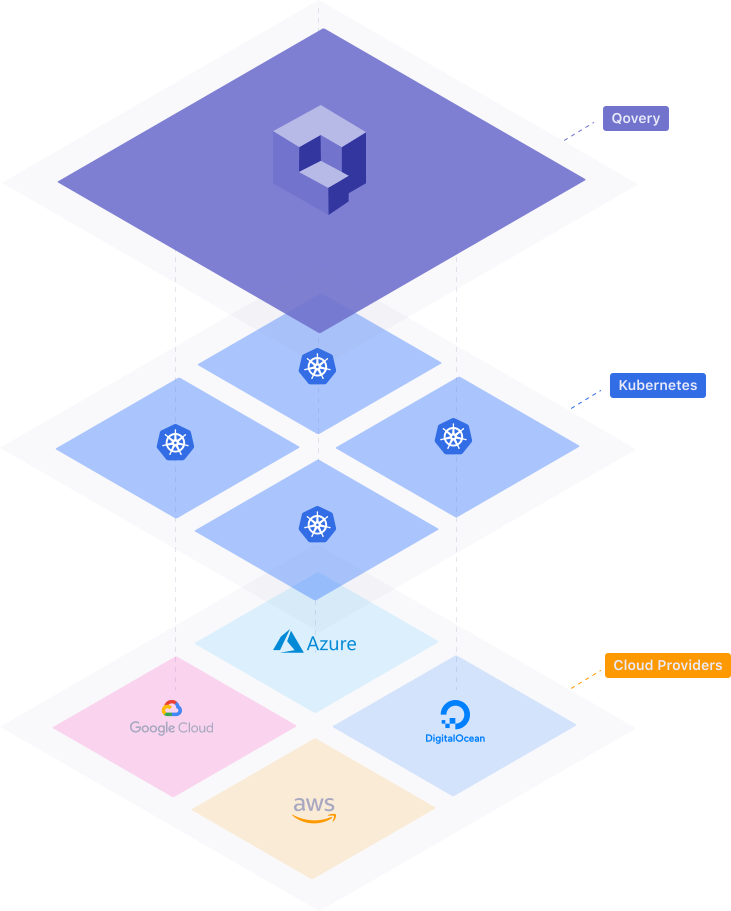
Qovery Engine is an open-source abstraction layer library that turns easy apps deployment on AWS, GCP, Azure, and other Cloud providers in just a few minutes. The Qovery Engine is written in Rust and takes advantage of Terraform, Helm, Kubectl, and Docker to manage resources.
- Website: https://www.qovery.com
- Full doc: https://docs.qovery.com
- Qovery Engine doc: coming soon
- Community: Join us on Discord and on our Q&A forum
Please note: We take Qovery's security and our users' trust very seriously. If you believe you have found a security issue in Qovery, please responsibly disclose by contacting us at [email protected].
✨
Features
- Zero infrastructure management: Qovery Engine initializes, configures, and manages your Cloud account for you.
- Multi Cloud: Qovery Engine is built to work on AWS, GCP, Azure and any Cloud provider.
- On top of Kubernetes: Qovery Engine takes advantage of the power of Kubernetes at a higher level of abstraction.
- Terraform and Helm: Qovery Engine uses Terraform and Helm files to manage the infrastructure and app deployment.
- Powerful CLI: Use the provided Qovery Engine CLI to deploy your app on your Cloud account seamlessly.
- Web Interface: Qovery provides a web interface through qovery.com
🔌
Plugins
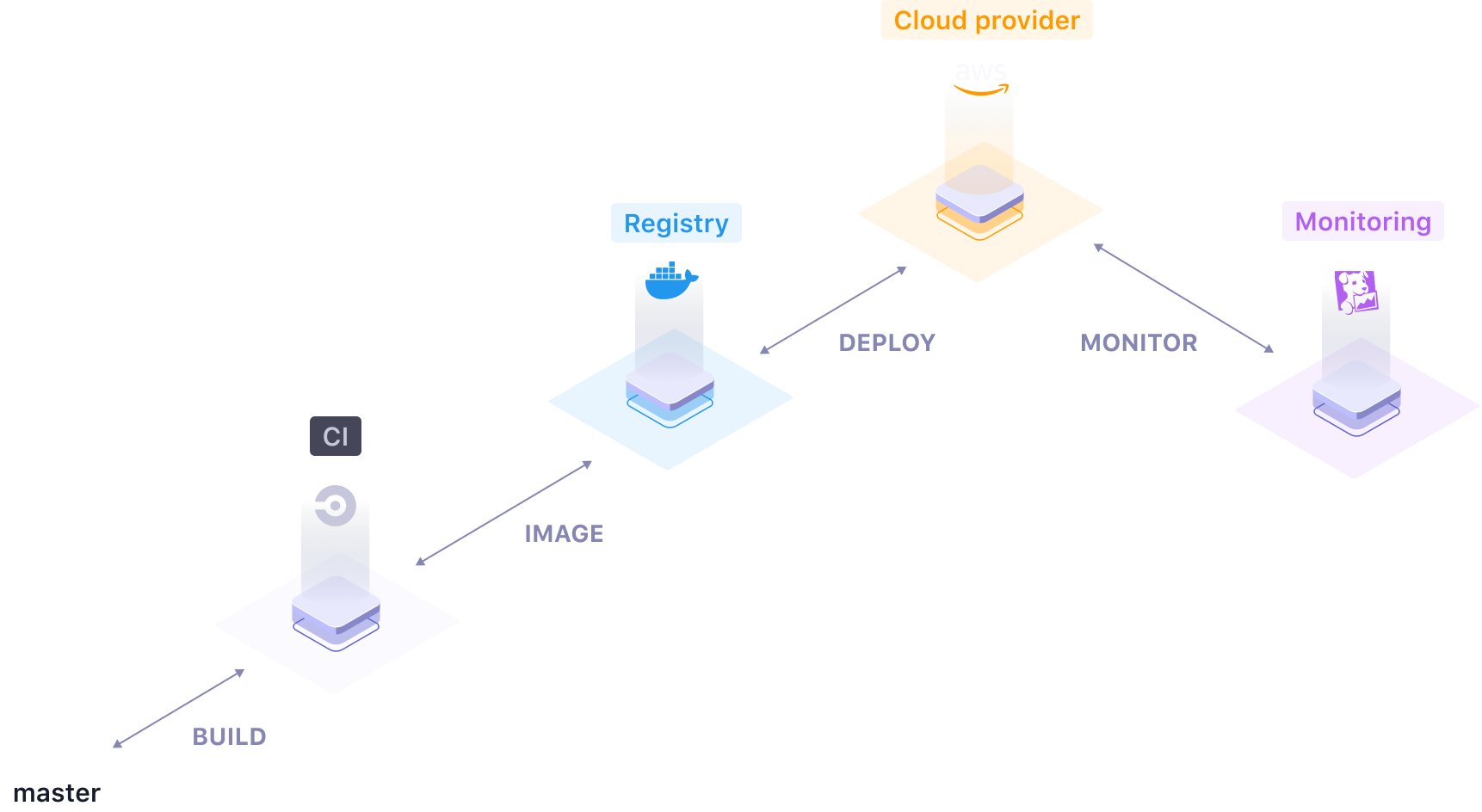
Qovery engine supports a number of different plugins to compose your own deployment flow:
- Cloud providers: AWS, Digital Ocean (in beta), Azure (vote), GCP (vote), Scaleway (vote)
- Build platforms: Qovery CI, Circle CI (vote), Gitlab CI (vote), Github Actions (vote)
- Container registries: ECR, DockerHub, DOCR (vote), ACR (vote), SCR (vote)
- DNS providers: Cloudflare
- Monitoring services: Datadog (vote), Newrelic (vote)
Demo
Here is a demo from Qovery CLI from where we use the Qovery Engine.

Getting Started
Installation
Use the Qovery Engine as a Cargo dependency.
qovery-engine = { git = "https://github.com/Qovery/engine", branch="main" }
Usage
Rust lib
Initialize EKS (AWS Kubernetes) and ECR (AWS container registry) on AWS
let engine = Engine::new(
    context, // parameters
    local_docker, // initialize Docker as a Build Platform
    ecr, // initialize Elastic Container Registry
    aws, // initialize AWS account
    cloudflare, // initialize Cloudflare as DNS Nameservers
);

let session = match engine.session() {
    Ok(session) => session, // get the session
    Err(config_error) => panic!("configuration error {:?}", config_error),
};

let mut tx = session.transaction();

// create EKS (AWS managed Kubernetes cluster)
tx.create_kubernetes(&eks);

// create the infrastructure and wait for the result
match tx.commit() {
    TransactionResult::Ok => println!("OK"),
    TransactionResult::Rollback(commit_err) => println!("ERROR but rollback OK"),
    TransactionResult::UnrecoverableError(commit_err, rollback_err) => println!("FATAL ERROR")
};
Deploy an app from a Github repository on AWS
// create a session before
//------------------------

let mut environment = Environment {...};

let app = Application {
    id: "app-id-1".to_string(),
    name: "app-name-1".to_string(),
    action: Action::Create, // create the application, you can also do other actions
    git_url: "https://github.com/Qovery/node-simple-example.git".to_string(),
    git_credentials: GitCredentials {
        login: "github-login".to_string(), // if the repository is a private one, then use credentials
        access_token: "github-access-token".to_string(),
        expired_at: Utc::now(), // it's provided by the Github API
    },
    branch: "main".to_string(),
    commit_id: "238f7f0454783defa4946613bc17ebbf4ccc514a".to_string(),
    dockerfile_path: "Dockerfile".to_string(),
    private_port: Some(3000),
    total_cpus: "1".to_string(),
    cpu_burst: "1.5".to_string(),
    total_ram_in_mib: 256,
    total_instances: 1,
    storage: vec![], // you can add persistent storage here
    environment_variables: vec![], // you can include env var here
};

// add the app to the environment that we want to deploy
environment.applications.push(app);

// open a transaction
let mut tx = session.transaction();

// request to deploy the environment
tx.deploy_environment(&EnvironmentAction::Environment(environment));

// commit and deploy the environment
tx.commit();
Note: the repository needs to have a Dockerfile at the root.
Documentation
Full, comprehensive documentation is available on the Qovery website: https://docs.qovery.com
Contributing
Please read our Contributing Guide before submitting a Pull Request to the project.
Community support
For general help using Qovery Engine, please refer to the official Qovery Engine documentation. For additional help, you can use one of these channels to ask a question:
- Discord (For live discussion with the Community and Qovery team)
- GitHub (Bug reports, Contributions)
- Roadmap (Roadmap, Feature requests)
- Twitter (Get the news fast)
Roadmap
Check out our roadmap to get informed of the latest features released and the upcoming ones. You may also give us insights and vote for a specific feature.
FAQ
Why does Qovery exist?
At Qovery, we believe that the Cloud must be simpler than what it is today. Our goal is to consolidate the Cloud ecosystem and makes it accessible to any developer, DevOps, and company. Qovery helps people to focus on what they build instead of wasting time doing plumbing stuff.
What is the difference between Qovery and Qovery Engine?
Qovery is a Container as a Service platform for developers. It combines the simplicity of Heroku, the reliability of AWS, and the power of Kubernetes. It makes the developer and DevOps life easier to deploy complex applications.
Qovery Engine is the Open Source abstraction layer used by Qovery to abstract the deployment of containers and databases on any Cloud provider.
Why is the Qovery Engine written in Rust?
Rust is underrated in the Cloud industry. At Qovery, we believe that Rust can help in building resilient, efficient, and performant products. Qovery wants to contribute to make Rust being a significant player in the Cloud industry for the next 10 years.
Why do you use Terraform, Helm and Kubectl binaries?
The Qovery Engine is designed to operate as an administrator and takes decisions on the output of binaries, service, API, etc. Qovery uses the most efficient tools available in the market to manage resources.
License
See the LICENSE file for licensing information.
Qovery
Qovery is a CNCF and Linux Foundation silver member.


 17 Dec 01, 2022
 12 Oct 06, 2022
 23 Jan 05, 2023
 2 Oct 06, 2021
 1 Dec 12, 2021
 1 Jan 04, 2022
 1 Jan 10, 2022
 2 Jan 02, 2022
 18 Nov 15, 2022
 2 Oct 04, 2022
 2 Sep 07, 2022
 18 Dec 20, 2022
 1 Dec 18, 2021
 1 Oct 15, 2021
 96 Jan 01, 2023
 4 Dec 22, 2021
 40 Nov 11, 2022
 90 Dec 15, 2022
 46 Dec 26, 2022
 23 Jan 21, 2022