当前位置:网站首页>Wechat applet_ 14. Creation and reference of components
Wechat applet_ 14. Creation and reference of components
2022-07-18 23:38:00 【icestone_ kai】
The goal is :
- Be able to know how to customize applet components
- Be able to know in applet components behaviors The role of
- Be able to know how to install and configure vant-weapp Component library
- Be able to know how to use MobX Realize global data sharing
- Be able to know how to control small programs API Conduct Promise turn
Component creation and reference
1. In the root directory of the project , Right mouse button , establish components->test Folder
2. In the new components->test folder , Right mouse button , Click on " newly build component"
3. Type the name of the component and press enter , The corresponding... Of the component will be generated automatically 4 File , The suffixes are .js,.json,.wxml and .wxss
Pictured :
Refer to the component :
The reference methods of components are divided into " Partial quote " and " Global references ", seeing the name of a thing one thinks of its function :
- Partial quote : Components can only be used in the page where the current page is referenced
- Global references : Components can be used in each applet page
Partial quote :
On page .json How components are referenced in the configuration file , be called " Partial quote ", The sample code is as follows :
{

  "usingComponents": {

    "my-test1":"/components/test/test"
  }
}
And then you can do it in WXML I quote :
<my-test1></my-test1>
Global references :
stay app.json How components are referenced in the global configuration file , be called " Global references ", The sample code is as follows :
stay app.json Under the node , and pages Add the following code at the same level :
  "usingComponents": {

    "my-test1": "/components/test/test"
  }
WXML:
<!-- Global group price :-->
<my-test1></my-test1>
Then you can use it
Application scenarios of global reference and local reference :
According to the frequency and range of components , To choose the appropriate reference method :
- If a component is often used in multiple pages , Recommended " Global references "
- If a component is only referenced in a specific page , Recommended " Partial quote "
Differences between components and pages :
On the face of it , Components and pages are made up of ,js,.json,.wxml, and .wxss These four documents consist of , however , Components and pages .js And .json The files are obviously different :
- Component's .json Declaration required in document "component":true attribute
- Component's .js What is called in the file is Component() function
- The event handler function of the component needs to be defined to methods In nodes
style :
Component style isolation :
By default , The style of a custom component is only valid for the current component , Will not affect... Outside the component UI structure , As shown in the figure :
- Components A The style of does not affect the component C The style of
- Components A The style of does not affect the style of the applet page
- The style of the applet page does not affect the component A and C The style of
benefits :
1. Prevent external styles from affecting internal styles of components
2. Prevent component styles from damaging external styles
Group notes on isolating styles :
- app.wxss The global style in is not valid for the component
- Only class The selector will have the effect of style isolation ,id Selectors , Label selectors are not affected by style isolation
Suggest : It is recommended to use... In components and pages referencing components class Selectors , Do not use id, attribute , tag chooser !
Modify style isolation options for components :
By default , The style isolation feature of custom components can prevent the interference of styles inside components , But sometimes , We want to be able to control the style inside the component from the outside , here , Can pass stylesolation Modify style isolation options for components , Usage is as follows :
// components/test/test.js
Component({
  options: {
    //  Here is the default , Enable default isolation
    styleIsolation: 'isolated'
  },
})
styleIsolation Optional values for :
| Optional value | The default value is | describe |
|---|---|---|
| islated | yes | Indicates that style isolation is enabled , Inside and outside of custom components , Use class The specified styles will not affect each other |
| apply-shared | no | Show page wxss Styles will affect custom components , But custom components wxss The style specified in does not affect the page |
| shared | no | Show page wxss Styles will affect custom components , Custom components wxss The styles specified in also affect the page and other settings apply-shared The custom component of |
Customize the data in the component , Methods and properties :
1.data data :
In the applet , For component template rendering and private data , Need to be defined in data In nodes , Examples are as follows :
// components/test/test.js
Component({

  /** *  A list of properties of a component  */
  properties: {

  },
  /** *  The initial data of the component  */
  data: {

    count: 0
  },
})
2.methods Method :
In applet components , Event handling functions and custom methods need to be defined to methods In nodes , The sample code is as follows :
// components/test/test.js
Component({

  methods: {

    //  Event handler
    addCount() {

      this.setData({

        count: this.data.count + 1
      })
      //  adopt this Directly call the custom method
      this._showCount();
    },
    //  Custom methods are recommended to _ start
    _showCount() {

      wx.showToast({

        title: 'count The value of is : ' + this.data.count,
        icon: 'none'
      })
    }
  },
  /** *  A list of properties of a component  */
  properties: {


  },
  /** *  The initial data of the component  */
  data: {

    count: 0
  },
})
3.properties attribute :
In the applet ,properties Is the external attribute of the component , It is used to receive the data transferred from the outside to the component , The sample code is as follows :
Component's wxml:
<text class="fontcolor">
  test Components :
</text>
count The value of is :{
   {count}}
<button bindtap="addCount" type="primary">count Self adding 1 And display </button>
In the component's .js In the file :
  /** *  A list of properties of a component  */
  properties: {

    //  How to fully define attributes ( When you need to specify the default value of the attribute , This method is recommended )
    max: {

      //  The data type of the attribute value
      type: Number,
      //  Property defaults
      vlaue: 10
    },
    //  Simplify the way you customize attributes ( When there is no need to specify the default value of the attribute , Simplified methods can be used )
    // max: Number
  },
In the reference component wxml I quote :
<my-test1 max='11'></my-test1>
4.data and properties The difference between :
In the components of the applet ,properties Properties and data The usage of data is the same , They are both readable and writable , It's just :
- data Prefer to store private data of components
- propertier Prefer to store the data passed from the outside to the component
// components/test/test.js
Component({

  properties: {

  /** *  A list of methods for a component  */
  methods: {

    _showInfo() {

      console.log(this.data);
      console.log(this.properties);
      console.log(this.properties === this.data);
    },
  },
})
5. Use setData modify properties Value :
because data Data and properties Attributes are essentially the same , therefore properties Property can also be used for page rendering , Or use setData by properties Attribute reassignment of , The sample code is as follows :
// components/test/test.js
Component({

  /** *  The initial data of the component  */
  data: {

    count: 0
  },

  /** *  A list of properties of a component  */
  properties: {

    //  How to fully define attributes ( When you need to specify the default value of the attribute , This method is recommended )
    max: {

      //  The data type of the attribute value
      type: Number,
      //  Property defaults
      vlaue: 10
    },
    //  Simplify the way you customize attributes ( When there is no need to specify the default value of the attribute , Simplified methods can be used )
    // max: Number
  },

  /** *  A list of methods for a component  */

  methods: {

    //  Event handler
    addCount() {

      if (this.data.count >= this.properties.max) return
      this.setData({

        count: this.data.count + 1
      })
      //  adopt this Directly call the custom method
      this._showCount();
    },
    //  Custom methods are recommended to _ start
    _showCount() {

      wx.showToast({

        title: 'count The value of is : ' + this.data.count,
        icon: 'none'
      })
    },
    _showInfo() {

      console.log(this.data);
      console.log(this.properties);
      console.log(this.properties === this.data);
    },
    change() {

      this.setData({

        max: this.properties.max + 1
      })
    }
  },
})
Here is change Function modification properties Medium max( Limit count The maximum of ),max Add one ,count The maximum value of is increased by one
Custom components - Data listener
1. What is a data listener :
The data listener is used to listen and respond to any changes in attributes and data fields , To perform specific operations , Its function is similar to vue Medium watch The listener , In applet components , The basic syntax format of the data listener is as follows :
Component({

  /** *  The initial data of the component  */
  data: {

    count: 0
  },

  /** *  A list of properties of a component  */
  properties: {

    //  How to fully define attributes ( When you need to specify the default value of the attribute , This method is recommended )
    max: {

      //  The data type of the attribute value
      type: Number,
      //  Property defaults
      vlaue: 10
    },
  },
  observers: {

    'max,count': function (max, count) {

      console.log("max The listening value is : " + max);
      console.log("count The listening value is : " + count);
    },
    'count': function (a) {

      console.log('count The value monitored separately is : ' + a);
    }
  }
})
2. Basic usage of data listener :
Component's UI The structure is as follows :
<view>
  {
   {n1}}+{
   {n2}}={
   {sum}}
</view>
<button size="mini" bindtap="addN1">
  n1 Self increasing
</button>
<button size="mini" bindtap="addN2">
  n2 Self increasing
</button>
js The code is as follows :
// components/numsAdd/numsAdd.js
Component({

  /** *  A list of properties of a component  */
  properties: {


  },

  /** *  The initial data of the component  */
  data: {

    n1: 0,
    n2: 0,
    sum: 0
  },

  /** *  A list of methods for a component  */
  methods: {

    addN1() {

      this.setData({

        n1: this.data.n1 + 1
      })
    },
    addN2() {

      this.setData({

        n2: this.data.n2 + 1
      })
    },
  },
  //  Data listening node
  observers: {

    'n1 , n2': function (n1, n2) {

      this.setData({

        sum: n1 + n2
      })
    },
  },
})
function :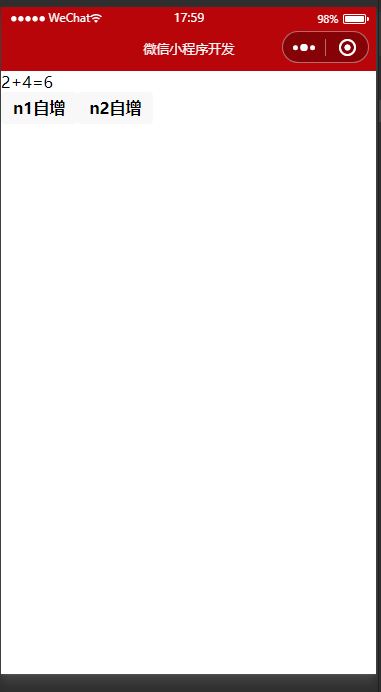
Case study :
Three buttons , Together, control RGB The three values of , Self increasing , When it increases to the maximum , No more self increasing :
WXML:
<view class="randomColor" style="background-color: rgb({
        {
        fullColor}});"></view>
<text>
  {
   {rgb.r}},{
   {rgb.g}},{
   {rgb.b}}
   At present RGB value :{
   {fullColor}}
</text>
<button size="mini" type="primary" bindtap="rAdd">R+1</button>
<button size="mini" type="primary" bindtap="gAdd">G+1</button>
<button size="mini" type="primary" bindtap="bAdd">B+1</button>
.js:
// components/numsAdd/numsAdd.js
Component({

  /** *  A list of properties of a component  */
  /** *  The initial data of the component  */
  data: {

    n1: 0,
    n2: 0,
    sum: 0,
    user: {

      name: " Zhang San ",
      age: 21,
      school: " Wuhan Light Industry Primary School "
    },
    rgb: {

      r: 0,
      g: 0,
      b: 0,
    },
    fullColor: '0,0,0' // according to rgb Three properties of an object , Dynamic computing fullColor Value
  },

  /** *  A list of methods for a component  */
  methods: {

    addN1() {

      this.setData({

        n1: this.data.n1 + 1
      })
    },
    addN2() {

      this.setData({

        n2: this.data.n2 + 1
      })
    },
    //  Modify object properties :
    changeName() {

      this.setData({

        user: {

          name: " Zhang San changed his name ",
          age: 22
        }
      })
    },
    rAdd() {

      this.setData({

        'rgb.r': this.data.rgb.r + 5 > 255 ? 255 : this.data.rgb.r + 5
      })
    },
    gAdd() {

      this.setData({

        'rgb.g': this.data.rgb.g + 5 > 255 ? 255 : this.data.rgb.g + 5
      })
    },
    bAdd() {

      this.setData({

        'rgb.b': this.data.rgb.b + 5 > 255 ? 255 : this.data.rgb.b + 5
      })
    },
  },
  //  Data listening node
  observers: {

    'n1 , n2': function (n1, n2) {

      this.setData({

        sum: n1 + n2
      })
    },
    'user.name': function (name) {

      console.log('user Medium name Property changed ');
    },
    'rgb.r,rgb.g,rgb.b': function (r, g, b) {

      this.setData({

        fullColor: `${
      r},${
      g},${
      b}`
      })
    }

    // ' object . attribute A, object . attribute B':function( attribute A The new value of , attribute B The new value of ){}
    //  Object triggers this listener in three ways :
    // [ For attributes A assignment ] Use setData Set up this.data. object . attribute A  Trigger when
    // [ For attributes B assignment ] Use setData Set up this.data. object . attribute B  Trigger when
    // [ Directly assign values to objects ] Use setData Set up this.data. object   Trigger when
  },
})
Here we use object attribute monitoring , function ( This part of the code is circled ):

3. Listen for changes in object properties :
The data listener supports monitoring the changes of single or multiple attributes in the object , The example syntax is as follows :
  //  Data listening node
  observers: {

    'n1 , n2': function (n1, n2) {

      this.setData({

        sum: n1 + n2
      })
    },
    'user.name': function (name) {

      console.log('user Medium name Property changed ');
    }
  },
Listen for changes to all properties in the object
If there are too many attributes in an object that need to be monitored , For convenience , You can use wildcards ** To listen for changes to all attributes in the object , The sample code is as follows :
Don't use ** To listen to :
  observers: {

    'rgb.r,rgb.g,rgb.b': function (r, g, b) {

      this.setData({

        fullColor: `${
      r},${
      g},${
      b}`
      })
    }

    // ' object . attribute A, object . attribute B':function( attribute A The new value of , attribute B The new value of ){}
    //  Object triggers this listener in three ways :
    // [ For attributes A assignment ] Use setData Set up this.data. object . attribute A  Trigger when
    // [ For attributes B assignment ] Use setData Set up this.data. object . attribute B  Trigger when
    // [ Directly assign values to objects ] Use setData Set up this.data. object   Trigger when
  },
Use ** monitor :
    'rgb.**': function (obj) {

      this.setData({

        fullColor: `${
      obj.r},${
      obj.g},${
      obj.b}`
      })
    }
边栏推荐
- 从0开始安装苹果cms及其资源采集和页面部分代码
- [development tutorial 1] open source Bluetooth heart rate waterproof sports Bracelet - Kit detection tutorial
- 小程序:picker-view选择器快速滚动,确认时,”值显示错误“
- Over fitting and under fitting
- 广州铁骑霸气“公主抱”,安全感拉满!
- 作为一款时序数据库,TDengine 是如何实现并开源其分布式集群功能?
- Guangzhou cavalry domineering "Princess hug", full of security!
- [white box test] design method of logic coverage and path test
- 单行文本 超出部分省略号,多行文本超出部分省略号,指定多行
- 20220715 domestic CONDA does not FQ the method of installing the latest version of pytoch
猜你喜欢

What are the efficient test methods for app regression testing?

Guangzhou cavalry domineering "Princess hug", full of security!
How does go ensure the order of concurrent reads and writes Memory model

Mysql事务隔离机制

Instance Noise A trick for stabilising GAN training
动态内存管理(C语言)下--常见错误及大厂笔试题

20220715 domestic CONDA does not FQ the method of installing the latest version of pytoch

10.10:VectorDraw C# VS VectorDraw WEB/Crack-VectorDraw

7、常见的垃圾回收器

11、摸清JVM对象分布

随机推荐
Instance Noise A trick for stabilising GAN training
没有比这更简单实用的单人姿态估计了
【开发教程3】疯壳·ARM功能手机-整板资源介绍
【Leetcode】232. Implement queue with stack
Web crawler technology from entry to mastery (penetration of high-end operations) Chapter 2
Google icons 库 Compose就可以直接用。
nodejs 定义错误验证机制
Lifeguard certificate examination
作为一款时序数据库,TDengine 是如何实现并开源其分布式集群功能?
Leetcode sum of two numbers
Send papers! AI, machine learning, CV boss scientific research project enrollment!
JVM-SANDBOX导致目标服务JVM Metaspace OOM的调查始末
[CVPR2019] On Stabilizing Generative Adversarial Training with Noise
万字详解C语言文件
Mysql存储模型
Raspberry pie uses opencv for image tracking, face recognition, etc
嘘!摸鱼神器,别让老板知道!| 语音实时转文本,时序快速出预测,YOLOv6在就能用,一行命令整理CSV | ShowMeAI资讯日报
11、摸清JVM对象分布
解决windbg无法加载ntdll符号的问题
How to set the thickness of lines in a three line table