当前位置:网站首页>Develop the first Flink app
Develop the first Flink app
2022-07-19 10:58:00 【Hua Weiyun】
Welcome to visit mine GitHub
Here we classify and summarize all the original works of Xinchen ( Including supporting source code ):https://github.com/zq2599/blog_demos
- stay 《Flink1.7 From installation to experience 》 In the article , We installed and experienced Flink, Use today java Let's develop a simple Flink application ;
Step list
- The actual combat experience is as follows :
- Create an ;
- code ;
- structure ;
- Submit task to Flink, Verification function ;
environmental information
- Flink:1.7;
- Flink The operating system of the machine :CentOS Linux release 7.5.1804;
- development environment JDK:1.8.0_181;
- development environment Maven:3.5.0;
Introduction to application functions
- stay 《Flink1.7 From installation to experience 》 In the article , We are Flink function SocketWindowWordCount.jar, The function realized is from socket Read string , Count the number of each word , Today we will code and develop this application , Realize this function ;
Create an
- The basic application code is through mvn Command created , Enter the following command at the command line :
mvn archetype:generate -DarchetypeGroupId=org.apache.flink -DarchetypeArtifactId=flink-quickstart-java -DarchetypeVersion=1.7.0- Press the prompt on the console to enter groupId、artifactId、version、package Etc , After all the way enter and confirm , It will generate a file that matches your input artifactId A folder with the same name , It's a maven engineering :
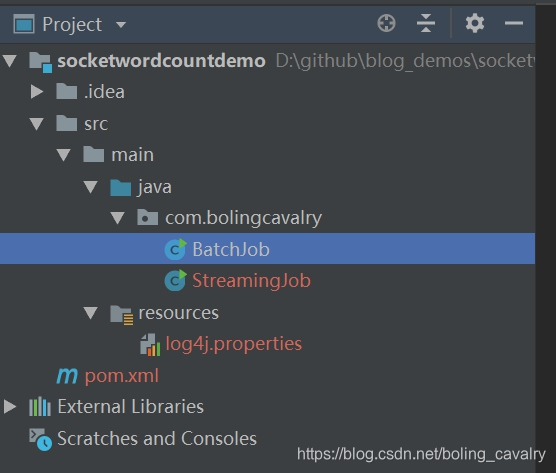
Define value for property 'groupId': com.bolingcavalryDefine value for property 'artifactId': socketwordcountdemoDefine value for property 'version' 1.0-SNAPSHOT: :Define value for property 'package' com.bolingcavalry: :Confirm properties configuration:groupId: com.bolingcavalryartifactId: socketwordcountdemoversion: 1.0-SNAPSHOTpackage: com.bolingcavalryuse IEDA Import this maven engineering , Here's the picture , There are already two classes :BatchJob and StreamingJob,BatchJob Is for batch processing , This actual battle does not use , So you can delete , Only stream processed StreamingJob:

App created successfully , Now we can start coding ;
code
- You can choose to directly from GitHub Download the source code of this project , The address and link information is shown in the following table :
| name | link | remarks |
|---|---|---|
| Project home page | https://github.com/zq2599/blog_demos | The project is in progress. GitHub Home page on |
| git Warehouse address (https) | https://github.com/zq2599/blog_demos.git | The warehouse address of the source code of the project ,https agreement |
| git Warehouse address (ssh) | [email protected]:zq2599/blog_demos.git | The warehouse address of the source code of the project ,ssh agreement |
This git Multiple folders in project , The source code of this chapter is in socketwordcountdemo Under this folder , As shown in the red box below :
Next, start coding :
stay StreamingJob Add static inner classes to class WordWithCount, This is a PoJo, Used to save a specific word and its frequency :

/** * Record words and their frequency Pojo */ public static class WordWithCount { /** * Word content */ public String word; /** * Frequency of occurrence */ public long count; public WordWithCount() { super(); } public WordWithCount(String word, long count) { this.word = word; this.count = count; } /** * Show the word content and frequency * @return */ @Override public String toString() { return word + " : " + count; } }- Write all business logic in StreamJob Class main In the method , As shown below , Chinese notes are added at key positions :
public static void main(String[] args) throws Exception { // environmental information final StreamExecutionEnvironment env = StreamExecutionEnvironment.getExecutionEnvironment(); // The data source is local 9999 port , Newline separator , You can also consider hostname and port Parameters through main The input parameters of the method are passed in DataStream<String> text = env.socketTextStream("localhost", 9999, "\n"); // adopt text Object conversion gets new DataStream object , // The transformation logic is to separate each string , Create one for all the words you get WordWithCount object DataStream<WordWithCount> windowCounts = text.flatMap(new FlatMapFunction<String, WordWithCount>() { @Override public void flatMap(String s, Collector<WordWithCount> collector) throws Exception { for(String word : s.split("\\s")){ collector.collect(new WordWithCount(word, 1L)); } } }) .keyBy("word")//key by word Field .timeWindow(Time.seconds(5)) // Tumbling time window every five seconds .reduce(new ReduceFunction<WordWithCount>() { //reduce Strategy @Override public WordWithCount reduce(WordWithCount a, WordWithCount b) throws Exception { return new WordWithCount(a.word, a.count+b.count); } }); // Single thread output results windowCounts.print().setParallelism(1); // perform env.execute("Flink Streaming Java API Skeleton"); }structure
- stay pom.xml Execute the command in the directory where the file is located :
mvn clean package -U- After the command is executed , stay target In the catalog socketwordcountdemo-1.0-SNAPSHOT.jar Files are built successfully jar package ;
stay Flink verification
- Flink For installation and start-up, please refer to 《Flink1.7 From installation to experience 》;
- Log in to Flink Location machine , Execute the following command :
nc -l 9999My side Flink Of the machine IP The address is 192.168.1.103, Therefore, access with browser Flink Of web The address is :http://192.168.1.103:8081;
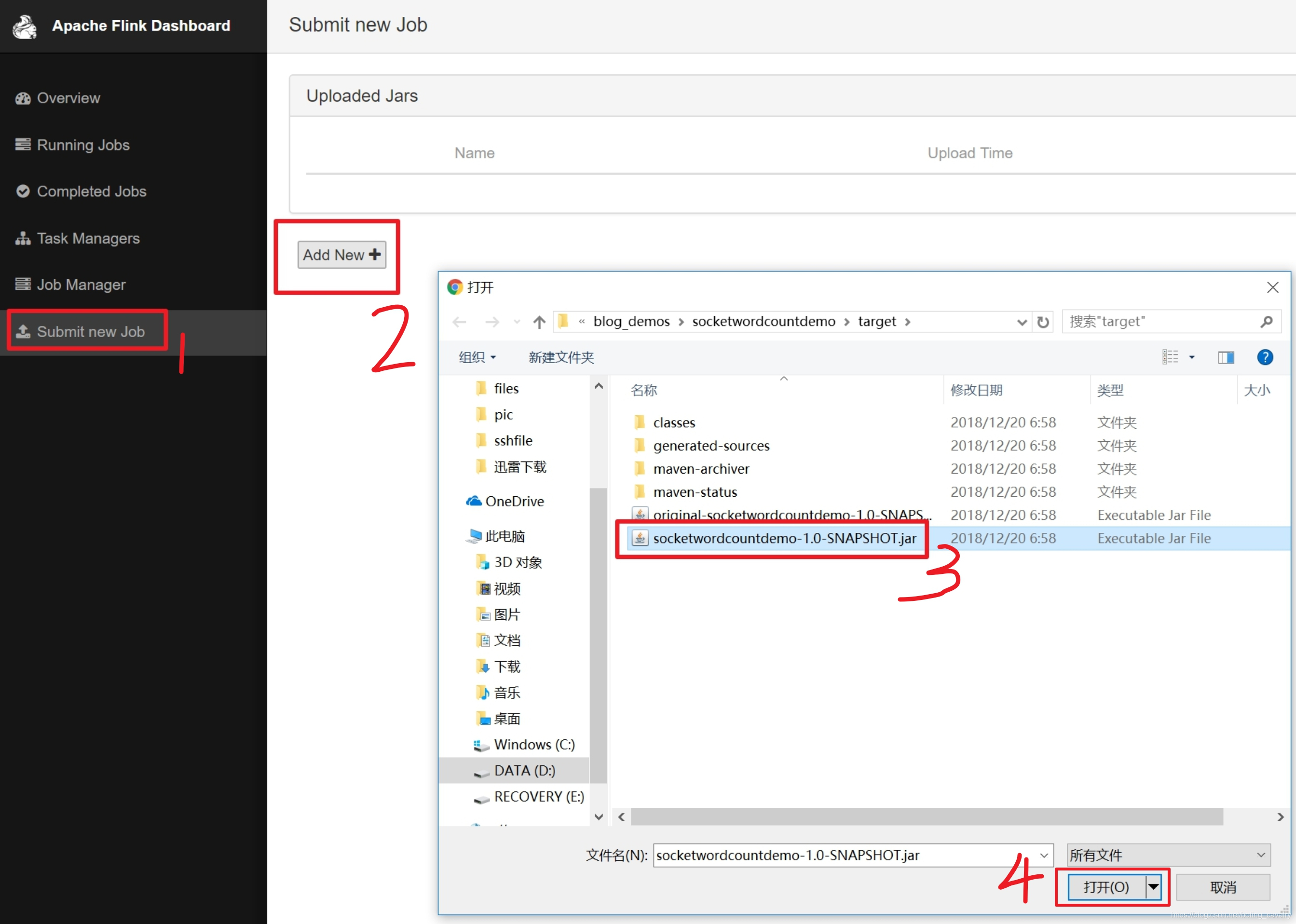
Choose the jar File as a new task , Here's the picture :
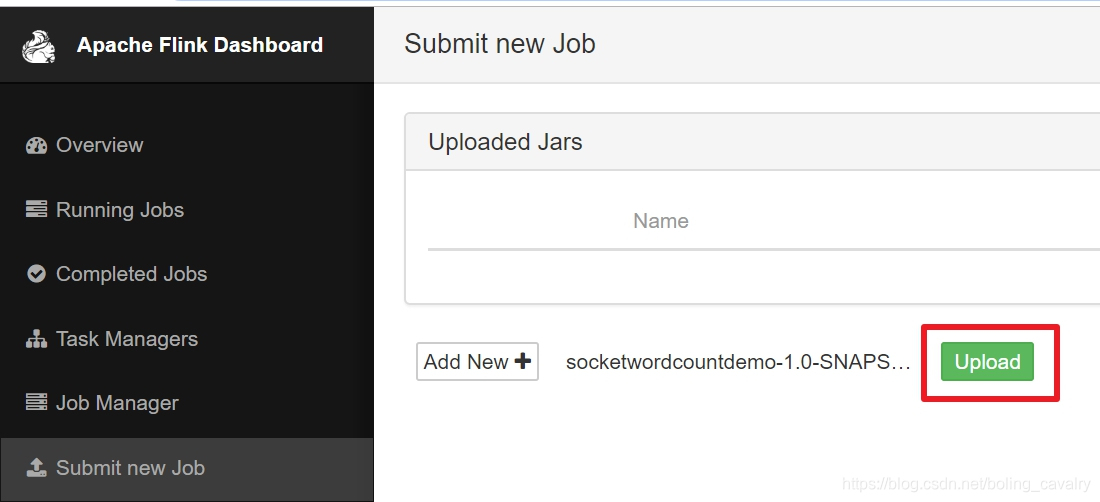
Click in the red box below "upload", Submit a document :
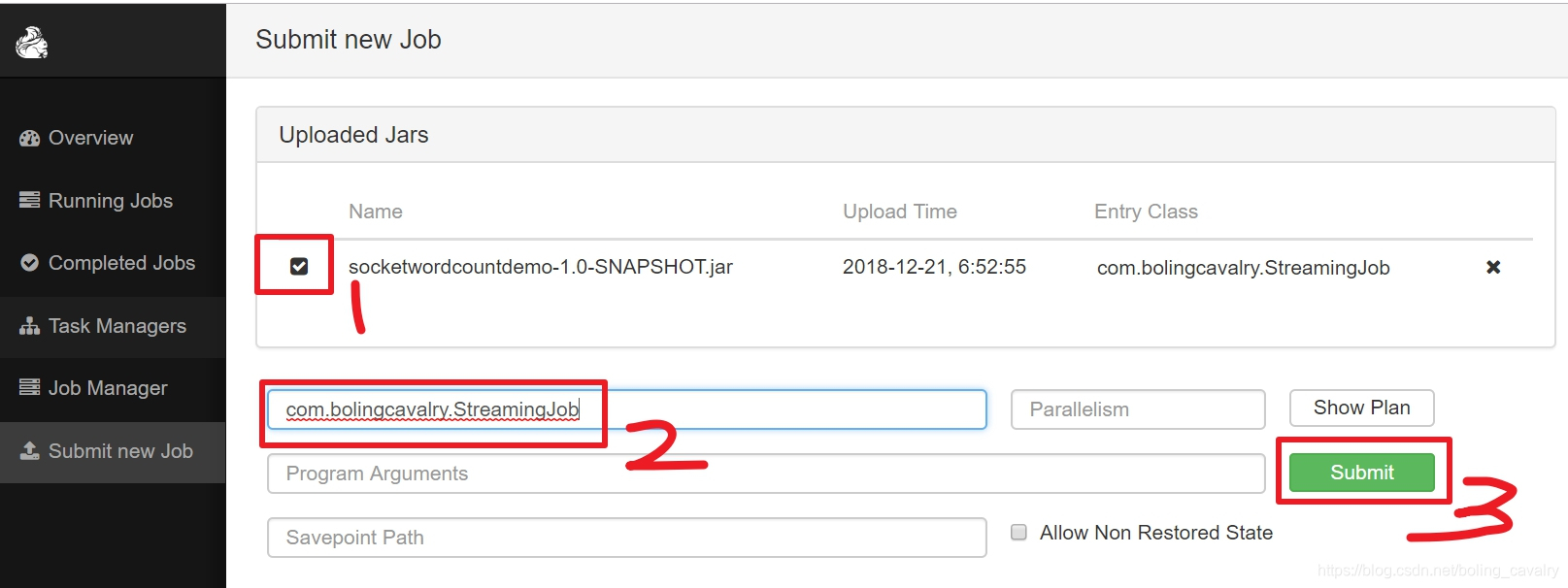
At present, only jar The file was uploaded , The next step is to manually set the execution class and start the task , Operation as shown below , Red box 2 Filled in the above StreamingJob Full name of the class :
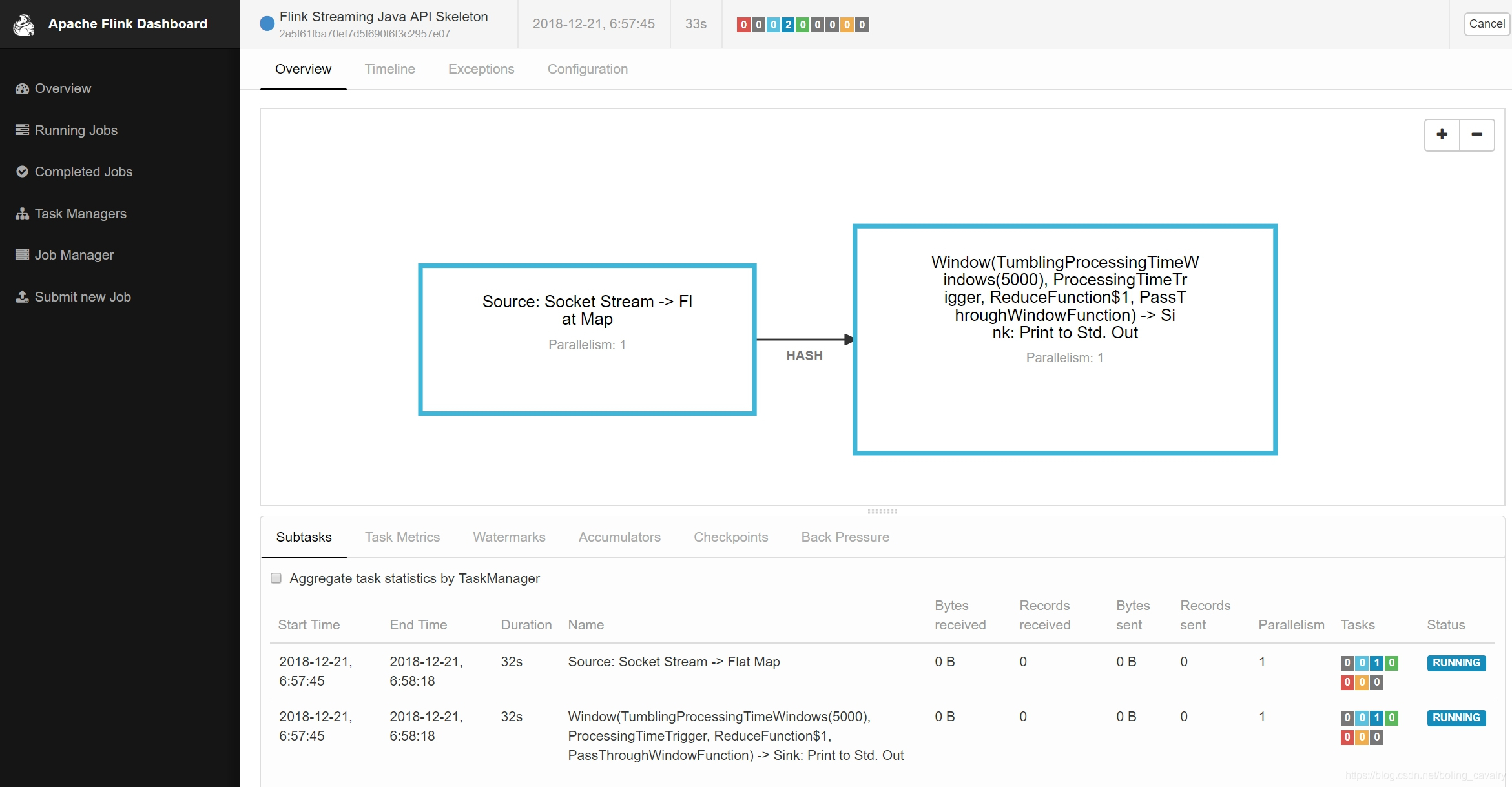
The effect of the submitted page is shown in the following figure , See a job It's already running :
go back to Flink Console of the machine , Entered before nc -l 9999 Input some English sentences in the window of , Then press enter , for example :
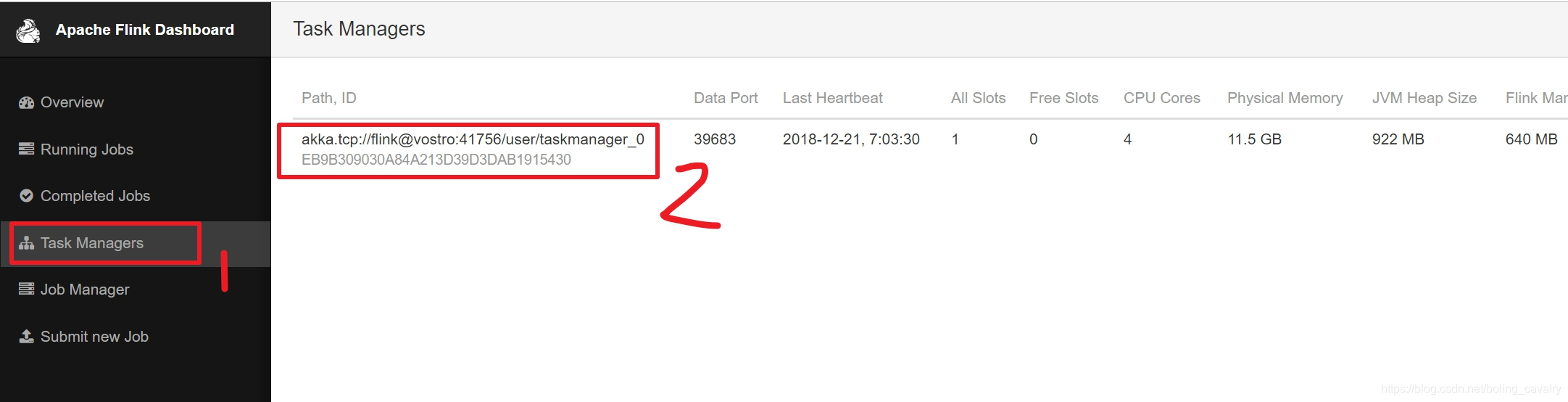
[[email protected] flink-1.7.0]# ./bin/start-cluster.shStarting cluster.Starting standalonesession daemon on host vostro.Starting taskexecutor daemon on host vostro.[[email protected] flink-1.7.0]# nc -l 9999Apache Flink is a framework and distributed processing engine for stateful computations over unbounded and bounded data streams. Flink has been designed to run in all common cluster environments, perform computations at in-memory speed and at any scale.Next, let's take a look at our job The implementation effect of , Here's the picture , Click on the left "Task Managers", There is only one in the list on the right Task, Click on it :
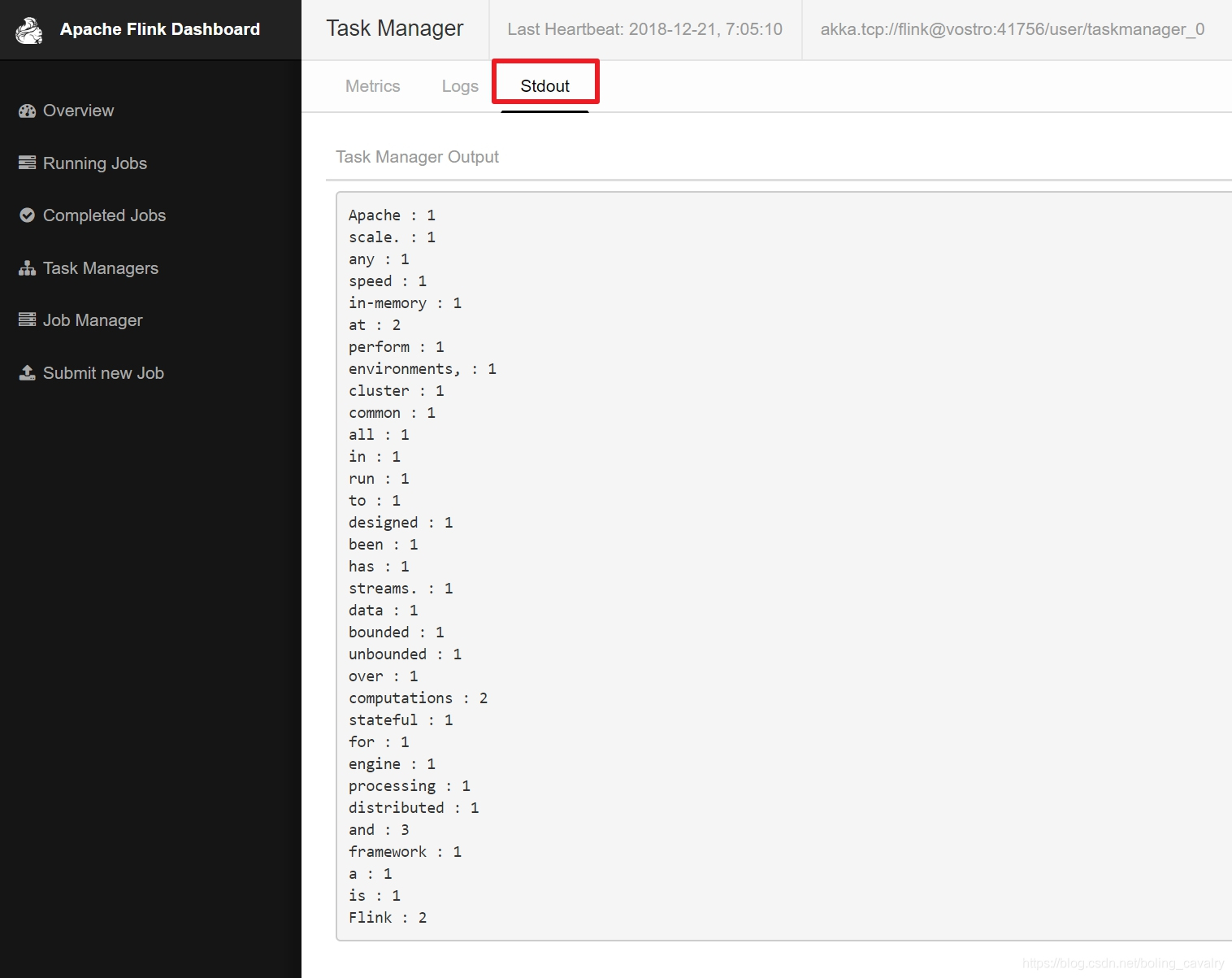
Three pages appear tab page , Click on "Stdout" This tab, You can see the statistical results of our task on the words in the previous sentence , Here's the picture :
thus , The first is the simplest Flink It's done. .
Welcome to Huawei cloud blog : Xinchen, programmer
On the way to study , You are not alone , Xinchen's original works are accompanied all the way …
边栏推荐
猜你喜欢

Beego框架实现文件上传+七牛云存储

腾讯云服务器利用镜像部署WordPress个人网站!

leetcode-08

Leetcode ugly number problem solution

UE4 understanding of animation blueprint

37. Flex layout

Explanation of tree chain dissection idea + acwing 2568 Tree chain dissection (DFS sequence + mountain climbing method + segment tree)

Paper notes: mind the gap an empirical evaluation of impaction ofmissing values techniques in timeseries
Tencent cloud server uses image to deploy WordPress personal website!

Avi 部署使用指南(2):Avi 架构概述
随机推荐
2022/7/16
[in vivado middle note ILA IP core]
金鱼哥RHCA回忆录:CL210描述OPENSTACK控制平面--识别overclound控制平台服务+章节实验
vulnhub inclusiveness: 1
Thinking about the integrated communication of air, space and earth based on the "7.20 Zhengzhou rainstorm"
[csp-j 2021] summary
win10开始键点击无响应
高数_第1章空间解析几何与向量代数__点到平面的距离
Pytoch realizes multi-layer perceptron manually
vulnhub inclusiveness: 1
Pytoch learning record 2 linear regression (tensor, variable)
Journal日志与oplog日志的区别
ROS duplicate name
ROS 重名
Maximal semi connected subgraph (tarjan contraction + topological ordering + DP longest chain)
追根问底:Objective-C关联属性原理分析
Pytorch. NN implementation of multi-layer perceptron
How to build dashboard and knowledge base in double chain note taking software? Take the embedded widget library notionpet as an example
Pytoch framework learning record 1 cifar-10 classification
Future applications and technical challenges of backscatter communication