当前位置:网站首页>37. Flex layout
37. Flex layout
2022-07-19 10:44:00 【Suyuoa】
flex Layout is also called elastic layout

Catalog
1 First time to know flex Layout
2 flex Parent common properties
2.1 Set the spindle direction flex-direction
2.1.2 From right to left row-reverse
2.1.3 From top to bottom column
2.1.4 From bottom to top column-reverse
2.2 Set the arrangement of sub elements of the main axis justify-content
2.2.1 Arrange from scratch flex-start
2.2.2 Arrange from the tail flex-end
2.2.3 The whole household center
2.2.4 Bisector space space-around
2.3 Whether the child elements wrap flex-wrap
2.4 A single ( Column ) The arrangement of the side axes align-items
2.4.2 Arrange from scratch flex-start
2.4.3 Arrange from the tail flex-end
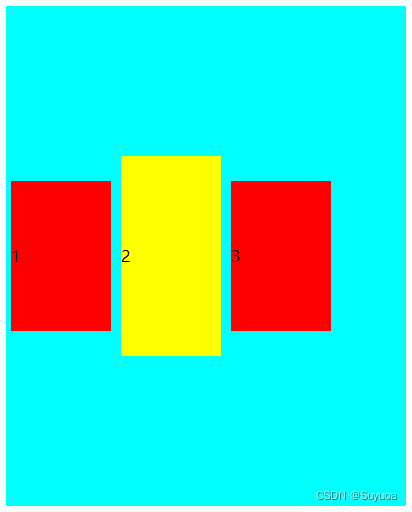
2.4.4 The whole household center
2.4.5 Align the first line of text to the baseline baseline
2.5 Multiple lines ( Column ) The arrangement of the side axes align-content
2.5.1 Occupy a line first ( Column ), Then divide the remaining space equally stretch
2.5.2 Arrange from scratch flex-start
2.5.3 Arrange from the tail flex-end
2.5.4 The whole household center
2.5.5 Bisector space space-around
2.6 Compound attribute flex-flow
3 flex Common properties of subitems
3.1.1 Fixed size on both sides , Intermediate adaptation
3.2 The arrangement of itself on the side axis align-self
3.3 The order in which the child elements are arranged order
1 First time to know flex Layout
If you use a traditional layout , It's useless to set the width and height of the inline block elements
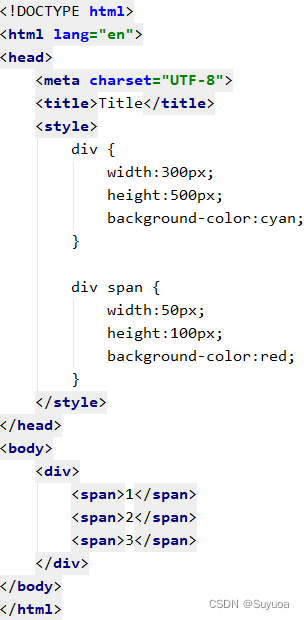
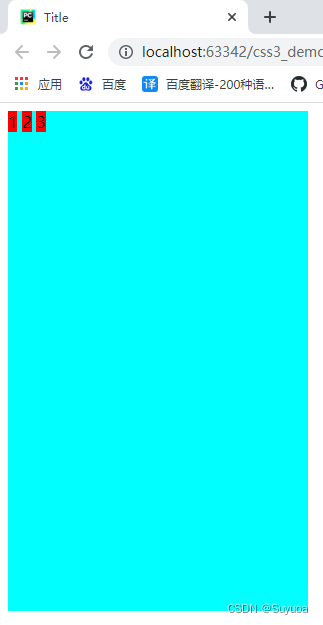
Now we use flex Layout

At this time, the width and height set for the inline block is effective
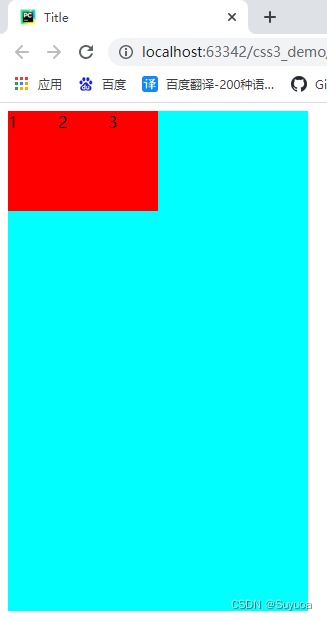
If we want it to be evenly distributed , You can add some flex Unique properties of layout


- Any container element can be specified as flex Layout
- When the parent element is set to flex Layout , Of the child element in the parent element float,clear,vertcal-align Property will fail
- flex Layout is also called telescopic layout , Elastic layout , Expansion box layout , Elastic box layout
- use flex Elements of layout ( Parent element ) be called flex Containers (flex container), The child elements in the container are called flex project (flex item)
2 flex Parent common properties
The following six are common attributes of the parent

2.1 Set the spindle direction flex-direction
flex The layout is divided into main axis and side axis . The default spindle direction is x Axis direction , Horizontal right . The default side axis direction is y Axis direction , Vertical down .
If we define the principal axis as horizontal , The side axis is automatically longitudinal
The side axis is always right or down
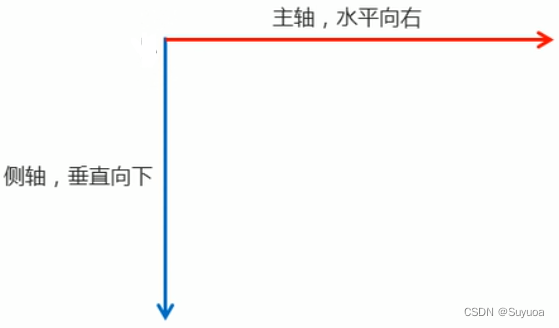
flex-direction It can be compared with the following four values

Now let's make a big box , Make three more small boxes

2.1.1 From left to right row
The default value is row, The main axis is x Axis , Direction from left to right

2.1.2 From right to left row-reverse


2.1.3 From top to bottom column


2.1.4 From bottom to top column-reverse


2.2 Set the arrangement of sub elements of the main axis justify-content
It can be compared with the following values

Let's first make a big box , There are three small boxes inside

2.2.1 Arrange from scratch flex-start
The default value is flex-start

2.2.2 Arrange from the tail flex-end
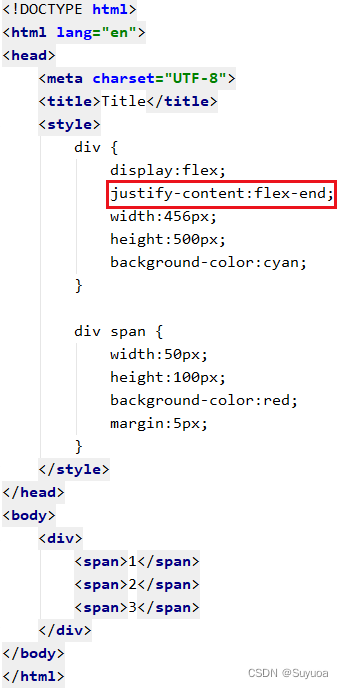
The effect is different from that of the reverse spindle , The order of the small box of the reverse spindle above is 3 2 1, Here is 1 2 3

2.2.3 The whole household center

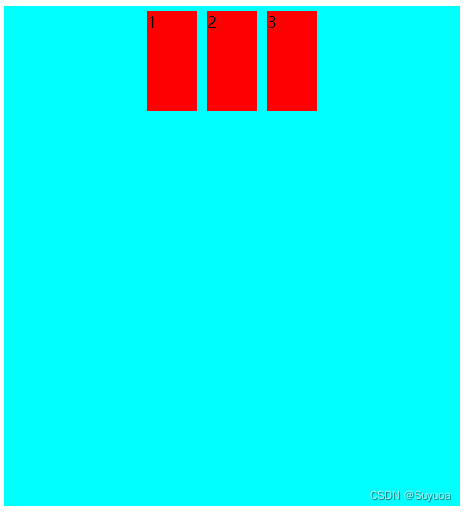
2.2.4 Bisector space space-around

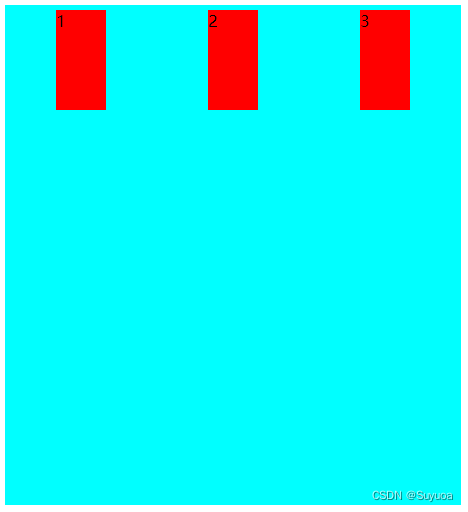
space-around Meaning is to make every element have similar margin

2.2.5 The first and last two elements are pasted , The remaining elements divide the remaining space equally space-between


2.3 Whether the child elements wrap flex-wrap
flex-wrap It can follow the following two values

2.3.1 Don't wrap nowrap
Default is no newline , When we are in a non newline state and the size of the child element exceeds the width of the parent element , The child element will automatically shrink
Now we have one big box and three small boxes

We found that the sum of the widths of the three small boxes is greater than the width of the large box , But it was still put aside
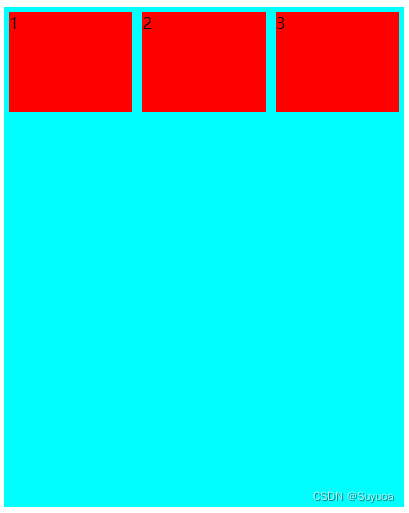
It shows that the size of the three small boxes is not 150px

2.3.2 Line break wrap

By default, the side axis elements will evenly allocate space

2.4 A single ( Column ) The arrangement of the side axes align-items
align-content Only in a single line ( Column ) Content takes effect , In many ways ( Column ) Content is invalid

2.4.1 stretch The tensile
The default is stretch , All elements will be placed at the beginning of the axis , And the following flex-start There is no difference in the display


2.4.2 Arrange from scratch flex-start


2.4.3 Arrange from the tail flex-end
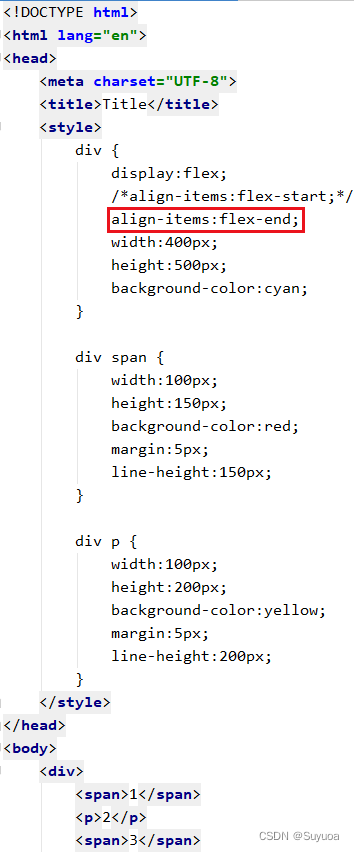

2.4.4 The whole household center

2.4.5 Align the first line of text to the baseline baseline
This is basically not used , We know this thing is ok


2.5 Multiple lines ( Column ) The arrangement of the side axes align-content
align-content Only in multiple lines ( Column ) Content takes effect , In a single line ( Column ) Content is invalid

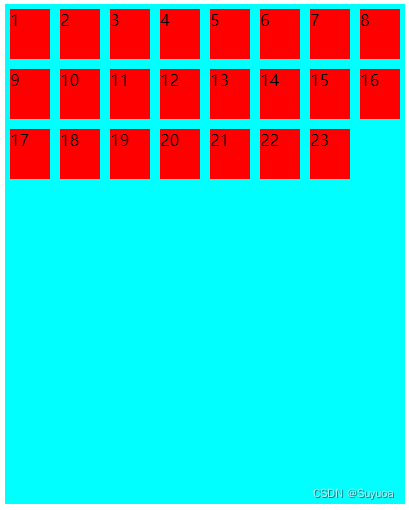
2.5.1 Occupy a line first ( Column ), Then divide the remaining space equally stretch
This is the default value , We make a big box and then 23 A small box , Allow line breaks


2.5.2 Arrange from scratch flex-start

2.5.3 Arrange from the tail flex-end


2.5.4 The whole household center


2.5.5 Bisector space space-around


2.5.6 First and last two lines ( Column ) Element welt , The remaining elements divide the remaining space equally space-between


2.6 Compound attribute flex-flow
flex-flow It can be set at the same time flex-direction( Spindle direction ) and felx-wrap( Do you want to change lines )
The default is x The axis is the main shaft from left to right , Don't wrap . We now set it to y From bottom to top is the main shaft , Line break
It was like this before it was set


After setting, it is like this


3 flex Common properties of subitems

3.1 Additional copies flex
After using the number of copies, the fixed size element space will be allocated first , Then divide the remaining space into the elements with the number of copies
Now let's make a big box , There are three small boxes inside , Accounting for 1 Share ,2 Share ,3 Share


Default 0 Share ,0 Only the width of the content . Now let's get another box number four

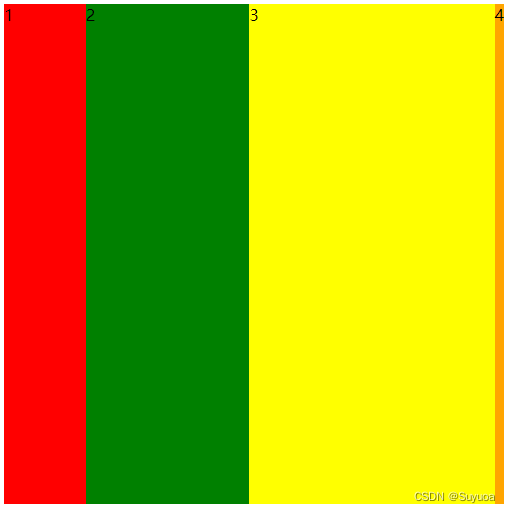
3.1.1 Fixed size on both sides , Intermediate adaptation
We can use flex Make a fixed size on both sides , The effect of intermediate adaptation
We need to set the parent object flex Layout , Then let the number of copies of the adaptive box be 1


3.1.2 flex Connect percentage
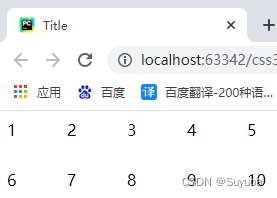
In addition to values flex You can also take percentage , For example, now I want to put two rows in a big box 10 A small box can be written like this

3.2 The arrangement of itself on the side axis align-self
Use align-self One or several elements can have their own unique order
The following values can be followed
- flex-start Arrange from scratch
- flex-end Arrange from the tail
- center In the middle
- stretch The tensile
- auto Inherit align-items, If the parent object does not align-items It is used by default stretch
I have a big box now , Three small boxes , The small boxes are arranged from head to tail on the side shaft


I now have the second box arranged from end to end on the side shaft


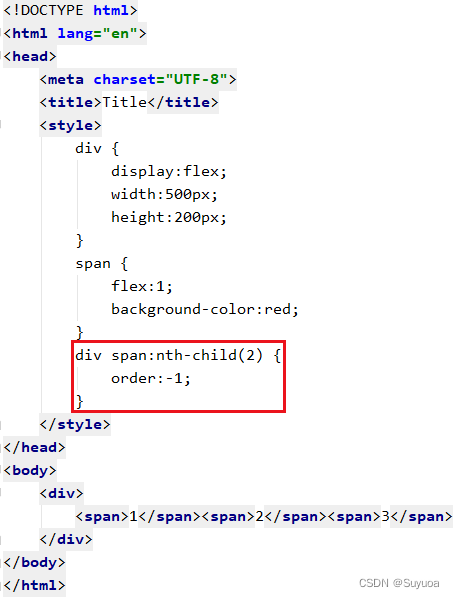
3.3 The order in which the child elements are arranged order
order Heel value , The default value is 0, The smaller the numerical , The further up the line
I now have the label 1,2,3 Three boxes of


I will now 2 Box No. 1 goes to the front

4 Ctrip homepage simulation
Ctrip mobile home address m.ctrip.com
My current page is like this

After that, it's like this

We will use flex Layout , Of course, the percentage method used before will also be used
Yes fixed Locating is to find a block of the same size to occupy the position , In this way, there is no need to adjust the height behind
css
@font-face {
    font-family: 'icomoon';
    src:  url('../fonts/fonts/icomoon.eot?209gaw');
    src:  url('../fonts/fonts/icomoon.eot?209gaw#iefix') format('embedded-opentype'),
    url('../fonts/fonts/icomoon.ttf?209gaw') format('truetype'),
    url('../fonts/fonts/icomoon.woff?209gaw') format('woff'),
    url('../fonts/fonts/icomoon.svg?209gaw#icomoon') format('svg');
    font-weight: normal;
    font-style: normal;
    font-display: block;
}


/* Head */
.header_position {
    position:relative;
    width:100%;
    height:50px;
}

.header {
    position:fixed;
    min-width:320px;
    max-width:540px;
    display:flex;
    justify-content:center;
    width:100%;
    z-index:998;
}

.header input {
    flex:1;
    height:32px;
    line-height:32px;
    border:3px solid rgb(54,160,248);
    border-radius:16px;
    margin:10px;
    color:rgb(153,153,153);
    text-indent:10%;
}

.header span::before {
    position:absolute;
    left:6%;
    top:14px;
    content:'\e986';
    font-family:'icomoon';
    font-size:16px;
    z-index:999;
}

/* Functional areas */
.function_area {
    overflow:hidden;
    display:flex;
    flex-wrap:wrap;
    position:relative;
    left:50%;
    transform:translate(-50%,0);
    width:95%;
    height:175px;
    border-radius:15px;
}

.function_area a {
    position:relative;
    display:flex;
    justify-content:center;
    align-items:center;
    flex-direction:column;
    width:20%;
}

.function_area a::before {
    position:absolute;
    left:0px;
    top:50%;
    transform:translate(0,-50%);
    content:'';
    width:1px;
    height:55px;
    background-color:white;
}


.function_area a span {
    display:inline-block;
    width:28px;
    height:28px;
    background-size:contain;
}

.function_area a:nth-child(-n+5) p {
    color:white;
}

/* First column */
.function_area a:nth-child(1) {
    background-color:rgb(250,109,83);
}

.function_area a:nth-child(1) span{
    background-image:url(../images/function_area/first_column/hotel.png);
}

.function_area a:nth-child(6), .function_area a:nth-child(11){
    background-color:rgb(255,245,241);
}

.function_area a:nth-child(6) span{
    background-image:url(../images/function_area/first_column/hotel_inn.png);
}

.function_area a:nth-child(11) span{
    background-image:url(../images/function_area/first_column/hotel_sale.png);
}

/* Second column */
.function_area a:nth-child(2) {
    background-color:rgb(71,158,250);
}

.function_area a:nth-child(2) span{
    background-image:url(../images/function_area/second_column/flight.png);
}

.function_area a:nth-child(7), .function_area a:nth-child(12){
    background-color:rgb(239,249,255);
}

.function_area a:nth-child(7) span{
    background-image:url(../images/function_area/second_column/flight_package.png);
}

.function_area a:nth-child(12) span{
    background-image:url(../images/function_area/second_column/airport_transfer.png);
}

/* The third column */
.function_area a:nth-child(3) {
    background-color:rgb(99,147,255);
}

.function_area a:nth-child(3) span{
    background-image:url(../images/function_area/third_column/train_ticket.png);
}

.function_area a:nth-child(8), .function_area a:nth-child(13){
    background-color:rgb(242,245,255);
}

.function_area a:nth-child(8) span{
    background-image:url(../images/function_area/third_column/bus_ticket.png);
}

.function_area a:nth-child(13) span{
    background-image:url(../images/function_area/third_column/car.png);
}

/* The fourth column */
.function_area a:nth-child(4) {
    background-color:rgb(68,208,180);
}

.function_area a:nth-child(4) span{
    background-image:url(../images/function_area/fourth_column/vacation.png);
}

.function_area a:nth-child(9), .function_area a:nth-child(14){
    background-color:rgb(236,252,248);
}

.function_area a:nth-child(9) span{
    background-image:url(../images/function_area/fourth_column/ticket.png);
}

.function_area a:nth-child(14) span{
    background-image:url(../images/function_area/fourth_column/weekend.png);
}


/* The fifth column */
.function_area a:nth-child(5) {
    background-color:rgb(255,150,63);
}

.function_area a:nth-child(5) span{
    background-image:url(../images/function_area/fifth_column/introduction.png);
}

.function_area a:nth-child(10), .function_area a:nth-child(15){
    background-color:rgb(255,249,242);
}

.function_area a:nth-child(10) span{
    background-image:url(../images/function_area/fifth_column/food.png);
}

.function_area a:nth-child(15) span{
    background-image:url(../images/function_area/fifth_column/shop.png);
}

/* Hot spots */
.hot_point {
    position:relative;
    justify-content:space-around;
    display:flex;
    height:150px;
    margin-top:5px;
}

/* Live part */
#live_report {
    display:flex;
    flex:1;
    flex-direction:column;
    margin:5px;
}

/* Live broadcast head */
#live_report_header {
    display:flex;
    justify-content:space-between;
}

#live_report_header img {
    height:20px;
}

#live_report_header span {
    padding:1px 4px;
    color:#ff4607;
    background-color:#ffebe3;
}

/* Live broadcast content */
#live_report_pic {
    border-radius:10px;
    flex:1;
    background-image:url(../upload/hot_point/live_report/1.png);
    background-size:100% 100%;
}

/* Ranking List */
.rank_list {
    display:flex;
    flex-direction:column;
    margin:5px;
}

/* Selected leaderboard */
#carefully_select_img {
    height:20px;
}

/* Authoritative ranking */
.rank_list span{
    padding:1px 4px;
    color:#ae6e15;
    background-color:#fdefd2;
    border-radius:2px;
}

.rank_list_content {
    height:115px;
    border-radius:5px;
}
/* The advertising part */
.advertisement {
    position:relative;
    left:50%;
    width:95%;
    transform:translate(-50%,0);
    height:130px;
    background-image:url(../upload/advertisement.jpg);
    background-size:100% 100%;
    border-radius:10px;
    margin-top:15px;
}

/* Telephone booking and downloading */
.phone_download {
    margin-top:15px;
    position:relative;
    display:flex;
    justify-content:space-around;
}

.phone_download span {
    position:relative;
    width:102px;
    height:32px;
    text-align:center;
    line-height:32px;
    border:1px solid gray;
    border-radius:5px;
}

.phone_download span:nth-child(1)::before {
    position:absolute;
    left:10px;
    content:'\e901';
    font-family:'icomoon';
}

.phone_download span:nth-child(2)::before {
    position:absolute;
    left:15px;
    content:'\e900';
    font-family:'icomoon';
}

/* Two links */

.two_link {
    display:flex;
    justify-content:center;
}

.two_link a{
    text-align:center;
    margin:30px;
}

/* Copyright */
.copyright {
    text-align:center;
}


.footer_position {
    position:relative;
    height:65px;
}
/* The tail */
.footer {
    position:fixed;
    width:100%;
    min-width:320px;
    max-width:540px;
    bottom:0px;
    display:flex;
    height:65px;
    justify-content:space-around;
    background-color:white;
}

.footer span {
    width:32px;
    height:45px;
    text-align:center;
    line-height:90px;
    background-image:url(../images/footer/tabbar.png);
    background-size:48px auto;
}

.footer span:nth-child(1) {
    background-position:-8px -8px;
}

.footer span:nth-child(2) {
    background-position:-8px -56px;
}

.footer span:nth-child(3) {
    background-position:-8px -103px;
}

.footer span:nth-child(4) {
    background-position:-8px -148px;
}

/* Check in Section */
.sign_in {
    position:fixed;
    right:20px;
    bottom:50px;
    width:76px;
    height:76px;
    background-image:url(../images/signin-d.png);
    background-size:76px 76px;
}
html
<!DOCTYPE html>
<html lang="en">
<head>
    <meta charset="UTF-8">
    <title>Title</title>
    <meta name="viewport" content="width=device-width,user-scalable=no,initial-scale=1.0,maximum-scale=1.0,minimum-scale=1.0">
    <link rel="stylesheet" href="css/initialization.css">
    <link rel="stylesheet" href="css/index.css">
</head>
<body>

    <section class="header">
        <span id="magnifier"></span>
        <input type="text" placeholder=" Search for : Destination / The hotel / Scenic spot / flight number ">
    </section>
    <section class="header_position"></section>
    <section class="function_area">
        <a href="#"><span></span><p> The hotel </p></a>
        <a href="#"><span></span><p> Plane ticket </p></a>
        <a href="#"><span></span><p> Train tickets </p></a>
        <a href="#"><span></span><p> tourism </p></a>
        <a href="#"><span></span><p> strategy / Scenic spot </p></a>

        <a href="#"><span></span><p> Home stay / Inn </p></a>
        <a href="#"><span></span><p> machine + Alcohol </p></a>
        <a href="#"><span></span><p> automobile / Steamer ticket </p></a>
        <a href="#"><span></span><p> tickets / Activities </p></a>
        <a href="#"><span></span><p> food </p></a>

        <a href="#"><span></span><p> Special Offer / Hot style </p></a>
        <a href="#"><span></span><p> Transfer / Charter a car </p></a>
        <a href="#"><span></span><p> Car rental </p></a>
        <a href="#"><span></span><p> Travel around </p></a>
        <a href="#"><span></span><p> shopping / duty-free </p></a>
    </section>

    <section class="hot_point">
        <div id="live_report">
            <div id="live_report_header">
                <img src="images/hot_point/live_report.png" alt="">
                <span> The special offer is on live broadcast </span>
            </div>
            <div id="live_report_pic"></div>
        </div>

        <div class="rank_list">
            <img src="images/hot_point/carefully_select.png" id="carefully_select_img">
            <img src="upload/hot_point/1.png" alt="" class="rank_list_content">
            <p>xxxxxxxx</p>
        </div>

        <div class="rank_list">
            <span> Authoritative ranking </span>
            <img src="upload/hot_point/1.png" alt="" class="rank_list_content">
            <p>xxxxxxxx</p>
        </div>
    </section>

    <section class="advertisement"></section>

    <section class="phone_download">
        <span> Telephone reservation </span>
        <span> download XX</span>
    </section>

    <section class="two_link">
        <a href="#"> Website map </a>
        <a href="#"> Computer version </a>
    </section>
    <p class="copyright">2022XX travel  XXX To prepare XXXXXXX Number </p>
    <section class="footer_position"></section>
    <section class="footer">
        <span> home page </span>
        <span> Community </span>
        <span> news </span>
        <span> my </span>
    </section>

    <section class="sign_in"></section>
</body>
</html>边栏推荐
猜你喜欢

How to use SVG to make text effects arranged along any path

Data Lake solutions of various manufacturers
【牛客刷题】/*C语言实现字符串左旋*/

HCIA OSPF

LeetCode 2331. 计算布尔二叉树的值(树的遍历)

Develop the first Flink app

Find balanced binary tree
[Niuke swipe questions] / *c language realizes left-hand rotation of strings*/
LeetCode 2315. 统计星号(字符串)

C serialport configuration and attribute understanding
随机推荐
c语言指针的有关总结
SAP S4 Material Management 库存模块 MARD 数据库表读取技术细节介绍
[makefile] some notes on the use of makefile
ue4对动画蓝图的理解
【CSP-J 2021】总结
追根问底:Objective-C关联属性原理分析
爱可可AI前沿推介(7.17)
[PostgreSQL] PostgreSQL 15 optimizes distinct
二叉树刷题(二)
37. flex布局
The R language uses the plot function in the native package (basic import package, graphics) to visualize the scatter plot
Redis集群、一主二从三哨兵的搭建
Transplant Wu Enda's deep learning 01 machine learning and neural network second week neural network basic programming homework elective homework to pycharm
R language uses the ordinal of epidisplay package or. The display function obtains the summary statistical information of the ordered logistic regression model (the odds ratio and its confidence inter
如何使用SVG制作沿任意路径排布的文字效果
华为防火墙认证技术
MFC|框架下自绘CEdit控件
SAP AppGyver 简介
"Baidu side" angrily sprayed the interviewer! Isn't it that the tree time increases by a line number?
SAP Fiori Launchpad 上看不到任何 tile 应该怎么办?