当前位置:网站首页>Experiment 5: Gui
Experiment 5: Gui
2022-07-19 06:36:00 【A student of programming】
- The experiment purpose
Design related classes through graphical interfaces 、 Interfaces, etc. , Realize the development of user graphical application ; Further consolidate JDBC Connect to the database and read and write files .
- The goal of the experiment
- Be able to master common GUI How to use the control components , adopt java.awt Packages and Javax.swing The classes and interfaces in the package realize the development of user graphical interface ;
- Be able to use Java Event handling mechanism of , adopt JDBC Operating the database , Realize user login function ;
- Be able to master and use I/O Stream operates on files .
- Experimental content
1 Experimental environment
java version "13.0.2" 2020-01-14
Java(TM) SE Runtime Environment (build 13.0.2+8)
Java HotSpot(TM) 64-Bit Server VM (build 13.0.2+8, mixed mode, sharing)
2 The specific content of the experiment
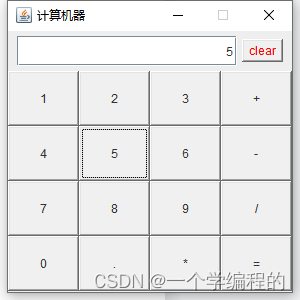
- utilize GUI Design and implement a calculator program ( notes : At least four basic operations of addition, subtraction, multiplication and division should be realized ).
- Design a graphic application about file operation , At least realize the following functions :
a) Contains a text box and add button , After entering text in the text box , Click the Add button to write the text in the text box in the file ;
b) Contains a read button , After clicking this button , Can read file contents , And display it in the text box .
- Analysis of experimental process
1 The experimental steps
1. Calculator program , Create a window page , At the same time, add several methods of requirements to this window , To realize the methods of addition, subtraction, multiplication and division .
The code is as follows :
package demo;

import javax.swing.*;

import java.awt.*;

import java.awt.event.ActionEvent;

import java.awt.event.ActionListener;


public class MyJfram extends JFrame implements ActionListener {

    private final JPanel upBottom = new JPanel();// Upper component

    private final Button clearButton = new Button("clear");

    private JTextField show = new JFormattedTextField();

    private final JPanel downBottom = new JPanel();// Next set up

    private final String string1 = "0123456789.";

    private final String string2 = "[\\+\\-*/]{1}";


    public void inti() {

        this.setBounds(500, 200, 300, 300);

        this.setTitle(" Computing machine ");

        this.setVisible(true);

        this.setDefaultCloseOperation(EXIT_ON_CLOSE);

        this.setResizable(false);

        this.upBottom();

        this.downBottom();

    }


    public void upBottom() {

        this.upBottom.setLayout(new FlowLayout());// Fluid layout

        this.show.setPreferredSize(new Dimension(220, 30));// Set the size method in the component

        this.upBottom.add(show);

        this.upBottom.add(clearButton);

        this.upBottom.setForeground(Color.RED);

        this.add(upBottom, BorderLayout.NORTH);

        clearButton.addActionListener(this);// Global monitoring

    }


    public void downBottom() {

        String s = new String("123+456-789/0.*=");

        this.downBottom.setLayout(new GridLayout(4, 4));// Grid layout

        for (int i = 0; i < 16; i++) {

            Button button = new Button();

            button.setLabel(String.valueOf(s.charAt(i)));

            button.addActionListener(this);

            downBottom.add(button);

        }

        this.add(downBottom, BorderLayout.CENTER);

    }


    public static void main(String[] args) {

        MyJfram myJfram = new MyJfram();

        myJfram.inti();

    }


    String firstNum = null;//

    String operate = null;

    String secondNum = null;


    @Override

    public void actionPerformed(ActionEvent e) {

        String command = e.getActionCommand();

        if (string1.contains(command)) {

            this.show.setText(this.show.getText() + command);

            this.show.setHorizontalAlignment(JTextField.RIGHT);

        } else if (command.matches(string2)) {

            operate = command;

            firstNum = this.show.getText();

            this.show.setText("");

        } else if ("=".equals(command)) {

            secondNum = this.show.getText();

            Double a = Double.valueOf(firstNum);

            Double b = Double.valueOf(secondNum);

            Double result = null;

            switch (operate) {

                case "+":

                    result = a + b;

                    break;

                case "-":

                    result = a - b;

                    break;

                case "*":

                    result = a * b;

                    break;

                case "/":

                    if (b != 0) {

                        result = a / b;

                    } else {

                        JOptionPane.showMessageDialog(this, " The dividend cannot be zero 0");

                    }

                    break;

                default:

                    break;

            }

            assert result != null;

            this.show.setText(result.toString());

        } else if ("clear".equals(command)) {

            this.show.setText("");

            firstNum = null;

            secondNum = null;

        }

    }

}
Calculation 12*5=60


- Graphical applications , Create a window interface , Add two components to this window , A window for input to the system , A window is used to output to the system .
The code is as follows :
package demo;

import javax.swing.*;

import java.awt.*;

import java.awt.event.ActionEvent;

import java.awt.event.ActionListener;

import java.io.*;


public class MyJfram extends JFrame implements ActionListener {

    public TextArea textArea = new TextArea();

    public Button button = new Button();

    public Button button1 = new Button();

    public StringBuffer inputString = new StringBuffer();


    public void inti() {

        this.setBounds(500, 200, 300, 300);

        this.setVisible(true);

        this.setResizable(false);

        this.setTitle(" Input and output ");

        this.setDefaultCloseOperation(EXIT_ON_CLOSE);

        this.setLayout(new FlowLayout());

        up();

        down();

    }


    private void down() {

        button.setLabel("InputText");

        button.setPreferredSize(new Dimension(300, 60));

        button.addActionListener(this);

        this.add(button, BorderLayout.SOUTH);

        button1.setLabel("OutText");

        button1.setPreferredSize(new Dimension(300, 60));

        button1.addActionListener(this);

        this.add(button1, BorderLayout.SOUTH);

    }


    public void up() {

        textArea.setPreferredSize(new Dimension(270, 100));

        textArea.setFont(new Font(" Song style ", Font.BOLD, 20));

        this.add(textArea);

    }


    public static void main(String[] args) {

        MyJfram myJfram = new MyJfram();

        myJfram.inti();

    }


    String string = "InputText";


    @Override

    public void actionPerformed(ActionEvent e) {

        String command = e.getActionCommand();

        if (string.equals(command)) {

            String text = textArea.getText();

            writerText(text);

        } else {

            readText();

        }

    }


    private void readText() {

        File file = new File("D:\\VM\\a.txt");

        try (FileReader fileReader = new FileReader(file)) {

            BufferedReader bufferedReader = new BufferedReader(fileReader);

            String len = null;

            StringBuilder result = new StringBuilder();

            while ((len = bufferedReader.readLine()) != null) {

                result.append(len);

            }

            JOptionPane.showMessageDialog(this, " Read successful ");

            textArea.setText(result.toString());

        } catch (IOException e) {

            e.printStackTrace();

        }

    }


    private void writerText(String text) {

        File file = new File("D:\\VM\\a.txt");

        try (FileWriter fileWriter = new FileWriter(file)) {

            inputString.append(text);

            fileWriter.write(inputString.toString());

            textArea.setText("");

            JOptionPane.showMessageDialog(this, " Archive success ");

        } catch (IOException e) {

            e.printStackTrace();

        }

    }

}
initialization :


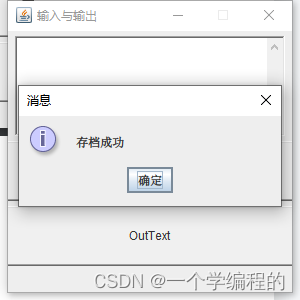

Then the output :


4.2 error analysis
1. In this experiment , It must be considered that the data during calculation cannot exceed the range , Otherwise, data loss will occur , Also consider that the divisor cannot be 0.
2. When inputting and outputting files , If you do not consider the closure of the file stream, the file data may be garbled , You have to set it up Java structure , Set the character type to UTF8.
- Summary of the experiment
answer :Java The basic component of GUI is component , A component is an object that is displayed graphically on the screen and can interact with users. Components cannot be displayed independently , The components must be placed in a container (container) Can be displayed in . Containers can hold multiple components , By calling the add(Component comp) Method to add a component to the container . Graphical user interface (GUI) is an interface display format for communication between people and computers , Allows users to manipulate icons or menu options on the screen using input devices such as a mouse , To select the command 、 Call file 、 Start a program or perform other routine tasks . Compared to a character interface that uses keyboard input text or character commands to perform routine tasks , GUI has many advantages . The GUI consists of windows 、 The drop-down menu 、 Dialog box and its corresponding control mechanism constitute , It's standardized in all kinds of new applications , That is, the same operation is always done in the same way , In the graphical user interface , What users see and operate are graphic objects , The application is the technology of computer graphics .
边栏推荐
- Leetcode string
- 量子三体问题: 数值计算概述
- Vscode one dark and C extended variable color conflict settings JSON is as follows
- [force buckle] symmetric binary tree
- Antd is not defined
- 用头部运动学习无姿态注视偏差
- DSL implements bucket aggregation
- Creation and implementation of WebService interface
- Unity2D学习 Fox Game制作 过程1:基本的游戏角色控制,动画效果,镜头控制,物品收集,bug优化
- Some basic concepts in network
猜你喜欢

无80和443端口下申请域名SSL证书(适用于 acme.sh 和 certbot)

Read pictures and convert them to show different color spaces

手把手搭建家用 NAS 全能服务器(1)| 配置选择及准备

机器人缝合手势识别和分类

EOG-based eye movement detection and gaze estimation for an asynchronous virtual keyboard基于EOG的异步虚

使用候选选择从人类注视中学习视频显著性

WebService接口的创建与实现

Restapi implements aggregation (dark horse tutorial)

用头部运动学习无姿态注视偏差

Résoudre le problème de l'ambiguïté de la cible dans l'interaction de fixation 3D par l'estimation de la profondeur vor
随机推荐
2022/07/12 learning notes (day05) JS built-in functions
C language calls the file browser to realize the effect of selecting files
Unity2d learning Fox game production process 1: basic game character control, animation effects, lens control, item collection, bug optimization
实习笔试解答
《PyTorch深度学习实践》-B站 刘二大人-day7
实验二 类与对象定义初始化
Creation and implementation of WebService interface
实验一 简单程序设计
山西省第二届网络安全技能大赛(企业组)部分赛题WP(二)
基于视觉显著性的外观注视估计
SalGaze:使用视觉显著性的个性化注视估计
Visual saliency based visual gaze estimation
Design and implementation of a gesture control system for tablet computer based on gaze
[force buckle] realize queue with stack
人脸识别错误
实验五: GUI
Addition and subtraction of busybox date time
Antd is not defined
Restapi implements aggregation (dark horse tutorial)
Set the index library structure, add suggestions that can be automatically completed to users, and turn some fields into collections and put them into suggestions