当前位置:网站首页>MongoDB的下载、安装和使用
MongoDB的下载、安装和使用
2022-07-17 05:25:00 【guizi0809】
一、下载
MongoDB 官网 https://www.mongodb.com/zh-cn
以社区版本为例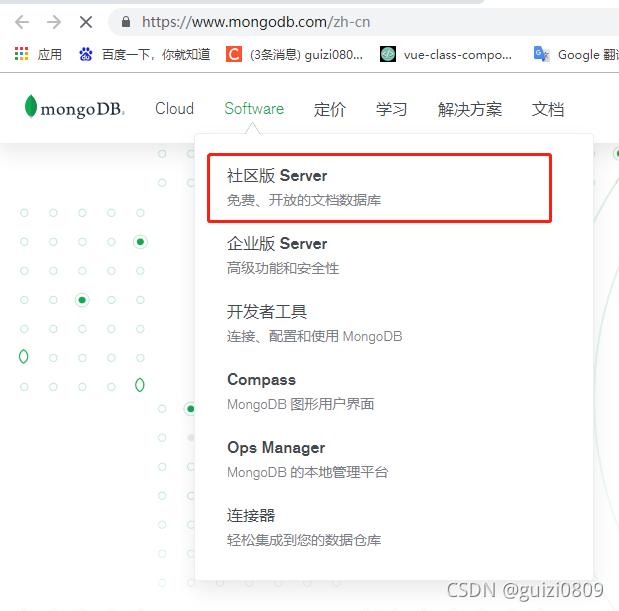
选择下载的版本和系统,当前选择版本为5.0.3,windows系统,下载文件格式为msi
二、安装
除了下面两项需要设置外,都点Next进入下一步
1.选择Complete,表示安装到默认路径(不推荐,C盘懂的都懂) 选择Custom,表示自定义安装路径(推荐),这里演示用就都安装在C盘了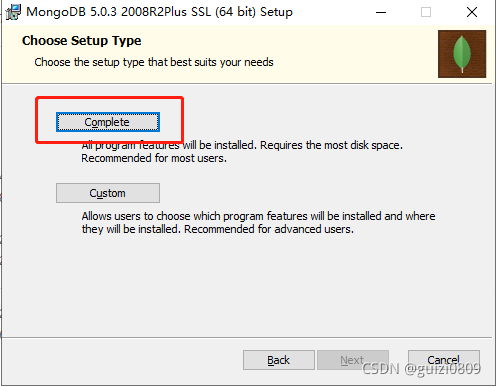
2.设置MongoDB的服务名称,数据目录和日志目录,建议将数据目录和日志目录设置在其他盘,因为c盘一般是系统盘,重装系统会丢失。
安装中…
安装完成~
三、配置
打开cmd,输入mongo命令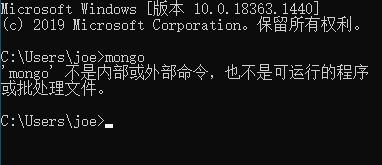
找到MongoDB安装目录的bin文件夹
复制这个bin文件夹目录路径
“我的电脑”右键–>属性,如下图打开系统变量配置
将刚刚复制的bin目录路径添加在系统环境变量中
重新打开cmd命令窗口,输入mongo命令
四、使用
#关于命令中的参数说明

#参数            描述
#--bind_ip         绑定服务IP,若绑定127.0.0.1,则只能本机访问,不指定默认本地
#所有IP
#--logpath         定MongoDB日志文件,注意是指定文件不是目录
#--logappend       使用追加的方式写日志
#--dbpath         指定数据库路径
#--port            指定服务端口号,默认端口27017
#--serviceName     指定服务名称
#--serviceDisplayName 指定服务名称,有多个mongodb服务时执行。
#--install         指定作为一个Windows服务安装。
启动MongoDB服务端
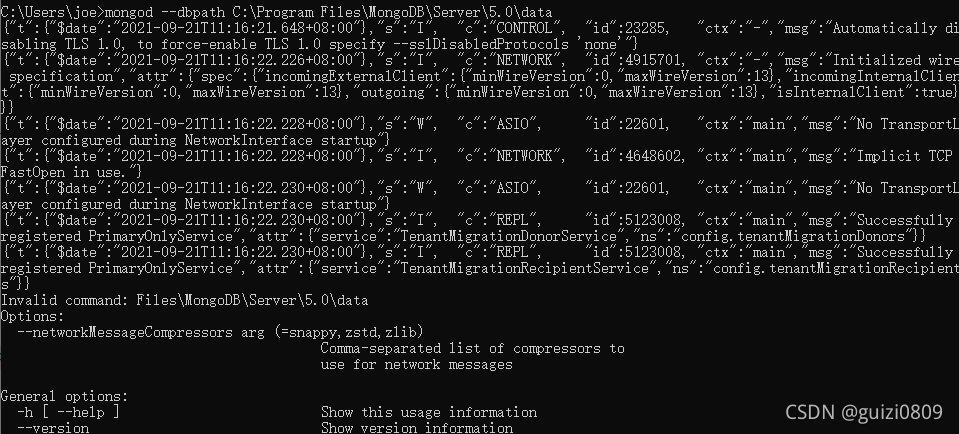
在浏览器访问 http://localhost:27017。见到如下页面,说明启动成功
打开一个新的cmd窗口,使用mongo命令启动MongoDB客户端 (注意:上面开启的MongoDB服务端不能关闭)
比如连接本地数据库
mongo
#或
mongo 127.0.0.1:27017
远程数据库
mongo 远程ip地址:27017
在MongoDB客户端输入show dbs查看数据库
MongoDB的使用
边栏推荐
- 小怿和你聊聊V2X测试系列之 如何实现C-V2X HIL测试(2022版)
- Introduction to arm development environment
- Use Altium designer software to draw a design based on stm32
- Coursera deep learning notes
- High concurrency day02 (concurrent package)
- Review of 4246 Algorithms for Data Science
- Review of 4705 NLP
- Spark3.x entry to mastery - stage 7 (spark dynamic resource allocation)
- Basic lighting knowledge of shader introduction
- js数组交集、差集和并集
猜你喜欢

Maxwell简介&使用

Pytorch随记(2)

Spark introduction to proficient - external part (operation and maintenance and simple operation of standaone cluster)

Review of 4705 NLP
Servlet notes

RNN卷积神经网络

SQL skimming summary SQL leetcode review

Summary of Statistics for Interview

机器学习之随机森林

Network knowledge-03 data link layer PPP
随机推荐
Divide method in BigDecimal
实操教程:CANoe在CAN总线测试中的应用
TSN协议之安全协议(802.1Qci)的那些事儿
利用PCA来简化数据
2021-10-25 browser compatibility problems
Solution to the conflict between security automatic login and anti CSRF attack
How does continuous integration manage Jenkins?
TSN security protocol (802.1qci)
Introduction to 3D Visualization: see how rendering pipelines work in GPU
Network knowledge-04 network layer IPv4 protocol
Promote trust in the digital world
一文带你了解SOA接口测试
FreeBSD 12 changing the background of the startup interface
Pychart installation tutorial
Review - 5703 Statistical Inference and Modeling
Solve MySQL (1064) error: 1064 - you have an error in your SQL syntax;
HMI概念设计的未来在哪里?
Jenkins 忘记密码怎么办?
AB Testing Review
SSM integration