当前位置:网站首页>RHCE ansible second operation
RHCE ansible second operation
2022-07-19 02:52:00 【 ᝰꫛꫀꪝ】
1、 Deploy to the managed host yum Warehouse , Examples are as follows :
Warehouse 1 :
Name: base
Description: baseos
Base url: https://mirrors.163.com/centos-vault/8.5.2111/BaseOS/x86_64/os/
Need to validate the package GPG Signature
GPG key stay /etc/pki/rpm-gpg/RPM-GPG-KEY-*
Enable this software repository
Warehouse 2:
Name: app
Description: appstream
Base url: https://mirrors.163.com/centos-vault/8.5.2111/AppStream/x86_64/os/
Need to validate the package GPG Signature
GPG key stay : /etc/pki/rpm-gpg/RPM-GPG-KEY-*
Enable this software repository
notes : Check your own linux System version , And select the corresponding version warehouse .
After successful deployment, install on the managed host vsftpd software package
First, make sure that there is ansible.conf and inventory File and configuration is correct
then vim One by .yml Final document
Here we use 1-create-yum.yml For example :
[[email protected] test1]$ vim 1-create-yum.yml
Then edit the following content in the file :

The code is as follows :
---
- name: play1
  hosts: all
  tasks:
    - name: create base
      yum_repository:
        name: base
        description: baseos
        baseurl: https://mirrors.aliyun.com/centos-vault/8.2.2004/BaseOS/x86_64/os/
        gpgcheck: yes
    - name: create appstream
      yum_repository:
        name: app
        description: appstream
        baseurl: https://mirrors.aliyun.com/centos-vault/8.2.2004/AppStream/x86_64/os/
        gpgcheck: yes
    - name: install vsftpd
      yum:
        name: vsftpd
        state: latest
2、 to web Host group write one playbook, The playbook There are two play, first play It can be guaranteed in web Install on host group httpd and php, Make sure web Of the host group /var/www/html/ There is a file under the directory named index.php, The contents are as follows :
$ cat /var/www/html/index.php
<?php
phpinfo();
Among them playbook The second one play Used to test the web Of the host group web Whether the service can be successfully accessed index.php Content .
First go to the configuration file to set web Group

Then configure one .yml file
The contents of the document are as follows :

The document code is as follows :
---
- name: play1
  hosts: web
  tasks:
    - name: install httpd
      yum:
        name:
          - httpd
          - php
        state: latest
    - name: create index
      copy:
        content: "<?php\nphpinfo();\n"
        dest: /var/www/html/index.php
    - name: delete index.html
      file:
        path: /var/www/html/index.html
        state: absent
    - name: add a firewalld rule
      firewalld:
        service: http
        permanent: true
        state: enabled
        immediate: true
    - name: restart httpd
      service:
        name: httpd
        state: restarted

- name: play2
  hosts: master
  tasks:
    - name: ceshi master
      uri:
        url: http://master
3、 Add a normal user on the controlled node xiaohong, Users who configure the current control node can log in without secret xiaohong user , also xiaohong Sure sudo.
Configure on the control node .yml file
[[email protected] test1]$ vim 3-useradd.yml
The contents of the document are as follows

Because I configured password free login before , So there is no need to generate public-private key pairs
if necessary
Add

The verification results
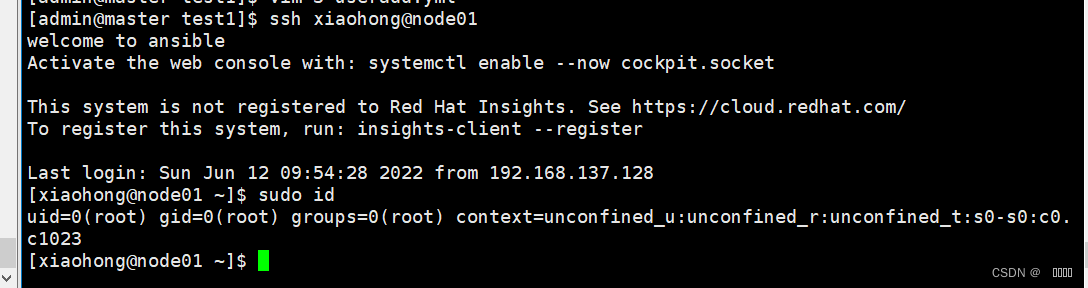
The document code is as follows :
---
- name: play1
  hosts: node01
  tasks:
    - name: useradd xiaohong
      user:
        name: xiaohong
        state: present

    - name: xiaohong sudoers
      lineinfile:
        line: "xiaohong ALL=(ALL) NOPASSWD:ALL"
        path: /etc/sudoers
    - authorized_key:
        state: present
        user: xiaohong
        key: "{
    { lookup('file', '/home/admin/.ssh/id_rsa.pub') }}"
边栏推荐
- GFS分布式文件系统
- MySQL backup and recovery
- C语言回调函数 & sprinf 实际应用一例
- 对工作节点执行drain操作时,通过pdb保护pod副本数
- Arm cross compiler naming rules
- Brief introduction of Feature Engineering and its implementation of sklearn
- squid代理服务部署
- Rhce8 Study Guide Chapter 7 service management
- ENSP静态路由实验
- Shell脚本变量、脚本编写和执行(部署Apache与远程备份MySQL数据库)
猜你喜欢




随机推荐
时间管理方法的反思与探讨
Echo -e usage
[unity Editor Extension] displays the memory size of all files in the resource directory
Oracle查询时间段内所有日期
Leetcode 70:Climbing Stairs
正则表达式
Leetcode buckle classic question - 42 Connect rainwater
Binary installation kubernetes 1.24.1
Upgrade kubernetes 1.23.2 to 1.24.1
使用gatekeeper限制kubernetes创建特定类型的资源
DHCP服务
Expect interaction free
Rip comprehensive experiment
Binary installation kubernetes 1.23.2
Understanding of array and bubbling
DNS domain name resolution
Rhce8 Study Guide Chapter 7 service management
HCIA第一次静态路由实验
RHCE学习指南 第5章 vim编辑器
Comprehensive experiment of static routing