当前位置:网站首页>Rhce8 Study Guide Chapter 7 service management
Rhce8 Study Guide Chapter 7 service management
2022-07-19 02:49:00 【Lao Duan studio】
Just installed Windows System time , Some optimization is needed , As shown in the figure below .
Right click the resulting menu , You can see some buttons including restart 、 stop it 、 Start the service . These manage the current state of the service .
Double click the service name , In the startup type, the system startup , Should this service run together , As shown in the figure below .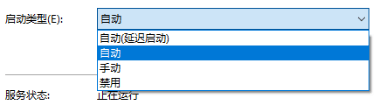
stay Windows Next manage a service , There are two ways of Management .
(1) Manage the current state .
(2) Whether the management starts automatically .
stay RHEL8 in , By input systemctl list-unit-file The command can list all services in the system , The suffix is service The services of are similar to Windows Next service . Check that the suffix is service Your services can be systemctl list-unit-files --type service command .
[[email protected] ~]# systemctl list-unit-files --type service
UNIT FILE                                  STATE
accounts-daemon.service                    enabled
alsa-restore.service                       static
... Output ...
[[email protected] ~]#
Finally according to the q sign out .
Generally, we start 、 restart 、 Out of Service , Refers to these suffixes as service Service for , suffix .service Generally, it is not necessary to write .
7.1 Manage the current status of the service
see sshd The command of whether this service is running is as follows .
[[email protected] ~]# systemctl is-active sshd
active
[[email protected] ~]#
Only the status is active It means that this service is running normally , In addition, other states indicate that the service is not running or is not running normally .
close sshd The command is as follows .
[[email protected] ~]# systemctl stop sshd
[[email protected] ~]# systemctl is-active sshd
inactive
[[email protected] ~]#
Turn on sshd The command is as follows .
[[email protected] ~]# systemctl start sshd
[[email protected] ~]# systemctl is-active sshd
active
[[email protected] ~]#
restart sshd The command is as follows .
[[email protected] ~]# systemctl restart sshd
[[email protected] ~]#
see sshd The command of the running state of is as follows .
[[email protected] ~]# systemctl status sshd
● sshd.service - OpenSSH server daemon
   Loaded: loaded (/usr/lib/systemd/system/sshd.service; enabled; vendor preset: enabled)
   Active: active (running) since Wed 2021-08-11 23:35:30 CST; 39s ago
	... Output ...
[[email protected] ~]#
above enabled It indicates that this service starts automatically when it is powered on ,active Indicates that it is currently in normal operation .
Terminal prompt is not displayed at bottom line , Press q sign out .
The command to disable the service is as follows .
[[email protected] ~]# systemctl mask sshd
Created symlink /etc/systemd/system/sshd.service → /dev/null.
[[email protected] ~]# systemctl stop sshd
[[email protected] ~]# systemctl start sshd
Failed to restart sshd.service: Unit sshd.service is masked.
[[email protected] ~]#
take sshd Set to mask, Then the service cannot be started after it is shut down , This is similar to Windows Next, I disabled a service , adopt systemctl status sshd To see if it is set to mask.
[[email protected] ~]# systemctl status sshd
● sshd.service
   Loaded: masked (Reason: Unit sshd.service is masked.)
   Active: inactive (dead) since Wed 2021-08-11 23:44:06 CST; 6s ago
	... Output ...
[[email protected] ~]#
To cancel mask, adopt unmask Command is enough , As shown below .
[[email protected] ~]# systemctl unmask sshd
Removed /etc/systemd/system/sshd.service.
[[email protected] ~]#
[[email protected] ~]# systemctl start sshd
[[email protected] ~]#
The above is divided by mask External operations only affect the current state , It will not affect whether the service will start automatically after the system is restarted .
7.2 The management service starts running automatically
Check whether a service starts automatically when it is started , adopt systemctl is-enabled Service name , If it turns out to be enabled It will run automatically after starting up , Whether it is currently started or not , This service will start automatically when starting , As shown below .
[[email protected] ~]# systemctl is-enabled sshd
enabled
[[email protected] ~]#
The result shown here is enabled, explain sshd The service will start automatically when it is powered on . If you don't want to start up automatically , Through systemctl disable service name that will do , As shown below .
[[email protected] ~]# systemctl disable sshd
Removed /etc/systemd/system/multi-user.target.wants/sshd.service.
[[email protected] ~]# systemctl is-enabled sshd
disabled
[[email protected] ~]#
Now displayed as disabled, explain sshd This service will not start automatically when it is turned on , Even if sshd Now it is running , But after restarting the system sshd It will not run automatically , Only manual start Then it can run .
enable and disable The operation affects whether the boot will start automatically , It does not affect the current state . If you want to set automatic startup , At the same time, the settings are now activated , So add –now Options , As shown below .
[[email protected] ~]# systemctl stop sshd
[[email protected] ~]# systemctl enable sshd --now
Created symlink /etc/systemd/system/multi-user.target.wants/sshd.service → /usr/lib/systemd/system/sshd.service.
[[email protected] ~]#
Now check out sshd The state of , As shown below .
[[email protected] ~]# systemctl is-active sshd
active
[[email protected] ~]# systemctl is-enabled sshd
enabled
[[email protected] ~]#
7.3 Determine what the service name is
Many times, after we install some software , Want to know what the service name is , Can pass “systemctl list-unit-files --type service | grep keyword ” To judge , for example ,ssh This service is ssh still sshd?
[[email protected] ~]# systemctl list-unit-files --type service | grep ssh
anaconda-sshd.service                      static
[email protected]                       disabled
sshd.service                               enabled
[email protected]                              static
sssd-ssh.service                           indirect
[[email protected] ~]#
Homework
One day the administrator tom Took over a new server , When he started vsftpd The following error is reported , Pictured 7-3 Shown .

Then he asked you to help solve it , So what should you do ?When you solve this problem , After a while tom Come to you again , Tell vsftpd This service should be started manually after each restart of the system , It's a real hassle . Do you have any good methods to solve this problem ?
边栏推荐
- 学习网络基础
- Regular and extended expressions, sed text processor and awk tool, changing IP address with script
- SSH Remote Control and access
- The JMeter BeanShell implementation writes the parameterized data generated by the request to the file
- rsync远程同步(增量备份)
- status 500 reading AftersaleService#getAftersaleList(Long)+com. sun. proxy.$ Proxy214.getAftersaleList
- Gzip的动态压缩和静态压缩详解
- Dynamic programming - 01 knapsack problem
- [unity Editor Extension] displays the memory size of all files in the resource directory
- RHCE8学习指南 第6章 归档与压缩
猜你喜欢




随机推荐
win10网络连接显示无网络但可以上网
Use of sqlmap
Rsync remote synchronization (incremental backup)
TCP的三次握手与四次断开
RHCE8学习指南第2章 基本命令的使用
A preliminary study of MySQL
Keep two decimal places and take values upward
数组、冒泡的认识
认识交换机以及作用
Various development tools
[hsjframework] unity time management timemanger timer
shell脚本之循环语句与函数
Let's learn about awk~
Net-Snmp开发 一
RIP综合实验
[unity development tips] unity mixer mixer controls global volume
安装.NET提示“无法建立到信任根颁发机构的证书链”(方法简单有下载地址)
DNS domain name resolution
String Full Permutation Problem
Metersphere is based on JMeter distributed performance pressure testing platform