当前位置:网站首页>[RT thread] NXP rt10xx sfud and fal component construction and use
[RT thread] NXP rt10xx sfud and fal component construction and use
2022-07-18 13:21:00 【L_ seventeen】
Preparation before development
- Hardware platform :nxp rt10xx Single chip microcomputer
- IDE: Keil
- spi The device drive framework has been built ( Use of this chapter spi2,flash Mount in this position )
SFUD brief introduction
SFUD Full name Serial Flash Universal Driver, Is an open source serial SPI Flash Universal driver library . Because of the current market Flash Most of them are species , each Flash There are differences in the specifications and commands of , SFUD Just to solve these problems Flash Design according to the current situation , So that our products can support different brands and specifications of Flash, The improvement involves Flash The reusability and extensibility of functional software , At the same time, we can avoid Flash The risk of out of stock or out of production .
1.SFUD stay rt-thread Position in assembly
sfud The component is in the following path ,README Part has its detailed description :

2.Env Environmental Science menuconfig To configure
open Env Get into RT-Thread Components -> Device Drivers Catalog , Select the following :

3. Add... To the project SFUD
file :spi_flash_sfud.c sfud.c sfud_sfdp.c And related header files 
4. Application function test
Bottom IO initialization , Pay attention to our Flash Mount location , For the time being in this chapter spi Not qspi test
 	IOMUXC_SetPinMux(IOMUXC_GPIO_SD_B1_07_LPSPI2_SCK, 0U);
	// IOMUXC_SetPinMux(IOMUXC_GPIO_SD_B1_06_LPSPI2_PCS0, 0U); IOMUXC_GPIO_SD_B1_06_GPIO3_IO06
	IOMUXC_SetPinMux(IOMUXC_GPIO_SD_B1_08_LPSPI2_SD0, 0U);
	IOMUXC_SetPinMux(IOMUXC_GPIO_SD_B1_09_LPSPI2_SDI, 0U);

	IOMUXC_SetPinConfig(IOMUXC_GPIO_SD_B1_07_LPSPI2_SCK, 0x10B0u);
	// IOMUXC_SetPinConfig(IOMUXC_GPIO_SD_B1_06_LPSPI2_PCS0, 0x10B0u);
	IOMUXC_SetPinConfig(IOMUXC_GPIO_SD_B1_08_LPSPI2_SD0, 0x10B0u);
	IOMUXC_SetPinConfig(IOMUXC_GPIO_SD_B1_09_LPSPI2_SDI, 0x10B0u);
Method 1 , Mount in the code W25Q128 Block device , Then perform data reading :
static int hw_spiflash_init(void)
{

	int result = RT_EOK;

	rt_hw_spi_device_attach("spi2", "spi20", GET_PIN(3, 6));

	if(RT_NULL == rt_sfud_flash_probe("W25Q128","spi20"))
	{

		rt_kprintf("probe fail w25q\r\n");
		return -RT_ERROR;
	}

    /* according to spi Equipment name , Query the attached SFUD Flash equipment */
    h_sfud_flash = rt_sfud_flash_find("spi20");
	if(RT_NULL == h_sfud_flash)
	{

		rt_kprintf("not find W25Q128\r\n");
		return -RT_ERROR;
	}

	rt_kprintf("spi flash name is %s \n",h_sfud_flash->name);

	h_sfud_flash = rt_sfud_flash_find_by_dev_name(h_sfud_flash->name);
	if(RT_NULL == h_sfud_flash)
	{

		rt_kprintf("not find flash devie \n");
	}

	sfud_read(h_sfud_flash,0,sizeof(readBuf),readBuf);

	return result;
}
Method 2 , Command line operations :
In fact, it only needs spi2 Bus Correlation spi20 Just the equipment , The following code :
rt_hw_spi_device_attach("spi2", "spi20", GET_PIN(3, 6));

FAL brief introduction
FAL (Flash Abstraction Layer) Flash Abstraction layer , It's right Flash And based on Flash Manage the partition of 、 The abstraction layer of the operation , For the upper echelon Flash ( The frame diagram is as follows )

1.Env Environmental Science menuconfig To configure
open Env Get into RT-Thread Components,FAL There are the following options ( This chapter will FAL and SFUD Directly related , So choose all ):

Reference folder :rt-thread->components->fal->samples->porting There's something about it , We will fal_cfg.h and fal_flash_sfud_port.c The files are copied to the upper level directory inc and src in , Modify the relevant content later

notes :rt10xx differ stm32, User code section , Many only have plug-ins rom(flash,sd card ,emmc) start-up ( Not bootrom The officially cured film rom Code ).
2. Add... To the project FAL Components
file :fal.c fal_flash.c fal_partition.c fal_rtt.c fal_flash_sfud_port.c
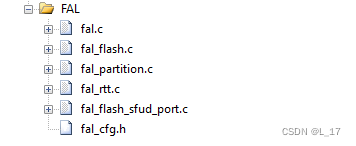
3. modify fal_cfg.h and fal_flash_sfud_port.c
fal_cfg.h It's mainly about filling in the partition table , The contents are as follows :
Partition structure :
/** * FAL partition */
struct fal_partition
{

    uint32_t magic_word;

    /* partition name */
    char name[FAL_DEV_NAME_MAX];
    /* flash device name for partition */
    char flash_name[FAL_DEV_NAME_MAX];

    /* partition offset address on flash device */
    long offset;
    size_t len;

    uint32_t reserved;
};
typedef struct fal_partition *fal_partition_t;
#ifndef _FAL_CFG_H_
#define _FAL_CFG_H_

#include <rtthread.h>
#include <board.h>

/* enable SFUD flash driver sample */
#define FAL_FLASH_PORT_DRIVER_SFUD

extern struct fal_flash_dev flash_w25q;

/* flash device table */
#define FAL_FLASH_DEV_TABLE \ {
       \ &flash_w25q, \ }
/* ====================== Partition Configuration ========================== */
#ifdef FAL_PART_HAS_TABLE_CFG
/* partition table */
#define FAL_PART_TABLE \ {
       \ {
      FAL_PART_MAGIC_WROD, "bootloader", FAL_USING_NOR_FLASH_DEV_NAME, 0, 256 * 1024, 0}, \ {
      FAL_PART_MAGIC_WROD, "app", FAL_USING_NOR_FLASH_DEV_NAME, 256 * 1024, 768 * 1024, 0}, \ {
      FAL_PART_MAGIC_WROD, "preset", FAL_USING_NOR_FLASH_DEV_NAME, (1024) * 1024, 512 * 1024, 0}, \ {
      FAL_PART_MAGIC_WROD, "img", FAL_USING_NOR_FLASH_DEV_NAME, (1024 + 512) * 1024, 7 * 1024 * 1024, 0}, \ {
      FAL_PART_MAGIC_WROD, "filesystem", FAL_USING_NOR_FLASH_DEV_NAME, (1024 + 512 + 7 * 1024) * 1024, 7 * 1024 * 1024, 0}, \ }
#endif /* FAL_PART_HAS_TABLE_CFG */
#endif /* _FAL_CFG_H_ */
Modify file content :fal_flash_sfud_port.c, take sfud and fal relation , Function data, etc. are registered to fal_flash_dev In the structure
/**************************************************START OF FILE*****************************************************/

/*------------------------------------------------------------------------------------------------------------------ Includes */
#include <fal.h>

#ifdef FAL_FLASH_PORT_DRIVER_SFUD
#include <sfud.h>
#include <spi_flash_sfud.h>


#ifndef FAL_USING_NOR_FLASH_DEV_NAME
#define FAL_USING_NOR_FLASH_DEV_NAME "W25Q128"
#endif

/*------------------------------------------------------------------------------------------------------------------ Functions */
static int init(void);
static int read(long offset, uint8_t *buf, size_t size);
static int write(long offset, const uint8_t *buf, size_t size);
static int erase(long offset, size_t size);

static sfud_flash_t h_sfud_dev = NULL;
struct fal_flash_dev flash_w25q =
{

	.name     = FAL_USING_NOR_FLASH_DEV_NAME,
	.addr     = 0,
	.len      = (16 * 1024 * 1024),
	.blk_size = 4096,
	.ops      = {
    init, read, write, erase},
	.write_gran = 1
};

static int init(void)
{

	if(RT_NULL == rt_sfud_flash_probe(FAL_USING_NOR_FLASH_DEV_NAME,"spi20"))
	{

		rt_kprintf("probe fail w25q\r\n");
		return -RT_ERROR;
	}

#ifdef RT_USING_SFUD
    /* RT-Thread RTOS platform */
    h_sfud_dev = rt_sfud_flash_find_by_dev_name(FAL_USING_NOR_FLASH_DEV_NAME);
#else
    /* bare metal platform */
    extern sfud_flash sfud_norflash0;
    h_sfud_dev = &sfud_norflash0;
#endif

    if (NULL == h_sfud_dev)
    {

        return -1;
    }

    /* update the flash chip information */
    flash_w25q.blk_size = h_sfud_dev->chip.erase_gran;
    flash_w25q.len = h_sfud_dev->chip.capacity;

    return 0;
}

static int read(long offset, uint8_t *buf, size_t size)
{

    sfud_read(h_sfud_dev, flash_w25q.addr + offset, size, buf);

    return size;
}

static int write(long offset, const uint8_t *buf, size_t size)
{

    if (sfud_write(h_sfud_dev, flash_w25q.addr + offset, size, buf) != SFUD_SUCCESS)
    {

        return -1;
    }

    return size;
}

static int erase(long offset, size_t size)
{

    if (sfud_erase(h_sfud_dev, flash_w25q.addr + offset, size) != SFUD_SUCCESS)
    {

        return -1;
    }

    return size;
}

#endif /* FAL_FLASH_PORT_DRIVER_SFUD */

/****************************************************END OF FILE*****************************************************/
4. Application function test
1. Bottom IO initialization , Refer to the front

2.SPI BUS Bus connection  SPI equipment
rt_hw_spi_device_attach("spi2", "spi20", GET_PIN(3, 6));

3. call fal Initialization function
fal_init();

4. operation  struct fal_flash_dev flash_w25q  Structure , Implement read and write operations, etc
flash_w25q.ops.read(0,readBuf,sizeof(readBuf));
Or omit the steps 4, Perform command line operations :

边栏推荐
- Aomei easy clone system disk backup
- 剑指 Offer 50. 第一个只出现一次的字符
- 【RT-Thread】nxp rt10xx SFUD和FAL组件搭建与使用
- Mysql5.7创建用户错误:ERROR 1364 (HY000): Field ‘ssl_cipher‘ doesn‘t have a default value解决方法
- 【随记】从入门到入土的密码学 | AES
- 19th week homework
- Reduce debugging costs by 50%. Xiaojiang IOT pushes a remote serial port debugging assistant
- 【机器学习】在线学习 - Online Learning
- SSH本地端口转发
- ClickHouse(04)如何搭建ClickHouse集群
猜你喜欢


随机推荐
Atcoder ABC 232 b~e problem solution
金仓数据库 KingbaseES SQL 语言参考手册 (3.1.1.5. 大对象数据类型)
USB protocol (I)
【机器学习】集成学习 - Ensemble Learning
吉时利万用表DMM6500
Yiwen xuxue pyspark data analysis foundation: Spark local environment deployment and construction
Kingbasees SQL language reference manual of Jincang database (3.1.2. domain type)
Outil de transfert de port rinetd
19th week homework
高频面试题——和为 k 的子数组
SSH本地端口转发
static变量看着有点晕,gdb汇编清醒清醒
SSH local port forwarding
One side is Wangwang's childlike innocence, and the other is an energy drink that can't be put down
Batch stream fusion upgrade: Apache Flink 1.15.0 releases pulsar Flink sink connector
Community summit pulsar summit old golden peak conference topic highlights exposure!
Kingbasees SQL language reference manual of Jincang database (3.1.1.5. large object data type)
Kingbasees SQL language reference manual of Jincang database (3.1.1.8. geometric type)
Halcon 3D create_pose
剑指 Offer 22. 链表中倒数第k个节点