当前位置:网站首页>keepalived 实现mysql自动故障切换
keepalived 实现mysql自动故障切换
2022-07-26 09:23:00 【为天空着色】
环境:
MySQL Master 192.168.135.139
MySQL Slave 192.168.135.141
VIP 192.168.135.188
先配置master-slave
https://blog.csdn.net/u010533511/article/details/88063523
master 和slave 都安装 keepalived
下载要安装的包传到服务器:http://www.keepalived.org/download.html
我测试目录是:/www/package/keepalived-2.0.13.tar.gz
#tar -zxvf keepalived-2.0.13.tar.gz
#cd keepalived-2.0.13
#./configure
# make && make install

#cp /www/package/keepalived-2.0.13/keepalived/etc/init.d/keepalived /etc/rc.d/init.d/
#cp /www/package/keepalived-2.0.13/keepalived/etc/sysconfig/keepalived /etc/sysconfig/

#mkdir /etc/keepalived

#cp /www/package/keepalived-2.0.13/keepalived/etc/keepalived/keepalived.conf  etc/keepalived/
#cp /usr/local/sbin/keepalived /usr/sbin/
#chkconfig --add keepalived
#chkconfig --level 345 keepalived on
安装期间可能会需要一些依赖包,用yum直接安装即可
主从的配置文件修改
master的配置文件
#vim /etc/keepalived/keepalived.conf
global_defs {
   router_id MySQL-HA #运行Keepalived的机器的一个标识
}

vrrp_script check_run {
script "/home/mysql/mysql_check.sh"  #配置业务进程监控脚本
interval 60  #设置脚本执行的时间间隔,秒
}

vrrp_sync_group VG1 {
group {
VI_1
}
}

vrrp_instance VI_1 {
    state BACKUP
    interface ens33 #要改为当前服务器的值
    virtual_router_id 51
    priority 100  #权重
    advert_int 1
    nopreempt
    authentication {
        auth_type PASS
        auth_pass 1234
    }
    track_script {
    check_run
    }
    notify_master /home/mysql/master.sh
    notify_stop /home/mysql/stop.sh

    virtual_ipaddress {
        192.168.135.188
    }
}
slave的keepalived配置文件:
#vim /etc/keepalived/keepalived.conf
global_defs {
   router_id MySQL-HA  #运行Keepalived的机器的一个标识
}

vrrp_script check_run {
script "/home/mysql/mysql_check.sh"  #配置业务进程监控脚本
interval 60  #设置脚本执行的时间间隔,秒
}

vrrp_sync_group VG1 {
group {
VI_1
}
}

vrrp_instance VI_1 {
    state BACKUP
    interface ens33 #要改为当前服务器的值
    virtual_router_id 51
    priority 90  #权重
    advert_int 1
    nopreempt
    authentication {
        auth_type PASS
        auth_pass 1234
    }
    track_script {
    check_run
    }
    notify_master /home/mysql/master.sh
    notify_stop /home/mysql/stop.sh

    virtual_ipaddress {
        192.168.135.188
    }
}
master与slave的keepalived配置文件中只有priority设置不同,master为100,slave为90,其它全一样。
/home/mysql/mysql_check.sh文件用以检测MySQL服务是否正常,当发现连接不上mysql,自动把keepalived进程杀掉,让VIP进行漂移.
vim /home/mysql/mysql_check.sh
#!/bin/bash
. /home/mysql/.bashrc
count=1

while true
do

mysql -uroot -S /data/mysql.sock -e "show status;" > /dev/null 2>&1
i=$?
ps aux | grep mysqld | grep -v grep > /dev/null 2>&1
j=$?
if [ $i = 0 ] && [ $j = 0 ]
then
   exit 0
else
   if [ $i = 1 ] && [ $j = 0 ]
   then
       exit 0
   else
        if [ $count -gt 5 ]
        then
              break
        fi
   let count++
   continue
   fi
fi

done
home/mysql/master.sh的作用是状态改为master以后执行的脚本。首先判断复制是否有延迟,如果有延迟,等1分钟后,不论是否有延迟,都并停止复制,并且记录binlog和pos点.
vim /home/mysql/master.sh
#!/bin/bash

. /home/mysql/.bashrc

Master_Log_File=$(mysql -uroot -S /data/mysql.sock -e "show slave status\G" | grep -w Master_Log_File | awk -F": " '{print $2}')
Relay_Master_Log_File=$(mysql -uroot -S /data/mysql.sock -e "show slave status\G" | grep -w Relay_Master_Log_File | awk -F": " '{print $2}')
Read_Master_Log_Pos=$(mysql -uroot -S /data/mysql.sock -e "show slave status\G" | grep -w Read_Master_Log_Pos | awk -F": " '{print $2}')
Exec_Master_Log_Pos=$(mysql -uroot -S /data/mysql.sock -e "show slave status\G" | grep -w Exec_Master_Log_Pos | awk -F": " '{print $2}')

i=1

while true
do

if [ $Master_Log_File = $Relay_Master_Log_File ] && [ $Read_Master_Log_Pos -eq $Exec_Master_Log_Pos ]
then
   echo "ok"
   break
else
   sleep 1

   if [ $i -gt 60 ]
   then
      break
   fi
   continue
   let i++
fi
done

mysql -uroot -S /data/mysql.sock -e "stop slave;"
mysql -uroot -S /data/mysql.sock -e "reset slave all;"
mysql -uroot -S /data/mysql.sock -e "reset master;"
mysql -uroot -S /data/mysql.sock -e "show master status;" > /tmp/master_status_$(date "+%y%m%d-%H%M").txt
home/mysql/stop.sh表示Keepalived停止以后需要执行的脚本。检查是否还有复制写入操作,最后无论是否执行完毕都退出。文件内容如下。
vim /home/mysql/stop.sh
#!/bin/bash

. /home/mysql/.bashrc

M_File1=$(mysql -uroot -S /data/mysql.sock -e "show master status\G" | awk -F': ' '/File/{print $2}')
M_Position1=$(mysql -uroot -S /data/mysql.sock -e "show master status\G" | awk -F': ' '/Position/{print $2}')
sleep 1
M_File2=$(mysql -uroot -S /data/mysql.sock -e "show master status\G" | awk -F': ' '/File/{print $2}')
M_Position2=$(mysql -uroot -S /data/mysql.sock -e "show master status\G" | awk -F': ' '/Position/{print $2}')

i=1

while true
do

if [ $M_File1 = $M_File1 ] && [ $M_Position1 -eq $M_Position2 ]
then
   echo "ok"
   break
else
   sleep 1

   if [ $i -gt 60 ]
   then
      break
   fi
   continue
   let i++
fi
done
分别在master上和slave上启动keepalived进程。
/etc/init.d/keepalived start (开启)
/etc/init.d/keepalived stop (开启)
查看进程

查看vip
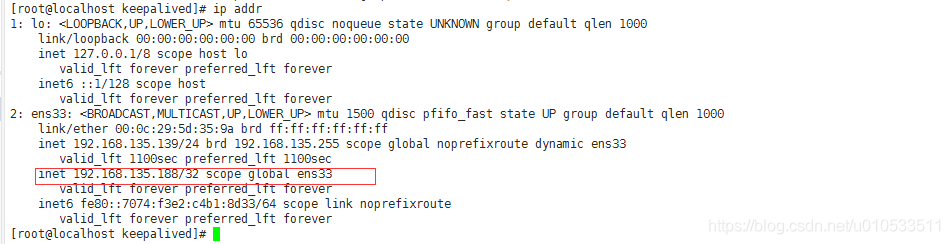
客户端使用VIP连接数据库,创建测试库,插入数据。

当master的mysql挂掉后
会自动切换到slave 然后手动启动 master 后
重新启动keepalived(两个服务器的都要重启) 然后又会主从自动同步 可以配置成双主结构,保证数据完整
keepalived.conf配置文件参数说明
group:设置同一组中的VRRP实例名,这里只有一个实例VI_1。
vrrp_instance配置VRRP实例。VRRP实例表示在上面开启了VRRP协议。这个实例说明了VRRP的一些特性,比如主从、VRID等等。可以在每个网卡上开启一个实例。VRRP实例主要定义vrrp_sync_group里面的每个组的漂移IP等。
state:指定实例的初始状态。在两台路由都启动后,马上会发生竞争,高priority的会竞选为Master,所以这里的state并不表示这台就一直是Backup。
interface:实例绑定的网卡。
virtual_router_id:VRID标记,值为0..255,这里使用默认的51。
priority:高优先级竞选为Master,Master要高于Backup至少50。这里MySQL主从库两个优先级分别设置为100和90,因此当Keepalived启动后,MySQL主库会被选为Master。
advert_int:检查间隔,这里设置为默认的1秒。
nopreempt:设置为不抢占,注意这个配置只能设置在state为BACKUP的主机上。当MASTER出现问题后,BACKUP会竞选为新的MASTER,那么当之前的MASTER重新在线后,是继续成为MASTER还是变成BACKUP呢?默认不设置不抢占,那么之前的MASTER起来后会继续抢占成为MASTER。这样的频繁切换对于业务是不能容忍的,我们希望MASTER起来后成为BACKUP,所以要设置不抢占。又因为nopreempt配置只能用在state为BACKUP的主机上,因此MASTER的state也得设置为BACKUP,也就是说192.168.135.139和192.168.135.141都要将state设置为BACKUP。通过在两台BACKUP上面设置不同的priority,让它们一起来就抢占,高priority的192.168.135.139成为最初的MASTER。
authentication:设置认证类型和认证密码。
auth_type:认证类型,支持PASS、AH两种,通常使用PASS类型。
auth_pass:明文认证密码。同一VRRP实例的MASTER与BACKUP使用相同的密码才能正常通信。
track_script:设置追踪脚本,这里为check_run,即调用vrrp_script中定义的脚本。
notify_master:指定当切换到MASTER时执行的脚本。
notify_stop:VRRP停止以后执行的脚本。
virtual_ipaddress:指定漂移地址(VIP),也就是切换到MASTER时,这些IP或被添加,切换到BACKUP时,这些IP会被删除。因此每台服务器上可以不绑定任何虚拟地址,而都把它们放到virtual_ipaddress里面,可以都多个。Keepalived会自动使用ip addr进行绑定。
边栏推荐
- PHP和MySQL获取week值不一致的处理
- Bloom filter
- Li Mu D2L (VI) -- model selection
- Byte buffer stream & character stream explanation
- 什么是异步操作
- Redis principle and usage - installation and distributed configuration
- [online problem] timeout waiting for connection from pool problem troubleshooting
- Simple message mechanism of unity
- Force button list question
- 您的登录IP不在管理员配置的登录掩码范围内
猜你喜欢

李沐d2l(四)---Softmax回归

围棋智能机器人阿法狗,阿尔法狗机器人围棋

jvm命令归纳

Redis principle and usage - installation and distributed configuration
What are CSDN spaces represented by

【Mysql】Mysql锁详解(三)

异常处理机制二

2022 chemical automation control instrument operation certificate test question simulation test platform operation

原根与NTT 五千字详解

The child and binary tree- open root inversion of polynomials
随机推荐
Polynomial open root
Object 的Wait Notify NotifyAll 源码解析
微信小程序学习笔记1
Sending and receiving of C serialport
When you click input, the border is not displayed!
【线上死锁分析】由index_merge引发的死锁事件
Pat grade a a1013 battle over cities
[online problem] timeout waiting for connection from pool problem troubleshooting
Redis principle and use - Basic Features
神经网络与深度学习-6- 支持向量机1 -PyTorch
Vertical search
吴恩达机器学习之线性回归
TableviewCell高度自适应
Conditions for JVM to trigger minor GC
Elastic APM installation and use
What is the difference between NFT and digital collections?
Qt | 关于如何使用事件过滤器 eventFilter
The child and binary tree- open root inversion of polynomials
Hbuilderx runs the wechat developer tool "fail to open ide" to solve the error
微信小程序开发