当前位置:网站首页>Linux中安装mysql 5.7.23
Linux中安装mysql 5.7.23
2022-07-16 04:28:00 【一湫1959】
下载地址:https://downloads.mysql.com/archives/community/


本文所用的都是绝对路径,可以直接按步骤无脑复制粘贴即可
解压
tar -xvf mysql-5.7.26-linux-glibc2.12-x86_64.tar
再移动并重命名一下, 我习惯把软件安装在 /usr/local目录
mv mysql-5.7.26-linux-glibc2.12-x86_64 /usr/local/mysql
创建mysql用户组和用户并修改权限
groupadd mysql
useradd -r -g mysql mysql
创建数据目录并赋予权限
mkdir -p  /data/mysql              #创建目录
chown mysql:mysql -R /data/mysql   #赋予权限
配置my.cnf
vim /etc/my.cnf
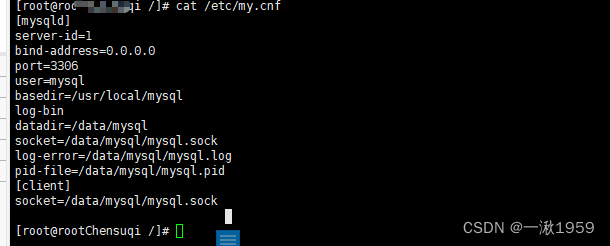
内容如下:核心就是修改数据存放位置
[mysqld]
server-id=1
bind-address=0.0.0.0
port=3306
user=mysql
log-bin
basedir=/usr/local/mysql
datadir=/data/mysql
socket=/data/mysql/mysql.sock
log-error=/data/mysql/mysql.log
pid-file=/data/mysql/mysql.pid
[client]
socket=/data/mysql/mysql.sock
初始化数据库
进入mysql的bin目录
cd /usr/local/mysql/bin/
初始化
./mysqld --defaults-file=/etc/my.cnf --basedir=/usr/local/mysql/ --datadir=/data/mysql/ --user=mysql --initialize
查看密码 之前配的log-error
cat /data/mysql/mysql.log

启动mysql,并更改root 密码
先将mysql.server放置到/etc/init.d/mysql中
cp /usr/local/mysql/support-files/mysql.server /etc/init.d/mysql
启动!!!
service mysql start

ps -ef|grep mysql

到这里说明mysql已经安装成功了!!
下面修改密码
首先登录mysql,前面的那个是随机生成的。
cd /usr/local/mysql/bin
./mysql -u root -p   #bin目录下
再执行下面三步操作,然后重新登录。
SET PASSWORD = PASSWORD('123456');
ALTER USER 'root'@'localhost' PASSWORD EXPIRE NEVER;
FLUSH PRIVILEGES;

use mysql                                            #访问mysql库
update user set host = '%' where user = 'root';      #使root能再任何host访问
FLUSH PRIVILEGES;                                    #刷新
边栏推荐
- 7.15模拟赛总结
- The writing method of like% variable% in Oracle SQL
- 自动补全(春季每日一题 58)
- 7.15 simulation summary
- A row of "cranes" in the clear sky: Chinese flying cranes with numbers as wings
- 【独立站运营】一分钟读懂跨境电商运营四大技巧!
- 老子云3D产品及服务全介绍,一张图告诉你如何选!
- 【目标跟踪】基于背景消减的图像帧间差分法目标检测及matlab仿真
- Installing the g2opy frame
- 记一篇IT培训日记068-心里有点不平衡
猜你喜欢
ABBYY FineReader 15标准版OCR文字识别及PDF编辑软工具

leetcode - 面试题 02.05. 链表求和

Use case interpretation: openinstall multi scenario application analysis

Baccalais PLC change axis task scanning time and cycle position issue

Advanced principle of MySQL: MySQL execution process and order

Sword finger offer 10- ii Frog jumping on steps
![ORA-600:[qertbGetPartitionNumber:qesma2],[],[],[]](/img/08/5c9a27c0b488f76e3815ce76047082.png)
ORA-600:[qertbGetPartitionNumber:qesma2],[],[],[]

Modèles de boîtes, flux de documents, positionnement, mise en page et conception réactive

Esp8266+blinker+web distribution network

Basic knowledge of triode (Part 2) ②
随机推荐
2018年江苏省信息与未来程序设计小能手比赛试题--(新)鸡兔同笼标程
第五届GXCPC广西大学生程序设计竞赛 部分题解(无CDK)
7.15 simulation summary
Quick use of jdbctemplate
canvas 性能优化的几种方式?
文献学习(part99)--Fast unfolding of communities in large networks
ESP8266+Blinker+WEB配网
Micro, m3o micro service series (I)
Dls-12b/dc220v double position relay
312312dd
函数的重载
ABBYY FineReader 15标准版OCR文字识别及PDF编辑软工具
Dls-42/4-4 dc110v double position relay
Function overloading
Reduction of type
Matlab科研绘图颜色补充(特别篇6)—336种法国传统颜色
Jesd204b debugging notes (practical version)
Solve the error of getting body content in filter, getreader() has already been called for this request
July 2022 information theory Wu Jun
in_ Example analysis of the third parameter of array