当前位置:网站首页>Mapbox loads local offline terrain
Mapbox loads local offline terrain
2022-07-19 05:20:00 【Wxy4Z1zzz】
One 、 Reference article :
(1)https://beginor.github.io/2021/01/11/publish-dem-data-with-mapbox-terrain-rgb.html
(2)https://blog.csdn.net/semian7633/article/details/120027672
Two 、 Relevant concepts :
Mapbox Terrain-RGB Include with PNG Grid slice encoded global digital elevation data , These color values can be decoded into the original height in meters . You can use Terrain-RGB Data is used in various visual and analytical applications , From designing terrain slope and mountain shadow styles to generating for video games 3D Terrain grid .
① of Terrain-RGB Some of the details of :
The horizontal accuracy is 5 rice about 256x256 Resolution slice , Zoom level to 15 level , 512x512 Resolution slice , Zoom level to 14 level ; The vertical accuracy is 0.1 rice The data to 0.1 Map the height increment of meters ; The coordinate system is WGS84 Web Mercator wkid by EPSG:3389 Of Web Mercator coordinates , yes WebGIS Criterion of fact ;
② Terrain-RGB Data decoding :
Terrain-RGB Use each color channel to 256 Hexadecimal number to indicate height , Thus allowing 16,777,216 A unique value . After receiving the block , You will need to get the red of each pixel (R), green (G) And blue (B) value . You can use the canvas layer in the browser ( Example ) Or use something like get-pixel Such tools to perform this operation .
Using the following formula, the pixel value can be decoded to get the height value , The height value is in meters :
height = -10000 + ((R * 256 * 256 + G * 256 + B) * 0.1)
3、 ... and 、 Operation steps :
1、 First you need to install three Python The program is used for tif File format conversion (tif The file defaults to a single channel grayscale image ,mapbox Of Terrain-RGB Support only rgb Three channel data , Is based on each color channel 256 Hexadecimal number to express the height , Therefore, channel conversion operation is required ):
(1)gdal Open source spatial data processing program :GDAL — GDAL documentation
(2)rasterio: MapBox stay gdal Based on the development of grid tools :
rasterioRasterio reads and writes geospatial raster datasets - GitHub - rasterio/rasterio: Rasterio reads and writes geospatial raster datasets https://github.com/mapbox/rasterio/(3)rio-rgbify: MapBox Published will dem The grid code is rgb Grid rasterio plug-in unit :

notes : Be sure to install in order , And the first two python The program must install the specified version , Otherwise, an error will be reported when installing the third program .
2、GeoTiff The coordinate system of must be WGS84 Web Mercator (EPSG:3857), It can be used rasterio Provide command line tools to get tif file information :
command :rio info --indent 2 3857_gd_dem.tif

3、 If not 3857 Coordinate system , Coordinate conversion is required ; In addition, it is necessary to ”nodate” The negative value of the row is cleared , because Terrain-RGB Cannot represent a negative value , Use gdal Provided gdalwarp The command line tool clears negative values while performing coordinate conversion :
command :gdalwarp -t_srs EPSG:3857 -dstnodata None -co TILED=YES -co COMPRESS=DEFLATE -co BIGTIFF=IF_NEEDED 3857_gd_dem.tif 3857_gd_dem_n.tif
4、 A new tif file , Again using rasterio Provides command line tools to view new tif file information , Ensure that the command executed in the previous step takes effect :

5、 The next step is to use rgbify Tools Convert gray data into rgb data , The formula for calculating the height is :
height = -10000 + ((R * 256 * 256 + G * 256 + B) * 0.1)
So set ribify Parameters of base value The parameters for -10000 , interval by 0.1 , Continue typing the following command :
command :rio rgbify -b -10000 -i 0.1 3857_gd_dem_n.tif 3857_gd_dem_n_rgb.tif
When it's done , Got 3857_gd_dem_n_rgb.tif It looks like this :(Terrain-RGB use 3 individual byte adopt rgb Three channels to represent the elevation , So it will be grayer than the original tiff It's a lot smaller )

6、 Put the new rgb Three channel tif Slice the file :( This involves a concept of slicing algorithm , Most slicing tools include geoserver The slicing tools are all Google's by default xyz Slicing algorithm , But the slices generated by this algorithm mapbox It's not recognized ,mapbox Support is osm tiles Slicing algorithm ), At present, it is found that Global Mapper Tools can slice using this algorithm .
(1) Put the new tif For documents Global Mapper Tool open , choice “ file ”>“ Output ”>“ Output web Format ”, Choose here OSM Tiles:

(2) Select the hierarchy , The higher the level , The higher the fineness of the generated terrain , Of course, the larger the file ; Uncheck the bottom “ senior : Always create 8 A palette of PNG file ”( Because our terrain defaults to 16 or 32 Bit , Forcibly converted to 8 Bit will lose a lot of details ), single click “ determine ” Select output position , Wait for the slice to finish :

(3) This is the case when generating a good slicing file format , The first layer represents Z,Z Represents the zoom level ,Z=zoom; The second layer represents X, The third layer represents Y,XY The origin of is in the upper left corner ,X From left to right , The longitude of the corresponding coordinate system ,Y From top to bottom , The latitude of the corresponding coordinate system :


7、 Put the sliced file directory locally or anywhere http The server can test the call ( Must be mapbox-gl-js and css 2.0 Only the above version can support loading terrain Services ).

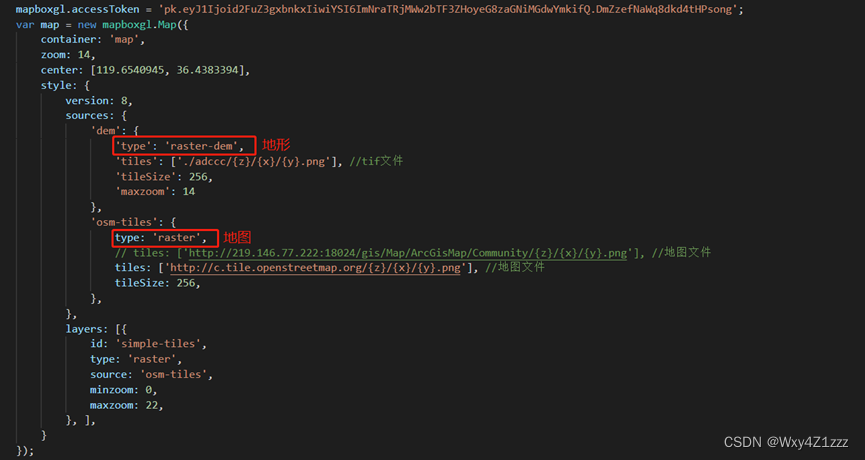
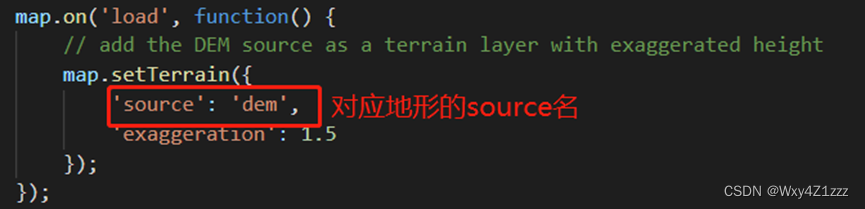
8、 A successful call ~

边栏推荐
- Router loopback port experiment
- Internship project 1 - personalized homepage configuration
- Flex flexible layout
- The first smart contract program faucet sol
- js 原生对象加属性
- Addition and removal of cesium geojson data
- 【Es6】forEach,for... in ,for... Of column, which allows you to quickly distinguish the usage and differences of various for statements through project cases (full version). There are detailed notes ins
- Easypoi之excel模板导出
- ArcGIS 点云(xyz)数据转DEM
- 多功能(实现)封装函数
猜你喜欢
ThreadLocal thread safety example and its principle

Wechat applet obtains the week, morning, noon and evening of month, year and day
![[AI] action recognition using simple neural network -- Based on coco key points](/img/67/cd6be6e070fb5d4d44ee043ebd7fac.png)
[AI] action recognition using simple neural network -- Based on coco key points

Nacos配置管理

微信小程序云开发使用方法-1
Nacos configuration management

mysql 缓存策略和解决方案

vscode终端无法使用解决的办法

Cesium 綁定鼠標事件和移除鼠標事件

es6新增-运算符的扩展
随机推荐
单臂路由配置
Cesium geojson数据的添加与移除
What are the B domain, m domain and O domain
Baidu map realizes thermal map
ArcMap 创建常量栅格并镶嵌至新栅格
Markdown notes and related shortcut keys of typora
JS native object plus attributes
Usage and examples of vlookup function
基于PaddleOCR解决文本检测训练模型与inference模型预测效果不一致的问题
RK356x U-Boot研究所(命令篇)3.4 mem内存相关命令的用法
STL container - basic operation of vector
Nacos configuration management
百度地图 实现 热力图
uniapp中使用ucharts图表,饼状图,柱状图,折线图
分布式注册中心-etcd
OpenDDS的QoS和自定义QoS(校时TimingQosPolicy)
es6新增-Symbol数据类型
Easypoi之excel多sheet导入
Flex flexible layout
2020-11-10