当前位置:网站首页>Huawei wireless devices are configured with static load balancing
Huawei wireless devices are configured with static load balancing
2022-07-19 09:50:00 【51CTO】

1. To configure LSW and AC, send AP And AC Can transmit between CAPWAP message
[LSW1]vlan batch 10
[LSW1-GigabitEthernet0/0/1]port link-type trunk
[LSW1-GigabitEthernet0/0/1]port trunk allow-pass vlan 10
[LSW1-GigabitEthernet0/0/2]port link-type trunk
[LSW1-GigabitEthernet0/0/2]port trunk allow-pass vlan 10
[LSW1-GigabitEthernet0/0/2]port trunk pvid vlan 10
[LSW1-GigabitEthernet0/0/2]port-isolate enable
[LSW1-GigabitEthernet0/0/3]port link-type trunk
[LSW1-GigabitEthernet0/0/3]port trunk allow-pass vlan 10
[LSW1-GigabitEthernet0/0/3]port trunk pvid vlan 10
[LSW1-GigabitEthernet0/0/3]port-isolate enable
[AC1]vlan batch 10
[AC1-GigabitEthernet0/0/1]port link-type trunk
[AC1-GigabitEthernet0/0/1]port trunk allow-pass vlan 10
2. To configure AC Interworking with the upper network equipment
[AC1]vlan batch 20 30 40
[AC1-Vlanif20]ip add 10.1.2.1 24
[AC1-Vlanif30]ip add 10.1.3.1 24
[AC1-Vlanif40]ip add 10.1.4.1 24
[AC1]ip route-static 0.0.0.0 0.0.0.0 10.1.4.2
[AC1-GigabitEthernet0/0/2]port link-type trunk
[AC1-GigabitEthernet0/0/2]port trunk allow-pass vlan 40
[AC1-GigabitEthernet0/0/2]port trunk pvid vlan 40
3. To configure AC to AP Distribute IP Address ,AR to STA Distribute IP Address
[AC1]dhcp enable
[AC1]int Vlanif 10
[AC1-Vlanif10]ip add 10.1.1.1 24
[AC1-Vlanif10]dhcp select interface // To configure AC Through the interface address pool for AP Distribute IP Address
[AC1-Vlanif20]dhcp select relay // To configure AC As DHCP Relay and enable DHCP Relay detect user table entry function
[AC1-Vlanif20]dhcp relay server-ip 10.1.4.2
[AC1-Vlanif30]dhcp select relay
[AC1-Vlanif30]dhcp relay server-ip 10.1.4.2
[AR1]dhcp enable // To configure AR As DHCP The server is STA Distribute IP Address
[AR1]ip pool sta-ip-pool1
[AR1-ip-pool-sta-ip-pool1]gateway-list 10.1.2.1
[AR1-ip-pool-sta-ip-pool1]network 10.1.2.0 mask 24
[AR1]ip pool sta-ip-pool2
[AR1-ip-pool-sta-ip-pool2]gateway-list 10.1.3.1
[AR1-ip-pool-sta-ip-pool2]network 10.1.3.0 mask 24
[AR1-GigabitEthernet0/0/0]ip add 10.1.4.2 24
[AR1-GigabitEthernet0/0/0]dhcp select global
[AR1]ip route-static 10.1.2.0 24 10.1.4.1
[AR1]ip route-static 10.1.3.0 24 10.1.4.1
4. To configure VLAN pool, Used as a business VLAN
[AC1]vlan pool sta-pool
[AC1-vlan-pool-sta-pool]vlan 20 30
[AC1-vlan-pool-sta-pool]assignment hash
5. To configure AP go online
[AC1]wlan
[AC1-wlan-view]ap-group name ap-group1 // establish AP Group
[AC1-wlan-view]regulatory-domain-profile name domain1 // Create domain management template , Configure... Under the domain management template AC Country code and in AP Reference domain management template under group
[AC1-wlan-regulate-domain-domain1]country-code cn
[AC1-wlan-view]ap-group name ap-group1
[AC1-wlan-ap-group-ap-group1]regulatory-domain-profile domain1
[AC1]capwap source interface Vlanif 10 // To configure AC Source interface of
[AC1]wlan
[AC1-wlan-view]ap auth-mode mac-auth
[AC1-wlan-view]ap-id 0 ap-mac 00e0-fcae-6d70 // stay AC Import online and offline AP
[AC1-wlan-ap-0]ap-name ap1
[AC1-wlan-ap-0]ap-group ap-group1
[AC1-wlan-view]ap-id 1 ap-mac 00e0-fc31-7140
[AC1-wlan-ap-1]ap-name ap2
[AC1-wlan-ap-1]ap-group ap-group1

6. To configure WLAN Business parameters
[AC1-wlan-view]security-profile name wlan-security // Create a security template , And configure the security policy
[AC1-wlan-sec-prof-wlan-security]security wpa2 psk pass-phrase [email protected] aes
[AC1-wlan-view]ssid-profile name wlan-ssid // Create name SSID Templates , And configuration SSID name
[AC1-wlan-ssid-prof-wlan-ssid]ssid wlan-net
[AC1-wlan-view]vap-profile name wlan-vap // establish VAP Templates , Configure business data forwarding mode 、 Business VLAN, And reference security templates and SSID Templates
[AC1-wlan-vap-prof-wlan-vap]forward-mode tunnel
[AC1-wlan-vap-prof-wlan-vap]service-vlan vlan-pool sta-pool
[AC1-wlan-vap-prof-wlan-vap]security-profile wlan-security
[AC1-wlan-vap-prof-wlan-vap]ssid-profile wlan-ssid
[AC1-wlan-view]ap-group name ap-group1 // To configure AP Group reference VAP Templates ,AP RF on 0 And RF 1 All use VAP Template configuration
[AC1-wlan-ap-group-ap-group1]vap-profile wlan-vap wlan 1 radio all
7. To configure AP RF channel and power
[AC1-wlan-view]rrm-profile name default
[AC1-wlan-rrm-prof-default]calibrate auto-channel-select disable // Turn off the automatic channel tuning function of RF
[AC1-wlan-rrm-prof-default]calibrate auto-txpower-select disable // Turn off the automatic power tuning function of RF
[AC1-wlan-view]ap-id 0 // To configure AP radio frequency 0 Channel and power
[AC1-wlan-ap-0]radio 0
[AC1-wlan-radio-0/0]channel 20mhz 6
[AC1-wlan-radio-0/0]eirp 127
[AC1-wlan-ap-0]radio 1
[AC1-wlan-radio-0/1]channel 20mhz 149
[AC1-wlan-radio-0/1]eirp 127
8. Configure the static load balancing function
[AC1-wlan-view]sta-load-balance static-group name wlan-static // Create a static load balancing group
[AC1-wlan-sta-lb-static-wlan-static]start-threshold 15 // Specify that the static load balancing start threshold is 15 individual
[AC1-wlan-sta-lb-static-wlan-static]gap-threshold 5 // Specify that the static load balancing difference threshold is 5%
[AC1-wlan-sta-lb-static-wlan-static]member ap-name ap1 // take AP Join static load balancing group
[AC1-wlan-sta-lb-static-wlan-static]member ap-name ap2
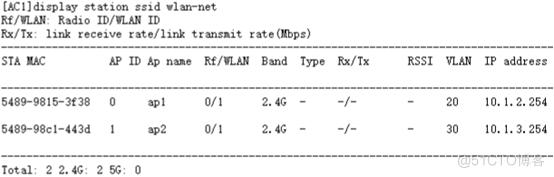
9. Verify configuration

边栏推荐
- Pytorch calls cublasltmattmul to do GEMM and add bias. It's well written
- Could NOT find CUDA (missing: CUDA_INCLUDE_DIRS) (found suitable exact version “11.4“)
- 第一部分—C语言基础篇_6. 函数
- Mux256to1v,Hadd,Fadd
- Implement word segmentation for text and draw word cloud
- Chapter 13 set/ multiset of STL
- Vim详解
- rhcsa 第二天 7.15
- es索引、类型(mapping)、文档、ik分词器
- 研究发现DNA纳米设备注射液可安全用于医疗用途
猜你喜欢







随机推荐
Part I - Fundamentals of C language_ 5. Arrays and strings
565. Array nesting
【摸鱼神器】UI库秒变低代码工具——表单篇(二)子控件
第一部分—C语言基础篇_4. 程序流程结构
组件间的相互访问
Go exceed API source code reading (II) -- openFile ()
Makefile中在命令前加上- 则忽略该命令产生的错误,继续执行下一条命令
OLED displays how to understand the character sizes of 12*6, 16*8, 24*12, etc
pip和pip3的区别用法详解
v-mode
Interview questions - design test cases for:: memcpy function
rhcsa 第一天 7.11
Componentized advanced -- slot
[C language] summary of function knowledge points
【C语言】 数据类型及意义
Part I - Fundamentals of C language_ 1. Overview of C language
[C language] user defined type elementary knowledge points
[C language] storage of shaping data
node+express搭建服务器环境
mysqldump全备恢复到新另一个实例然后再执行flush privileges的情况分析