当前位置:网站首页>Vim详解
Vim详解
2022-07-17 10:38:00 【ChampionDragon】
vim快速定位到某一行的几种方法和显示行号,定位匹配字符串,显示当前行信息的命令
1.命令模式下(没有输入i进行编辑前),:n 比如想到第65行,输入 ":65" 按回车即可定位到65行。
2.命令模式下(没有输入i进行编辑前),ngg 比如想到第86行,输入 "86gg" 或"86G" (这个不用按回车就直接定位到对应行了)

3.打开文件定位到指定行 vim filename +n 比如想到第65行,输入 vim filename +65 或者 vim +65 filename
快速匹配字符串:
vim +/pattern filename:打开文件,并将光标置于第一个与pattern匹配的字符串处
比如想到定位到第一个与"hello"匹配的行,输入 vim +/hello filename
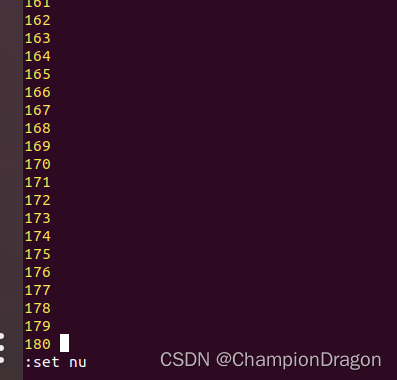
显示行号的方法:输入set number或者set nu,取消显示输入set nonu
查看当前行信息,命令模式下(没有输入i进行编辑前),同时按键:ctrl+g
在底部显示类似信息:"mytest.txt" 3 lines --100%-- 显示的是当前位置的行号和占整个文件的百分比。
边栏推荐
猜你喜欢

【网络研究院】机器学习系统的威胁是时候该认真对待了

第一部分—C语言基础篇_1. C语言概述

Es conceptual model and basic faults

第4章-一阶多智体系统一致性 -> 切换拓扑系统一致性
多租户 SaaS 的数据库设计模式,你学废了吗?

MySQL--SQL优化案例--隐式字符编码转换

Add - before the command in makefile to ignore the error caused by the command and continue to execute the next command

第九章 STL 之 deque

C语言基础篇 —— 2-1 指针与野指针

C language compilation process
随机推荐
Codeworks 5 questions per day (average 1500) - day 17
pip和pip3的区别用法详解
实用工具系列 - Xshell安装下载与使用
[Network Research Institute] the threat of machine learning system is time to take it seriously
【Flink】Flink 设置检查点失败一次就报错 setTolerableCheckpointFailureNumber 不起作用
[Luogu] p2357 tomb keeper
第一部分—C语言基础篇_5. 数组和字符串
MySQL--SQL优化案例--隐式字符编码转换
Anaconda与Jupyter Notebook入门级详细使用教程
【C语言】数组知识点总结
[performance optimization methodology series] VI. summary
银河麒麟v10-arm版离线安装Portainer
[C language] summary of function knowledge points
06---光在介质中的特性
Chapter VIII vector of STL
R语言ggplot2可视化分面图(faceting):ggplot2可视化分面图并移除分面图之间的边框线、以及分面图之间的间隙(Remove Spacing between Panels)
Line Flow Based Simultaneous Localization and Mapping
how to use culasLt
MySQL view
第4章-一阶多智体系统一致性 -> 连续时间含时延系统一致性