当前位置:网站首页>在神州IV开发板上成功移植STemWin V5.22
在神州IV开发板上成功移植STemWin V5.22
2022-07-26 10:38:00 【aping_cs_dn】
神州IV开发板的MCU型号为STM32F107VC,而官方提供的例子中STM3210C-EVAL是用的这款MCU,这点很重要,开始选用的是STM3210E-EVAL走了弯路,因为STM3210E-EVAL用的是STM32F103Z MCU,移植步骤如下:
1,复制STemWin源码包到测试工作目录,如STemWinTes等等。我的是MVC。
2,定位到E:\MVCProjects\MVCTest\STemWin_Library_V1.1.2\Project\STM3210C-EVAL\RTOS\EWARM目录,打开STemWinDemo.ww,前提是你的系统中安装了EWARM V6.3 以上开发环境。
3,Project -> Options -> General Options ->Target ,选中Device,点击右边列表按钮选中STM32F107xC,如下图。

4,选中C/C++ Complier 栏,定位到 Preprocessor页,如下图。

将如下红色部分内容复制到里面
$PROJ_DIR$\..\..\..\..\Libraries\CMSIS\Device\ST\STM32F10x\Include
$PROJ_DIR$\..\..\..\..\Libraries\CMSIS\Include
$PROJ_DIR$\..\..\..\..\Libraries\CMSIS\RTOS
$PROJ_DIR$\..\..\..\..\Libraries\STemWinLibrary522\Config
$PROJ_DIR$\..\..\..\..\Libraries\STemWinLibrary522\inc
$PROJ_DIR$\..\..\..\..\Libraries\STemWinLibrary522\Lib
$PROJ_DIR$\..\..\..\..\Libraries\STemWinLibrary522\OS
$PROJ_DIR$\..\..\..\..\Libraries\STM32F10x_StdPeriph_Driver\inc
$PROJ_DIR$\..\..\..\..\Libraries\STM32F10x_StdPeriph_Driver\src
$PROJ_DIR$\..\Config
$PROJ_DIR$\..\User
$PROJ_DIR$\..\Demo
$PROJ_DIR$\..\..\..\..\Utilities\Third_Party\FreeRTOS\Source\include
$PROJ_DIR$\..\..\..\..\Utilities\Third_Party\FreeRTOS\Source\portable\IAR\ARM_CM3
$PROJ_DIR$\..\..\..\..\Utilities\STM32_EVAL\Common
$PROJ_DIR$\..\..\..\..\Utilities\STM32_EVAL\STM3210C_EVAL
然后同样将将下面内容复制到Defined Symbols栏
USE_STDPERIPH_DRIVER
STM32F10X_CL
顺便说下PROJ_DIR变量,它是指xxx.ww工程配置文件所在目录,这里的PROJ_DIR=E:\MVCProjects\MVCTest\STemWin_Library_V1.1.2\Project\STM3210C-EVAL\RTOS\EWARM。
切换到Assembler栏,定位到 Preprocessor页,把如下红色部分内容复制到里面
$PROJ_DIR$\..\Config
$PROJ_DIR$\..\..\..\..\Utilities\Third_Party\FreeRTOS\Source\portable\IAR\ARM_CM3

点击OK确定如上设置。
5,编译工程,如果不出意外,编译可以顺利通过。
6,打开stm3210c_eval.h文件定位到111行附近,加入下面红色部分代码
/**
* @brief Define for STM3210C_EVAL board
*/
#define USE_SHENZHOU_IV_EVAL
#ifndef USE_SHENZHOU_IV_EVAL
#define USE_STM3210C_EVAL
#endif
/** @addtogroup STM322xG_EVAL_LOW_LEVEL_LED
* @{
*/
#define LEDn 4
#define LED1_PIN GPIO_Pin_7
#define LED1_GPIO_PORT GPIOD
#define LED1_GPIO_CLK RCC_APB2Periph_GPIOD
#define LED2_PIN GPIO_Pin_13
#define LED2_GPIO_PORT GPIOD
#define LED2_GPIO_CLK RCC_APB2Periph_GPIOD
#define LED3_PIN GPIO_Pin_3
#define LED3_GPIO_PORT GPIOD
#define LED3_GPIO_CLK RCC_APB2Periph_GPIOD
#define LED4_PIN GPIO_Pin_4
#define LED4_GPIO_PORT GPIOD
#define LED4_GPIO_CLK RCC_APB2Periph_GPIOD
7,打开stm3210c_eval_lcd.h文件定位到52行附近,加入下面红色部分代码
/**
* @}addtogroup STM3210C_EVAL_LCD //定义ShenZhouIV Eval LCD硬件相关操作
*/
#define Lcd_Light_ON
#define Lcd_Light_OFF
#define SetCs GPIO_SetBits(LCD_PORT_CS, LCD_Pin_CS);
#define ClrCs GPIO_ResetBits(LCD_PORT_CS, LCD_Pin_CS);
#define SetWr GPIO_SetBits(LCD_PORT_WR, LCD_Pin_WR);
#define ClrWr GPIO_ResetBits(LCD_PORT_WR, LCD_Pin_WR);
#define SetRs GPIO_SetBits(LCD_PORT_RS, LCD_Pin_RS);
#define ClrRs GPIO_ResetBits(LCD_PORT_RS, LCD_Pin_RS);
#define SetRd GPIO_SetBits(LCD_PORT_RD, LCD_Pin_RD);
#define ClrRd GPIO_ResetBits(LCD_PORT_RD, LCD_Pin_RD);
#define LCD_Write(LCD_DATA) GPIO_Write(GPIOE, LCD_DATA)
#define LCD_Read() GPIO_ReadInputData(GPIOE)
/* LCD Control pins */
#define LCD_Pin_WR GPIO_Pin_14
#define LCD_PORT_WR GPIOB
#define LCD_CLK_WR RCC_APB2Periph_GPIOB
#define LCD_Pin_CS GPIO_Pin_8
#define LCD_PORT_CS GPIOC
#define LCD_CLK_CS RCC_APB2Periph_GPIOC
#define LCD_Pin_RS GPIO_Pin_13
#define LCD_PORT_RS GPIOD
#define LCD_CLK_RS RCC_APB2Periph_GPIOD
然后再定位到394行附近,加入下面两个函数声明:
void LCD_CtrlLinesConfig(void);
void LCD_CtrlLinesWrite(GPIO_TypeDef* GPIOx, uint16_t CtrlPins, BitAction BitVal);
void LCD_SPIConfig(void);
void LCD_DB_AS_InPut(void);
void LCD_DB_AS_OutPut(void);
#ifdef __cplusplus
}
#endif
#endif /* __STM3210C_EVAL_LCD_H */
/**
* @}
*/
8,打开stm3210c_eval_lcd.c文件定位到160行附近,加入下面红色部分代码
void LCD_Setup(void)
{
__IO uint32_t lcdid = 0;
/* Configure the LCD Control pins --------------------------------------------*/
LCD_CtrlLinesConfig();
/* Configure the LCD_SPI interface ----------------------------------------------*/
#ifndef USE_SHENZHOU_IV_EVAL
LCD_SPIConfig();
#endif
_delay_(5); /* Delay 50 ms */
LCD_WriteReg(0x0000,0x0001); start internal osc启动晶振
_delay_(5); /* delay 50 ms */
LCD_DB_AS_InPut();
/* Read the LCD ID */
lcdid = LCD_ReadReg(LCD_REG_0);
LCD_DB_AS_OutPut();
/* Check if the LCD is ILI9320 Controller */
if(lcdid == LCD_ILI9320)
{
... ...
然后再定位到1164行附近,加入下面代码
/**
* @brief Reset LCD control line(/CS) and Send Start-Byte
* @param Start_Byte: the Start-Byte to be sent
* @retval None
*/
#ifndef USE_SHENZHOU_IV_EVAL
void LCD_nCS_StartByte(uint8_t Start_Byte)
{
LCD_CtrlLinesWrite(LCD_NCS_GPIO_PORT, LCD_NCS_PIN, Bit_RESET);
SPI_I2S_SendData(LCD_SPI, Start_Byte);
while(SPI_I2S_GetFlagStatus(LCD_SPI, SPI_I2S_FLAG_BSY) != RESET)
{
}
}
#endif
/**
* @brief Writes index to select the LCD register.
* @param LCD_Reg: address of the selected register.
* @retval None
*/
void LCD_WriteRegIndex(uint8_t LCD_Reg)
{
#ifndef USE_SHENZHOU_IV_EVAL
/* Reset LCD control line(/CS) and Send Start-Byte */
LCD_nCS_StartByte(START_BYTE | SET_INDEX);
/* Write 16-bit Reg Index (High Byte is 0) */
SPI_I2S_SendData(LCD_SPI, 0x00);
while(SPI_I2S_GetFlagStatus(LCD_SPI, SPI_I2S_FLAG_BSY) != RESET)
{
}
SPI_I2S_SendData(LCD_SPI, LCD_Reg);
while(SPI_I2S_GetFlagStatus(LCD_SPI, SPI_I2S_FLAG_BSY) != RESET)
{
}
LCD_CtrlLinesWrite(LCD_NCS_GPIO_PORT, LCD_NCS_PIN, Bit_SET);
#else
/* Write 16-bit Index, then Write Reg */
ClrCs
ClrRs
ClrWr
LCD_Write(LCD_Reg);
SetWr
SetCs
#endif
}
/**
* @brief Reads the selected LCD Register.
* @param None
* @retval LCD Register Value.
*/
uint16_t LCD_ReadReg(uint8_t LCD_Reg)
{
#ifndef USE_SHENZHOU_IV_EVAL
uint16_t tmp = 0;
uint8_t i = 0;
/* LCD_SPI prescaler: 4 */
LCD_SPI->CR1 &= 0xFFC7;
LCD_SPI->CR1 |= 0x0008;
/* Write 16-bit Index (then Read Reg) */
LCD_WriteRegIndex(LCD_Reg);
/* Read 16-bit Reg */
/* Reset LCD control line(/CS) and Send Start-Byte */
LCD_nCS_StartByte(START_BYTE | LCD_READ_REG);
for(i = 0; i < 5; i++)
{
SPI_I2S_SendData(LCD_SPI, 0xFF);
while(SPI_I2S_GetFlagStatus(LCD_SPI, SPI_I2S_FLAG_BSY) != RESET)
{
}
/* One byte of invalid dummy data read after the start byte */
while(SPI_I2S_GetFlagStatus(LCD_SPI, SPI_I2S_FLAG_RXNE) == RESET)
{
}
SPI_I2S_ReceiveData(LCD_SPI);
}
SPI_I2S_SendData(LCD_SPI, 0xFF);
/* Read upper byte */
while(SPI_I2S_GetFlagStatus(LCD_SPI, SPI_I2S_FLAG_BSY) != RESET)
{
}
/* Read lower byte */
while(SPI_I2S_GetFlagStatus(LCD_SPI, SPI_I2S_FLAG_RXNE) == RESET)
{
}
tmp = SPI_I2S_ReceiveData(LCD_SPI);
SPI_I2S_SendData(LCD_SPI, 0xFF);
while(SPI_I2S_GetFlagStatus(LCD_SPI, SPI_I2S_FLAG_BSY) != RESET)
{
}
/* Read lower byte */
while(SPI_I2S_GetFlagStatus(LCD_SPI, SPI_I2S_FLAG_RXNE) == RESET)
{
}
tmp = ((tmp & 0xFF) << 8) | SPI_I2S_ReceiveData(LCD_SPI);
LCD_CtrlLinesWrite(LCD_NCS_GPIO_PORT, LCD_NCS_PIN, Bit_SET);
/* LCD_SPI prescaler: 2 */
LCD_SPI->CR1 &= 0xFFC7;
return tmp;
#else
uint16_t data;
/* Write 16-bit Index (then Read Reg) */
ClrCs
ClrRs
ClrWr
LCD_Write(LCD_Reg);
SetWr
/* Read 16-bit Reg */
SetRs
ClrRd
SetRd
data = LCD_Read();
SetCs
return data;
#endif
}
/**
* @brief Prepare to write to the LCD RAM.
* @param None
* @retval None
*/
void LCD_WriteRAM_Prepare(void)
{
#ifndef USE_SHENZHOU_IV_EVAL
LCD_WriteRegIndex(LCD_REG_34); /* Select GRAM Reg */
/* Reset LCD control line(/CS) and Send Start-Byte */
LCD_nCS_StartByte(START_BYTE | LCD_WRITE_REG);
#else
/* Write 16-bit Index, then Write Reg */
ClrCs
ClrRs
ClrWr
LCD_Write(R34);
SetWr
SetCs
#endif
}
然后再定位到1328行附近,加入下面代码
void LCD_WriteReg(uint8_t LCD_Reg, uint16_t LCD_RegValue)
{
#ifndef USE_SHENZHOU_IV_EVAL
/* Write 16-bit Index (then Write Reg) */
LCD_WriteRegIndex(LCD_Reg);
/* Write 16-bit Reg */
/* Reset LCD control line(/CS) and Send Start-Byte */
LCD_nCS_StartByte(START_BYTE | LCD_WRITE_REG);
SPI_I2S_SendData(LCD_SPI, LCD_RegValue>>8);
while(SPI_I2S_GetFlagStatus(LCD_SPI, SPI_I2S_FLAG_BSY) != RESET)
{
}
SPI_I2S_SendData(LCD_SPI, (LCD_RegValue & 0xFF));
while(SPI_I2S_GetFlagStatus(LCD_SPI, SPI_I2S_FLAG_BSY) != RESET)
{
}
LCD_CtrlLinesWrite(LCD_NCS_GPIO_PORT, LCD_NCS_PIN, Bit_SET);
#else
/* Write 16-bit Index, then Write Reg */
ClrCs
ClrRs
ClrWr
LCD_Write(LCD_Reg);
SetWr
/* Write 16-bit Reg */
SetRs
ClrWr
LCD_Write(LCD_RegValue);
SetWr
SetCs
#endif
}
/**
* @brief Writes to the LCD RAM.
* @param RGB_Code: the pixel color in RGB mode (5-6-5).
* @retval None
*/
void LCD_WriteRAM(uint16_t RGB_Code)
{
#ifndef USE_SHENZHOU_IV_EVAL
SPI_I2S_SendData(LCD_SPI, RGB_Code >> 8);
while(SPI_I2S_GetFlagStatus(LCD_SPI, SPI_I2S_FLAG_BSY) != RESET)
{
}
SPI_I2S_SendData(LCD_SPI, RGB_Code & 0xFF);
while(SPI_I2S_GetFlagStatus(LCD_SPI, SPI_I2S_FLAG_BSY) != RESET)
{
}
#else
/* Write 16-bit Index, then Write Reg */
ClrCs
SetRs
ClrWr
LCD_Write(RGB_Code);
SetWr
SetCs
#endif
}
然后再定位到1430行附近,加入下面代码
void LCD_DisplayOff(void)
{
/* Display Off */
LCD_WriteReg(LCD_REG_7, 0x0);
}
/*****************************
** 硬件连接说明 **
** STM32 ili9320 **
** PE0~15 <----> DB0~15 **
** PD15 <----> nRD **
** PD13 <----> RS **
** PB14 <----> nWR **
** PC8 <----> nCS **
** Reset <----> nReset **
** VCC <----> BK_LED **
******************************/
/* Private typedef -----------------------------------------------------------*/
/*******************************************************************************
* Function Name : LCD_DB_AS_InPut
* Description : config MCU LCD_DB pins AS InPut
* Input : None
* Output : None
* Return : None.
*******************************************************************************/
void LCD_DB_AS_InPut(void)
{
GPIO_InitTypeDef GPIO_InitStructure;
// DB15--0
GPIO_InitStructure.GPIO_Pin = GPIO_Pin_All;
GPIO_InitStructure.GPIO_Speed = GPIO_Speed_50MHz;
GPIO_InitStructure.GPIO_Mode = GPIO_Mode_IN_FLOATING;
GPIO_Init(GPIOE, &GPIO_InitStructure);
}
/*******************************************************************************
* Function Name : LCD_DB_AS_OutPut
* Description : config MCU LCD_DB pins AS OutPut
* Input : None
* Output : None
* Return : None.
*******************************************************************************/
void LCD_DB_AS_OutPut(void)
{
GPIO_InitTypeDef GPIO_InitStructure;
// DB15--0
GPIO_InitStructure.GPIO_Pin = GPIO_Pin_All;
GPIO_InitStructure.GPIO_Speed = GPIO_Speed_50MHz;
GPIO_InitStructure.GPIO_Mode = GPIO_Mode_Out_PP;
GPIO_Init(GPIOE, &GPIO_InitStructure);
}
/**
* @brief Configures LCD control lines in Output Push-Pull mode.
* @param None
* @retval None
*/
void LCD_CtrlLinesConfig(void)
{
GPIO_InitTypeDef GPIO_InitStructure;
#ifndef USE_SHENZHOU_IV_EVAL
/* Enable GPIO clock */
RCC_APB2PeriphClockCmd(LCD_NCS_GPIO_CLK, ENABLE);
/* Configure NCS in Output Push-Pull mode */
GPIO_InitStructure.GPIO_Pin = LCD_NCS_PIN;
GPIO_InitStructure.GPIO_Speed = GPIO_Speed_50MHz;
GPIO_InitStructure.GPIO_Mode = GPIO_Mode_Out_PP;
GPIO_Init(LCD_NCS_GPIO_PORT, &GPIO_InitStructure);
#else
RCC_APB2PeriphClockCmd(LCD_CLK_RS | RCC_APB2Periph_GPIOE |
LCD_CLK_WR | LCD_CLK_RD |
LCD_CLK_CS, ENABLE);
// DB15--0
GPIO_InitStructure.GPIO_Pin = GPIO_Pin_All;
GPIO_InitStructure.GPIO_Speed = GPIO_Speed_50MHz;
GPIO_InitStructure.GPIO_Mode = GPIO_Mode_Out_PP;
GPIO_Init(GPIOE, &GPIO_InitStructure);
//LCD_Pin_WR
GPIO_InitStructure.GPIO_Pin = LCD_Pin_WR;
GPIO_Init(LCD_PORT_WR, &GPIO_InitStructure);
//LCD_Pin_CS
GPIO_InitStructure.GPIO_Pin = LCD_Pin_CS;
GPIO_Init(LCD_PORT_CS, &GPIO_InitStructure);
//LCD_Pin_RS
GPIO_InitStructure.GPIO_Pin = LCD_Pin_RS;
GPIO_Init(LCD_PORT_RS, &GPIO_InitStructure);
//LCD_Pin_RD
GPIO_InitStructure.GPIO_Pin = LCD_Pin_RD;
GPIO_Init(LCD_PORT_RD, &GPIO_InitStructure);
SetCs
#endif
}
然后再定位到1552行附近,加入下面代码
#ifndef USE_SHENZHOU_IV_EVAL
void LCD_SPIConfig(void)
{
SPI_InitTypeDef SPI_InitStructure;
GPIO_InitTypeDef GPIO_InitStructure;
/* Enable GPIO clock */
RCC_APB2PeriphClockCmd(LCD_SPI_SCK_GPIO_CLK | LCD_SPI_MISO_GPIO_CLK | LCD_SPI_MOSI_GPIO_CLK
| RCC_APB2Periph_AFIO, ENABLE);
GPIO_PinRemapConfig(GPIO_Remap_SPI3, ENABLE);
/* Enable SPI clock */
RCC_APB1PeriphClockCmd(LCD_SPI_CLK, ENABLE);
/* Configure SPI pins: SCK, MISO and MOSI */
GPIO_InitStructure.GPIO_Pin = LCD_SPI_SCK_PIN;
GPIO_InitStructure.GPIO_Speed = GPIO_Speed_50MHz;
GPIO_InitStructure.GPIO_Mode = GPIO_Mode_AF_PP;
GPIO_Init(LCD_SPI_SCK_GPIO_PORT, &GPIO_InitStructure);
GPIO_InitStructure.GPIO_Pin = LCD_SPI_MISO_PIN;
GPIO_Init(LCD_SPI_MISO_GPIO_PORT, &GPIO_InitStructure);
GPIO_InitStructure.GPIO_Pin = LCD_SPI_MOSI_PIN;
GPIO_Init(LCD_SPI_MOSI_GPIO_PORT, &GPIO_InitStructure);
SPI_I2S_DeInit(LCD_SPI);
/* SPI Config */
SPI_InitStructure.SPI_Direction = SPI_Direction_2Lines_FullDuplex;
SPI_InitStructure.SPI_Mode = SPI_Mode_Master;
SPI_InitStructure.SPI_DataSize = SPI_DataSize_8b;
SPI_InitStructure.SPI_CPOL = SPI_CPOL_High;
SPI_InitStructure.SPI_CPHA = SPI_CPHA_2Edge;
SPI_InitStructure.SPI_NSS = SPI_NSS_Soft;
SPI_InitStructure.SPI_BaudRatePrescaler = SPI_BaudRatePrescaler_2;
SPI_InitStructure.SPI_FirstBit = SPI_FirstBit_MSB;
SPI_Init(LCD_SPI, &SPI_InitStructure);
/* SPI enable */
SPI_Cmd(LCD_SPI, ENABLE);
}
#endif
9,打开LCDConf_stm3210c_eval.c文件定位到74行附近,确定LCD的物理分辨率
//
// Physical display size
//
#define XSIZE_PHYS 240
#define YSIZE_PHYS 320
然后再定位到127行附近,加入下面红色部分代码
static void LcdWriteReg(U16 Data) {
#ifndef USE_SHENZHOU_IV_EVAL
LCD_CtrlLinesWrite(LCD_NCS_GPIO_PORT, LCD_NCS_PIN, Bit_SET);
LCD_WriteRegIndex (Data);
LCD_nCS_StartByte(START_BYTE | LCD_WRITE_REG);
#else
/* Write 16-bit Index, then Write Reg */
LCD_WriteRegIndex (Data);
#endif
}
/********************************************************************
*
* LcdWriteData
*
* Function description:
* Writes a value to a display register
*/
static void LcdWriteData(U16 Data) {
#ifndef USE_SHENZHOU_IV_EVAL
LCD_WriteRAM(Data);
LCD_CtrlLinesWrite(LCD_NCS_GPIO_PORT, LCD_NCS_PIN, Bit_SET);
#else
/* Write 16-bit data */
LCD_WriteRAM(Data);
#endif
}


边栏推荐
- Problems encountered in QRcode QR code (C language)
- [notes on machine learning] [building a cyclic neural network and its application] deeplearning ai course5 1st week programming(keras)
- json-c库的简单使用——将json文件转换为struct.
- kali 查看ip地址
- L2-005 集合相似度(vector、set求并交集)
- Simple use of json-c Library -- converting JSON files to struct
- 7-25 0-1背包 (50分)
- 控制随机抽中几率 [ C# | Random ]
- 将json文件中数组转换为struct
- 一些你不知道的 web API
猜你喜欢

.NET 开源框架在工业生产中的应用
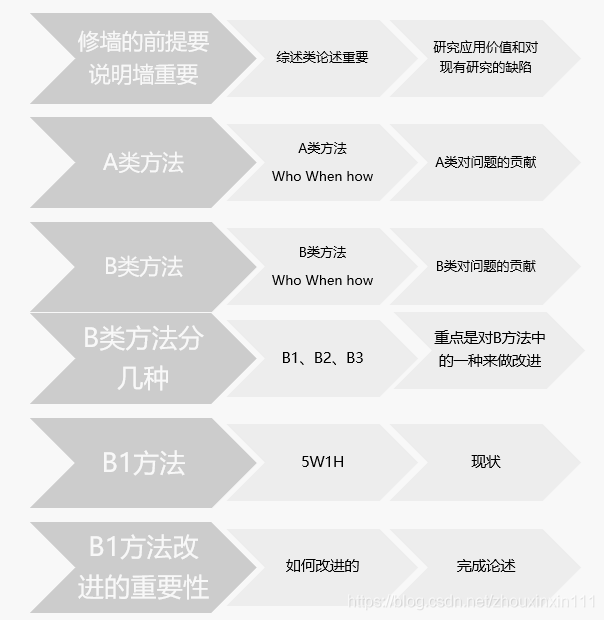
GIS方法类期刊和论文的综述(Introduction)怎么写?

第5期:大学生入职必备技能之二

Okaleido生态核心权益OKA,尽在聚变Mining模式

mysql20210906
![[Halcon vision] threshold segmentation](/img/1c/e2463a796f99804a55680b69e714a6.png)
[Halcon vision] threshold segmentation

【机器学习小记】【人脸识别】deeplearning.ai course4 4th week programming

【机器学习小记】【风格迁移】deeplearning.ai course4 4th week programming(tensorflow2)

链式方法调用的事务问题剖析

干货likeshop外卖点餐系统开源啦100%开源无加密
随机推荐
13 以对象管理资源
Asynctask < T> decoration and await are not used in synchronous methods to obtain asynchronous return values (asynchronous methods are called in synchronous methods)
一些你不知道的 web API
MD5 encryption
使用Geoprocessor 工具
C语言鹏哥20210812C语言函数
centos8(liunx)部署WTM(ASP.NET 5)使用pgsql
Database functions
L2-005 set similarity (intersection of vector and set)
从蚂蚁的觅食过程看团队研发(转载)
Zongzi battle - guess who can win
Simple use of json-c Library -- converting JSON files to struct
7-25 0-1背包 (50分)
C语言计算日期间隔天数
Redis docker instance and data structure
第5期:大学生入职必备技能之二
超图 影像 如何去除黑边(两种方法)
【机器学习小记】【人脸识别】deeplearning.ai course4 4th week programming
SAP ABAP 守护进程的实现方式
剑指Offer(五十二):正则化表达式