当前位置:网站首页>Automatic tracking tool bgmi
Automatic tracking tool bgmi
2022-07-18 12:59:00 【Yangpu Laosu】

Nucleic acid screening for all staff in the region has been added 3 God , What makes old Su feel more gratified is , Saturday's screening was changed to evening , Finally, I don't have to 7 Get up before o'clock
On Wednesday afternoon 40.9 Extreme value of extreme heat in centigrade , Equaled Shanghai Zi 1873 The highest value since the year of meteorological records . Thursday passed, too 40 Centigrade , A red warning of high temperature was issued . Watch the weather forecast , Today, light rain turns to moderate rain , The temperature also fell to 37 Centigrade .
This software is a netizen
114514The recommended
What is? BGmi ?
BGmiIt's one withWeb UIOfcliTools , To subscribe tobangumi.
What is? BGmi-docker-all-in-one ?
BGmi-docker-all-in-oneIt's built inBGmiService andtransmissionDownloaders are all in onedockerimage , Simple and convenient .
install
On the group light with Docker Way to install .
Search the registry for bgmi-all-in-one , Select first codysk/bgmi-all-in-one, Version selection latest.

volume
stay docker In the folder , Create a new folder bgmi, And create a subfolder data
| Folder | Loading path | explain |
|---|---|---|
docker/bgmi/data | /bgmi | Store database, etc |

port
The local port does not conflict , If you're not sure, you can use the command to check
#  Check port usage
netstat -tunlp | grep  Port number
| Local port | Container port | remarks |
|---|---|---|
9090 | 80 | BGmi Of Web UI |
9091 | 9091 | transmission Of Web UI |

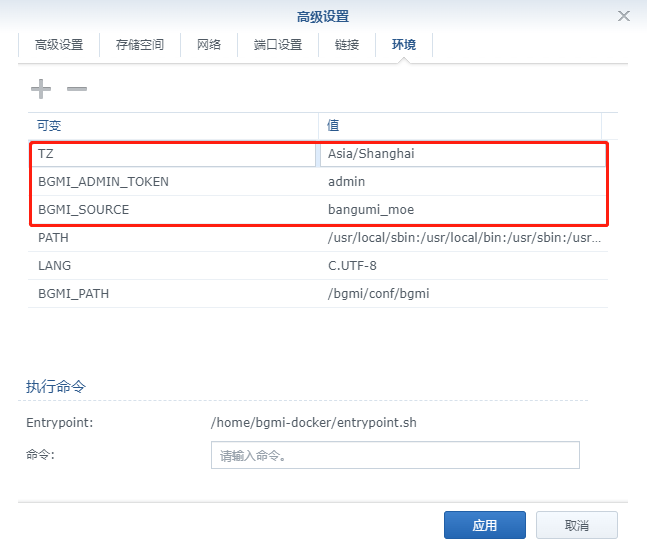
Environmental Science
| variable | value |
|---|---|
BGMI_SOURCE | Set the default data source , At present, we support bangumi_moe, mikan_project and dmhy |
BGMI_ADMIN_TOKEN | Set up bgmi Web Interface authentication token |
TZ | Time zone settings , Domestic general equipment Asia/Shanghai |
Command line installation
If you are familiar with the command line , Possible docker cli Faster
#  New folder  bgmi  and   subdirectories
mkdir -p /volume2/docker/bgmi/data

#  Get into  bgmi  Catalog
cd /volume2/docker/bgmi

#  Run container
docker run -d \
   --restart always \
   --name bgmi \
   -p 9090:80 \
   -p 9091:9091 \
   -v $(pwd)/data:/bgmi \
   -e BGMI_SOURCE=bangumi_moe \
   -e BGMI_ADMIN_TOKEN=admin \
   -e TZ=Asia/Shanghai \
   codysk/bgmi-all-in-one
It can also be used. docker-compose install , Save the following as docker-compose.yml file
version: '2'

services:
  bgmi:
    image: codysk/bgmi-all-in-one
    container_name: "bgmi"
    restart: "always"
    volumes:
      - ./data:/bgmi
    ports:
      - 9090:80
      - 9091:9091
    environment:
      - BGMI_SOURCE=bangumi_moe
      - BGMI_ADMIN_TOKEN=admin
      - TZ=Asia/Shanghai
Then execute the following command
#  New folder  bgmi  and   subdirectories
mkdir -p /volume2/docker/bgmi/data

#  Get into  bgmi  Catalog
cd /volume2/docker/bgmi

#  take  docker-compose.yml  Put in the current directory

#  One button start
docker-compose up -d
function
Enter... In the browser http:// Synology IP:9090 You can see the main interface

Subscription needs to enter Subscribe

The first click may require input
Token, That's what we set up earlierBGMI_ADMIN_TOKENValue

If the content on the interface is empty , You need to enter the container and execute the following command to get the play schedule
It can also be from the terminal or
PortainerGet into , If you don't read old Su's previous articles
#  Into the container
docker exec -it < Containers ID Or the name > /bin/bash

#  Example :root Identity into the container
docker exec -it --user root bgmi /bin/bash

#  Update the schedule of Fanju
bgmi cal

After seeing the printed information , Refresh the page to see the content , You can do it directly subscribe
Old Su knew Conan , It's because Xiao Su liked to watch it when he was a child

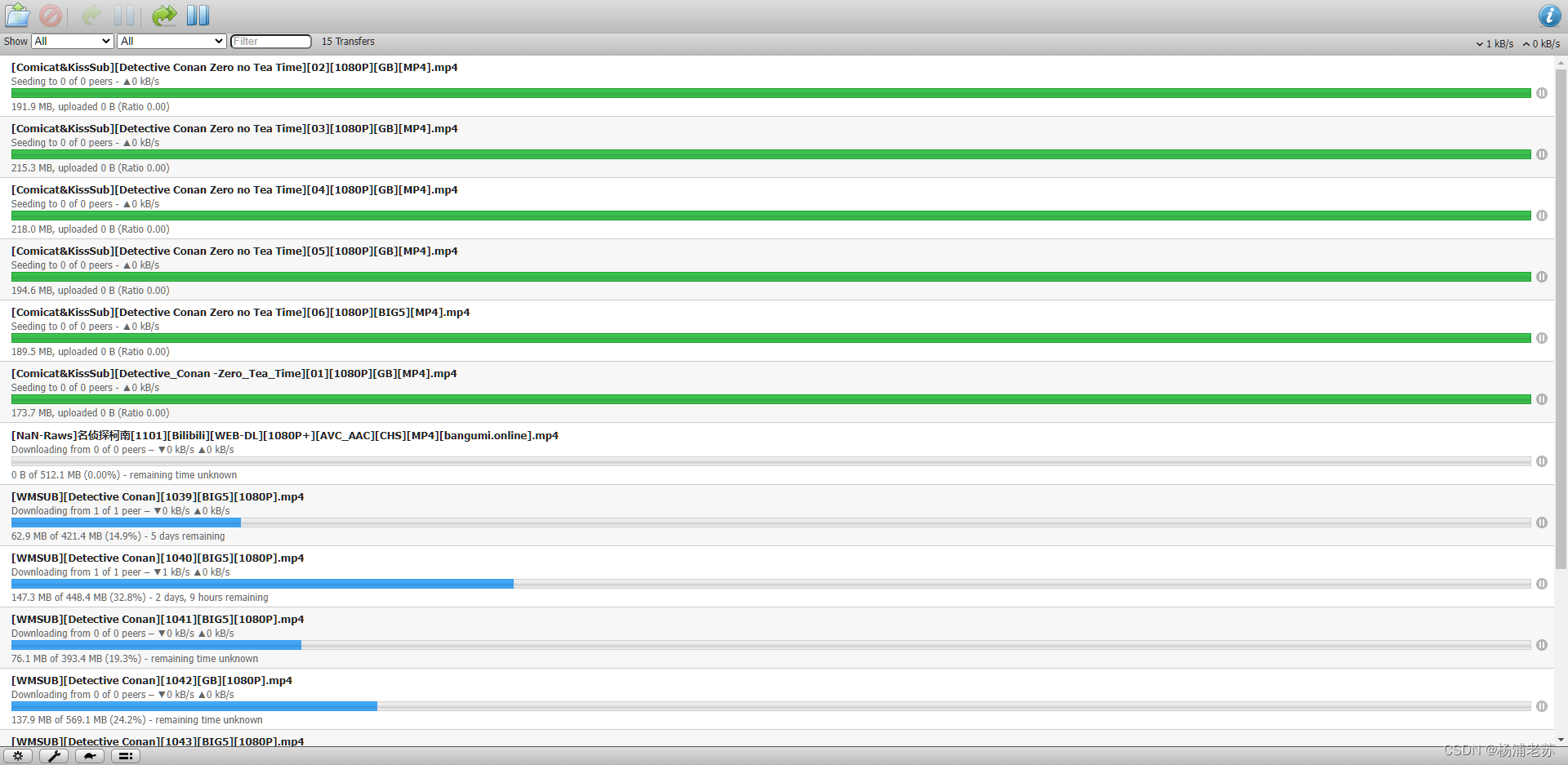
After a period of time, you can see that the download has been successful

It can be played directly

from Bangumi Files Enter to see the list of downloaded and downloading files

stay File Station Can also be found in

All download tasks , Can be in http:// Synology IP:9091 see , This is built in transmission Downloader Web UI
Reference documents
BGmi/BGmi: BGmi is a cli tool with Web UI for subscribed bangumi.
Address :https://github.com/BGmi/BGmi
codysk/bgmi-docker-all-in-one: All in one docker image for BGmi/BGmi
Address :https://github.com/codysk/bgmi-docker-all-in-one#other-message
kaaass/bgmi_hardlink_helper: Hardlink BGmi files for scraper
Address :https://github.com/kaaass/bgmi_hardlink_helper#%E9%85%8D%E7%BD%AE%E7%9B%AE%E5%BD%95%E6%A0%BC%E5%BC%8F
边栏推荐
- CRS-2674,CRS-4000
- Banned, off the shelf! Wechat has made a move to standardize and renovate the digital collection platform!
- Cute image classification - conv network finally breathed a sigh: it blew up swin's convnext
- Coming home late
- 广电5G正式进场:没有四国混战,而是两线对抗
- Recommend the most popular flow chart and chart tool draw IO, old tools are no longer used
- 【Golang | gRPC】使用TLS/SSL认证的gRPC服务
- 【Golang | gRPC】gRPC-Server Streaming服务端流实战
- 还在用命令行看日志?快用Kibana吧,可视化日志分析YYDS ~
- 慢慢就学会了
猜你喜欢

9. Conception du module Px4: introduction au mode de vol Px4

MySQL error 1142 - select command denied to user 'dev' @ 'localhost' for table 'user' (resolved)

推荐一款最流行的流程图及图表工具draw.io,老掉牙的工具已无人再用

分享一下Postman连接MySQL数据库的操作步骤,从安装开始讲起

数字藏品系统开发,助力企业元宇宙场景营销

CRS-2674,CRS-4000

Flume data collection

揭秘MetaMask的起源:成为入门Web3文化的工具集

TCP IP ICMP 以太网帧格式

ORA-00322&ORA-00312
随机推荐
Grid layout
【Golang | gRPC】使用TLS/SSL认证的gRPC服务
深度解读财团参与Twitter私有化的投资逻辑
py篇之字典系列
印度独角兽再添一员:5ire以15亿美元估值获1亿美元A轮融资
Is free knowledge not worth paying attention to?
揭秘MetaMask的起源:成为入门Web3文化的工具集
永恒牛市的幻灭
推荐一款最流行的流程图及图表工具draw.io,老掉牙的工具已无人再用
MySQL Basic - add and Advanced Query
Principle of MySQL master-slave replication
Revelation of AI application: honey and arsenic in security market
ES6浏览器支持及运行环境支持检测及ES6转码ES5
沉睡者的简历-有老板需要招兵买马吗?您的成功就差一个我
2022学习软件测试心态建设和落地
企业如何选择合适的 Time Series Database?
How did the unsecured loan agreement on the chain perform in the encryption storm?
P1567 统计天数【入门】
可爱的图像分类——Conv网络终于出了一口气:打爆了Swin的ConvNeXt
MySQL基礎——新增與進階查詢