当前位置:网站首页>Use of shutter Intl
Use of shutter Intl
2022-07-19 05:42:00 【Spring and autumn of Qin and Han Dynasties】
Flutter Intl Use
Preface
Intl yes flutter A library used to support multilingual operations in , It's convenient for developers to pass through arb File to localize , Omit the operation of some established steps .
Flutter Intl It's for Intl Library development plug-ins , The main function is to automatically generate code , Simplify front-end operations , Let developers focus more arb Compiling ;
Flutter Intl The plug-in currently has VSCode edition and IDEA/Android Studio edition , The use steps are roughly the same .
arb The full name of the document Application Resource Bundle(abbr. ARB) Is a localized resource format , follow json standard ,arb Documents can be provided to translators after translation , Then import it separately .
Intl It uses l10n standard (l10n namely localization Abbreviation ), The current version of the library is 0.17.0, The operation steps may be different from the previous version , Pay attention to identification .
This article is about VSCode Demonstrate in the environment Flutter Intl Use of plug-ins ,Flutter SDK Version is 3.0.3,Dart Version is 2.17.5.
Enable plug-ins
Installing a plug-in
Search in the extended application market "Intl", choice “Flutter Intl" install :
To enable the plugin
After installation ,Ctrl+Shift+P Open the package command window , choice “Flutter Intl: initialization ”: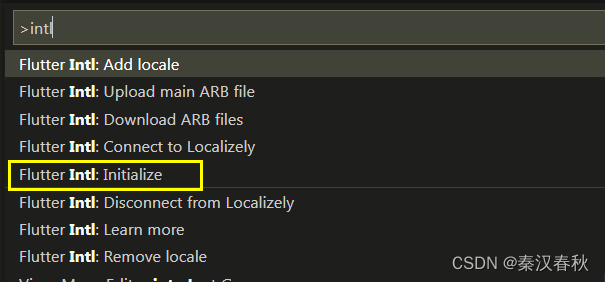
Automatically generate related files
The plug-in will be in flutter The following directories and files are automatically generated under the project directory :
--lib
  --l10n
    --intl_en.arb
  --generated
  	--l10n.dart
  	--intl
      --messages_all.dart
   	  --messages_en.dart
intl_en.arb That is, the corresponding english Translating documents ;
l10n.dart Localization related classes are automatically generated in , The default class name is S;
messages_en.dart Mapping intl_en.arb The corresponding field of ;
messages_all.dart Write the management messages_en.dart And other corresponding regions messages_xx.dart Factory class ;
It's easy to put Call chain Understood as a :
l10n.dart <--messages_all.dart <--message_xx.dart <--intl_xx.arb
In addition to generating corresponding files , Plugins will also be in pubspec.yaml The end of the file is automatically added intl Of Enable identification :
flutter_intl:
  enabled: true
Localization configuration
Add dependency
Localized rely on Need to be on your own pubspec.yaml Add :
dependencies:
  flutter_localizations:
    sdk: flutter
Add in dependencies Nodes or dev_dependencies Nodes depend on the situation ,dependencies It means project dependency ,dev_dependencies It means that the development environment depends on ;
Here according to the official Flutter Localized applications Introduction added in dependencies Under the node ;
Intl Library dependencies have been added to pubspec.lock In file :
  intl:
    dependency: transitive
    description:
      name: intl
      url: "https://pub.flutter-io.cn"
    source: hosted
    version: "0.17.0"
But considering that pubspec.lock official Don't suggest As a project submission , So in pubspec.yaml It is also excellent to directly rely on files , The final dependence is like this :
dependencies:
  flutter:
    sdk: flutter
  flutter_localizations:
    sdk: flutter
  intl: ^0.17.0
( It should be executed after adding dependency pub get packages Command to remotely import related libraries , But most of them are intelligent IDE All performed this process by themselves )
Add Chinese support
Ctrl+Shift+P Open package command , choice "Add Locale":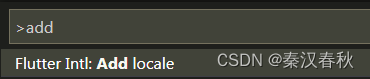
Fill in the corresponding area code "zh":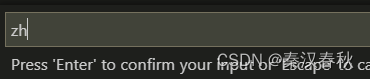
After execution, it will automatically generate intl_zh.arb and messages_zh.dart file , The directory structure changes to :
--lib
  --l10n
    --intl_en.arb
    --intl_zh.arb
  --generated
  	--l10n.dart
  	--intl
      --messages_all.dart
   	  --messages_en.dart
   	  --messages_zh.dart
arb File operations
stay intl_en.arb Add the fields to be mapped in the file , as follows :
{

    "home": "Home",
    "about": "About",
    "greet": "Hi, {name}",
    "askChoice": "There are two choices:{one}? or {two}",
    "@askChoice": {

        "description": "Give someone two choice and wait for selection",
        "placeHolder": {

            "one": {
    },
            "two": {
    }
        }
    },
    "customDateFormat": "current date: {date}",
    "@customDateFormat": {

        "placeholders": {

            "date": {

                "type": "DateTime",
                "format": "EEE, MM/dd/yyyy",
                "isCustomDateFormat": "true"
            }
        }
    }
}
And in intl_zh.arb Add corresponding fields , as follows :
{

    "home": " home page ",
    "about": " About ",
    "greet": " Hello , {name}",
    "askChoice": " There are two options :{one}? or  {two}",
    "@askChoice": {

        "description": " Give someone two choices , Then wait for his choice ",
        "placeHolder": {

            "one": {
    },
            "two": {
    }
        }
    },
    "customDateFormat": " The current date : {date}",
    "@customDateFormat": {

        "placeholders": {

            "date": {

                "type": "DateTime",
                "format": "EEE, MM/dd/yyyy",
                "isCustomDateFormat": "true"
            }
        }
    }
}
Ordinary fields are equivalent to 【 Resource reference 】, And then "@” The fields at the beginning of the symbol represent rules and comments ;
Each update intl_xx.arb After the document , Corresponding messages_xx.dart as well as l10n.dart Medium S Class will automatically update the corresponding field method , So finally call S Class to get the mapped field ;
Localized portal configuration
At the program entrance or UI top floor , It's usually MaterialApp or WidgetsApp Configure localized fields at the entrance of ;
namely localizationsDelegates and supportedLocales Two fields ;
The former is the agent , You can understand the delegation of processing field mapping , The latter is the area , That is, the list of supported area codes ;
As mentioned above l10n.dart Default localization related classes generated in S, It's used here :
return MaterialApp(
      localizationsDelegates: const [
        S.delegate,
        GlobalMaterialLocalizations.delegate,
        GlobalCupertinoLocalizations.delegate,
        GlobalWidgetsLocalizations.delegate,
      ],
      supportedLocales: S.delegate.supportedLocales,
      //... Other code
}
About ios Localized configuration , You can also refer to the official documents Flutter Localized applications in iOS localization : to update iOS app bundle One section introduction .
Use
Output of different language environments
The final call S.current or S.of(context) Corresponding arb Field can be :
print(S.current.about);
print(S.current.greet(" my dear friend "));
print(S.current.askChoice(" determine ", " Cancel "));
print(S.current.customDateFormat(DateTime.now()));
Output in Chinese environment :
 About
 Hello ,  my dear friend
 There are two options : determine ? or   Cancel
 The current date :  Friday , 07/15/2022
Output in English :
About
Hi,  my dear friend
There are two choices: determine ? or  Cancel
current date: Fri, 07/15/2022
Of course , Of the above outputs “ determine ”“ Cancel ” And other fields are also better arb Defined in advance in the document .
The above examples all correspond to Intl In the library message Use of methods , For more usage, please refer to Intl API.
Manually specify the locale
The program will choose according to the system settings Locale, You can also specify ;
For example, you can create global classes , Appoint Intl Of defaultLocale Attribute to change the locale :
class Application {

  static Future init() async {

    Intl.defaultLocale = 'en';
  }
}
Then package at the entrance of the program :
Application.init().then((value) => runApp(MyApp()));
Intl.defaultLocale It may not work on some platforms , You can try localeResolutionCallback Force the default locale ( This method is more stable );
return MaterialApp(
      localeResolutionCallback:
          (Locale? locale, Iterable<Locale> supportedLocales) {

        var result = supportedLocales
            .where((element) => element.languageCode == locale?.languageCode);
        if (result.isNotEmpty) {

          print(locale?.languageCode);
          // return locale;
          return Locale('en');
        }
        return Locale('en');
      },
      //... other
}
边栏推荐
- Application of recursion
- Time difference calculation
- 微信小程序的常用组件
- Common (Consortium)
- 5.1数据采集通道搭建之业务数据采集通道搭建
- Configure tabbar and request network data requests
- 软件过程与管理总复习
- MySQL -- triggers and views
- MySQL 服务正在启动 . MySQL 服务无法启动
- [first launch in the whole network] will an abnormal main thread cause the JVM to exit?
猜你喜欢

软件过程与管理总复习

Application of recursion

用facenet源码进行人脸识别测试过程中的一些问题

微信小程序中的WXML模板语法

10 question 10 answer: do you really know thread pools?

Ambari cluster expansion node + expansion service operation

微信小程序密码显示隐藏(小眼睛)

Scala primary practice - statistics of mobile phone traffic consumption (1)

Composants communs des applets Wechat

Unable to determine Electron version. Please specify an Electron version
随机推荐
Common components of wechat applet
6.数据仓库搭建之数据仓库设计
Macro definition of C language
微信小程序代码的构成
Pointnet++代码详解(四):index_points函数
关于线程池中终止任务
Common (Consortium)
【语音识别】kaldi安装心得
Composants communs des applets Wechat
2021-05-21
微信小程序的常用组件
电商用户行为实时分析系统(Flink1.10.1)
Solve idea new module prompt module XXXX does exits
SnackBar source code analysis and packaging
用facenet源码进行人脸识别测试过程中的一些问题
JNA加载DLL及在jar中的运用
Gradle custom plug-in
gradle自定义插件
The future of data Lakehouse - Open
Use iceberg in CDP to pressurize the data Lake warehouse