当前位置:网站首页>Huawei wireless device configuration intelligent roaming
Huawei wireless device configuration intelligent roaming
2022-07-19 10:20:00 【51CTO】

1. To configure LSW and AC, send AP And AC Can transmit between CAPWAP message
[LSW1]vlan batch 10
[LSW1-GigabitEthernet0/0/1]port link-type trunk
[LSW1-GigabitEthernet0/0/1]port trunk allow-pass vlan 10
[LSW1-GigabitEthernet0/0/2]port link-type trunk
[LSW1-GigabitEthernet0/0/2]port trunk allow-pass vlan 10
[LSW1-GigabitEthernet0/0/2]port trunk pvid vlan 10
[LSW1-GigabitEthernet0/0/2]port-isolate enable
[LSW1-GigabitEthernet0/0/3]port link-type trunk
[LSW1-GigabitEthernet0/0/3]port trunk allow-pass vlan 10
[LSW1-GigabitEthernet0/0/3]port trunk pvid vlan 10
[LSW1-GigabitEthernet0/0/3]port-isolate enable
[AC1]vlan batch 10
[AC1-GigabitEthernet0/0/1]port link-type trunk
[AC1-GigabitEthernet0/0/1]port trunk allow-pass vlan 10
2. To configure AC Interworking with the upper network equipment
[AC1]vlan batch 20 30 40
[AC1-Vlanif20]ip add 10.1.2.1 24
[AC1-Vlanif30]ip add 10.1.3.1 24
[AC1-Vlanif40]ip add 10.1.4.1 24
[AC1]ip route-static 0.0.0.0 0.0.0.0 10.1.4.2
[AC1-GigabitEthernet0/0/2]port link-type trunk
[AC1-GigabitEthernet0/0/2]port trunk allow-pass vlan 40
[AC1-GigabitEthernet0/0/2]port trunk pvid vlan 40
3. To configure AC to AP Distribute IP Address ,AR to STA Distribute IP Address
[AC1]dhcp enable
[AC1]int Vlanif 10
[AC1-Vlanif10]ip add 10.1.1.1 24
[AC1-Vlanif10]dhcp select interface // To configure AC Through the interface address pool for AP Distribute IP Address
[AC1-Vlanif20]dhcp select relay // To configure AC As DHCP Relay and enable DHCP Relay detect user table entry function
[AC1-Vlanif20]dhcp relay server-ip 10.1.4.2
[AC1-Vlanif30]dhcp select relay
[AC1-Vlanif30]dhcp relay server-ip 10.1.4.2
[AR1]dhcp enable // To configure AR As DHCP The server is STA Distribute IP Address
[AR1]ip pool sta-ip-pool1
[AR1-ip-pool-sta-ip-pool1]gateway-list 10.1.2.1
[AR1-ip-pool-sta-ip-pool1]network 10.1.2.0 mask 24
[AR1]ip pool sta-ip-pool2
[AR1-ip-pool-sta-ip-pool2]gateway-list 10.1.3.1
[AR1-ip-pool-sta-ip-pool2]network 10.1.3.0 mask 24
[AR1-GigabitEthernet0/0/0]ip add 10.1.4.2 24
[AR1-GigabitEthernet0/0/0]dhcp select global
[AR1]ip route-static 10.1.2.0 24 10.1.4.1
[AR1]ip route-static 10.1.3.0 24 10.1.4.1
4. To configure VLAN pool, Used as a business VLAN
[AC1]vlan pool sta-pool
[AC1-vlan-pool-sta-pool]vlan 20 30
[AC1-vlan-pool-sta-pool]assignment hash
5. To configure AP go online
[AC1]wlan
[AC1-wlan-view]ap-group name ap-group1 // establish AP Group
[AC1-wlan-view]regulatory-domain-profile name domain1 // Create domain management template , Configure... Under the domain management template AC Country code and in AP Reference domain management template under group
[AC1-wlan-regulate-domain-domain1]country-code cn
[AC1-wlan-view]ap-group name ap-group1
[AC1-wlan-ap-group-ap-group1]regulatory-domain-profile domain1
[AC1]capwap source interface Vlanif 10 // To configure AC Source interface of
[AC1]wlan
[AC1-wlan-view]ap auth-mode mac-auth
[AC1-wlan-view]ap-id 0 ap-mac 00e0-fcae-6d70 // stay AC Import online and offline AP
[AC1-wlan-ap-0]ap-name ap1
[AC1-wlan-ap-0]ap-group ap-group1
[AC1-wlan-view]ap-id 1 ap-mac 00e0-fc31-7140
[AC1-wlan-ap-1]ap-name ap2
[AC1-wlan-ap-1]ap-group ap-group1

6. To configure WLAN Business parameters
[AC1-wlan-view]security-profile name wlan-security // Create a security template , And configure the security policy
[AC1-wlan-sec-prof-wlan-security]security wpa2 psk pass-phrase [email protected] aes
[AC1-wlan-view]ssid-profile name wlan-ssid // Create name SSID Templates , And configuration SSID name
[AC1-wlan-ssid-prof-wlan-ssid]ssid wlan-net
[AC1-wlan-view]vap-profile name wlan-vap // establish VAP Templates , Configure business data forwarding mode 、 Business VLAN, And reference security templates and SSID Templates
[AC1-wlan-vap-prof-wlan-vap]forward-mode tunnel
[AC1-wlan-vap-prof-wlan-vap]service-vlan vlan-pool sta-pool
[AC1-wlan-vap-prof-wlan-vap]security-profile wlan-security
[AC1-wlan-vap-prof-wlan-vap]ssid-profile wlan-ssid
[AC1-wlan-view]ap-group name ap-group1 // To configure AP Group reference VAP Templates ,AP RF on 0 And RF 1 All use VAP Template configuration
[AC1-wlan-ap-group-ap-group1]vap-profile wlan-vap wlan 1 radio all
7. To configure AP RF channel and power
[AC1-wlan-view]rrm-profile name default
[AC1-wlan-rrm-prof-default]calibrate auto-channel-select disable // Turn off the automatic channel tuning function of RF
[AC1-wlan-rrm-prof-default]calibrate auto-txpower-select disable // Turn off the automatic power tuning function of RF
[AC1-wlan-view]ap-id 0 // To configure AP radio frequency 0 Channel and power
[AC1-wlan-ap-0]radio 0
[AC1-wlan-radio-0/0]channel 20mhz 6
[AC1-wlan-radio-0/0]eirp 127
[AC1-wlan-ap-0]radio 1
[AC1-wlan-radio-0/1]channel 20mhz 149
[AC1-wlan-radio-0/1]eirp 127
8. Configure intelligent roaming function
[AC1-wlan-view]rrm-profile name smart-roam // establish RRM Templates
[AC1-wlan-rrm-prof-smart-roam]smart-roam enable // stay RRM Enable the intelligent roaming function under the template
[AC1-wlan-rrm-prof-smart-roam]smart-roam roam-threshold check-snr check-rate // Specify the triggering method of user roaming based on terminal signal-to-noise ratio and terminal signal rate
[AC1-wlan-rrm-prof-smart-roam]smart-roam roam-threshold snr 30 // The specified trigger threshold is 30dB
[AC1-wlan-rrm-prof-smart-roam]smart-roam roam-threshold rate 30 // The specified trigger threshold is 30%
[AC1-wlan-view]radio-2g-profile name radio2g // establish 2G RF template , And reference RRM Templates
[AC1-wlan-radio-2g-prof-radio2g] rrm-profile smart-roam
[AC1-wlan-view]radio-5g-profile name radio5g // establish 5G RF template , And reference RRM Templates
[AC1-wlan-radio-5g-prof-radio5g] rrm-profile smart-roam
[AC1-wlan-view]ap-group name ap-group1 // stay AP Group reference 5G RF template and 2G RF template
[AC1-wlan-ap-group-ap-group1]radio-2g-profile radio2g radio all
[AC1-wlan-ap-group-ap-group1]radio-5g-profile radio5g radio all
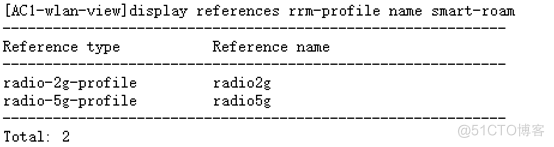
9. Verify configuration



边栏推荐
猜你喜欢

C# 搭建一个基于.NET5的WPF入门项目

麒麟信安操作系统衍生产品解决方案 | 主机安全加固软件,实现一键快速加固!

Run yolov3 on Huawei modelarts_ coco_ detection_ dynamic_ AIPP sample

VC view memory leak

Online education knowledge payment website source code system + live broadcast + applet, installation tutorial

荔枝音质高保真AI降噪技术分享
Packet knowledge

押注.NET 是件好事

Flink entry to practice - stage 5 (processing function)

中科磐云——网络空间安全抓包题目 B.pcap
随机推荐
ROV and AUV of underwater vehicle
机械臂速成小指南(零点五):机械臂相关资源
高性能IO框架库libevent(三):libevent框架函数概述
Microsoft OneNote 教程,如何在 OneNote 中插入数学公式?
基于AI智能关联技术的5G网络切片研究与实现
潇洒郎:VMware固定虚拟机IP地址
vim怎么保存后退出
Flink入门到实战-阶段五(处理函数)
Rocky基础之正则表达式
中科磐云——网络空间安全抓包题目 B.pcap
中职网络安全——(2022网络安全nc批量连接的脚本)免费的脚本哦~~~
Huawei Shengsi mindspire detailed tutorial
Smart Lang: VMware fixed virtual machine IP address
R语言使用epiDisplay包的ordinal.or.display函数获取有序logistic回归模型的汇总统计信息(变量对应的优势比及其置信区间、以及假设检验的p值)、使用summary汇总统计
[separate hyperimage classification platform] use those exciting models in deep learning to build an image classification platform
空天地海协同应用综述
私钥,公钥的区分——私钥公钥讲解
数据湖(十二):Spark3.1.2与Iceberg0.12.1整合
【vulnhub靶场】PRIME:1打靶过程记录
2022年陕西省中职组“网络空间安全”—数据包分析