当前位置:网站首页>[Download] take you to use FRP to achieve intranet penetration detailed tutorial!
[Download] take you to use FRP to achieve intranet penetration detailed tutorial!
2022-07-19 10:07:00 【Network security self-study room】
frp Achieve intranet penetration
Project address :https://github.com/fatedier/frp/releases
This tool relies on a public network IP Of PC Or servers . The intranet penetration tool is used to solve the problem that there is no public network IP Problem. .
Baidu cloud disk download address can be obtained at the end of the text
download :frp_windwos_amd64.zip This (amd64 yes 64 System ,386 yes 32 Bit system , Now the computer is basically 64 Yes. ), such as frp_0.33.0_windows_amd64.zip
frp It is a high performance reverse proxy application for intranet penetration , Support tcp, udp agreement , by http and https Application protocols provide additional capabilities , And try to support point-to-point penetration . The name is actually used Fast Reverse Proxy An acronym for . The structure is as follows :

Case study : Put the intranet Linux On the server web The website is mapped to the public network
Before making specific configuration , According to the corresponding operating system and architecture , from github Page download the latest version of the program .
take frps And frps.ini Put it on the Internet IP On the machine . Please pay attention to configuring the firewall or security group to release the ports used in the configuration file .
take frpc And frpc.ini Put it on a machine in an intranet environment .
On the public network windows Upper Department frps
First step : Upload frp_0.39.1_windows_386 To the public network Windows Server

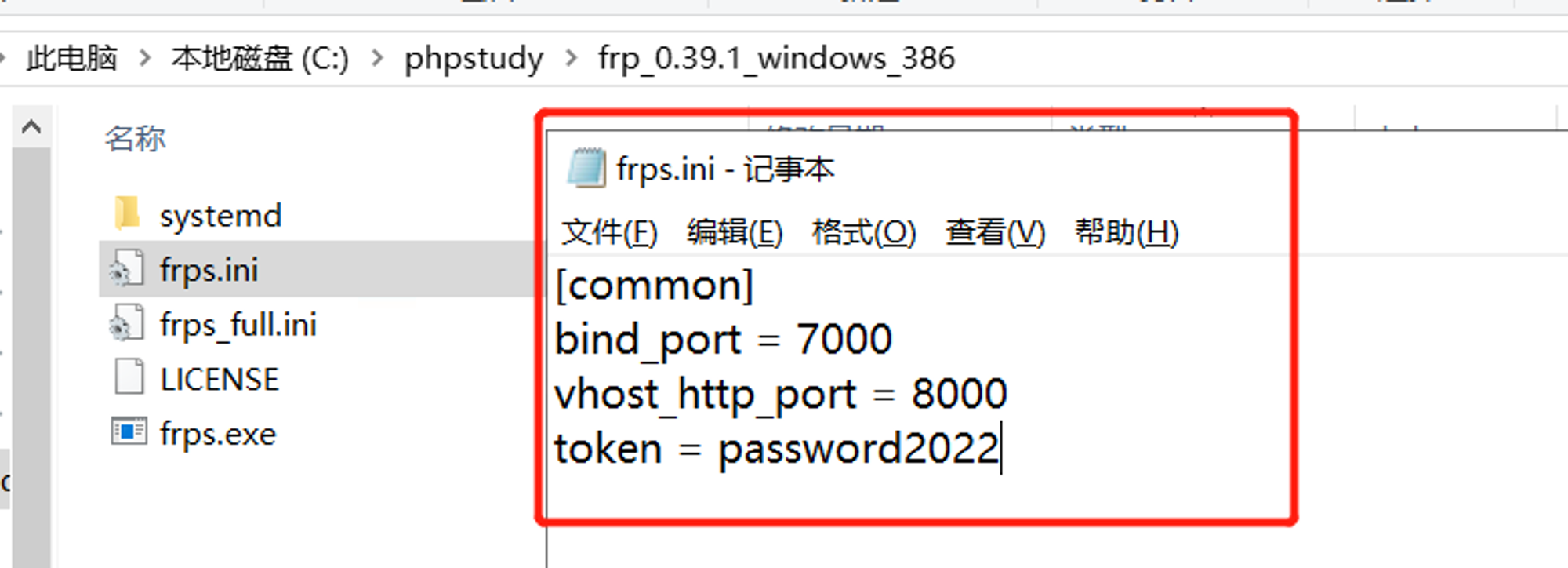
The second step : Modify file frps.ini file
The third step : stay cmd Start... By entering the following command in frps.exe Program
appear frps started successfully representative frps Successful launch ;

On the Intranet liunx Upper Department frpc
Step four : hold frpc Upload to the local intranet liunx On the server and extract the file

Step five : edit frpc.ini ( You need to have your own domain name )

Step six : start-up frpc, appear [web] start proxy success that will do

Access in browser
Step seven : Successfully accessed on the browser

Use scenarios
1. adopt rdp Visit the home machine
modify frps.ini file , For safety's sake , It's best to configure authentication here , Server and client common The configuration of the token If the parameters are consistent, the authentication passes :
# frps.ini
[common]
bind_port = 7000
#  For authentication , Please modify , Ensure that the server is consistent with the client
token = password2022
start-up frps:
Linux Start the :
./frps -c ./frps.ini
windows Upper use
frps.exe -c ./frps.ini
modify frpc.ini file , hypothesis frps The public network of the server IP by x.x.x.x:
# frpc.ini
[common]
server_addr = x.x.x.x
server_port = 7000
For authentication , Please modify , Ensure that the server is consistent with the client
token = password2022
[rdp] type = tcp local_ip = 127.0.0.1 local_port = 3389 remote_port = 6000
start-up frpc:
./frpc -c ./frpc.ini

frpc.exe -c ./frpc.ini

 adopt  rdp  Access remote machines , The address is :

x.x.x.x:6000
Boot from boot
in the light of Windows System , For ease of use , It can be configured to start silently when starting up . stay frpc.exe Create a start_frpc.vbs:
start_frpc.vbs Please modify the path according to the actual situation
CreateObject("WScript.Shell").Run """D:\Program Files\frp_windows_amd64\frpc.exe""" & "-c" & """D:\Program Files\frp_windows_amd64\frpc.ini""",0
Copy start_frpc.vbs file , Open the following directory , Pay attention to <USER_NAME> Change it to your user name :
`C:\Users\<USER_NAME>\AppData\Roaming\Microsoft\Windows\Start Menu\Programs\Startup`
Right mouse click , Paste as a shortcut .
2. adopt SSH Access the company intranet machine
frps The deployment steps are the same as above . start-up frpc, The configuration is as follows :
frpc.ini
[common]
server_addr = x.x.x.x
server_port = 7000
For authentication , Please modify , Ensure that the server is consistent with the client
token = abcdefgh
[ssh] type = tcp local_ip = 127.0.0.1 local_port = 22 remote_port = 6000
adopt SSH Access intranet machine , Suppose the user name is test:
ssh -oPort=6000 [email protected]
3. Access to intranet deployed through a custom domain name Web service
Sometimes we want others to access or test our local... Through domain names Web service , But because the local machine has no public network IP, Unable to resolve domain name to local machine , adopt frp You can do this , The following example is http service ,https The service configuration method is the same , vhost_http_port Replace with vhost_https_port, type Set to https that will do . modify frps.ini file , Set up http Access port is 8080:
frps.ini
[common]
bind_port = 7000
vhost_http_port = 8080
For authentication , Please modify , Ensure that the server is consistent with the client
token = abcdefgh
start-up frps:
./frps -c ./frps.ini
 modify  frpc.ini  file , hypothesis  frps  Of the server  IP  by  x.x.x.x,local_port  On the local machine  Web  The port corresponding to the service ,  Bind custom domain name  `www.yourdomain.com`:

frpc.ini

[common]
server_addr = x.x.x.x
server_port = 7000
For authentication , Please modify , Ensure that the server is consistent with the client
token = abcdefgh
[web] type = http local_port = 80 custom_domains = ctf.caichuanqi.cn
start-up frpc:
./frpc -c ./frpc.ini`
take ctf.caichuanqi.cn Domain name of A The record resolves to IP x.x.x.x , If the server already has a corresponding domain name , Can also be CNAME The record resolves to the original domain name of the server . Access... Through a browser http://ctf.caichuanqi.cn:8080 You can access the machine on the intranet Web service .
4. Provide simple external file access services
adopt static_file The plug-in can provide a simple interface based on HTTP File access service .
frps The deployment steps are the same as above . start-up frpc, Enable static_file plug-in unit , The configuration is as follows :
frpc.ini [common] server_addr = x.x.x.x server_port = 7000
For authentication , Please modify , Ensure that the server is consistent with the client
token = abcdefgh
[test_static_file] type = tcp remote_port = 6000 plugin = static_file
Directory of files to be exposed
plugin_local_path = /tmp/file
visit url Prefixes to be removed from , The reserved content is the file path to be accessed
plugin_strip_prefix = static plugin_http_user = abc plugin_http_passwd = abc
Access... Through a browser To see where /tmp/file In the catalog http://x.x.x.x:6000/static/ file , You will be asked to enter the set user name and password .
Common functions
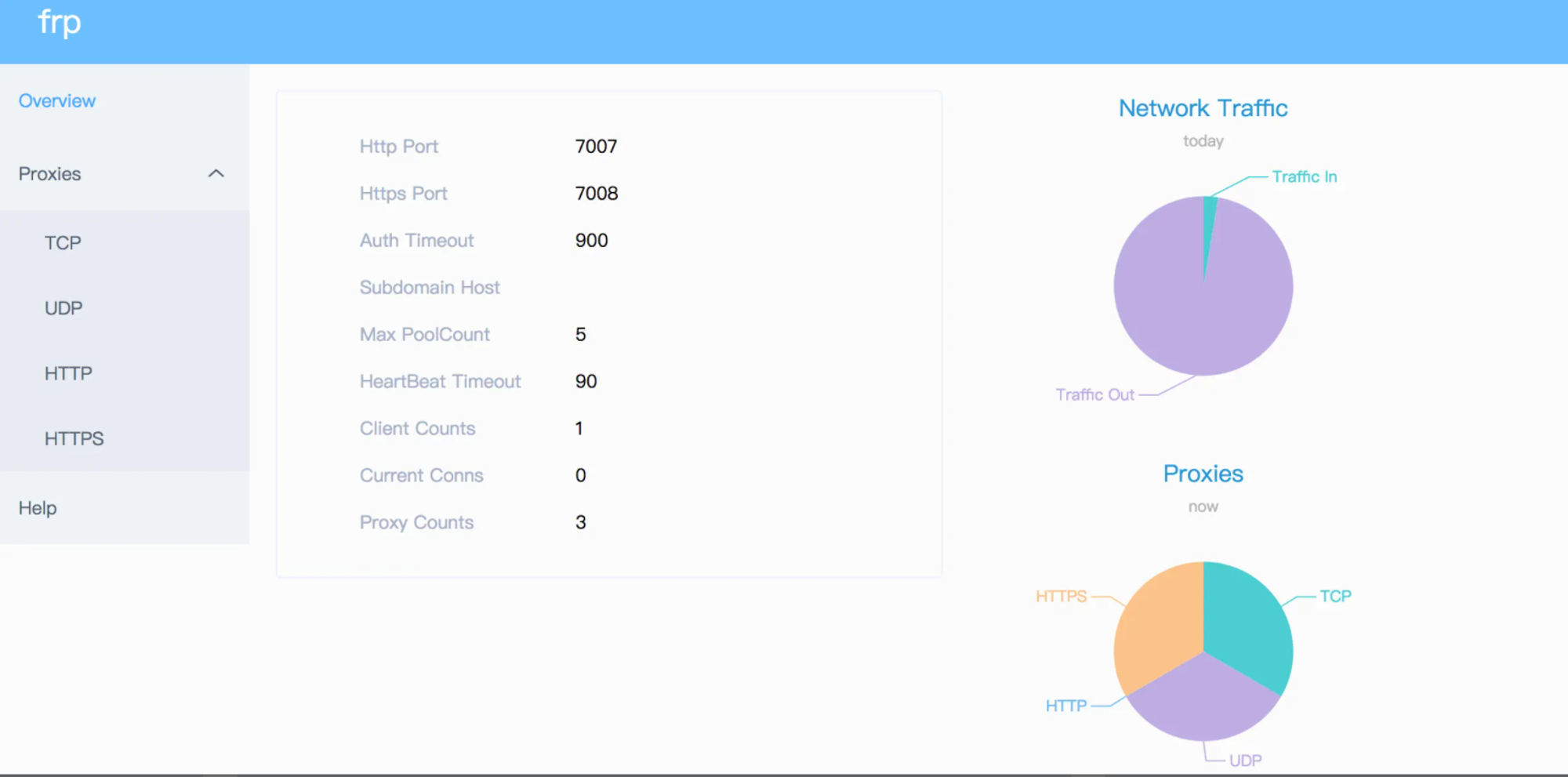
Statistics panel (Dashboard)
View... Through a browser frp Status and agent statistics display .
notes :Dashboard Not yet for a large number of proxy Optimize data presentation , If appear Dashboard Slow access , Please do not enable this feature .
Need to be in frps.ini It is specified in dashboard The port used by the service , This function can be turned on :
Open the browser through http://[server_addr]:7500 visit dashboard Interface , The default username and password is admin .
Encryption and compression
These two functions are not enabled by default , Need to be in frpc.ini Enables encryption and compression for the specified agent through configuration , The compression algorithm uses snappy:
If the company's intranet firewall has carried out traffic identification and shielding for external network access , For example, it's banned SSH Agreements, etc , By setting use_encryption = true, take frpc And frps Encrypted transmission of communication content between , Will effectively prevent traffic from being intercepted .
If the transmitted message length is long , By setting use_compression = true Compress the transmitted content , Can effectively reduce frpc And frps Network traffic between , Speed up traffic forwarding , But it will consume some extra CPU resources .
TLS
from v0.25.0 Version start frpc and frps Support between TLS Protocol encrypted transmission . By means of frpc.ini Of common Middle configuration tls_enable = true To enable this feature , safer .
For port multiplexing ,frp establish TLS The first byte of the connection is 0x17.
Be careful : When this function is enabled, except xtcp Outside , No need to set again use_encryption.
Proxy speed limit
At present, it supports setting the speed limit of the agent level in the agent configuration of the client , Limit individual proxy Available bandwidth .
Add... In the agent configuration bandwidth_limit Field enables this feature , Currently only supported MB and KB Company .
Range port mapping
stay frpc Mapping multiple ports can be specified in the configuration file of , Currently only supported tcp and udp The type of .
This function passes through range: Paragraph markers to achieve , The client will parse the configuration in this tag , Split it into multiple proxy, every last proxy Name with numbers as suffixes .
For example, to map local 6000-6005, 6007 this 6 Ports , The main configuration is as follows :
After the actual connection is successful, it will create 8 individual proxy, Name it test_tcp_0, test_tcp_1 ... test_tcp_7.
More configuration
because frp Currently, there are many supported functions and configuration items , For a complete sample configuration file, refer to :
frps Full profile
frpc Full profile
Reference material
[3]github page :https://github.com/fatedier/frp/releases
[4]frps Full profile :https://github.com/fatedier/frp/blob/master/conf/frps_full.ini
[5]frpc Full profile :https://github.com/fatedier/frp/blob/master/conf/frpc_full.ini
边栏推荐
- Chapter 4 - first order multi-agent system consistency - > continuous time system consistency with time delay [program code]
- Run yolov3 on Huawei modelarts_ coco_ detection_ dynamic_ AIPP sample
- 水下机器人ROV和AUV
- 金纳米粒子修饰MIL-101骨架材料(AuNPs/MIL-101)/负载COF-TpPa-1(Au NPs/COF-TpPa-1)|齐岳试剂
- Idea stuck and reported an error: UI was frozen for xxxxx MS problem solving
- 基于AI智能关联技术的5G网络切片研究与实现
- 华为无线设备配置动态负载均衡
- 18. Shell Scripting (1)
- Chapter 4 - first order multi-agent system consistency - > switching topology system consistency [program code]
- laravel 生成分表脚本示例
猜你喜欢

Chapter 4 - consistency of first-order multi-agent systems - > consistency of continuous time systems with time delays

Among China's top ten national snacks, it is actually the first
自己创建的模块 使用cmd打开报 ModuleNotFoundError: No module named 解决方案
数据湖(十二):Spark3.1.2与Iceberg0.12.1整合
![[200 opencv routines] 233 Moment invariants of regional features](/img/03/8d4bd81a839f18142e7ee14adbfa40.png)
[200 opencv routines] 233 Moment invariants of regional features

18. Shell Scripting (1)

卫星网络中基于时变图的节能资源分配策略

Online education knowledge payment website source code system + live broadcast + applet, installation tutorial

Build a server environment with node+express

Implement word segmentation for text and draw word cloud
随机推荐
CLWY权限管理(二)--- 用户模块
mof定制产品|N-K2Ti4O9/g-C3N4/UiO-66三元复合材料|纸基Au-AgInSe2-ZIF-8纳米复合材料
ES6中的let、const、var
喜报
506.相对名次
喜报
CLWY权限管理(三)--- 用户组模块
数据湖(十二):Spark3.1.2与Iceberg0.12.1整合
AsyncLocalStorage 的妙用
[C language] string, escape character and comment
【C语言】浅涉选择、循环语句、函数及数组
光辉使用输出
死锁、线程与进程讲解
Huawei Shengsi mindspire detailed tutorial
Traffic ranking 100W website
ES Restful操作
上学=挣钱?无需缴纳学费的神仙院校!
TLS四次握手
Machine learning basics that can be easily introduced in 5 minutes
rhcsa 第二天 7.15