当前位置:网站首页>HCIA RIP实验 7.11
HCIA RIP实验 7.11
2022-07-17 12:00:00 【恩赫阿木古朗汗】
一、搭建拓扑

二、规划ip

R1的IP

R2的IP

R3的IP

通过R2测试


三、RIP V2
1、RIP V2基础配置
RIP V2 R1
[r1]rip 1
[r1-rip-1]version 2
[r1-rip-1]undo summary    # 不要汇总
[r1-rip-1]network 192.168.1.0
[r1-rip-1]
RIP V2 R2
[r2]rip 1
[r2-rip-1]version 2
[r2-rip-1]undo summary
[r2-rip-1]network 192.168.1.0
RIP V2 R3
[r3]rip 1
[r3-rip-1]version 2
[r3-rip-1]undo summary
[r3-rip-1]network 192.168.1.0
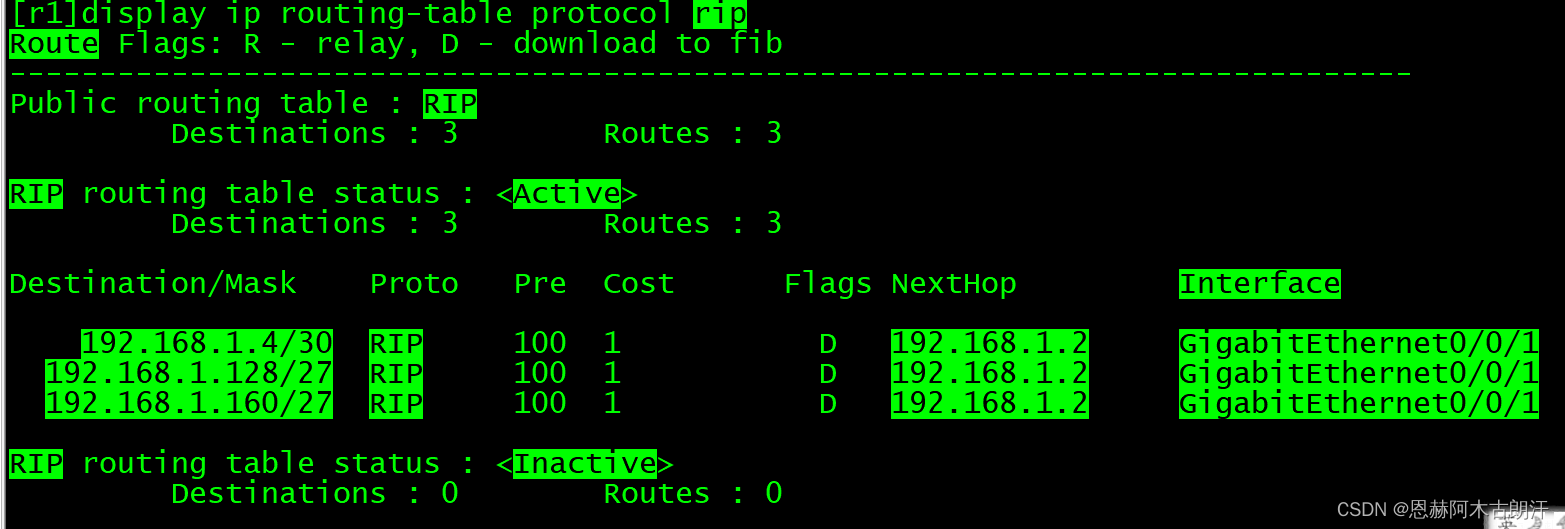
查看R1的路由表
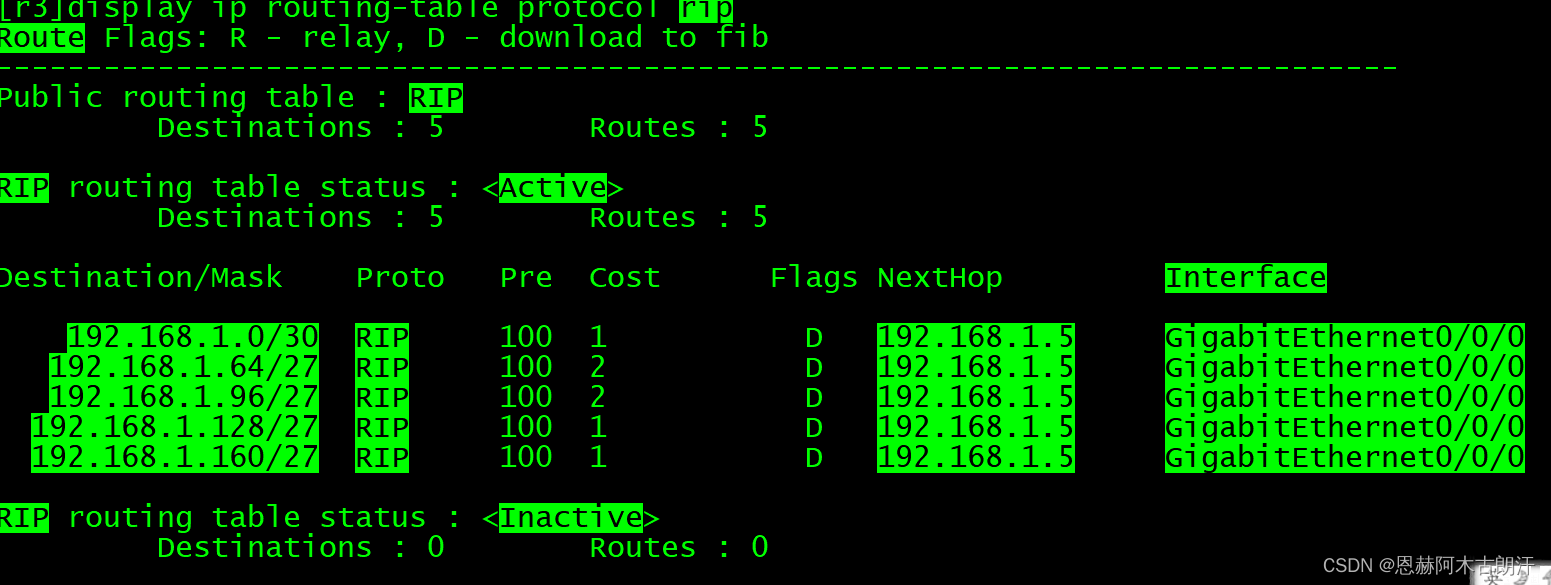
查看R3的路由表
R3pingR1的环回

2、RIP V2扩展配置
R3写一条缺省路由
[r3]rip
[r3-rip-1]default-route originate
查看R2的路由表

查看R1的路由表

R1pingR3的环回

此时,全网可达
保障更新安全
[r1-GigabitEthernet0/0/1]rip authentication-mode md5 usual cipher huawei

[r2-GigabitEthernet0/0/0]rip authentication-mode md5 usual cipher huawei
[r2-GigabitEthernet0/0/1]rip authentication-mode md5 usual cipher huawei

[r3-GigabitEthernet0/0/0]rip authentication-mode md5 usual cipher huawei
注:R1与R2间的密码一致,R2与R3的密码一致
减少路由条目数量
[r1-GigabitEthernet0/0/1]rip summary-address 192.168.1.64 255.255.255.192

[r2-GigabitEthernet0/0/0]rip summary-address 192.168.1.128 255.255.255.192
[r2-GigabitEthernet0/0/1]rip summary-address 192.168.1.128 255.255.255.192
查看R3的路由表
Destination/Mask    Proto   Pre  Cost      Flags NextHop         Interface

    192.168.1.0/30  RIP     100  1           D   192.168.1.5     GigabitEthernet0/0/0
   192.168.1.64/26  RIP     100  2           D   192.168.1.5     GigabitEthernet0/0/0
  192.168.1.128/26  RIP     100  1           D   192.168.1.5     GigabitEthernet0/0/0

RIP routing table status : <Inactive>
         Destinations : 0        Routes : 0

<r3>
避免环路
[r1]ip route-static 192.168.1.64 26 NULL 0

[r2]ip route-static 192.168.1.128 26 NULL 0
边栏推荐
猜你喜欢






随机推荐
2022年湖南 省中职组“网络空间安全”Windows渗透测试 (超详细)
Data Lake (XII): integration of spark3.1.2 and iceberg0.12.1
Network Security Learning (Qianfeng network security notes) 1-- building virtual machines
set、vector与list的构造与排序的耗时测试
R语言使用epiDisplay包的ordinal.or.display函数获取有序logistic回归模型的汇总统计信息(变量对应的优势比及其置信区间、以及假设检验的p值)、使用summary汇总统计
Huawei Shengsi mindspire detailed tutorial
2022.07.14 暑假集训 个人排位赛(九)
FreeRTOS个人笔记-临界值的保护
[C language] a brief introduction to the first C language program and data type
文件操作的底层原理(inode与软硬链接,文件的时间属性)
Run yolov3 on Huawei modelarts_ coco_ detection_ dynamic_ AIPP sample
Pfsense configure tailscal site to site connection
GIS数据漫谈(三)
TLS four handshakes
vc查看内存泄漏
vim怎么保存后退出
Simulation Research on optimal detection of fault data in communication network
Solutions to notebook keyboard failure
Flink introduction to actual combat - phase IV (time and window diagram)
【MySQL】MySQL的增删查改(进阶)