当前位置:网站首页>Expanding hard disk in VMWare
Expanding hard disk in VMWare
2022-07-19 08:44:00 【Certainly tomorrow】
Pain points
Before, I had a random whole on the virtual machine centos System , Allocated a relatively small space and found that the hard disk was not enough , Ready to add more .
solve

Double click the hard disk perhaps Click Edit virtual machine settings .
In the dialog box Click hard disk , Point extension .

Set how much space you need to prepare , I'm here from 40 Rise to 45, Then click expand .

Then turn on the virtual machine , Use df -h see , It turns out that nothing has changed , still 40G

df command Used to display the available disk space on the partition . The default display unit is KB. You can use this command to get the space occupied by the hard disk , How much space and other information is left .
-h or --human-readable: Display information in a more readable way ;
Use fdisk -l Check the new disk partition
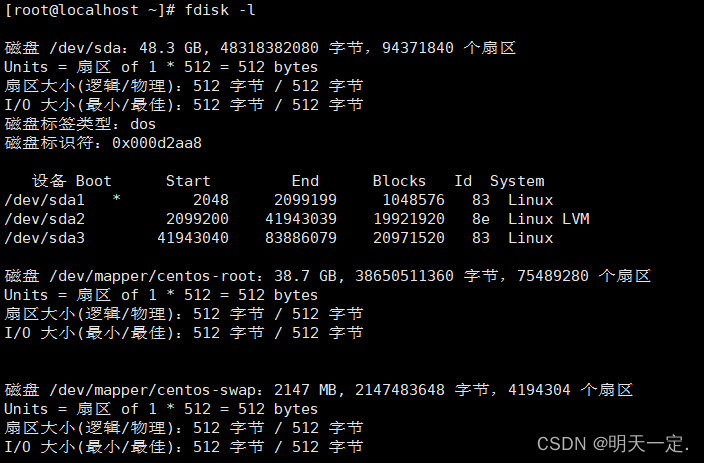
fdisk command Used to observe the use of hard disk entities , You can also partition the hard disk . It uses a traditional question and answer interface , Not like DOS fdisk Of cfdisk Interactive operation interface , Therefore, it is inconvenient to use , But the function is not discounted at all .
fdisk [ Options ] -l < disk > List partition table
fdisk [ Options ] < disk > Change partition table
You can see that there are three partitions sda1、sda2、sda3
We use fdisk /dev/sda Partition the newly added disk , You can enter m See how to use
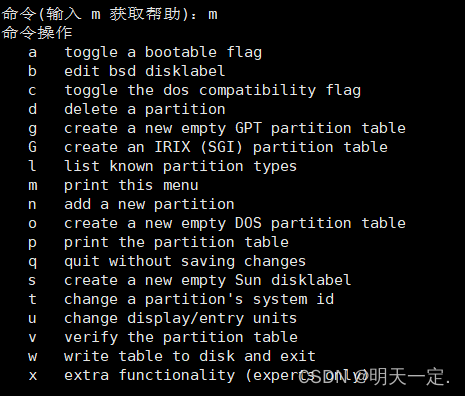
We type in n Add a new partition
Then input p
Then keep walking by default , Until there is : Partition 4 Set to Linux type , The size is set to 5 GiB
next , We type in w, Enter exit .
We type in fdisk -l Then you can see that the partition has been created successfully

Restart the virtual machine :reboot
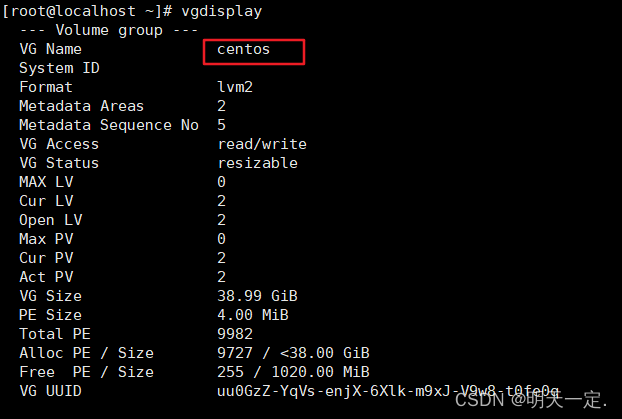
Then check the disk volume group name :vgdisplay. You can see the name is centos
Initialize partition :pvcreate /dev/sda4
Add the initialized partition to the virtual volume group :vgextend centos /dev/sda4
Input again vgdisplay You can see that there is room left

Next , We allocate the spare disk to the file system that needs to be expanded ., We use df -h, We're going to expand /dev/mapper/centos-root

Then input lvextend -L +5G /dev/mapper/centos-root enter , Expand the existing volume group capacity . If you fail , Please reduce the value and try again , Only numbers lower than your preset value can be extended .

You also need to expand the file system .
My system instructions are :xfs_growfs /dev/mapper/centos-root. Different systems have different instructions , You need to check this by yourself ( Input cat /etc/fstab |grep centos-root enter , View the format of the file system , My is xfs)
thus , Have succeeded

Reference resources
VMware Expand disk space _ Little programmer roast's blog -CSDN Blog _vmware Expansion disk
边栏推荐
猜你喜欢

oop_ Reference type variable transfer value

Super dry! Thoroughly understand golang memory management and garbage collection

Hcip - Comprehensive Experiment of OSPF

Detailed explanation of ansible automatic operation and maintenance (IV) preparation, use, command execution and example demonstration of playbook in ansible
1. Decision tree
60. Initial knowledge of wsgiref handwritten web framework +jinja2 module

朋友圈如何定位?3个核心步骤,打造卖爆产品的朋友圈

Linear regression + basic optimization of deep learning

Microservices and microservice architecture

1、flask基础
随机推荐
WebGL的CPU负载问题-WebGL对比
Hcip - Comprehensive Experiment of OSPF
CPU load of webgl - webgl comparison
Enjoy JVM -- knowledge about GC garbage collection
搭建嵌入式开发环境
Difference and connection between structure and Consortium
Leetcode sword finger offer II 041 Average value of sliding window: low space consumption solution
Snap 1669 combine deux notes de liste
半透明双层玻璃侧厚
分布式事务-最大努力通知方案
JS learning notes 14-15: JS array and array letter quantity
Eureka Basics
项目代码训练教程
【回归预测】基于粒子滤波实现锂离子电池寿命预测附matlab代码
rosbridge
46、IO模型
Database write Optimization: database and table segmentation and related issues
Event loop, macro task, micro task
Nacos 新建配置管理
Finishing of key concepts on deep neural networks exercises in the fourth week of in-depth learning