当前位置:网站首页>Uni app learning summary
Uni app learning summary
2022-07-26 09:46:00 【44w0】
One . Create a project 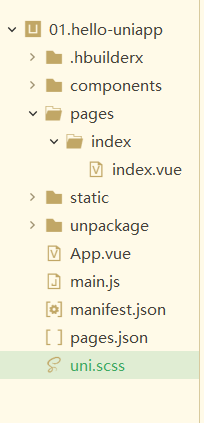
commonents: Component storage directory , Storing components
pages: All pages are stored in directories , Deposit .vue file
static: Static resource directory , Store pictures, etc
unpackage: Package directory , There are packaged files of various platforms
App.vue: Page entry file , The content inside will be realized on every page , You can set public styles, etc
main.js: Entry documents for the project , initialization vue Instance and use the required plug-ins
manifest.json: Configuration of application , Specify the permissions of the application 、 name 、 Icon, etc
pages.json: The configuration file , Yes uni-app Global configuration , Determine the path of the page file 、 Window style 、 The native navigation bar 、 The original at the bottom tabbar etc.
uni.css: In order to facilitate the overall control of the application style . Like button color 、 Border style ,uni.scss There are a number of preset files scss Variable presets .
1.pages,
Create a page directly , After creation, in page.json in pages:[] In the definition of
2.page.json in pages:[]
–> Every page needs to be in pages In the definition of ,
among style If it exists and globalStyle The same configuration item in , Will cover the lower edge globalStyle Configuration item for
pages The first item in the array represents the application startup item , That is, the home page of the project
3.page.json in globalStyle
–> Global appearance style configuration
4.pages.json in condition : Start pattern matching
Jump without corresponding path , Go directly to the page : In the browser, you can enter the page path directly , In wechat development tools, you need to manually change the compilation mode .
– current: Currently active mode , That is to say list Index entry for
– list:name:“ Schema name ”, path:“ The path to which the page belongs ”
5. Basic content components
a.–> text Text component , amount to , It can only nest text, Inline elements
selecttable,user-select–> Whether the text can be selected
space–> Set the space display ,
decode --> Whether the decoding
6. View container components
a.–>view, amount to div
hover-class: Press down the style ;
hover-start-time: How long does it take to change
hover-stay-time: How long does the style change last
hover-stop-propagation: Whether to prevent the parent element from changing with the child element
7. Form components
a.–>button
size: default( Big )、mini( Small )
type: primary( Applet , Browser default ),default( white ),warn( Red )
plain: Transparent background color
disables: Whether to disable
loading:
8. Page style and layout
a.–> Unit of measure
Support px、rpx( Response type px) .750px Is the screen width . But in App End sum H5 End screen width reaches 960px when , By default, it will follow 375px Calculate the screen width of ,
App End ,.json The file only supports px
b.–> Style import
@import “ Relative paths ”;
@import url(’’);
c.–> inline style
style: Accept dynamic styles
class: class , Set the style according to the class
Support various selectors , But does not support * Selectors
page amount to body
d.–> Global and local styles
Global style : It's defined in App.vue Style in .
Local style : It's defined in pages In the catalog vue Styles in files , It only works on this page , At the same time, the same style in the global will be overwritten .
e.–> Background image
Wechat applet does not support relative path
f.–> The fonts icon
The reference path of font file uses [email protected] The absolute path at the beginning
In the imported file , Modify the path 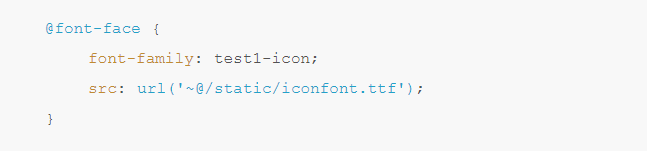
Introduce... Globally @import url();
Use... On the page
g.–>uni.scss
You can use the variables defined in this file
8. Basic data binding
Use { {}}
9.key attribute
–> be used for v-for in , If the position of items in the list will change dynamically or new items will be added to the list in , And I hope the items in the list can keep their state ( Such as input Input content in ,switch Selected state of ) , Need to use :key To specify the unique identifier of the item in the list
:key The value of is provided in two forms
Use v-for loop array in item One of the property, The property The value of needs to be a unique string or number in the list , And can't change dynamically .
Use v-for In circulation item In itself , It's time to item Itself is a unique string or number
If you do not provide :key, Will report a warning, If you know that the list is static , Or you don't have to pay attention to the order , You can choose to ignore .
10.v-on .
The ginseng ,
e m i t : interview ask element yes Of D O M things Pieces of , take Ben body Of things Pieces of , through too emit: Visit yuan yes DOM event , Take your own events , adopt emit: interview ask element yes Of DOM things Pieces of , take Ben body Of things Pieces of , through too emit Pass it on to the method
@click=“onClick($emit)”
11. Life cycle .
The process from creation to destruction
a.–> Application life cycle .
Must be written in App.vue In the listening
onLaunch --> When uni-app Triggered when initialization is complete ( Global trigger only once )
onShow --> When uni-app start-up , Or enter the front desk from the background ( Enter the project from others , If you use the browser to run and open the project , Just switch to the browser page from another point , I'll do it once onShow)
onHide --> When entering the backstage from the front desk , Leave the project
onError --> Trigger when an error is reported
b. --> Page lifecycle .
onInit Monitor page initialization , Trigger earlier than onLoad, It is also applicable to page reference
onLoad Monitor page loading , Its parameter is the data passed from the previous page , Parameter type is Object( For page reference ) Parameters :option Will not trigger more than once
onShow Monitor page display . Every time a page appears on the screen, it triggers , This includes returning from the lower page to expose the current page
onReady Listening page first rendering completed . Will not trigger more than once .
onHide Monitor page hidden
onUnlosd Monitor page hidden uninstall
onResize Monitor window size changes
The drop-down refresh :
onPullDownRefresh Monitor user pull-down action ( The drop-down refresh ):
1. Turn off global refresh : close .json in "globalStyle" Refresh in (enablePullDownRefresh),
2. Open page refresh : On the corresponding page page Next , Opening refresh ,
3. In the corresponding page, pass enablePullDowRefresh() To listen for drop-down events , adopt uni.stopPullDownRefresh() Turn off refresh , In order to have refresh results , You can set setTimeout,
4. You can also use uni.startPullDownRefresh() The binding event , Opening refresh .
Pull on loading
onReachBottom Page scrolls to the bottom of the event
1. In the style in Set up onReachBottomDistance The distance from the bottom when the pull bottom event is triggered on the page , The default is 50
2. Set in the corresponding page onReachButton Page scrolling Events
c. --> Component lifecycle ( Same as vue Life cycle )
beforeCreate Call before instance initialization
created
beforeMount Call before mount
mounted
beforeUpdate Call... When data is updated
upadted
beforeDestory Call before strength destruction
destroyed
12. Initiate request
uni.request({url,data,success(),fail()})
13. Data caching ( Local cache )
asynchronous
uni.setStorage({key,data,success(),fail})
uni.getStorage({key,success(),fail()})
uni.removeStorage({key,success(),fail()})
Sync
uni.setStorageSync(key,data)
uni.getStorageSync(key)
uni.removeStorageSync(key)
14. Upload and preview of pictures
Upload pictures
uni.chooseImage({count,success(res.tempFilrPaths)})
Preview of the picture
Add a click event to the picture , The ginseng ,item, event (current) Receiving parameters
uni.previewImage({current,urls})
15. Conditional compilation , Solve the problem of cross domain compatibility
// #ifdef Platform name
Platform specific code display
// #endif
Conditions are compiled using annotations , Notes are different in different grammars , Support .vue .js .css pages.json And so on
for example : Encapsulate the carousel map into a component , It is called in the page , Wechat to program and H5 The picture address of the page is different ,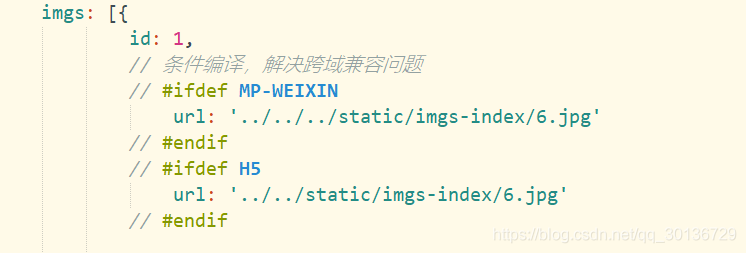
16. Page Jump
1. Life jump navigator
The above form cannot jump to tabbar page , You have to set open-type=“switchTab”,
open-type =“redirect” --> Close current page , Jump to another page , That is, you can't return to the previous page
2. Programming jump
uni.navigateTo(url:‘ Jump to page path ’) --> Keep the current page , Jump to another page , Be able to return to the previous page
uni.switchTab(url:‘ Jump tabbar Page path ’) --> Close all other non tabbar page , Jump to another page
uni.redirectTo(url:‘ Jump to page path ’) --> Close current page , Jump to the page , Unable to return to previous page
17. Component lifecycle
Use components , New component --> When using component page, introduce import、 register components:{}、 Use components <>
Life cycle
beforeCreate Call before instance initialization
created After the instance is created, call
beforeMount Call before mount
mounted
beforeUpdate Call... When data is updated
upadted
beforeDestory Call before strength destruction
destroyed
18. Communication between components
1. Father's son props
Parent component , It's the page .vue
Child components , It's an encapsulated component .vue
1. Define the parameters to be passed in the parent component , Then add attributes in the using sub components , Attribute value is parameter name 
2. Passed in the child component propos[‘ Property name ’,’’], receive data , adopt { { Property name }}, Apply it to components 
**2. Son father e m i t ∗ ∗ 1. Son Group Pieces of in , set up Set up Fang Law , through too emit** 1. Sub components , Setup method , adopt emit∗∗1. Son Group Pieces of in , set up Set up Fang Law , through too emit(‘ Method 1’, Data transmitted )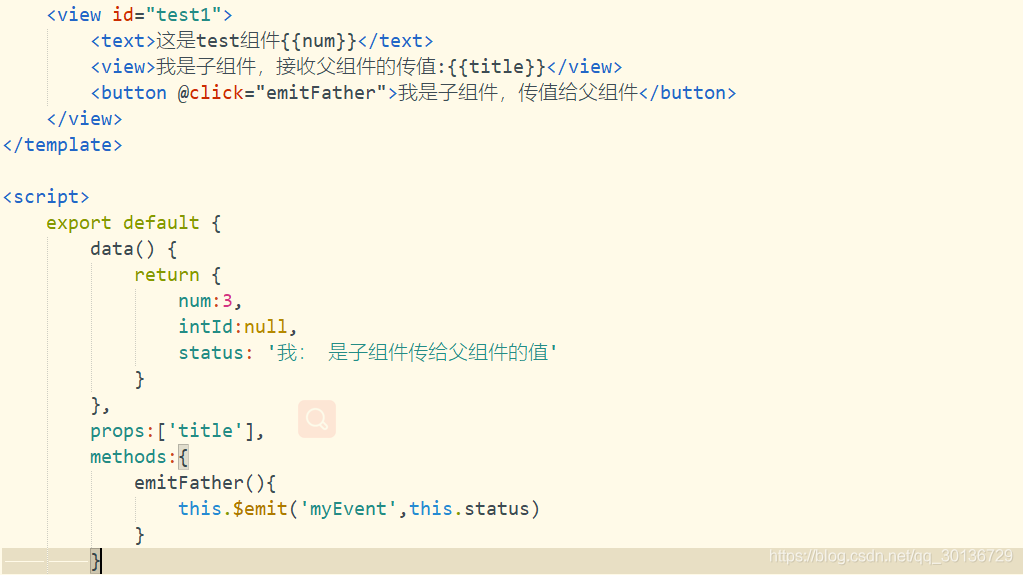
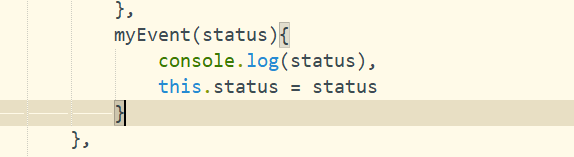
2. Parent component , add to @ Method , Method name must be the same as $emit The first parameter name in is the same , This method receives the passed parameters by passing parameters .
3. Communication between sibling components ( Such as b Pass on a)
a Components :
In the life cycle created Use in uni. o n ( ′ Fang Law name ′ , return transfer Letter Count ( save stay One individual ginseng Count ) ) b Group Pieces of : add Add things Pieces of , through too u n i . on(' Method name ', Callback function ( There is a parameter )) b Components : Add event , adopt uni. on(′ Fang Law name ′, return transfer Letter Count ( save stay One individual ginseng Count ))b Group Pieces of : add Add things Pieces of , through too uni.emit(‘ Method name ’, Parameters passed ) ,
19. The realization of carousel chart
<swiper indicator-dots indicator-color:’’ indicator-active-color: >


20. Map display
Using map components
longitude: longitude , latitude: latitude , scale: Zoom level , markers: Marker points 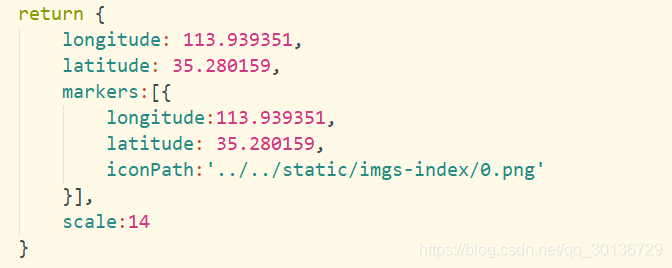
21. Make a phone call
uni.makePhoneCall(phoneNumber:‘ Phone number ’)
22. Scrollable view navigation
scroll-x: Roll horizontally
scroll-y: Scroll vertically
When rolling vertically , A fixed height must be set for
23. To use v-for Of view Click add class
1. Using the ternary operator
:class=" active==index? ‘ Class name ’:’’ "
2. Defining variables active, initialization
active:0
3. Add click event , take index To this method
@click=‘atClick(index)’
4. Event acceptance parameters
atClick(index){
this.active = index
}
24. Preview of the picture
uni.previewimage(current,urls)
urls Need to preview the picture link list ,
current( The link or index value of the current picture ), If it is not filled in or invalid, it defaults to urls First in 
25. Component communication
Click on the page to jump to the page --> ( Father's son )
Add a click event to the sub component , Click event , utilize this.$emit(‘myEvent’), Send the click event to the parent page ,( Then there is the communication between father and son )
26. Get the text content of the web page
Direct access is H5 Content , Including various labels
Use
27. Page parameters
Jump through the route and page uni.navigateTo And page life cycle onLoad To complete 

onLoad Monitor page loading , Its parameters are the data transferred from the previous page , Parameter type is Object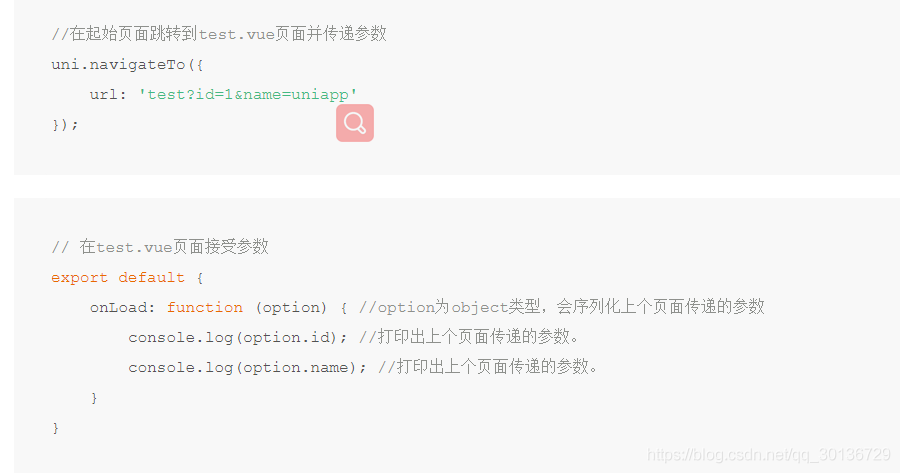 28. Customize tabBar Components
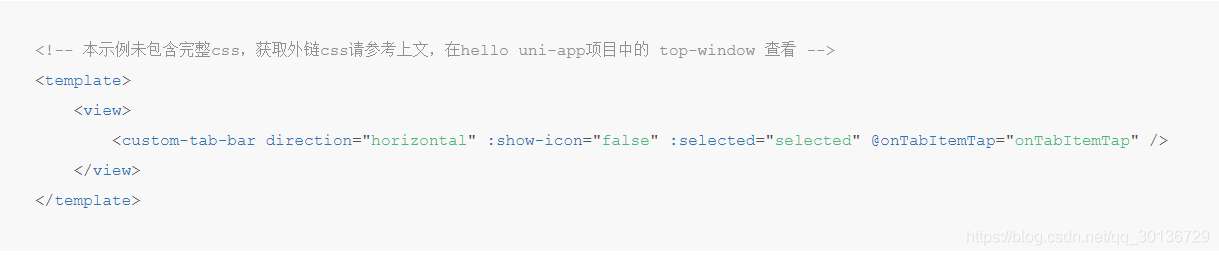
<custom-tab-bar direction=“ Arrangement direction of options (horizontal/vertical)” show-icon=“ Whether or not shown icon(false/true)” selected=“ Selected tabBar Option index value ” @onTabItemTap=“onTabItemTap”>
29. The packaging of small programs goes online
The pictures used for packaging and online requirements are online pictures , Upload local pictures to the online , Use it directly
1. WeChat public platform register Register applet Sign in Click development Copy the corresponding AppID
2. stay mainfest.json Medium Wechat applet Fill in AppID
3. here , Uploading in wechat development tools is clickable
4. uti/api.js Modify the interface address domain name Configure the used online server domain name to the small program development of wechat public platform
5. Click upload
6. home page , version management , Development version
7. If you go online , Click submit for review
30.H5 pack
1. stay mainfest.json Medium H5 Fill in The page title 、 Select routing mode (hash、history)
2. Click release H5 Mobile version release Click release --> Project package Generate a path
边栏推荐
- Add DLL
- POJ 1012 Joseph
- 云原生(三十六) | Kubernetes篇之Harbor入门和安装
- MQTT X CLI 正式发布:强大易用的 MQTT 5.0 命令行工具
- 青少年软件编程等级考试标准解读_二级
- In the same CONDA environment, install pytroch first and then tensorflow
- 【Datawhale】【机器学习】糖尿病遗传风险检测挑战赛
- 高斯消元的应用
- Neural network and deep learning-6-support vector machine 1-pytorch
- Alibaba cloud technology expert haochendong: cloud observability - problem discovery and positioning practice
猜你喜欢

Source code analysis of object wait notify notifyAll

B站这个视频我是跪着看完的

苹果独占鳌头,三星大举复兴,国产手机在高端市场颗粒无收

【Datawhale】【机器学习】糖尿病遗传风险检测挑战赛

Registration module use case writing

Xiaobai makes a wave of deep copy and shallow copy
Fiddler download and installation

配置ADCS后访问certsrv的问题

Login module use case writing

Fuzzy PID control of motor speed
随机推荐
copyTo
IIS网站配置
E. Two Small Strings
asp. Net using redis cache
spolicy请求案例
Mqtt x cli officially released: powerful and easy-to-use mqtt 5.0 command line tool
Alibaba cloud technology expert haochendong: cloud observability - problem discovery and positioning practice
Gauss elimination
苹果独占鳌头,三星大举复兴,国产手机在高端市场颗粒无收
【Mysql数据库】mysql基本操作集锦-看得会的基础(增删改查)
matlab中的AR模型短时预测交通流
反射机制的原理是什么?
B站这个视频我是跪着看完的
In the same CONDA environment, install pytroch first and then tensorflow
Write a script that can run in Bash / shell and PowerShell
Interpretation of the standard of software programming level examination for teenagers_ second level
EOJ 2020 January race E-number transformation
V-permission add permission
Calling DLL to start thread
JS判断数据类型 Object.prototype.toString.call和typeof