当前位置:网站首页>Colliding mice collision engineering analysis
Colliding mice collision engineering analysis
2022-07-19 14:16:00 【Jingchu idlers】
Engineering effect
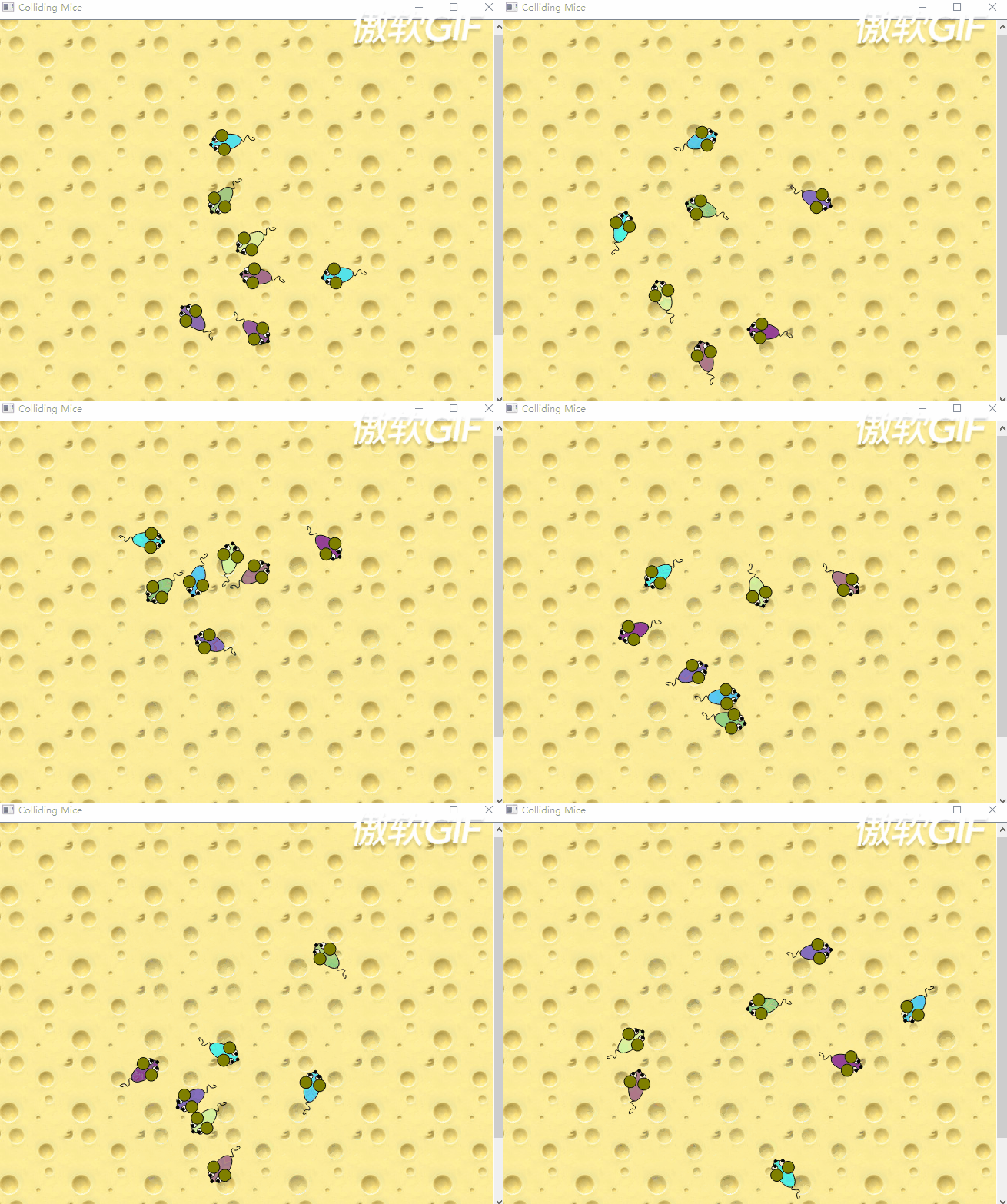
The specific and complete code can be found in the example . The project path is Qt Install under directory
Examples\Qt-XX.XX.XX\widgets\graphicsview\collidingmice Under the table of contents ,XX.XX.XX by Qt Version number of , Such as :5.14.1.
You can see , The little mouse's ears turn red after collision .


The overall project is one more mouse Source files and header files , namely Mouse Class related documents . stay Graphics View The framework structure mainly contains three classes : Scene class (QGraphicsScene)、 View class (QGraphicsView) And element classes (QGraphicsItem), Collectively referred to as “ Three elements ”. and Mouse Class is inherited from QGraphicsItem Class .
Scene Classes manage a large number of Item class , And organize their information exchange . But it only plays the function of background management , Will not let these Item Class presentation appears .View Class plays the role of Item The function of class visualization , Support rotation and scaling . It is a bit similar to the back end and front end of the browser , The back end is responsible for process interaction , The front end is responsible for displaying the effect .
mouse.h
Actually QT In itself, it provides Item class , Include rectangle 、 ellipse 、 Line type, etc , But the patterns we usually use are a combination of several types , So you need to customize the class . The following is the official Item class .

class Mouse : public QGraphicsItem
{
public:
    Mouse();

    QRectF boundingRect() const override;
    QPainterPath shape() const override;
    void paint(QPainter *painter, const QStyleOptionGraphicsItem *option,
               QWidget *widget) override;

protected:
    void advance(int step) override;

private:
    qreal angle = 0;
    qreal speed = 0;
    qreal mouseEyeDirection = 0;
    QColor color;
};
Mouse Class is inherited from QGraphicsItem class , So we see many undefined functions in the project , Is from QGraphicsItem class . stay Graphics View In the frame ,QGraphicsItem It's all item The base class . The last three functions are custom Item Class must redefine pure virtual functions .

paint Function is the actual drawing function , Contains the body of a mouse 、 Glasses and other parts are needed in paint Draw... In the function .
boundingRect Function returns Item Redrawn area size , Equivalent to the plane area of rats . Because in fact, the realization of animation , Is to erase the old , Draw a new one , So it seems to move . The size of this erase area is determined by boundingRect() To return the .
Shape Function is mainly used for collision detection , It will return the exact shape of the mouse , By default, it returns boundingRect Value , But sometimes we want to get close 5cm Think of collision , You need to rewrite this function .
advance Function is used to advance Scene, It's easy to achieve Item Animation effect of . call Scene Of advance The function will automatically call Scene All in Item Of advance function , and Item Of advane The function will be called twice in two stages . for the first time phase by 0, Tell everyone Items:Scene It's going to change ; The second time phase by 1, At this time, specific operations are carried out .
qreal yes double data type ,QColor yes Qt Color variables for , These defined vectors will be used later .
mouse.cpp
One 、paint function
First let's see how it passes paint Function to draw the mouse .Graphics View The framework calls paint Function to draw item The content of , And it is based on the local coordinate system .
1. The body 、 eyes 、 nose

setBrush Function is the function of setting brush , It's mainly the color of the interior filling , there color A variable is Mouse Class , It is mainly a mouse that wants to realize random color .
drawEllipse The function is paninter Class draw ellipse function , There are four parameters , The first two represent the coordinates of the upper left corner of the corresponding rectangle , The last two represent width and height .


setBrush Function is the function of setting brush , It's mainly the color of the interior filling , there color A variable is Mouse Class , It is mainly a mouse that wants to realize random color .
drawEllipse The function is paninter Class draw ellipse function , There are four parameters , The first two represent the coordinates of the upper left corner of the corresponding rectangle , The last two represent width and height .

Random color setting :color yes Qt class Qcolor Instantiate the object , Three parameters represent RGB Value .bounded Function is mainly used to generate 0-256 The random number . The instructions in the help manual are as follows :

Determination of random angle :setRotation Functions are inherited from QGraphicsItem A function of class , Mainly used to set item Appear in the sence Angle in coordinate system . By default ,item In general, it is based on sence Center of (0,0) Is the center of its local coordinate system . adopt setRotation Function can change the direction when the mouse starts moving .
Next, draw white eyes and black nose , If drawEllipse The last two parameters of are the same , Draw a circle . As for this QRectF Is a cast function , That is to change the four parameters into QRectF, And then as drawEllipse The parameters of the function . This is called function overloading . Whether it is the direct four parameters , Or incoming QRectF All parameters are ok ,QT All provide corresponding functions .
painter->setBrush(Qt::black);
painter->drawEllipse(QRectF(-2, -22, 4, 4));

2. Pupil

There is a variable in the upper left corner of the rectangle x, This mouseEyeDirection A variable is in advance Function to update , The main effect is , When the mouse goes to the left , Then the pupil moves a little to the left ; When the mouse goes to the right , Then the pupil moves a little to the right .
3. Ears
Ears are used to indicate collision , Normally, the ears are grayish yellow , When mice collide , Ears turn red . It's used here scene Class collidingItems Function to determine whether there is a collision . This this Represents the class itself , Is an object ( The mouse ), Function will return other collision with the mouse item List of . Because this project only needs to judge whether there is a collision , There is no need to judge who collides with , So use isEmpty Function to determine whether it is empty .
Relevant instructions in the instruction manual are as follows :

from By default, all items whose shape intersects item or is contained inside item's shape are returned. It can be learned that , Collision detection is based on shape Subject to intersection or inclusion , This is it. shape Functionally implemented .
4. tail

drawPath Function is used to draw a given path curve .

cubicTo Functions are functions that draw Bezier curves . Use c1 and c2 The specified control point is added three times between the current position and the given endpoint Bezier curve . After adding curves , Update the current position to the endpoint of the curve . So there is 6 Parameters , In fact, it corresponds to c1、c2、endPoint Coordinate points of three points . When instantiating an object (0,20) It's the starting point .
because path.cubicTo(-5, 22, -5, 22, 0, 25); Medium c1 and c2 It's the same , Equivalent to the curve must pass through this point ( A characteristic of Bessel curve is : The line between the control points must intersect the curve , The coordinates of these two points are the same , At these two control points is the intersection , That is, on the curve ). and path.cubicTo(5, 27, 5, 32, 0, 30); Then it means that the curve gets from (5,27) and (5,32) These two points pass through , Then arrive at (0,30) This point .

thus , The mouse has finished painting . A brief introduction to Bezier curve , Please see the 《 A brief introduction to Bezier curve 》.
Two 、advance function
When Scene When you are ready to refresh the scene , Will call each Item Class advance function , Complete the scene refresh . adopt advance Function we can complete the movement of the mouse .
  void Mouse::advance(int step)
  {
      if (!step)
          return;
      QLineF lineToCenter(QPointF(0, 0), mapFromScene(0, 0));
      if (lineToCenter.length() > 150) {
          qreal angleToCenter = std::atan2(lineToCenter.dy(), lineToCenter.dx());
          angleToCenter = normalizeAngle((Pi - angleToCenter) + Pi / 2);

          if (angleToCenter < Pi && angleToCenter > Pi / 4) {
              // Rotate left
              angle += (angle < -Pi / 2) ? 0.25 : -0.25;
          } else if (angleToCenter >= Pi && angleToCenter < (Pi + Pi / 2 + Pi / 4)) {
              // Rotate right
              angle += (angle < Pi / 2) ? 0.25 : -0.25;
          }
      } else if (::sin(angle) < 0) {
          angle += 0.25;
      } else if (::sin(angle) > 0) {
          angle -= 0.25;
      }
First , If step by 0, The mouse doesn't make any progress , direct return. because scene Will call twice advance function , First call step by 0, indicate item Will be updated soon ; Second call step be equal to 1, This is the actual update . So we have to make sure that step be equal to 0 when ,item No change .
GraphicsView Coordinate system 
Item The coordinate system is its own local coordinate system ,Scene The coordinate system is the global coordinate system . Before we passed paint Drawing is Item Drawn on a class coordinate system , But when the mouse moves, it needs to be Scene Moving in a similar coordinate system , So there is a problem of coordinate mapping , It can also be called coordinate transformation . Like in the picture Item The origin of the quasi coordinate system (0,0) Convert to Scene The quasi coordinate system is about (15,-10) such .
QLineF lineToCenter(QPointF(0, 0), mapFromScene(0, 0));
QLineF Is a line , Two parameters , A starting point and an ending point .mapFromScene Functions are inherited from QGraphicsItem Class , Mainly is to Scene The coordinates of are converted to Item Class coordinates . This code is actually going to Scene Class coordinates (0,0) Convert to Item A point in a coordinate system . This line is the red line shown in the figure below .

If the length of this line length Greater than 150, Change the direction , This is to ensure that the mouse stays in a 150 Within the circle of pixels . If exceeded 150, This method can be used to solve some problems with large number of combinations . adopt QLineF Class dx Functions and dy function , combination atan2 Function can calculate the angle of this line , Formula for float angle = atan2( y2-y1, x2-x1 ), That is, the end minus the start .atan2 Function and atan The value range of the function is different , yes -π To π. If the atan、atan2 Don't understand, , Please refer to
《C++ Tangency atan2(y,x) And atan(x) The difference between 》 post .

          qreal angleToCenter = std::atan2(lineToCenter.dy(), lineToCenter.dx());
          angleToCenter = normalizeAngle((Pi - angleToCenter) + Pi / 2);
because atan2 For the range of [-PI, PI], Apply the knowledge of mathematical inequality , be :
-PI<= - angleToCenter <= PI
0 <= PI - angleToCenter <= 2*PI
PI / 2 <= PI - angleToCenter + PI / 2 <= 2*PI + PI / 2
From Y The axis goes around in the positive direction 360° That is, after turning a circle, it returns to Y Affirmative direction . Routine through atan2 Function to calculate the azimuth , And after normalizeAngle Function to adjust the angle , And this normalizeAngle Function is the angle processing function customized by the routine . Function function is not difficult to understand , Will be PI /2 ~ 5* PI / 2 The angle range is limited to 0-2π Between .
static qreal normalizeAngle(qreal angle)
{
    while (angle < 0)
        angle += TwoPi;
    while (angle > TwoPi)
        angle -= TwoPi;
    return angle;
}
Why pass atan2 After the angle , It still needs to go through (Pi - angleToCenter) + Pi / 2 How about calculation ? This is what I figured out after thinking for a long time , Because the instruction manual doesn't say .
The following is an example , The angle does not represent the real angle , It is to express the conversion relationship between them . The head of the mouse is upward , We are used to taking the mouse head as the benchmark , Then judge the direction , As shown in the figure below, we can think Scene The origin of the coordinate system is at the left front of the mouse's head .
however tan2 The angle calculated by the function is in Item Coordinate system , For example, in the picture below -120° It is through atan2 Calculated by function , This represents the straight line angle from x It turns counterclockwise in the positive direction 120°. adopt (Pi - angleToCenter) + Pi / 2 Calculation , The angle obtained is 390°, Substitute this parameter into normalizeAngle function , obtain 30°, This is the angle we want .
So we can infer this angleToCenter The angle is based on Item In coordinate system y The negative direction of the axis is the reference , Then the angle of counterclockwise rotation .
Let's do another example :

Of course, the values obtained and calculated in the program are expressed in radians , The angle value is used above for explanation . The principle is the same .

If angleToCenter In the lower left corner , The mouse may turn left and return , It may also turn right and return , By the angle decision .angleToCenter It means Scenne Coordinate system origin and Item The angle of the origin of the coordinate system , That is to determine the position of the center of the mouse , that angle What does it mean ?
angle It can be inferred that it is the direction of the mouse , You can know from the instruction manual , This angle is Item Along the Z Direction of axis rotation , Clockwise is positive , By default 0. That is, two coordinate systems x、y When the axis direction is consistent 0.
Here's a picture , At this time, the mouse angle Namely 0 degree , No rotation occurred .

according to angleToCenter Values are different ,angle The increase or decrease in value is also different . Radian system 0.25 About equal to the angle system is 14 degree .
        if (angleToCenter < Pi && angleToCenter > Pi / 4) {
            // Rotate left
            angle += (angle < -Pi / 2) ? 0.25 : -0.25;
The following figure shows the direction of the mouse with the direction of the arrow , The criteria are -Pi/2, That is, the primitive mouse rotates counterclockwise 90°. You can see it in the picture below , This judgment is : Let the mouse go -Pi/2 Direction deflection , Turn around Scene The center of the coordinate system moves , Not to run outside the circle . The principle is :
- If the mouse is (pi /4, pi) Within the interval ( See the previous figure ) When running , The span angle of counterclockwise rotation is less than pi / 2, Then the compensation is added 0.25 Angle of radian , Prevent mice from running , Ran out of the circle in the upper left corner .
- If the mouse is (pi /4, pi) Within the interval ( See the previous figure ) When running , The span angle of counterclockwise rotation is greater than pi / 2, Then the compensation is subtracted 0.25 Angle of radian , Prevent mice from running , Ran out of the circle in the lower right corner .
- If the mouse is [pi, Pi + Pi / 2 + Pi / 4) Within the interval ( See the previous figure ) When running , The span angle of clockwise rotation is greater than pi / 2, Then the compensation is subtracted 0.25 Angle of radian , Prevent mice from running , Ran out of the circle in the upper right corner .
- If the mouse is [pi, Pi + Pi / 2 + Pi / 4) Within the interval ( See the previous figure ) When running , The span angle of clockwise rotation is less than pi / 2, Then the compensation is added 0.25 Angle of radian , Prevent mice from running , Ran out of the circle in the lower left corner .

The principles of the following judgments are similar , It's all about making mice in different positions turn around and move towards the center .

Avoid collision

The above code is to try not to let mice collide .QList yes QT The linked list data structure of , It's like an array . The data type in this list is Item Class pointer , It's that little mouse .scene Function inherited from Item class , Go back to this Item Where are we now scene.items The function is QGraphicsScene Class , Return to the scene All of the Item The order list of .
mapToScene The function is Item The points of the coordinate system are mapped to Scene Coordinate system , yes mapFromScene The reverse operation of a function .
QPoltgonF Function is a function that generates polygons , Generate a polygon with three points , It's a triangle .(0,0) It's the center of the mouse ,(-30,-50) and (30,-50) It's the edge of the upper left corner and the upper right corner of the mouse's two ears . The triangle generated by these three points , A triangle half the size of a mouse .
To calculate the angleToMouse and angleToCenter It's the same , It's all about y The negative half axis is 0°, Counter clockwise rotation .angle In order to z The clockwise rotation angle of the shaft , add 0.5 Clockwise rotation is about 28°, subtract 0.5 It rotates counterclockwise about 28°.

As shown in the figure below , The blue mouse is located in the orange mouse 0-Pi/2 In the area , According to the judgment condition , increase angle increase 0.5, Spin to the right 28°, Avoid the blue mouse .

Add random motion

dangerMice It's the queue with all the rats , If the number of mice in the queue size Greater than 1, And the generated random number is equal to 0. because bounded The generated random number is located in 0-9 Between , So it's equal to 0 The probability is one in ten . Then add or reduce a random angle .
Mice move
angle angle It is determined by three ways , One is the distance and position from the center , The second is the positional relationship with other mice , The third is the angle produced by random motion .speed It is also a result of bounded The resulting random number , Combine the whole equation , Produced speed The value is -0.05 to +0.49.dx The scope is -10 to 10 Between .

rotation The function represents the current item Around the Z The clockwise rotation angle of the shaft , The default value is 0( As shown in the figure below ).

setRotation What's set up is Item The angle of rotation of , The scope is -360° to 360°.setRotation(rotation() + dx); Is based on the original , rotate dx degree . But the routine passed qreal dx = ::sin(angle) * 10; Make the radian angle Converted to angle value dx, I don't understand this conversion relationship , It may be the conversion of the approximate range . Because normally, the arc rotation angle value , yes /Pi*180.
setRotation Determines the direction of the mouse , and setPos Is to make the mouse move . According to the instruction manual , Set up item Position in the parent coordinate system , If it has no parent , Then take scene The coordinate system shall prevail . The mouse of this routine is alone item, It has no parent class . item Location description of , refer to item The origin of the coordinate system is scene The position of the coordinate system .

setPos(mapToParent(0, -(3 + sin(speed) * 3)));
boundingRect function
boundingRect The function is defined as a rectangle item The outer limits of .Graphice View The frame uses this rectangle to decide item Need to repaint , So all drawing needs to be done in a rectangular box . If you draw more than this rectangle ,Graphice View The framework will not erase the part beyond .
You can see how the above data is obtained through the following figure , Basically, it returns a ratio item And a larger rectangle .

Shape function
Graphice View Frame usage shape The function returns a shape to determine two item Whether there is a collision , therefore shape The shape returned by the function will be more precise . As shown in the code , This rectangle is equivalent to the oval size of the mouse , Don't consider the extra part of the tail .

Main function
First, I created a scene, As mentioned before scene The coordinate system is created here .scene The upper left corner is (-300,-300), Both length and width are 600 Pixels .
      QGraphicsScene scene;
      scene.setSceneRect(-300, -300, 600, 600);
QGraphicsScene Class is used as QGraphicsItems Class's container , It can efficiently determine each item Where and which item Is visible .
As shown below ,Scene The default is to use the indexing algorithm , This algorithm can speed up the search item, It is more suitable for static scenes . But if the scene has a lot of animation , We can set it to NoIndex, This will be faster .
scene.setItemIndexMethod(QGraphicsScene::NoIndex);

adopt addItem to scene Add mice .
      for (int i = 0; i < MouseCount; ++i) {
          Mouse *mouse = new Mouse;
          mouse->setPos(::sin((i * 6.28) / MouseCount) * 200,
                        ::cos((i * 6.28) / MouseCount) * 200);
          scene.addItem(mouse);
      }
scene To manage item, But don't let item visualization . Visualization needs to be created QGraphicsView class .
setRenderHin function : Anti aliasing is set \ Anti aliasing (Antialiasing), Mainly to make the lines more supple , No jagged edges .
setBackgroundBrush function : Set up view Background map ---- Cheese map .
setCacheMode function : Set cache mode , Speed up rendering background .
setViewportUpdateMode function :ViewportUpdateMode Property describes View How does the class update its view when the scene changes , There are five modes .
QGraphicsView::FullViewportUpdate: Update the entire view ;
QGraphicsView::MinimalViewportUpdate: This is the default mode , Seek to minimize the area for updating ;
QGraphicsView::SmartViewportUpdate: Analyze redrawn areas , Then try to find the best model ;
QGraphicsView::BoundingRectViewportUpdate:( This routine selects the mode ), Only change the content within the boundary . The disadvantage of this model is that even others item No change , Redrawing will also occur within its boundaries .
QGraphicsView::NoViewportUpdate: Try not to update , This kind of user wants to control the mode selected when updating ;
setDragMode function : This DragMode Attribute defines when the user clicks scene What happens when you drag the mouse over the background , There are three modes .
QGraphicsView::NoDrag : Ignore mouse events , You cannot drag .
QGraphicsView::ScrollHandDrag : The cursor changes to hand , You can drag the scene to move .( This routine uses )
QGraphicsView::RubberBandDrag : Make a regional choice , You can select all graphic items in an area .
    QGraphicsView view(&scene);
    view.setRenderHint(QPainter::Antialiasing);
    view.setBackgroundBrush(QPixmap(":/images/cheese.jpg"));
    view.setCacheMode(QGraphicsView::CacheBackground);
    view.setViewportUpdateMode(QGraphicsView::BoundingRectViewportUpdate);
    view.setDragMode(QGraphicsView::ScrollHandDrag);
**setWindowTitle function : Set the window title ;
    view.setWindowTitle(QT_TRANSLATE_NOOP(QGraphicsView, "Colliding Mice"));
    view.resize(400, 300);
    view.show();
Create a timer , Connect timer timeout The signal , To scene Of advance Slot function . Every time the timer reaches the time , Just activate scene Refresh the scene . The reality of the timer is 1000/33 millisecond . So the animation will refresh in one second 30 frame . For most animations , This frame rate is enough .
    QTimer timer;
    QObject::connect(&timer, &QTimer::timeout, &scene, &QGraphicsScene::advance);
    timer.start(1000 / 33);
In this paper, from :Qt Creator Colliding Mice Collision mouse routine parsing 【1.5W Long words ! detailed !】_ Research monk - Binbin's blog -CSDN Blog
边栏推荐
- chrome插件用于信息收集
- Silent AI: how does shengteng AI solve the problem of sign language learning with large models?
- 欧奈尔的RPS曲线的编制方法(陶博士原创)
- asterisk:No compatible codecs, not accepting this offer!
- [Flink] Flink will report an error if it fails to set checkpoints once. Setlerablecheckpointfailurenumber does not work
- 【ACWing】2521. 数颜色
- TKE跨云联网挂载CFS
- NO.6浮点数的表示与运算
- ModuleNotFoundError: No module named ‘_ distutils_ hack‘
- 分析并HOOK SSHD来劫持密码
猜你喜欢

(with source code) a variety of machine learning models (knn\lr\rf\ada\xg\gbdt...) Model training in precipitation downscaling under

类3实践
Ranking of top ten ERP software systems at home and abroad!
Take a look at try{}catch{}

Use of Google browser developer tools (Master!)

揭开服务网格~Istio Service Mesh神秘的面纱

A review of classical must see for Nonconvex Optimization Problems "from symmetry to geometry", University of Rochester, et al
![洛谷:P3092 [USACO13NOV]No Change G(状压+二分,独特的状态定义,不写会后悔一辈子的题)](/img/b9/8cacd3d4ae1cf014654e0204cb3a62.png)
洛谷:P3092 [USACO13NOV]No Change G(状压+二分,独特的状态定义,不写会后悔一辈子的题)

What are the ways to realize load balancing?
![[7.13] code source - [hungry meals] [path count 2] [function sum]](/img/0a/d0510848c473679a4c93132968ddce.png)
[7.13] code source - [hungry meals] [path count 2] [function sum]
随机推荐
CBS type PVC recycling strategy
00 后博士获聘南大特任副研究员,曾 4 岁上小学,14 岁考入南大!
"Technology podcast month" day 10: meta podcast: talk about Podcasting
(with source code) a variety of machine learning models (knn\lr\rf\ada\xg\gbdt...) Model training in precipitation downscaling under
Is it safe for Hongye futures to open an account online? Are there any account opening guidelines?
Ranking of top ten ERP software systems at home and abroad!
96. Different binary search trees
腾讯云对象存储操作流程
FreeRTOS个人笔记-支持多优先级
AcWing 134. Double ended queue
主流erp系统排名,主流erp系统对比
洛谷P3522 [POI2011]TEM-Temperature 题解
洛谷:P4516 [JSOI2018] 潜入行动(树形dp、树上分组背包统计方案数)
华为无线设备配置动态负载均衡
uniapp 高德地图定位功能
Android开发大厂面试,做好这3个准备,规划好自己
活动预告|Apache Doris x Apache SeaTunnel 联合 Meetup 开启报名!
About XML file (VII) - XML DTD
NO.2汇编初步
No.2 compilation preliminary