当前位置:网站首页>Restclient operation document
Restclient operation document
2022-07-19 04:54:00 【Ozawa can't Java】
In order to separate from the index library operation , Let's take part in a test class again , Do two things :
initialization RestHighLevelClient
Our hotel data is in the database , Need to use IHotelService Go to query , So inject this
@SpringBootTest
public class HotelDocumentTest {
    @Autowired
    private IHotelService hotelService;

    private RestHighLevelClient client;

    @BeforeEach
    void setUp() {
        this.client = new RestHighLevelClient(RestClient.builder(
                HttpHost.create("http://192.168.150.101:9200")
        ));
    }

    @AfterEach
    void tearDown() throws IOException {
        this.client.close();
    }
}
1. The new document
We need to query the hotel data in the database , write in elasticsearch in .
1.1. Index library entity class
The result of database query is Hotel Object of type . The structure is as follows :
@Data
@TableName("tb_hotel")
public class Hotel {
@TableId(type = IdType.INPUT)
private Long id;
private String name;
private String address;
private Integer price;
private Integer score;
private String brand;
private String city;
private String starName;
private String business;
private String longitude;
private String latitude;
private String pic;
}
It is different from our index library structure :
longitude and latitude Need to merge into location
therefore , We need to define a new type , Consistent with the index library structure :
@Data
@NoArgsConstructor
public class HotelDoc {
private Long id;
private String name;
private String address;
private Integer price;
private Integer score;
private String brand;
private String city;
private String starName;
private String business;
private String location;
private String pic;public HotelDoc(Hotel hotel) {
this.id = hotel.getId();
this.name = hotel.getName();
this.address = hotel.getAddress();
this.price = hotel.getPrice();
this.score = hotel.getScore();
this.brand = hotel.getBrand();
this.city = hotel.getCity();
this.starName = hotel.getStarName();
this.business = hotel.getBusiness();
this.location = hotel.getLatitude() + ", " + hotel.getLongitude();
this.pic = hotel.getPic();
}
}
1.2. Syntax description
New document DSL The statement is as follows :
POST /{ Index library name }/_doc/1
{
"name": "Jack",
"age": 21
}
Corresponding java Code as shown :

You can see that it is similar to creating an index library , It's also a three-step process :
1) establish Request object
2) Prepare request parameters , That is to say DSL Medium JSON file
3) Send a request
What has changed is , I'm going to use it directly here client.xxx() Of API, No longer need client.indices() 了 .
The overall steps of the code are as follows :
1) according to id Query hotel data Hotel
2) take Hotel Encapsulated in the HotelDoc
3) take HotelDoc Serialize to JSON
4) establish IndexRequest, Specify the index library name and id
5) Prepare request parameters , That is to say JSON file
6) Send a request
@Test
void testAddDocument() throws IOException {
    // 1. according to id Query hotel data
    Hotel hotel = hotelService.getById(61083L);
    // 2. Convert to document type
    HotelDoc hotelDoc = new HotelDoc(hotel);
    // 3. take HotelDoc turn json
    String json = JSON.toJSONString(hotelDoc);

    // 1. Get ready Request object
    IndexRequest request = new IndexRequest("hotel").id(hotelDoc.getId().toString());
    // 2. Get ready Json file
    request.source(json, XContentType.JSON);
    // 3. Send a request
    client.index(request, RequestOptions.DEFAULT);
}
2. Query the document
2.1. Syntax description
Of the query DSL The statement is as follows :
GET /hotel/_doc/{id}
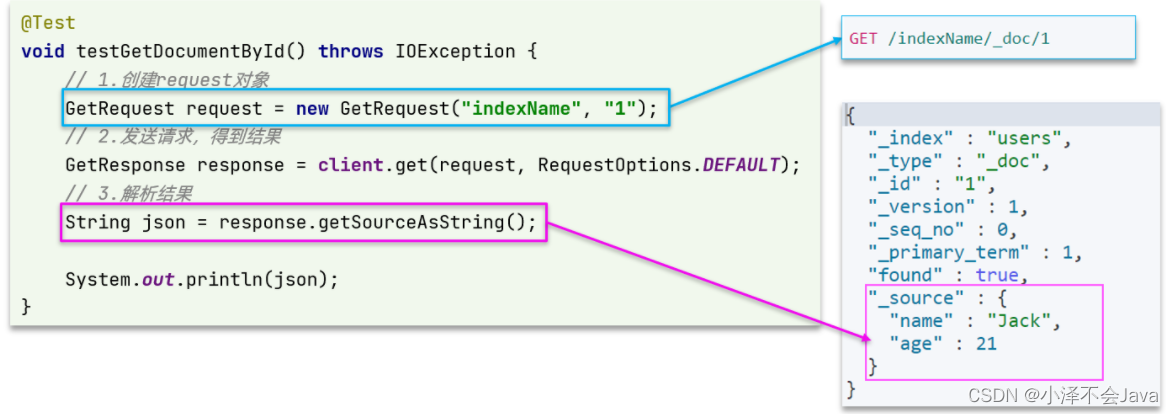
Similar to before , It's also three steps :
1) Get ready Request object . This is a query , So it is GetRequest
2) Send a request , Get the results . Because it's a query , This call client.get() Method
3) Analysis results , That's right JSON Do deserialization
@Test
void testGetDocumentById() throws IOException {
    // 1. Get ready Request
    GetRequest request = new GetRequest("hotel", "61082");
    // 2. Send a request , Get a response
    GetResponse response = client.get(request, RequestOptions.DEFAULT);
    // 3. Analytical response results
    String json = response.getSourceAsString();

    HotelDoc hotelDoc = JSON.parseObject(json, HotelDoc.class);
    System.out.println(hotelDoc);
}
3. Delete the document
Delete the DSL For this :
DELETE /hotel/_doc/{id}
Compared with query , Just a request from DELETE become GET, As you can imagine Java The code should still be three steps :
1) Get ready Request object , Because it's deletion , This time it is DeleteRequest object . To specify the index library name and id
2) Prepare parameters , No arguments
3) Send a request . Because it's deletion , So it is client.delete() Method
@Test
void testDeleteDocument() throws IOException {
    // 1. Get ready Request
    DeleteRequest request = new DeleteRequest("hotel", "61083");
    // 2. Send a request
    client.delete(request, RequestOptions.DEFAULT);
}
4. Modify the document
4.1. Syntax description
Modify the two ways we talked about :
Full revision : The essence is based on id Delete , Add new
Incremental changes : Modify the specified field value in the document
stay RestClient Of API in , Fully modified and newly added API Exactly the same , The basis of judgment is ID:
If you add ,ID Already exist , The modified
If you add ,ID non-existent , Then add

Similar to before , It's also three steps :
1) Get ready Request object . This is a revision , So it is UpdateRequest
2) Prepare parameters . That is to say JSON file , It contains the fields to be modified
3) Update the document . This call client.update() Method
@Test
void testUpdateDocument() throws IOException {
    // 1. Get ready Request
    UpdateRequest request = new UpdateRequest("hotel", "61083");
    // 2. Prepare request parameters
    request.doc(
        "price", "952",
        "starName", " Four drill "
    );
    // 3. Send a request
    client.update(request, RequestOptions.DEFAULT);
}
5. Batch import documents
Case needs : utilize BulkRequest Batch import database data into the index library .
Steps are as follows :
utilize mybatis-plus Query hotel data
The queried hotel data (Hotel) Convert to document type data (HotelDoc)
utilize JavaRestClient Medium BulkRequest The batch , Realize batch addition of documents
5.1. Syntax description
Batch processing BulkRequest, Its essence is to integrate multiple ordinary CRUD Requests are sent together .
It provides a add Method , Used to add other requests :
 You can see , Requests that can be added include :
IndexRequest, That is, new
UpdateRequest, That is to modify
DeleteRequest, Delete
In fact, it's still three steps :
1) establish Request object . Here is BulkRequest
2) Prepare parameters . Batch parameters , It's the others Request object , Here are many IndexRequest
3) Initiate request . This is batch processing , The method called is client.bulk() Method
@Test
void testBulkRequest() throws IOException {
    //  Batch query of hotel data
    List<Hotel> hotels = hotelService.list();

    // 1. establish Request
    BulkRequest request = new BulkRequest();
    // 2. Prepare parameters , Add multiple new Request
    for (Hotel hotel : hotels) {
        // 2.1. Convert to document type HotelDoc
        HotelDoc hotelDoc = new HotelDoc(hotel);
        // 2.2. Create a new document Request object
        request.add(new IndexRequest("hotel")
                    .id(hotelDoc.getId().toString())
                    .source(JSON.toJSONString(hotelDoc), XContentType.JSON));
    }
    // 3. Send a request
    client.bulk(request, RequestOptions.DEFAULT);
}
6. Summary
Basic steps of document operation :
initialization RestHighLevelClient
establish XxxRequest.XXX yes Index、Get、Update、Delete、Bulk
Prepare parameters (Index、Update、Bulk The need when )
Send a request . call RestHighLevelClient#.xxx() Method ,xxx yes index、get、update、delete、bulk
Analysis results (Get The need when )
边栏推荐
- 2022 latest version of campus errand applet source code
- masm32写程序
- Water and electricity meter reading and recharge management system in Colleges and universities in property community
- shardingsphere的核心概念和快速实战
- 天道酬勤,保持热爱
- RestAPI
- 3.RestClient查询文档
- Hightec new aurix tc37x demo project
- [fuel cell] simulation of fuel cell system control strategy based on Simulink
- HighTec 新建 AURIX TC37X demo 工程
猜你喜欢

Freshman task-5

Eureka, take advantage of the tens of millions of daily visits!

索引库操作基本操作

es的一些概念

Database learning notes (I) retrieval data

MYSQL模糊匹配1,11,111这种相似字符串问题
![Money making master applet [latest version 5.9.9] mall / instant withdrawal of commission / distribution promotion / phone recharge / is meituan hungry for takeout](/img/8b/29027c2dee4ef764bb2e4b5b499a23.jpg)
Money making master applet [latest version 5.9.9] mall / instant withdrawal of commission / distribution promotion / phone recharge / is meituan hungry for takeout
[论文精读]BERT

项目组暑假总结02

快速掌握MIPI开发攻略
![[论文精读]BERT](/img/7f/7202f79ab22ddff5f477299d2cd3d5)
随机推荐
Hightec new aurix tc37x demo project
力扣刷题02(三数之和+最大子序和+二叉树最近公共祖先)
Wechat applet source code of high imitation Netease cloud music UI
Load balancer ribbon practice
ES文档操作
邮箱发送邮件(包含附件,网易、QQ)
Penetration test 10 - scan web directories (dirb, wfuzz, wpscan, Nikto)
Eureka, take advantage of the tens of millions of daily visits!
浅聊链路追踪
Tidb learning
Demo analysis of sliding conflict external interception method
mysql优化
Notes for Resume Writing
Freshman task-5
[FPGA tutorial case 26] realize the basic operation of decimals through Verilog in FPGA
Declaration and definition of template class
Using circular statements to make login programs
RestClient操作文档
2022 latest version of campus errand applet source code
HighTec 新建 AURIX TC37X demo 工程