当前位置:网站首页>Hightec new aurix tc37x demo project
Hightec new aurix tc37x demo project
2022-07-19 04:46:00 【Big orange madness】
Preface
AURIX TriCore Developed IDE More software , There are Tasking and HighTec, This article introduces through HighTec newly build AURIX TC37X demo engineering , It also tells how to compile 、 Commissioning, etc .
from Tasking Engineering transplantation can also refer to this article .
Use steps
First, plan the path relationship between the project and the source code , Try to ensure the independence of engineering and source code , Convenient for subsequent use of different IDE, Transplant .

Create a project
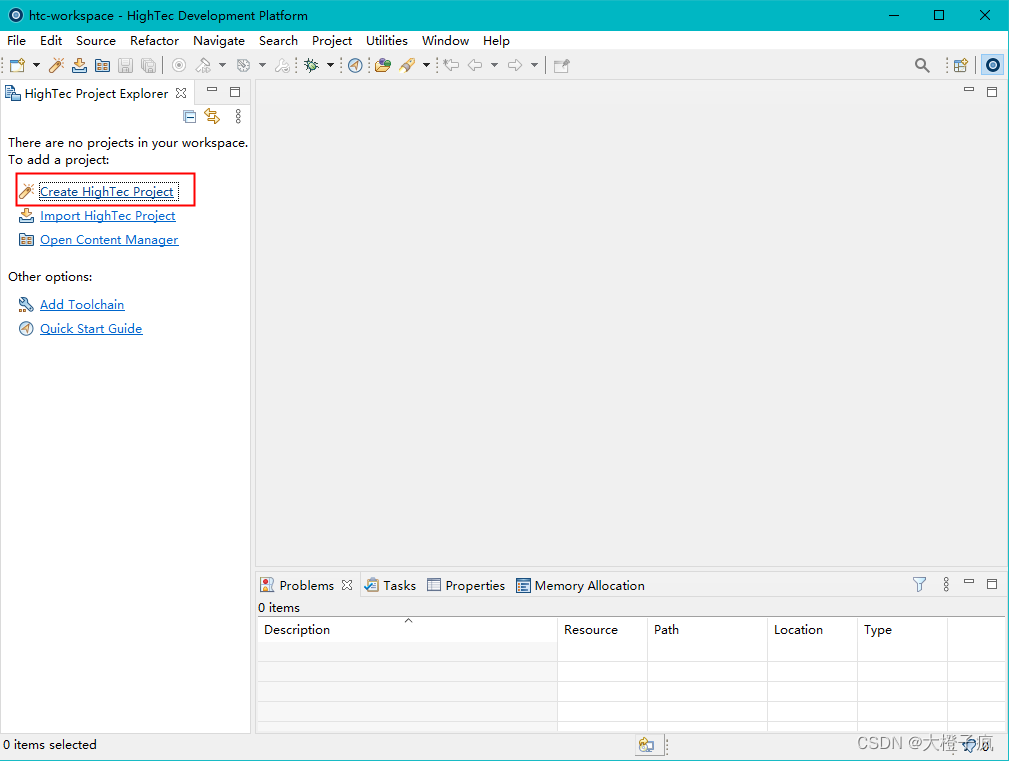
1、 open HighTec after , Click Create HighTec engineering .
2、 Select a blank project to create .

3、 Project naming , At the same time choose HighTec Project path , After the next step, you can click to complete the creation .

4、 Right click Project , Click on "Properties", Choose a specific chip model .

The code to compile
After the project is created, it is found that there is only one “Includes”, At this point, we need to add the source code .
1、 First, copy the source code to the directory we created in the file manager src Next .

2、 Add code path to the project .

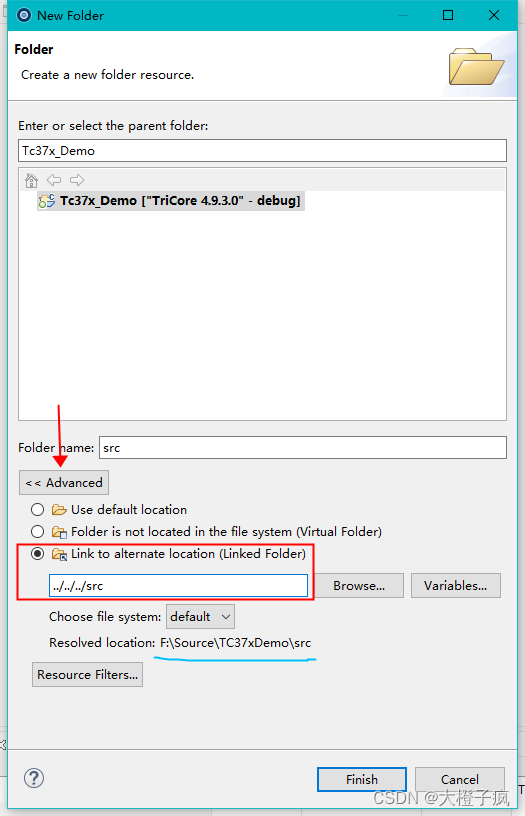
3、 Click Advanced , Add by path linking ( The relative path is adopted here, so that the change of the project path will not be affected ).
4、 Ready to add header file : Right click Project , Click on "Properties".

5、 Click Select after the pop-up box “Workspace...”, Click the header file project to be added in the newly popped project , Press key “Alt+*” an , Then press the key combination “Ctrl+A” Future generations ( No response, press more times ), Add all at once ( Applicable to the first creation function , Add it separately later ).
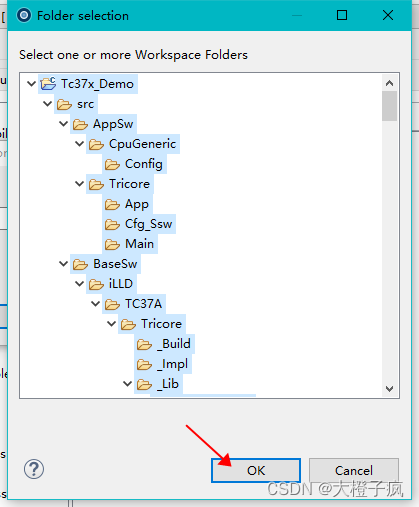
6、 When I'm done , Save and close ; A box may pop up , Click on “yes” that will do .

7、 Add link file path ( Relative paths , The linked file selection is applicable to HighTec Engineering documents :src\ToolEnv\0_Build\1_Config\Config_Tricore_Gnuc\Lcf_Gnuc_Tricore_Tc.lsl), Also check to not link the startup file ( There is... In the source code , So no need ).

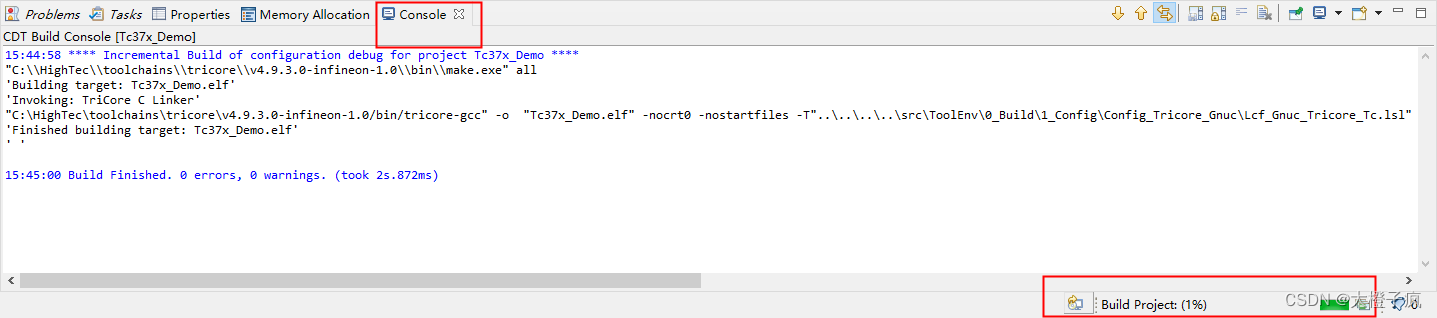
8、 Right click the project and select compile , Or the compilation icon of the toolbar .

9、 You can check the compilation progress (makfile It takes a long time to generate ).
Download debugging
1、 use HighTec IDE Self debugging tools UDE( Integrated ). For the first time, you need to create , Then click debug directly .

2、 There are usually error warnings in the pop-up interface , The prompt is wrong .
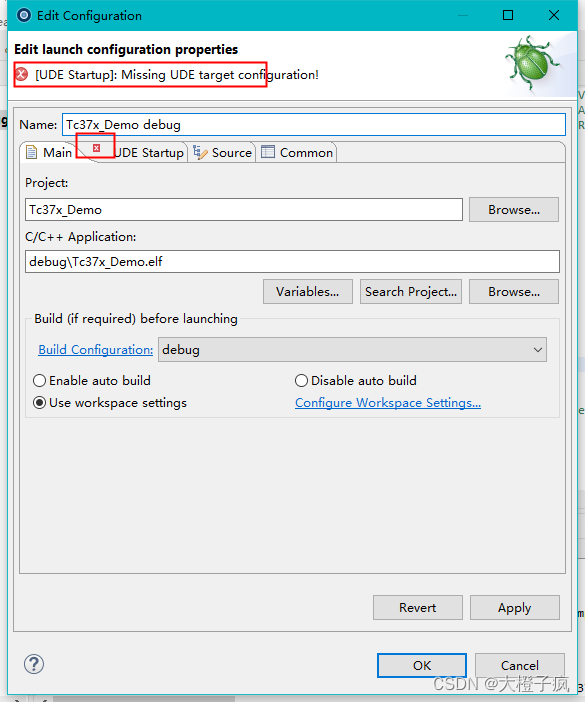
3、 Select the interface with prompt and error , Select chip debugging configuration .

4、 Select the configuration file of the target board chip type , Save after confirmation .

5、 After saving, it will automatically start downloading , You can see IDE The following progress .

6、 Start clicking program download .

7、 Click exit after downloading ( Both interfaces are ).

8、 Reset 、 Can run .

9、 The download box will pop up again after each compilation , At this point, you can choose to download and debug again .

边栏推荐
- 摄像头切换
- C list set object de duplication LINQ de duplication with time de duplication
- AutoJs学习-找图数据生成
- minio安装部署及使用
- Unity UMP打包黑屏問題總結
- Project structure of wechat applet
- Wechat applet source code of high imitation Netease cloud music UI
- [Unity] 交互之双击
- Challenges and Countermeasures of deep forgery to national security
- 网址在线封装APK系统源码
猜你喜欢

一款好用的网络骗子举报系统无加密版本源码

VB. Net plug-in development - extract files

使用小丸工具箱进行极限视频压缩

Only when the data analysis report is written in this way can we really understand the data
An easy-to-use network liar reporting system without encrypted version source code

2022最新版校园跑腿小程序源码
OLTP 负载性能优化实践

赚钱大师小程序【最新版5.9.9】商城/佣金即时提现/分销推广/话费充值/美团饿了么外卖

Eureka,拿捏日千万级访问量妥妥的!

快速掌握MIPI开发攻略
随机推荐
【TA-霜狼_may-《百人计划》】基础渲染光照介绍(一)
EasyExcel简单使用
【TA-霜狼_may-《百人计划》】图形2.5 Bump Mapping
【TA-霜狼_may-《百人计划》】美术2.1 DCC工具链与引擎工具链
简洁UI好玩的文字转换emoji表情微信小程序支持句子词语转换_源码
常用postgresql数据操作备忘(不定时更新)
AutoJs学习-实现极乐净土
Extreme video compression using the pellet toolbox
删除文件 unable to find or create trash dirctory
【FPGA教程案例26】在FPGA中通过verilog来实现小数的基础运算
Rearrange data according to date JS
Constraints on MySQL tables (Basics)
用FastApi进行WEB开发
Fudan micro fmql (domestic zynq) [PS of IAR bare metal development] - non byte aligned access
超链接实现post方式提交
PHP array_filter去空保留0,false
rotoc-gen-go: unable to determine Go import path for **. proto
Static attributes and static methods of class in JS
[Unity] Input. Index of gettouch[index]
CKS 核心知识点概述