当前位置:网站首页>Legendary game setup tutorial
Legendary game setup tutorial
2022-07-19 07:03:00 【V13807970340】
Today, I want to talk to you about how to set up legendary games. No more nonsense. Let's start the tutorial
The following procedures need to be prepared for erection :
Legendary server ( edition Mirserver)
DBC2000 ( Baidu can download directly )
Supporting login ( Some versions come with )
Before starting erection , Get ready first , Download the legendary server to your local computer , After decompression, there is 2 File , One is version (MirServer), The other is the game patch file , First extract the version to D disc , Name it MirServer
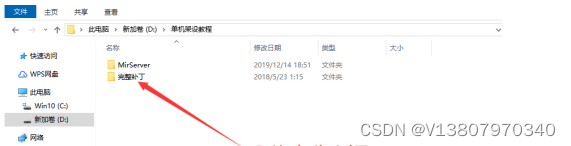
There is logical thinking in setting up legends , Straighten out the logic , Erection is naturally simple , In a nutshell , Single machine erection is divided into 5 A step :
1 To configure DBC2000
2 Configure and start the engine
3 Modify and upload the list
4 Configure the build login
5 Put the game patch into the root directory of legendary client
1、 To configure DBC2000
DBC2000 You can download it in the legend sharing tool , Download and unzip to the desktop , Click open folder , You can see a DBC_2000 The program , Double click to install , Just keep going to the next step

DBC2000 installed , Next configure DBC2000, Open the control panel , View mode selection : Large icon , You can see a DBE Administrator The program , Turn it on , Enter the configuration interface , You can see a Databases English , Right click on the “New”, Fast key :Ctrl+N, It means to create a new database , Change the name of the database to HeroDB, Case doesn't matter , But the name should be the same as the database name on the engine , Then set the path of the database , Set on the right , Refer to the path below :D:\MirServer\Mud2\DB, Path settings OK, click Yes Save it

2、 Configure and start the engine
Open the version folder , You can see that there is an engine program , Double-click to open , Click configuration wizard , Check the path of the version and the name of the game database , Change the name of the login , Click next , Next, default settings , Keep clicking next , Save the configuration until it is finished , Start the game controller after saving


What I'm demonstrating is GOM Version of the engine , So after starting the game controller , The interface is minimized , After all gateways are started normally , Just minimize the main controller , Do not shut down. , The engine is configured , Next, modify and upload the list
3、 Modify and upload the list
Look for a list format in the login folder , If yes, you can modify it directly in this document , If not, you can find a beautiful list format to create a new document Copy its contents and then modify
To modify , Change the modified document name to a number .txt, It's easier to remember , Then upload the list document to List of single computers in chi Network Free list space inside , Get and copy the list address 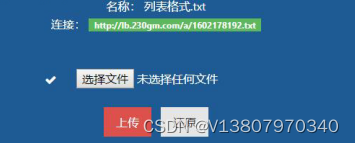
4、 Configure the build login
Open the login folder , You can see gom Configurator , Double-click to open , The primary list and standby list use the list address just copied , Modify the shortcut , The shortcut here is the name of the login , You can change the skin if you have the matching skin of the login , Click generate login , Just wait for the generation to succeed

5、 Put the game patch into the root directory of legendary client
Finally, you need to unzip the patch , If you extract the patch incorrectly , After opening the game on the login , You can't see maps and equipment , Unzip the patch you downloaded to the root directory of your own hot blood legend client , Remember the root directory ; You can open your login configurator , One of them Resources( Game patch ) Have your patch folder name , You must have a folder with the same name in the root directory of the client to unzip successfully , If they are the same, you can directly open the game on the login
After the login and patch are configured, you can test the game
边栏推荐
- FreeBSD 12 国内源提速 pkg 和 ports 做个笔记
- Wireshark packet capturing: error analysis
- m基于matlab的超宽带MIMO雷达对目标的检测仿真,考虑时间反转
- Performance evaluation and comparison of Huawei cloud Kunpeng arm ECs and x86 ECS
- 传奇手游怎么开服?需要投资多少?需要那些东西?
- 华为云 鲲鹏ARM云服务器 和 x86云服务器 性能评测对比
- 剑指Offer刷题记录——Offer 05. 替换空格
- 剑指Offer刷题记录——Offer 03. 数组中重复的数字
- 关于文件上传下载问题
- Postage range (array or + function)
猜你喜欢

Wireshark packet capturing: error analysis
Servlet 笔记

中国知网论文free下载的方法

字典、元組和列錶的使用及區別,

ssh远程登录服务
![[CS Genesis] comparative analysis of advantages and disadvantages of SD NAND and raw NAND](/img/d8/a367c26b51d9dbaf53bf4fe2a13917.png)
[CS Genesis] comparative analysis of advantages and disadvantages of SD NAND and raw NAND

论文阅读:Deep Residual Learning in Spiking Neural Networks

Performance evaluation and comparison of lightweight application servers of major cloud service manufacturers, Alibaba cloud, Tencent cloud, Huawei cloud, and ucloud

天翼雲 杭州 雲主機(VPS) 性能評測

edit关闭保存时自动生成配置文件
随机推荐
Functions and random numbers
Arm server building my world (MC) version 1.18.2 private server tutorial
基于simulink的转速反馈单闭环直流调速系统
Galaxy Kirin server system building local and LAN Yum source
论文阅读:Deep Residual Learning in Spiking Neural Networks
Quickly understand redirection
Minecraft整合包 [GTNH]格雷科技:新视野 服务器搭建教程
剑指Offer刷题记录——Offer 07.重建二叉树
m基于simulink的16QAM和2DPSK通信链路仿真,并通过matlab调用simulink模型得到误码率曲线
PyTorch学习笔记(一)
Ucloud Shanghai arm cloud server evaluation
闭包与装饰器
ARM服务器搭建 我的世界(MC) 1.18.2 版私服教程
What is tsd/qsd? What is CS Genesis SD NAND?
逃出湖心(数学题)
Performance evaluation and comparison of lightweight application servers of major cloud service manufacturers, Alibaba cloud, Tencent cloud, Huawei cloud, and ucloud
【无标题】
FreeBSD 12 国内源提速 pkg 和 ports 做个笔记
cookie、session的配置和使用
103.53.124. What is the difference between X IP BGP line and ordinary dedicated line