当前位置:网站首页>多项式插值拟合(一)
多项式插值拟合(一)
2022-07-17 00:17:00 【HySmiley】
使用多项式插值法进行点间拟合。
多项式方程:

展开形式:f(x)=a0x+a1x^2+a2x^3+...
给定n个平面坐标点,通过多项式方程可求解n个方程参数解,并且解是唯一的(自证)。
解法采用范德蒙行列式求解。
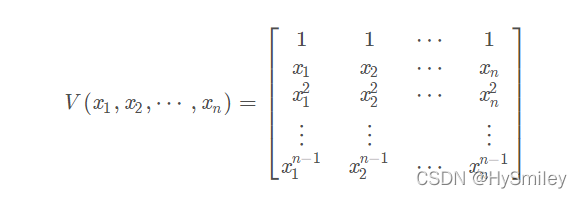
在图像处理过程中有时会用到线段区域拟合,因此采用插值法将n点之间进行点补充。
一阶方程:y=kx+b 需要两点(x1,y1),(x0,y0)
参数 k=(y1-y0)/(x1-x0),b=y0-k*x0
可以使用scipy库中的插值类
举个例子:对5点之间进行一阶插值
import numpy as np
from scipy.interpolate import interp1d,interp2d
import pylab as pl


x=np.array([1,2,3,4,5])
y=np.array([1,4,2,4,1])


fun=interp1d(x,y,kind='linear')#函数 y是一系列点,根据x,y关系推出函数
xint=np.linspace(x.min(),x.max(),20)
print("库x:",xint)
print("库y:",fun(xint))
pl.scatter(x,y,c='b',marker='o')
pl.plot(xint,fun(xint),color='red')
pl.show()
插值后的图像

输出插值结果
库x: [1. 1.21052632 1.42105263 1.63157895 1.84210526 2.05263158
2.26315789 2.47368421 2.68421053 2.89473684 3.10526316 3.31578947
3.52631579 3.73684211 3.94736842 4.15789474 4.36842105 4.57894737
4.78947368 5. ]
库y: [1. 1.63157895 2.26315789 2.89473684 3.52631579 3.89473684
3.47368421 3.05263158 2.63157895 2.21052632 2.21052632 2.63157895
3.05263158 3.47368421 3.89473684 3.52631579 2.89473684 2.26315789
1.63157895 1. ]
自定义插值
import numpy as np
from scipy.interpolate import interp1d,interp2d
import pylab as pl


#------------------------
x=np.array([1,2,3,4,5])
y=np.array([1,4,2,4,1])


xint=np.linspace(x.min(),x.max(),20)


# 1、线性
def linear_inter(x0,y0,x1,y1,nx):
    k=(y1-y0)/(x1-x0)
    b=y0-k*x0
    ny=k*nx+b
    return ny


for i in range(1,len(x)):
    print("-----第",i,"区间内数据-----")
    # print(ny)
    nx=[]
    for val in xint:
        if val>=x[i-1] and val<=x[i]:
            nx.append(val)

    print(nx)
    nx=np.array(nx)
    ny = linear_inter(x[i - 1], y[i - 1], x[i], y[i], nx)
    print("结果",ny)

    pl.scatter(x,y,c='b',marker='o')
    pl.plot(nx,ny,color='red')
pl.show()
由于分段连接与上图结果有所区别。

每个两点区间获得的y值均相等。
-----第 1 区间内数据-----
[1.0, 1.2105263157894737, 1.4210526315789473, 1.631578947368421, 1.8421052631578947]
结果 [1. 1.63157895 2.26315789 2.89473684 3.52631579]
-----第 2 区间内数据-----
[2.052631578947368, 2.263157894736842, 2.473684210526316, 2.6842105263157894, 2.894736842105263]
结果 [3.89473684 3.47368421 3.05263158 2.63157895 2.21052632]
-----第 3 区间内数据-----
[3.1052631578947367, 3.3157894736842106, 3.526315789473684, 3.7368421052631575, 3.9473684210526314]
结果 [2.21052632 2.63157895 3.05263158 3.47368421 3.89473684]
-----第 4 区间内数据-----
[4.157894736842105, 4.368421052631579, 4.578947368421052, 4.789473684210526, 5.0]
结果 [3.52631579 2.89473684 2.26315789 1.63157895 1. ]
边栏推荐
- Understand the switch and its role
- BiSeNetV2-面部分割 ncnn推理
- RHCE ansible first operation
- 3、AsyncTool框架原理源码解析
- DHCP原理与配置
- Dynamic display of digital tube stopwatch of single chip microcomputer
- ENSP static routing experiment
- TCP three handshakes and four disconnects
- Oracle中字符串截取最全方法总结
- DHCP principle and configuration
猜你喜欢

Learning network foundation

PXE automated installation

HCIA_ OSPF experiment

【NoSQL】NoSQL之redis配置与优化(简单操作)

RHCE学习指南 第5章 vim编辑器

DHCP principle and configuration
Brief introduction of Feature Engineering and its implementation of sklearn

Understand the JVM memory structure in one article

MySQL日志管理和完全备份增量备份与恢复

梦开始的地方----初识c语言
随机推荐
RHCE-ansible-第一次作业
ELK日志分析系统
Binary installation kubernetes 1.24.1
【MySQL】数据查询操作(select语句)
wangEditor介绍(入门级)
备份kubernetes 备份etcd数据
RHCE8学习指南 第4章 获取帮助
Upgrade kubernetes 1.23.2 to 1.24.1
Convert string to integer
10. System safety and Application
Rhce8 Study Guide Chapter 7 service management
Net-Snmp开发 一
Multi layer packet structure and TCP triple handshake
Yum warehouse service and PXE automatic deployment system
When the drain operation is performed on the work node, the number of pod copies is protected through the PDB
Lamp platform deployment and Application
Reflection and Discussion on time management methods
RHCE-ansible第二次作业
A preliminary study of MySQL
Understanding of array and bubbling