当前位置:网站首页>Understanding of array and bubbling
Understanding of array and bubbling
2022-07-19 02:45:00 【Nothing in the world is difficult 754】
List of articles
One array
1.1 Definition of array
- An array is a collection of data of the same type , It opens up a continuous space in memory , Usually used together with recycling
- The type of array
Normal array : Direct definition without declaration , Subscript index can only be an integer
Associative array : Need to use declare -A Otherwise, the system does not recognize it , The index can be a string
1.2 How to define an array
A="1 2 3 456"       // Define string
A=(1 2 3 4 456)		// Define an array ( Each number inside is also called an element )
   0 1 2 3 4		// Below it ,0 As the starting point ( Also known as array subscript , Index subscript )
The first one is :
Directly enclose the elements to be added to the array in parentheses , Separate... With spaces in the middle
 Array name =(value0 value1 value2)

num=(11 22 33 44)
echo ${
    #num}     ## Displays the length of a single string
2
[[email protected] ~]# echo ${num[*]} ## Show detailed string ( Array ) Content ,# Number change @ It can also have the same effect
11 22 33 44
[[email protected] ~]# echo ${#num[*]} ## Show all strings ( Array ) length ,# Number change @ It can also have the same effect
4
The second kind :
Precisely define a value for each subscript index and add it to the array , Index numbers can be discontinuous
 Array name =([0]=value [1]=value [2]value ...)

num=([0]=55 [1]=66 [2]77 [4]88)

[[email protected] ~]# echo ${num[*]}
[0]55 [1]66 [2]77 [3]88
The third kind of :
First assign all the elements to be added to the array to a variable , Then reference this variable and add it to the array
 List name ="value0 value1 value2...."
 Array name =($ List name )

list="11 12 13 14"
num=($list)
[[email protected] ~]# echo ${num[*]}
11 12 13 14
[[email protected] ~]# echo ${#num[*]}
4
A fourth :
Define according to the subscript
 Array name [0]="11"
 Array name [0]="22"
 Array name [0]="33"

 Array name [0]="value"
 Array name [0]="value"
 Array name [0]="value"
1.3 The data types included in the array
value type
Character type : Use " " or ’ ’ Definition
1. Get array length
num=(11 22 33 44)
[[email protected] ~]# echo ${#num[*]} ## Show all strings ( Array ) length ,# Number change @ It can also have the same effect
4
[[email protected] ~]# echo ${#num[@]}
4
2. Get the data list
num=(11 22 33 44)
[[email protected] ~]# echo ${num[*]} ## Show detailed string ( Array ) Content ,# Number change @ It can also have the same effect
11 22 33 44
[[email protected] ~]# echo ${#num[@]}
11 22 33 44
3. Array element traversal
#!/bin/bsah
arr=(1 2 3 4 5)
for i in ${arr[*]}
do
echo $i
done
[[email protected] ~]# sh 4.sh
1
2
3
4
5
4. Element slice
[[email protected] ~]# ky20-zy=(4 7 9 5 2) ## Define an array
[[email protected] ~]# echo ${ky20-zy[*]} ## Output the elements in the array
4 7 9 5 2
0 1 2 3 4    ## Index subscript
[[email protected] ~]# echo ${ky20-zy[*]:2:3} ## Extract subscript from index 2 At the beginning 3 Elements
9 5 2
[[email protected] ~]# echo ${ky20-zy[*]:2:2} ## Extract subscript from index 2 At the beginning 2 Elements
9 5
[[email protected] ~]# echo ${ky20-zy[*]:3:2} ## Extract subscript from index 3 At the beginning 2 Elements
5 2
[[email protected] ~]# echo ${ky20-zy[*]:1:2} ## Extract subscript from index 1 At the beginning 2 Elements
7 9
5. Array element replacement
[[email protected] ~]# mqj=(36 35 34 33 32 31) ## Define an array
[[email protected] ~]# echo ${mqj[*]} ## Output the elements in the array
36 35 34 33 32 31
[[email protected] ~]# echo ${mqj[*]/3/55} ## There will be 3 Replace or add a specified value to the element of 55, Just covering , Not a permanent replacement ( Replace only the first match of each element )
556 555 554 553 552 551
6. Array delete
[[email protected] ~]# jmq=(34 45 55 12)
[[email protected] ~]# echo ${jmq[*]}
34 45 55 12
[[email protected] ~]# unset jmq ## Delete array
[[email protected] ~]# echo ${jmq[*]}

[[email protected] ~]# jmq=(34 45 55 12)
[[email protected] ~]# echo ${jmq[*]}
34 45 55 12
[[email protected] ~]# unset jmq[3] ## Delete the fourth element , The index subscript in brackets , After deletion, only elements are not displayed , But it will become a space occupying the index subscript , If you check the length, it will be reduced
[[email protected] ~]# echo ${jmq[*]}
34 45 55
1. example : Define random roll calls in an array
[[email protected] opt]# vim w ## Create and edit a file, write the name and corresponding number
1 Big lion
2 Little rabbit
3 Little dolphin
4 Butterfly
5 Sparrow

[[email protected] opt]# vim w.sh ## Write array script
#!/bin/bash
bu=`cat /opt/w`        ## Defining variables
arr=($bu)             ## Define array variables
for i in ${arr[*]}    ## Cycle through the content array in
do
a=$[$RANDOM%5]       ## Define variables to take random numbers
done
echo " The number and name of the small animal is : ${arr[$a]}"   ## Output the number and name corresponding to the random number

[[email protected] opt]# sh w.sh
 The number and name of the small animal is : 1 Big lion

 Simple method
#!/bin/bash
bu=`cat /opt/w`
arr=($bu)
a=$[$RANDOM%5]
echo " The number and name of the small animal is : ${arr[$a]}"
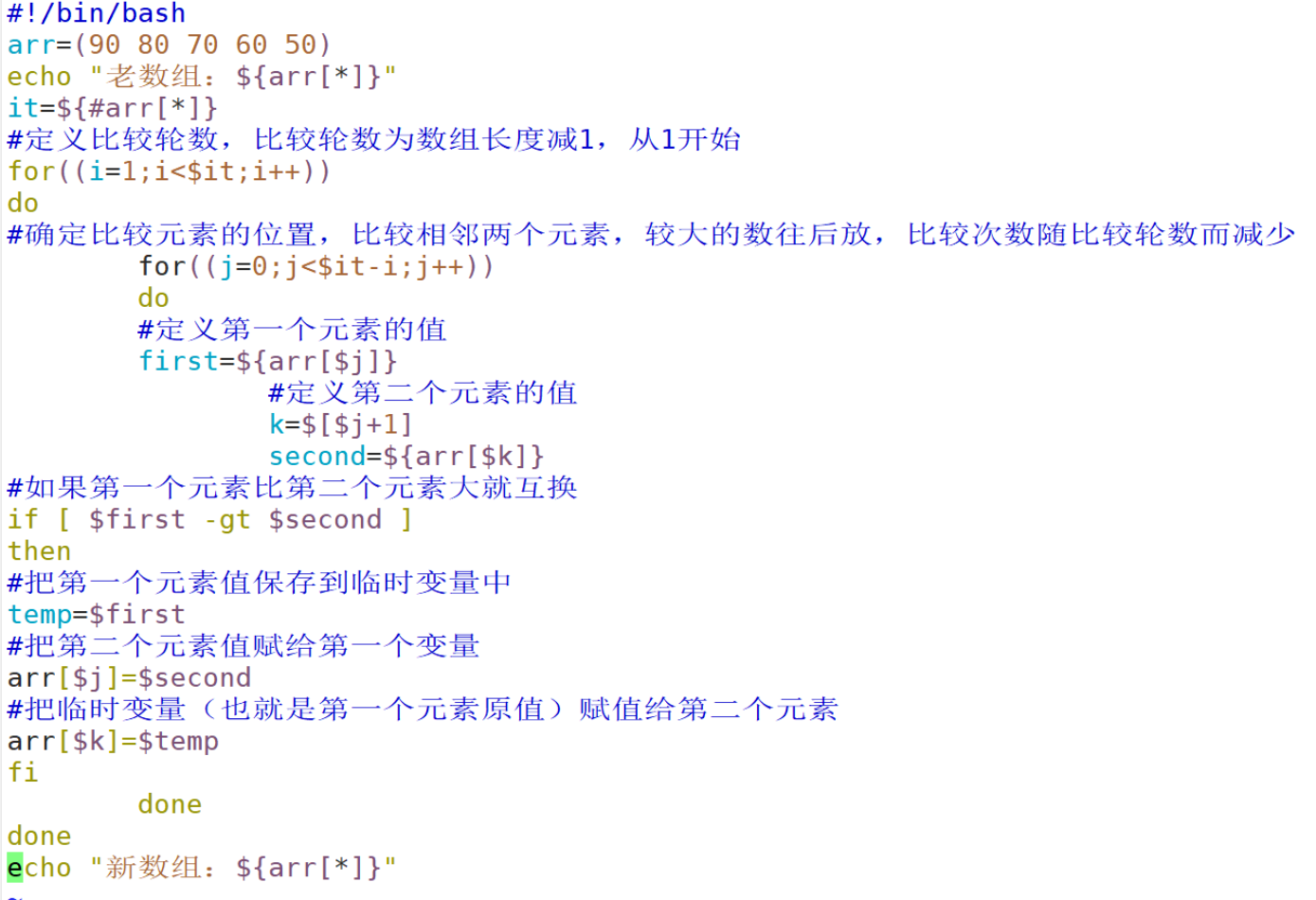
Two 、 Array sorting algorithm ( Bubble sort )
It's like a bubble rising , Move the data forward continuously from small to large or from large to small in the array
- The basic idea
The basic idea of bubble sorting is to compare the values of two adjacent elements , Exchange element values if conditions are met , Move the smaller elements to the front of the array , Move the larger elements behind the array ( That is, to exchange the positions of two elements ), So the smaller elements rise from the bottom to the top like bubbles
- Algorithm ideas
The bubbling algorithm is realized by two-layer loops , The external loop is used to control the number of sorting rounds , Generally, the length of the array to be sorted minus 1 Time , Because there's only one array element left in the last loop , There's no need to compare , At the same time, the array has been sorted
The inner loop is mainly used to compare the size of each adjacent element in the array , To determine whether to exchange position comparison and exchange times decrease with the number of sorting rounds
- example : hope a and b Adjust the position of the value of
a=10
b=20

dxz=$a     ## Add custom variables dxz Purpose , It's to make a The assignment of custom variables is idle , It's easy to exchange later
a=$b
b=$dxz

##dxz=$a
dxz=10
a=10
b=20

##a=$b
dxz=10
a=20
b=20

##b=$a
dxz=10
a=20
b=10

a=20
b=10
## Bubble sort element exchange
dxz=(10 20)
echo ${dxz[*]}

## Swap places
xtz=`echo ${dxz[0]}`

dxz[0]=`echo ${dxz[1]}`

dxz[1]=$xtz

echo ${dxz[*]}

[[email protected] ~]# sh 7.sh
10 20
20 10
##a=$b
dxz=10
a=20
b=20
##b=$a
dxz=10
a=20
b=10
a=20
b=10
## Bubble sort element exchange
dxz=(10 20)
echo ${dxz[*]}
## Swap places
xtz=echo ${dxz[0]}
dxz[0]=echo ${dxz[1]}
dxz[1]=$xtz
echo ${dxz[*]}
[[email protected] ~]# sh 7.sh
10 20
20 10
边栏推荐
- Flyway的SaaS多租户实现方案
- Use of sqlmap
- Decentralized edge rendering meta universe protocol cadeus was invited to attend the cbaia 2022 summit to enable more Web3 application scenarios with technology
- Leetcode buckle classic topic - 82 Maximum rectangle in column chart
- The JMeter BeanShell implementation writes the parameterized data generated by the request to the file
- BeanShell script gets the current time
- JMeter response time test component & multi interface concurrency
- Subnet division (see details)
- [solution] the local Group Policy Editor (gpedit.msc) in Win 11 cannot be opened
- CTFHub----RCE
猜你喜欢

Sword finger offer 53 - I. find the number I in the sorted array

HCIA_NAT实验

正则表达式

Server knowledge (details)

Subnet division (see details)

ctfhub--ssrf

Project Performance Optimization Practice: solve the white screen problem of the home page, customize the loading animation to optimize the first screen effect
shell脚本之循环语句与函数

Inverse yuan (I'll add these words if there are too many people using the name)

How to add software shortcuts to the right mouse button list
随机推荐
Reprint: SQL injection common bypass
If a hunter shoots a rabbit with a gun
shell脚本之条件语句
No, no, No. yesterday, someone really didn't write binary enumeration
String Full Permutation Problem
[unity Editor Extension] displays the memory size of all files in the resource directory
In depth performance test data analysis
HCIA_OSPF实验
全链路压测
The jstat command checks the GC status of the JVM
Experience in using flow playback tool Gor
Leetcode 1: Two Sum
数组、冒泡的认识
Dirty reading, unreal reading, non repeatable reading
Metersphere is based on JMeter distributed performance pressure testing platform
Detailed explanation of caduceus project of metauniverse public chain (I): project concept and technical framework of caduceus metaverse protocol
Inverse yuan (I'll add these words if there are too many people using the name)
Graduation thesis word skills Collection
Interpretation of concurrent virtual users, RPS and TPS
echo -e用法