当前位置:网站首页>C#从入门到精通之第一篇: C#概述与入门
C#从入门到精通之第一篇: C#概述与入门
2022-07-17 16:04:00 【暗余】
1.1 C#概述
C#语言及特点
- C#是微软公司发布的一种面向对象的、运行于.NET Framework和 .Net Core(完全开源,跨平台能够在Windows/Linux上运行)之上的高级程序设计语言。
- C#是一种安全的、稳定的、简单的、优雅的,由C和C++衍生出来的面向对象的编程语言。它在继承C和C++强大功能的同时去掉了一些它们的复杂特性;
- C#是面向对象的编程语言;
.Net是什么?.Net和C#究竟是什么关系?
- .Net是一个平台,而C#则是在这个平台里面的一门语言;
- .Net上面可以有其他语言,比如VB、C++等都可以运行,而C#是.Net平台上最主流的开发语言;
- .Net不仅仅能够让C#运行,它还能够提供提供一些必要的工具让C#完成更多强大的功能;
1.2 C# 开发工具安装
- 开发工具VisualStudio?
- Microsoft Visual Studio(简称VS)是美国微软公司的开发工具包系列产品。VS是一个基本完整的开发工具集,是编写C#程序或者说.NET程序最常用的开发工具。因其功能强大、简单易用、速度快、智能度高,被网友戏称宇宙第一IDE。
- 安装:
- 点击 官网,选择合适类型的IDE进行下载:

- 下载下来后,会进行下载安装包,完成后我们再选择组件;
- 根据我们实际的开发环境选择对应的组件,可以多选,少选也没有事情,后续可以进行修改再增加组件;建议勾选的组件如下:


- 勾选之后点击安装,安装完成则安装成功(安装的时候需要联网);成功后启动VS,界面如下:

- 点击 官网,选择合适类型的IDE进行下载:
1.3 创建第一个C#程序
- 点击
创建新项目,然后选择Windows、桌面,最后选择Windows窗体应用(.NET Framework),然后点击下一步: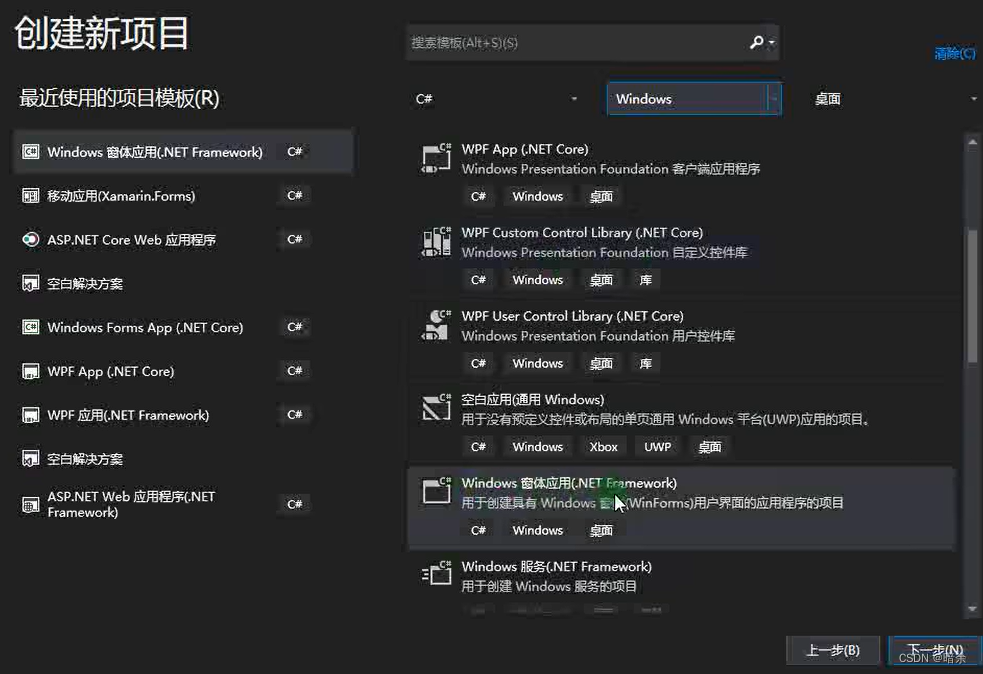
- 按照如图步骤,填入对应的项目信息,最后点击
创建按钮新建工程:
- 如图所示界面表示创建成功:

- 先选中
Form1.cs文件,然后点击左侧工具箱,就可以看到许多控件: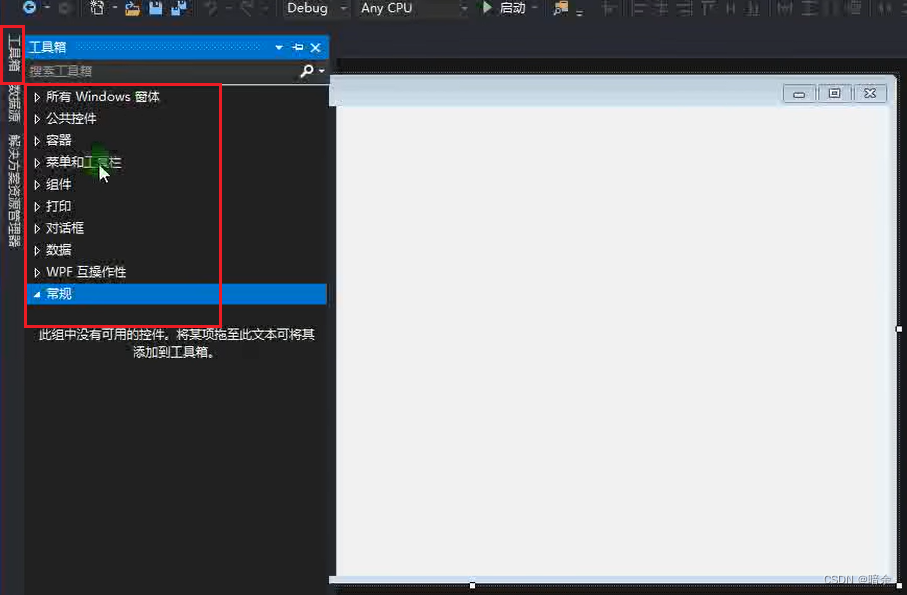
- 选中公共控件中的
Label,拖动到窗口中:
- 再右键选择
属性,我们可以对Label里面的属性进行设置,如图所示通过修改Text的值,我们将这个空间名称从Label1修改为了我的第一个程序:
边栏推荐
- Choice is more important than effort
- How to build dashboard and knowledge base in double chain note taking software? Take the embedded widget library notionpet as an example
- Example of C language painting - progress bar
- 使用原生js实现按钮的全选功能,简单清晰
- Tikv memory parameter performance tuning
- How to delay loading JS
- Overview of the application of air, space and sea Association
- HCIP (7)
- Nintendo patent shows that the follow-up products of fitness ring accessories may be under development
- 2022 National latest fire-fighting facility operator (intermediate fire-fighting facility operator) simulation test questions and answers
猜你喜欢

Round table record: fireside dialogue -- how to realize innovation in Web3

es安装ik分词器

Opencv draw a black rectangle and write the serial number

Flink
Gradient button function button drawing C language example

mysql学习笔记-约束

Leetcode 150. 逆波兰表达式求值

01背包面试题系列(一)

Nature子刊 | 地下水固碳速率与寡营养海洋系统固碳速率相近
![[original] magisk+shamiko has been tested by app root](/img/85/29367cf544c0f221a5c296cdd8facd.png)
[original] magisk+shamiko has been tested by app root
随机推荐
Genesis与BlueRun Ventures展开深度交流
MGRE 环境下配置OSPF实验
Redis分布式緩存-Redis集群
Focus on the new track of green development - release of MAPGIS intelligent environmental protection solution
How to delay loading JS
C语言绘图示例-繁花图案
LeetCode_216_组合总和Ⅲ
2022 National latest fire-fighting facility operator (intermediate fire-fighting facility operator) simulation test questions and answers
LeetCode_17_电话号码的字母组合
MapGIS IGServer九州-驾驭国产化环境下的拓展服务开发
Configuring OSPF experiment in mGRE environment
NAT technology and NAT alg
【机器学习】多标签分类的评价指标与代码实现
C语言绘图示例-商标徽标
Microcomputer principle and technology Interface Experiment four subroutines and interrupt experiment
人大、微软等提出InclusiveFL:异构设备上的包容性联邦学习
LeetCode_77_组合
任天堂专利显示健身环配件后续产品或已在开发中
LeetCode_ 17_ Letter combination of telephone number
JS chain call sleep function ------ "autumn trick punch in Chapter 2"