当前位置:网站首页>Hue oozie editor scheduling shell
Hue oozie editor scheduling shell
2022-07-19 02:05:00 【sun_ xo】
1. prepare shell case
$ hdfs dfs -cat oozie/apps/hue/hello_hue.sh
#!/bin/sh

echo "my_output=Hello Mushishi"
2. create shell workflow
1) enter oozie editor
2) assign app name as "shell"
3) add a description (if need)
4) drag and drop a shell action node to an acvtive area
5) select and fill script name into "shell command" field, click "Add", then add the script to "FILES"
6) click Save button on top right corner
7) click Submit button nearby
Then hello_hue.sh is running, after it done, you can check workflow / job log from panel
hue_oozie_shell
3. add fork to workflow
1) open workflow "shell" from "My documents"
2) click "Edit"
3) change app name to "shell-fork"
4) drag and drop a Kill action node under shell action node, add error message if needs
5) drag and drop another Kill action node to the right of the previous Kill node
6) then a fork node pops up, convert it to Decision node
7) fill and modify conditions as needs, ensure all node name are proper and "capture output" is opened
8) remove useless node if any
9) save and submit "shell-fork" workflow
Then you can verify result via workflow / job log, or see job DAG graph directly on oozie console
hue_oozie_shell_fork
btw, workflow xml created by hue looks like this:
<workflow-app name="shell-fork" xmlns="uri:oozie:workflow:0.5">
    <start to="shell-50ec"/>
    <kill name="Kill">
        <message>Action failed, error message[${wf:errorMessage(wf:lastErrorNode())}]</message>
    </kill>
    <action name="shell-50ec">
        <shell xmlns="uri:oozie:shell-action:0.1">
            <job-tracker>${jobTracker}</job-tracker>
            <name-node>${nameNode}</name-node>
            <exec>/user/sun_xo/oozie/apps/hue/hello_hue.sh</exec>
            <file>/user/sun_xo/oozie/apps/hue/hello_hue.sh#hello_hue.sh</file>
              <capture-output/>
        </shell>
        <ok to="decision-8c70"/>
        <error to="Kill"/>
    </action>
    <kill name="kill-21d4">
        <message>Action failed, error message[${wf:errorMessage(wf:lastErrorNode())}]</message>
    </kill>
    <decision name="decision-8c70">
        <switch>
            <case to="End">
              ${wf:actionData('shell-50ec')['my_output'] eq 'Hello Mushishi'}
            </case>
            <default to="kill-21d4"/>
        </switch>
    </decision>
    <end name="End"/>
</workflow-app>
reference Hue Guide > User > Scheduler
边栏推荐
- On the properties and methods of list < t >
- gdb+vscode进行调试6——gdb调试多线程命令札记
- 【pycharm】Cannot find reference ‘XXX‘ in ‘__ init__. Py 'solution
- Frustratingly Simple Few-Shot Object Detection
- 动手学深度学习--多层感知机篇(MLP)
- deep learning实验笔记
- Allegro design entry CIS and OrCAD capture CIS relationship
- [translation] transformers in computer vision
- VGG (Visual Geometry Group)
- [go language] detailed explanation of dynamic library and static library
猜你喜欢

Owl Eyes: Spotting UI Display Issues via Visual Understanding

Powerful chart component library scottplot

Uncaught syntaxerror: unexpected token '< is reported on the blank page of the H5 uniapp package‘

VIM 配置文件

关于List<T>的属性与方法

Fairness in Semi-supervised Learning: Unlabeled Data Help to Reduce Discrimination
![[literature reading] tenet: a framework for modeling tensor dataflow based on relational centric notation](/img/2a/786d78cee28382a593cd664695e3b9.png)
[literature reading] tenet: a framework for modeling tensor dataflow based on relational centric notation
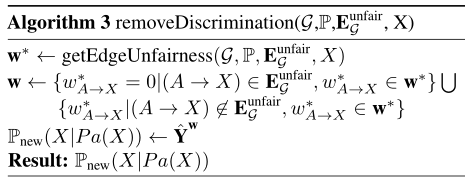
利用因果线性模型监测不公平A Causal Linear Model to Quantify Edge Unfairness for Unfair Edge Prioritization
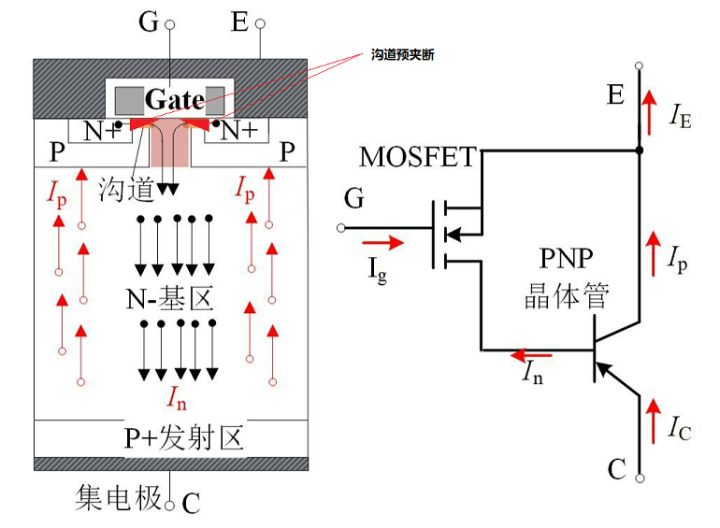
Analysis of IGBT direct short circuit process

SAE J1708/J1587 协议详解
随机推荐
03 design of urban road dedusting and cooling system based on ZigBee
捉虱子的博弈论
Switch details
Characteristics and application points of electrolytic capacitor
动手学深度学习---深度学习计算篇
openGauss Developer Day 2022|东方通诚邀您莅临“东方通生态工具分论坛”
Oozie 集成 Shell
Combined key screenshot analysis
One vs One Mitigation of Intersectional Bias
GoogLeNet
电解电容特性及应用要点
YYDS!阿里技术官最新总结的分布式核心技术笔记已上线,堪称福音
Basic principle and parameter interpretation of operational amplifier
Powerful chart component library scottplot
06 design of smart electronic medicine box based on stm32
性能强悍的图表组件库 ScottPlot
Hands on deep learning - deep learning computing
[go language] detailed explanation of dynamic library and static library
Compilation and link of C language program
bag of visual words(BoVW)视觉词袋 个人理解